- Raspberry Pi OS adopts Debian 13 with Linux 6.12 LTS and renewed design (PiXtrix/PiXonyx).
- New Control Center app with plugins and desktop packaged in metapackages.
- Improvements to panel, keyboard and apps; a clean install from Bookworm is recommended.
- Inherits key changes from Debian 13: /tmp in tmpfs, OpenSSH and sysctl tweaks.
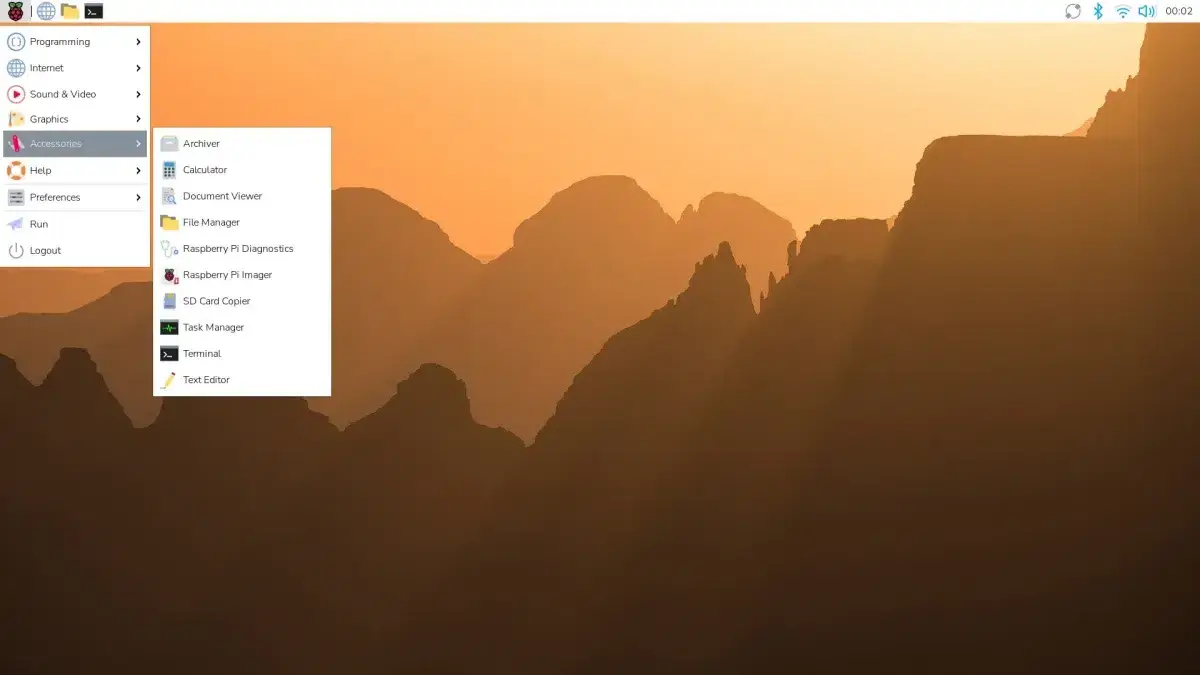
The latest version of Raspberry Pi OS takes a significant step forward by being based on Debian 13 "Trixie ," while retaining the Linux 6.12 LTS kernel and introducing a much more polished desktop environment without compromising performance. This change of foundation opens the door to newer packages, significant improvements (such as Y2038 mitigations ), and a more modular ecosystem.
Although you can attempt to upgrade to existing installations, the foundation itself recommends starting with a clean install if you're coming from Bookworm to benefit from the new meta-package organization and avoid carryover issues. However, if you're in a hurry, we'll explain below how to try the beta version via APT with all due caution.
Key features of Raspberry Pi OS based on Trixie
The switch to the new Debian 13 base brings an up-to-date catalog, optimizations across various subsystems, and a clear focus on desktop modularity . All of this is built on Linux 6.12 LTS , a long-term support kernel that prioritizes stability with a steady stream of bug fixes and hardware support . Check out the new kernel features.
The visual appearance has also been revamped: two new GTK themes have been added – PiXtrix (light, by default) and PiXonyx (dark) – along with a matching icon set (PiXtrix), a more legible typeface ( Nunito Sans Light ), and an updated collection of backgrounds. This combination gives the environment a more modern look without sacrificing its light and airy feel.
Under the hood, the desktop image is broken down into meta-packages , making it easy to upgrade from a minimal base to something more complete in just a couple of steps. This, combined with a plugin-driven Control Center , simplifies both the initial installation and daily configuration.
Dashboard and desktop: plugins, order and cleanliness
The taskbar now includes a system monitor with power alerts and other critical events at a glance. Additionally, the wf-panel-pi and lxpanel-pi panels now share a consistent clock plugin , reducing redundancies and improving overall consistency.
The classic LXDE Panel is maintained through a specific fork, lxpanel-pi , in which unsupported components have been removed to improve reliability . This deliberate streamlining enhances environment stability and reduces minor day-to-day annoyances.
Overall, the desktop combines a more modern look with very low power consumption , something key in a platform where the balance between aesthetics and efficiency is non-negotiable.
New Unified Control Center
System configuration is centralized in the Control Centre app , a lightweight core that loads functionalities as plugins. It replaces separate utilities such as Raspberry Pi Configuration , Appearance , Mouse and Keyboard , Display Settings , and printer management, offering everything in a single window.
This modular approach supports third-party extensions and custom pages for specific hardware or utilities. If a manufacturer wants to integrate their settings, they can do so without reinventing the wheel, providing a level of flexibility rarely seen in such lightweight environments.
Keyboard and menus: small, big improvements
Two tools are added terminal oriented to official keyboards: rpi-keyboard-config y rpi-keyboard-fw-update, designed for configure and update firmware where appropriate, and you can learn to Detect USB events in Linux to create automatic actions. They are accompanied by improvements to keyboard control in GTK apps and a thorough cleanup of the Main menu to make it more coherent.
These types of usability adjustments don't make much noise, but in the long run they make a difference: the desktop responds better, there's less friction, and the whole thing is more consistent for both new and veteran users.
Metapackages and installation paths
The desktop is laid out in blocks to facilitate gradual jumps; if you start from Raspberry Pi OS Lite, you can add a base environment with rpd-wayland-core (Wayland) or rpd-x-core (X11), and complete at your convenience with rpd-applications and the utility package rpd-utilities, for example for Build a retro console with Raspberry Pi.
Along with this modularity come up-to-date versions of Chromium and Firefox , and a reorganization of the desktop image packages. The goal is to make it easier for you to convert a Lite installation to a full one (or vice versa) without any hassle or strange cross-dependencies.
Apps and content: Bookshelf gets serious
The Bookshelf app already distinguishes content exclusive to contributors and includes a Contribute button to unlock it. Recent titles are marked with a padlock icon if they are not available in your account, which perfectly clarifies what you can open now and what requires a subscription.
This dynamic fosters support for the ecosystem without hindering the reading experience of those who only want to explore open material or see what's new, and the development of programs for Raspberry Pi.
Download, compatibility and installation methods
The Raspberry Pi OS image, based on Debian 13, can be downloaded from the official website and flashed to an SD card or USB drive using Raspberry Pi Imager or similar tools. Both 32-bit and 64-bit versions are available to cover a wider range of use cases and hardware. If you're using PoE, please refer to our PoE networking guide.
Motherboard compatibility: 1A+, 1B+, 2B, 3B, 3B+, 3A+, 4B, 400, 500, CM1, CM3, CM3+, CM4, CM4S, Zero, Zero W, and Zero 2 W. If you are upgrading from Bookworm , the official recommendation is to back up your data and perform a clean install of the new Trixie image to avoid any issues and take advantage of the modular architecture from day one.
Performance and technical basis
The Linux 6.12 LTS + Debian 13 combination offers a very balanced foundation: improved desktop responsiveness, more modern libraries and packages, and internal changes geared towards long-term maintainability . Without making unnecessary claims, the increased fluidity in everyday use is noticeable.
The combination of the new Control Center , the reorganization by meta-packages, and the commitment to updated themes and icons puts Raspberry Pi OS where it should be: a lightweight, clear, and extensible system that you can fine-tune whether you're starting from scratch or coming from a minimal configuration.
How to beta test by editing APT (cautiously)
If you're curious and prefer to try Trixie without reinstalling, you can force the update via APT. However, remember that this is only for testing purposes , and the clean installation recommended by the project is the most sensible approach for production.
Summary of steps: First, update your current system, reboot if necessary, and then edit your repositories to point to Trixie . After that, perform a full upgrade and finish with a dist-upgrade . In general terms, the flow would be:
- Update the present:
sudo apt updateysudo apt upgrade -y(if a lot of packages come in, restart). - Edit repos in
/etc/apt/sources.listand in/etc/apt/sources.list.d/raspi.list, substituting bookworm by trixie on all lines (including trixie-updates y trixie-security). - Update indexes and packages:
sudo apt update& AFTERsudo apt upgrade(there will be confirmations and notifications of configuration changes). - Complete dependencies and transitions with
sudo apt dist-upgradeto fit in all the pieces of the new release. - Reboot to apply global changes and finally free up space with
sudo apt autoremoveysudo apt autoclean.
We insist: it is not the path recommended by the foundation, but it works to tinker and get a feel for the system before taking the leap with a clean image.
Warnings and legacy changes from Debian 13 that may affect you
Raspberry Pi OS follows the Debian lifecycle and, with Trixie, inherits several general changes worth knowing about. Below is an overview of the most relevant changes with practical impact on real-world installations :
- OpenSSH and remote updates: There is an issue in Bookworm that can block reconnections if a remote update is interrupted. SSHBefore migrating, make sure you have OpenSSH 1:9.2p1-2+deb12u7 or higher via stable-updates.
- i386 is no longer a normal architecture: there is no official kernel or i386 installer; it is reserved for legacy code via multiarch or chroot on amd64. Doesn't apply to the Pi, but may affect auxiliary tools.
- armel, last update: Trixie is the last one for armel; only Pi 1, Zero and Zero W still have kernel package support. Consider reinstalling as armhf or arm64 when it is possible.
- MIPS removed: mipsel y mips64el disappear from Debian; relevant if you compile for external devices.
- /boot larger: the kernel and firmware have grown; make sure that
/boothave at least 768 MB and about 300 MB free or the update may fail. - /tmp now in tmpfs: by default it is mounted in memory (up to the 50 % available). Gain speed, but be careful when dumping large files there. You can revert it in
tmp.mounto/etc/fstab. - OpenSSH no longer reads
~/.pam_environment: moves variables to~/.bashrcor equivalent mechanisms; subtle changes in new SSH sessions. - DSA Keys Out: OpenSSH 9.8p1 no longer supports DSA even when enabling them; use Ed25519/ECDSA/RSA. For older DSA-only devices, there is
ssh1(package openssh-client-ssh1). - last/lastb/lastlog: make way for wtmpdb, lastlog2 y
lslogins. If you do not migrate to wtmpdb, delete/var/log/wtmp*after update. - Encrypted disks: self-decryption is now systemd-cryptsetup (installed as recommended). In dm-crypt plain change the default values; if you created them in Bookworm, leave them fixed cipher=aes-cbc-essiv:sha256,size=256,hash=ripemd160 en
/etc/crypttabor they won't ride. - RabbitMQ: HA queues replaced by quorum queuesThere is no direct upgrade path from Bookworm; after upgrading to Trixie, you sometimes have to clean up
/var/lib/rabbitmq/mnesia. - MariaDB: Major version jumps require clean shutdown previous; otherwise, the new server will refuse to start until it recovers to the previous version.
- sysctl: systemd-sysctl he no longer reads
/etc/sysctl.conf. Arrives linux-sysctl-defaults with/usr/lib/sysctl.d/50-default.conf. Your local settings go in/etc/sysctl.d/*.conf. - Unprivileged ping: now uses datagram sockets; access depends on
net.ipv4.ping_group_range. In normal installations it leaves it permissive the default sysctl package. - NIC names: may vary with systemd v257 (i40e or ACPI _SUN driver). Check it before rebooting with
udevadm test-builtin net_setup_linkand sets names with systemd.link if you need stability. - Dovecot 2.4: incompatible configuration format; the replicator disappears. Test the configuration in a different environment. Non-productive before.
- Libvirt: drivers and backends in separate packagesAfter updating, check which binaries you have installed and clean up any leftovers. You may see files marked as obsolete.
- Samba: AD-DC moves to samba-ad-dc; ceph and gluster VFS modules go to dedicated packages (samba-vfs-ceph y samba-vfs-glusterfs).
- OpenLDAP: Now your TLS goes with OpenSSL (not GnuTLS). Options and behavior change; if you don't specify a CA, the system's trust base will be loaded.
- Bacula: The schema change is huge; it can take hours or days and requires about double the space temporary on the DB server.
- usrmerge: you will see warnings from
dpkgwhen updating; ignore them, it's normal when the project ends. - Don't skip versions: complete the update to Bookworm before starting Trixie's.
- WirePlumber: New configuration system; if you customize, check
/usr/share/doc/wireplumber/NEWS.Debian.gz. - strongSwan: migrates from charon-daemon a charon-systemd with swanctl and config in
/etc/swanctl/conf.d. - sg3-utils: missing udev properties can break streams with SCSI devices that depend on sg3-utils-udev.
- tzdata-legacy: Non-standard time zones are separated; if your system or services use them, install tzdata-legacy.
- Cleaning of
/tmpy/var/tmp: On new installations, old files (10 and 30 days) are deleted. When upgrading, a rule is created to maintain the classic behavior; you can change this in tmpfiles.d. - Systemd message unmerged-bin: ignore it; merge manually
/usr/biny/usr/sbinbreak future updates. - Browser Security: webkit2gtk covered with patches, but qtwebkit No. For general use, Firefox or Chromium ESR recompiled for stable is best.
- Go/Rust: Limited security coverage via static linking; some fixes coming via minor updates.
- QEMU ppc64el: be careful with page sizes; if the guest needs 4 KiB, use
cap-hpt-max-page-size=4096; if 64 KiB, install linux-image-powerpc64le-64k. - Notable deprecated packages: libnss-gw-name (USA libnss-myhostname), pcregrep (USA
grep -Po pcre2grep), request-tracker4 (migrate to request-tracker5), git-daemon-run/sysvinit, nvidia-graphics-drivers-tesla-470, deborphan (USAapt autoremoveyapt-mark minimize-manual), tldr (replaceable by tealdeer o tldr-py), Tpp (alternatives lookatme, fries). - Looking ahead to Debian 14: sudo-ldap will be withdrawn (usa libsss-sudo), possible withdrawal of sudo_logsrvd, libnss-docker may crash due to deprecated API, OpenSSH without GSS-API by default (uses packages -gssapi if you need it), end of sbuild-debian-developer-setup in favor of sbuild+unshare, goodbye to fcitx 4.x (migrate to fcitx5), lxd replaced by incus, isc-dhcp deprecated (Kea on servers; NetworkManager/systemd-networkd or dhcpcd-base in clients), end of development of KDE 5 (exit during forky cycle).
- Known serious bugs at the time of publication: these include, among others, #1032240, #1078608, #1108467, #1109499, #1108010, #1102690, #1109509, #1110119, #1036041, #1102160, #913916, #984760, #1099655, #935182, #1017906, #1109203, #1109676, #1109512, #1104231, #1084955, #1104177, #1104336, #1084954, #1095866, #1100981, #1109519, #1110263, #1108039, #1089432, #1101956, #1101839, #1017891, #1109833, #988477. Check the BTS for updated status.
Raspberry Pi 500+: New hardware that fits Trixie
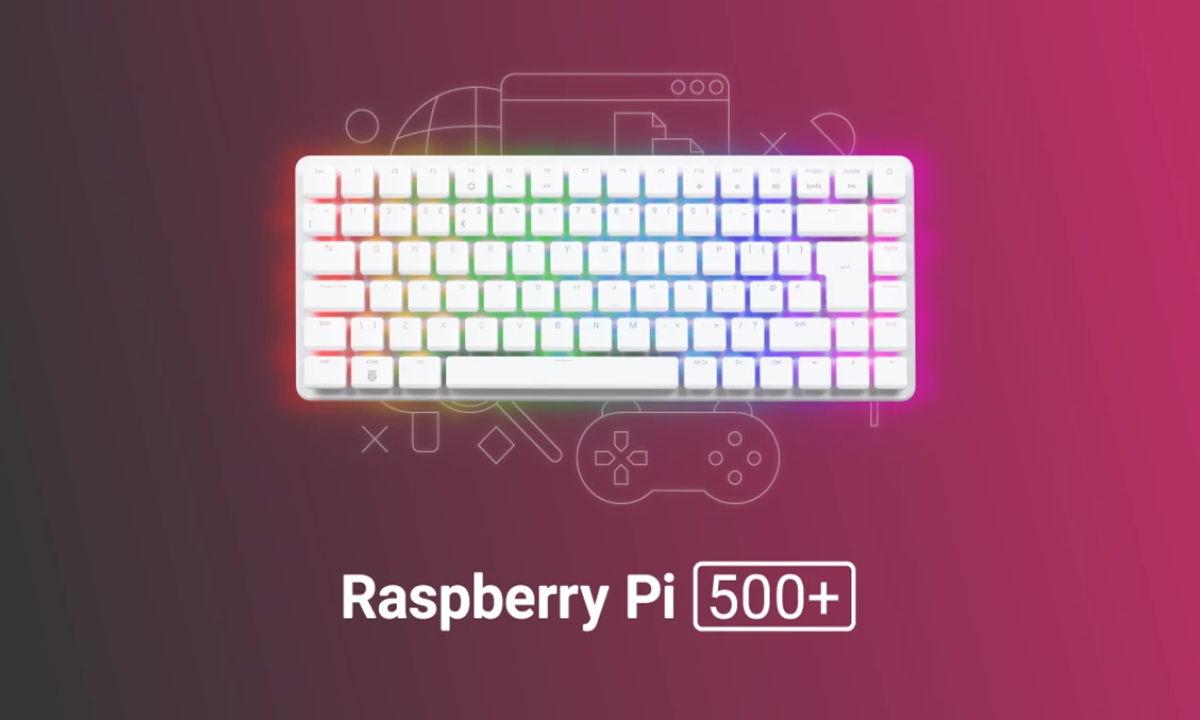
The company also unveiled the Raspberry Pi 500+ , an evolution of the keyboard PC concept that boosts performance and adds some very appealing features. Inside, it boasts a Broadcom BCM2712 quad-core Cortex-A76 processor clocked at 2,4 GHz and a VideoCore VII GPU with support for OpenGL ES 3.1 and Vulkan 1.2 , along with 16 GB of LPDDR4x-4267 RAM , M.2 2280 storage with a 256 GB SSD , and a microSD card reader.
The real draw is the keyboard: it abandons the membrane for Gateron KS-33 Blue mechanical keys with RGB backlighting, and each key integrates an RP2040 running open QMK firmware. Customization is extensive and compatible with most switches on the market, a clear nod to the more casual gaming audience.
Connectivity is not lacking: integrated Wi-Fi and Bluetooth , two micro-HDMI ports supporting up to 4K, three USB-A ports, Gigabit Ethernet, and the standard 40-pin GPIO header. It costs around $200 (the Desktop Kit, for $20 more, adds an official mouse, a 27W USB-C power supply, and a micro-HDMI cable), and the company guarantees production and spare parts availability until at least 2035. The recommended operating system is, of course, Raspberry Pi OS based on Trixie, which is also ideal for running Kodi.
Post-installation and customization tips (optional)
If you're keen to fine-tune your system, here are a few quick suggestions that work well with Debian 13 and the new Raspberry Pi OS. They're not mandatory, but they help round out the experience :
- Network and Terminal: Configure the network if it wasn't ready during installation; customize the terminal (dark theme, shortcuts) Ctrl+C/V to copy/paste) to work more comfortably.
- Privileges: If it is useful to you, add your user to sweats temporarily to streamline administrative tasks (remember to revert if you don't need it).
- Mounting discs: use
blkidfor UUID and declare your records in/etc/fstab(for example, riding in/mntwith ext4 defaults 0 0). - Basic security: install ufw/gufw as firewalls and clamav/clamtk for a spot scan. Keep your system up to date and services to a minimum.
- Users and virtualization: separate profiles by tasks or strip Virtual machines with VirtualBox, Virt-Manager/QEMU o VMware (proprietary) for risk-free testing.
- 3-2-1 Copies: Three copies, two different media, and one away from home. Tools such as Rsync o NAS type solutions They simplify your life.
- Pi-hole: If you want to block ads/telemetry at the network level, Pi-hole works like a charm on a Raspberry Pi. Remember to disable DHCP in the router if you assume it from Pi-hole and adjust lists gravity with head.
For the visual layer in GNOME (if you use this environment), install Synaptic and tools like gnome-shell-extensions-manager and the gnome-shell-extensions package . Very useful extensions include: dash-to-panel , caffeine , weather , desktop-icons-ng , apps-menu , and window-list ; if you prefer a dock, try dash-to-dock . A good resource for themes and icons is Gnome-look.
For fonts, font-manager and font-viewer make your life easier. Recommended packages: fonts-linuxlibertine , fonts-recommended . For non-Latin languages: fonts-ancient-scripts (old fonts), fonts-babelstone-han (Chinese), fonts-baekmuk (Korean), fonts-noto-core/extra (massive coverage), or fonts-sil-taiheritagepro (Vietnamese). For office compatibility, install ttf-mscorefonts-installer and, if needed, fonts like Calibri or Cambria from a source with a valid license.
Repositories and software: review /etc/apt/sources.list in order to have trixie with relevant components (main, non-free-firmware, etc.) and updates with apt. External repos such as deb‑multimedia can fix certain thumbnails, but use them wisely. Browsers like Free wolf They have their own repos; follow their instructions to avoid conflicts.
Packaging alternatives: Flatpak and Snap are useful if you can't find a working native package. Install Flatpak and, if you want, integrate it with gnome-software . You'll find the installation command for almost everything popular on Flathub .
Loose packages: with dpkg -i you install .deb (if any dependencies are missing, resolve them and try again). Tarballs like those from Anki They usually include script installation; others such as Waterfox allow to be executed from /opt, adding a .desktop en ~/.local/share/applications. Adjust permissions with chown/chmod if necessary. The AppImage are even simpler: give them execution permission and that's it.
Compiling from source is still a valid option for projects that do not package (e.g., GNU IceCat). And to adjust tools, a practical example: mPV. You can create ~/.config/mpv/input.conf for shortcuts (volume, forward/backward, screenshots) and ~/.config/mpv/mpv.conf for options like autofit o geometry, achieving a behavior very personalIf you're just starting out, a good foundation is a Introduction to Python Programming.
For the browser, familiar tricks work : uBlock Origin , telemetry monitoring, separate profiles for different tasks, and, if you like, separating bookmarks by work context in different browsers (Firefox, Chromium, LibreWolf, Waterfox). It's more manual, but it avoids mixing habits and data.
With all this, you have a well-established Raspberry Pi OS based on Trixie: lightweight, modern, and organized . Between the base upgrade, the metapackages, the Control Center, and the polished interface, it's a great time to make the switch if you want a more refined experience without sacrificing the platform's frugal philosophy.


Passionate writer about the world of bytes and technology in general. I love sharing my knowledge through writing, and that's what I'll do on this blog, show you all the most interesting things about gadgets, software, hardware, tech trends, and more. My goal is to help you navigate the digital world in a simple and entertaining way.