- Windows 11 26H1 is a platform update limited to new devices with ARM Gen 2 SoCs, especially the Qualcomm Snapdragon X2 series.
- It is not offered as an upgrade from Windows 11 24H2 or 25H2; current computers will continue along the main branch to 26H2 with new features and AI.
- 26H1 debuts the Bromine internal base, optimized for performance, battery and advanced NPU, and will have its own future upgrade path.
- Versions 24H2, 25H2, and 26H1 maintain support with monthly patches manageable by tools such as Intune, Autopatch, or Configuration Manager.
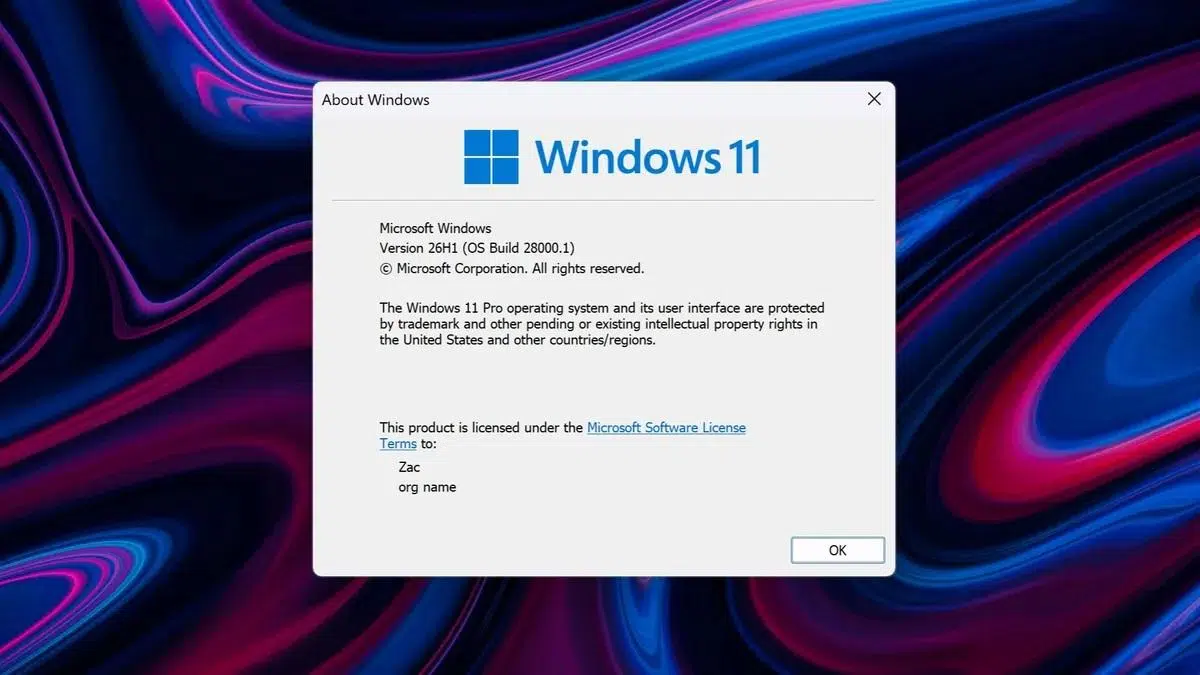
If you've heard about Windows 11 26H1 and aren't quite sure what it is , don't worry, you're not alone. This version has arrived amidst a lot of questions because it breaks with the traditional way Microsoft has been releasing its major Windows 11 updates.
In the following lines we will see what Windows 11 26H1 is really for, how it differs from 25H2 and 26H2 , which devices will be able to use it, what processors it requires, what relationship it has with the new Bromine internal base and why Microsoft has decided to split the evolution of Windows into two parallel branches for a few years.
What exactly is Windows 11 26H1 and why is it a limited version?
Windows 11 26H1 is, first and foremost, a platform update, not a feature update . This means it focuses on changing the technical foundation of the operating system for certain hardware, rather than introducing a host of new features that are visible to the user on a daily basis.
Microsoft has made it clear that Windows 11 26H1 is intended for a very limited number of new devices , which began arriving on the market from the first quarter of 2026. It is not intended to replace 24H2 or 25H2 on existing computers, nor will it appear as a regular update in Windows Update.
In the official documentation, the company defines this version as a special edition that supports hardware innovations planned for 2026 , with advancements in processors and power management that improve performance and battery life. In other words, the focus is on maximizing the potential of a new generation of chips.
Therefore, Windows 11 26H1 does not follow the usual "install and go" pattern on your existing PC. It is distributed exclusively through new computers that come with it pre-installed , and there is no direct upgrade path from 24H2 or 25H2 on computers currently in use.
Relationship between 26H1, 25H2 and the future 26H2
To fully understand the situation, it's important to know that Microsoft is managing two distinct development paths within Windows 11. On one hand, there's the main branch we all know, and on the other, this new, specific branch focused on the next generation of Arm-based SoCs and the differences between Windows on Arm and x86.
The main branch starts at 25H2 and will continue with 26H2 , which will be the major annual update that most users will receive in the second half of 2026. This includes both PCs with x86 processors (Intel and AMD) and Arm devices that were already on the market and follow the usual route through Windows Update.
In parallel , Windows 11 26H1 appears as a distinct branch , based on a new internal system base called Bromine, which replaces the Germanium platform used in 24H2 and 25H2. This platform change is not a simple name change: it introduces profound adjustments to the system kernel, hardware management, power consumption, and integration with modern SoCs.
The practical consequence is that devices running 26H1 will not be able to update to the major annual update in the second half of 2026. Microsoft explains that the next feature release is built on a different kernel than 26H1, so these devices will follow a different and future update path, which has yet to be publicly announced.
Meanwhile, PCs running Windows 11 24H2 and 25H2 will continue to receive monthly security patches, quality improvements, and new features , with their next big update coming in 26H2. For most users, the update process will be completely normal, and they won't even see 26H1 mentioned in their Windows Update.
Why Windows 11 26H1 isn't coming to your current PC
One of the key points is that Windows 11 26H1 is not designed to be offered or installed on existing devices . Microsoft has been very explicit in several statements: this version will only be available on "some new devices with certain selected silicon boards" that will be released starting in early 2026.
This means you won't see 26H1 as an update in Windows Update, nor will you be able to install it via an in-place upgrade on a PC that already has 24H2 or 25H2 . If you have a current desktop or laptop computer, you'll continue with the main branch of Windows 11 and will receive 26H2 later.
This decision aims to prevent users from getting confused by trying to force a version that isn't designed for their hardware and offers no real advantages over existing devices . In fact, Microsoft emphasizes that Windows 11 26H1 "will have no impact" on existing devices.
Even so, PCs that do install this special version will receive monthly security, quality, and feature updates , just like the other branches of Windows 11. The difference lies not in the support, but in the type of hardware it targets and the future update path.
In summary, if you're on 24H2 or 25H2, your horizon is 26H2 as the next major normal upgrade , while 26H1 is in a different league for very specific devices with next-generation Arm SoCs.
An exclusive version for ARM Gen 2 and Snapdragon X2
Behind this strategy lies a very clear message: Windows 11 26H1 is focused on the new generation of Arm Gen 2 SoCs . It's not a separation strictly by architecture (x86 versus Arm), but by hardware generation within the Arm ecosystem itself.
Currently, the official list of chips that can run Windows 11 26H1 includes the Qualcomm Snapdragon X2 series , which features the Snapdragon X2 Elite and Snapdragon X2 Plus models. These processors are positioned as the new wave of SoCs geared towards laptops, with a strong emphasis on efficiency, battery life, and AI acceleration through advanced NPUs.
These Snapdragon X2 processors are considered second-generation SoCs within the Windows on Arm push , with significant changes in AI capabilities, power management, and operating system integration, including support for native software in Windows 11 Arm.
First-generation Arm SoCs, like their predecessors Snapdragon processors, remain on the mainline Windows 11 platform with 25H2 and the upcoming 26H2 and subsequent versions . In other words, Microsoft hasn't abandoned these devices; they're simply excluded from the 26H1 experiment for Arm Gen 2.
In addition to Qualcomm, there's mention of future chips like the NVIDIA N1X, new solutions from MediaTek, and AMD's Sound Wave platform , all pointing to a much more diverse Arm ecosystem in the coming years. Microsoft's idea is that 26H1 and subsequent evolutions of this branch will serve as the foundation for this new high-end hardware focused on AI and efficiency.
Specific devices compatible with Windows 11 26H1
As it is a limited version, the number of devices currently compatible with Windows 11 26H1 is small and very specific . They all share one essential requirement: they integrate a Qualcomm Snapdragon X2 series SoC.
Within the current catalog, several ASUS models stand out, as it is currently the brand that has invested most heavily in this platform. ASUS offers laptops, convertibles, and an all-in-one desktop equipped with the Snapdragon X2 Elite , placing them among the first candidates to ship with 26H1.
Among them are devices like the ASUS Zenbook A14 (UX3407NA) , a 14-inch laptop with a 1920x1200 60Hz OLED panel, an ultralight chassis, up to 32GB of LPDDR5x memory, and up to 1TB of NVMe SSD storage. This device stands out for its multi-day battery life, boasting around 33 hours of video playback thanks to the Snapdragon X2 Elite with an 18-core CPU and an NPU capable of reaching 80 TOPS and support for native ARM64 apps.
One step up is the ASUS Zenbook A16 (UX3607OA) , which features a 16-inch OLED display with a 2880x1800 resolution and 120Hz refresh rate, using ASUS Lumina OLED 3K technology and a distinctive "ceraluminum" chassis. It can be configured with up to 48GB of LPDDR5x RAM and a 2TB NVMe SSD, and uses a Snapdragon X2 Elite Extreme processor with up to 18 CPU cores and the same 80 TOPS NPU. Its 70Wh battery promises around 21 hours of continuous use and offers compatibility for both x86 and x64 applications on Windows 11 Arm.
Also featured is the ASUS Vivobook S16 (S3607NA) , a 16-inch laptop available with a 1920x1200 OLED display at 60 Hz or a 2560x1600 IPS panel at 144 Hz. It integrates Snapdragon X2 Elite processors, with configurations of 16 to 32 GB of LPDDR5x RAM and PCIe SSDs ranging from 512 GB to 1 TB, and a 70 Wh battery capable of delivering up to 25 hours of light use.
In the convertible category, the ASUS ProArt PZ14 (HT7407NA) is a 14-inch tablet with a 2800x1800 OLED display at 144Hz and a detachable keyboard. It also features a Snapdragon X2 Elite processor, up to 32GB of LPDDR5x RAM, a 1TB SSD, and a 75Wh battery, geared towards creators and professionals seeking power in a highly portable form factor.
Completing ASUS's lineup is the ASUS VM441QA AiO , a 23,8-inch all-in-one PC with an anti-glare FHD display. It's one of the first all-in-one desktops to feature a Snapdragon X2 Elite processor (between 8 and 18 CPU cores and an NPU up to 85 TOPS). It offers up to 16GB of RAM and an SSD of up to 512GB, designed for all-day use without a battery.
HP and Lenovo laptops with Snapdragon X2 and 26H1
ASUS isn't the only company that has jumped on the bandwagon of the new SoCs. HP also has its own model with a Snapdragon X2 processor and potential support for Windows 11 26H1 , within its well-known family of professional laptops.
Specifically, we're talking about the HP EliteBook X G2q (Qualcomm) , part of the EliteBook X G2 series, in its "G2q" variant equipped with a Snapdragon processor. This 14-inch laptop can be configured with a WUXGA OLED (1920×1200) display with 300 nits of brightness and 95% DCI-P3 color gamut coverage, or with an IPS panel, also 1920×1200, and a maximum brightness of 400 nits.
At the processor level, the user can choose between two versions of the Snapdragon X2 Elite: the X2E-88-100 with 18 CPU cores and the X2E-80-100 with 12 cores . The former offers greater performance in intensive and multithreaded tasks, something that is obviously reflected in the final price of the device.
In terms of memory and storage, the HP EliteBook X G2q supports up to 64 GB of LPDDR5x RAM and up to 2 TB of SSD storage , with an integrated 56 Wh battery designed to provide solid battery life in professional environments where mobility is important.
Lenovo has chosen the 14-inch Yoga Slim 7x as its flagship device, powered by the Snapdragon X2 . This laptop features a 2800x1800 OLED display with a peak brightness of up to 1100 nits, ideal for HDR content and creative work.
The Yoga Slim 7x can be configured with an 18-core Snapdragon X2 Elite CPU or a Snapdragon X2 Plus with 10 or 6 cores , paired with up to 64GB of dual-channel RAM and up to a 2TB SSD. Lenovo boasts a battery capable of lasting up to 29 hours under laboratory conditions, reinforcing the platform's focus on energy efficiency.
Windows 11 26H1 and the new Bromine base
Beyond the list of devices, the relevant point is that Windows 11 26H1 marks the debut of the internal Bromine platform , which acts as the new foundation for the system on these Arm Gen 2 SoCs. This foundation replaces Germanium, used in 24H2 and 25H2, and entails profound modifications to the way Windows communicates with the hardware.
This transition affects aspects such as power management, the controller model , interaction with modern NPUs, and how workloads are distributed between CPUs, GPUs, and dedicated accelerators . The goal is for the system to be able to leverage the new generation of AI-centric chips without being burdened by legacy limitations.
According to Microsoft itself, many features seen in development branches like Dev, Beta, or Canary are not exclusive to 26H1 . Rather, they are reused in this version to test their compatibility with the Bromine base. Therefore, associating "visible new features" with 26H1 can be misleading: the truly strategic changes lie beneath the surface, in the system's core.
This approach also acknowledges that, currently, a single Windows 11 that fully and equally supports both x86 and second-generation Arm is not viable . The separation between Arm Gen 1 and Arm Gen 2 demonstrates that Redmond has chosen to specialize the platform along two paths, rather than forcing everything into a single, universal branch.
In the medium term, many of the improvements tested in Bromine are expected to be integrated into the main system branch with versions like 26H2 . It will be then that the average user will begin to notice practical benefits resulting from the quiet work being done in 26H1.
Compatibility, support, and update management in 26H1
In terms of support, Microsoft has emphasized that Windows 11 26H1 will receive monthly security, quality, and feature updates , just like versions 24H2 and 25H2. Despite being a special branch, these devices are not excluded from the regular maintenance cycle.
Businesses and IT administrators will be able to manage 26H1 updates using the same tools as always : Windows Autopatch, Microsoft Intune, Microsoft Configuration Manager, and similar solutions for corporate fleets.
However, there's an important caveat: Windows 11 26H1 doesn't support hotpatch , meaning it doesn't support certain "on-the-fly" patch update methods that allow for fixes to be applied without restarting the system in some scenarios. Here, the strategy relies on the classic update model with a restart when necessary.
Microsoft states that, for now, there are no known active issues associated with 26H1 , and encourages users to use the Feedback Hub app to report any bugs they encounter on devices running this version.
If a user or company needs additional help, they can use the Get Help in Windows app, Microsoft technical support, or enterprise support channels , as well as the online support community for specific questions about the version.
Windows 11 26H1 versus 26H2 and the role of artificial intelligence
While 26H1 focuses on the new technical foundation for Arm Gen 2, 26H2 will be the major update visible to most Windows 11 users . This version, confirmed through the Windows Insider program with references to an "enablement package," is expected to arrive in the fall of 2026 as a quick and relatively lightweight update.
Preliminary builds are already testing new AI-focused features, especially those related to Copilot . One of the most striking changes is the integration of Copilot directly into File Explorer, in the form of a side panel capable of analyzing documents, summarizing content, and helping to organize folders using natural language.
Work is also underway on "Ask Copilot" integrated into the taskbar , which will replace the classic search with a more fluid interface from which you can launch complex queries, request configuration changes (for example, activating dark mode) or automate tasks.
Microsoft even mentions agentic AI features , where Copilot could operate with some autonomy to handle routine tasks, such as organizing files or managing calendar events. These capabilities will be disabled by default and will require manual activation by the user, at least initially.
It is important to emphasize that 26H2 will be the update intended for the vast majority of x86 PCs and current Arm devices , while 26H1 remains as a "sister" branch that prepares the ground for very specific hardware and does not participate in the same feature cycle.
Interface changes, system stability and quality
Visually, the builds targeting 26H2 bring some highly anticipated tweaks for veteran Windows users . One of these is the return of the Calendar view when clicking on the clock, a feature that allowed users to quickly check their calendar and events in Windows 10 but disappeared with Windows 11.
This new calendar view is built on WebView2 technology , which facilitates integration with modern web interfaces but may consume slightly more RAM than the classic Windows 10 implementation. In return, integration with Outlook and other services is more consistent.
Another classic getting a refresh is the Run dialog box (Win + R) , which has remained virtually unchanged for decades. The new versions adopt the Mica aesthetic and WinUI design principles, with rounded corners and transparencies, as well as functional improvements such as a more visual command history and smart suggestions.
A full-screen, console-style experience is also being developed for the Xbox app , designed for Windows handheld consoles or PCs connected to TVs and controlled exclusively with a controller. This interface replaces the traditional desktop with a console-style control panel, simplifying access to games and multimedia content.
Meanwhile, Microsoft has focused on improving software quality after several months of problematic Windows 11 updates . To this end, it has internally launched "Operation Swarm," which involves concentrating teams of engineers from different departments to resolve critical bugs and performance issues.
The stated priority of Windows management is to prioritize stability over new features, especially those related to AI , in the lead-up to the massive rollout of Windows 26H2. The company is aware that much of the trust of its advanced users is at stake in this phase.
With all this context, it becomes clearer why Windows 11 26H1 is conceived as a strategic but discreet piece , reserved for the new batch of Arm Gen 2 devices, while most PCs will continue their normal path towards 26H2 and subsequent versions, progressively benefiting from the work that is currently being tested in that specialized branch.
Ultimately, the picture this whole movement paints is one of a Windows ecosystem that is temporarily splitting: on one hand, the general branch for the vast majority of users, and on the other, a specific branch for next-generation Arm SoCs , with a different internal base and very specific objectives in performance, battery life, and artificial intelligence. If your current device isn't among the few Snapdragon X2 models already on the market, you don't need to worry about chasing 26H1, because your natural path will be to continue receiving patches in 24H2 or 25H2 and make the jump to 26H2 when the time comes.


Passionate writer about the world of bytes and technology in general. I love sharing my knowledge through writing, and that's what I'll do on this blog, show you all the most interesting things about gadgets, software, hardware, tech trends, and more. My goal is to help you navigate the digital world in a simple and entertaining way.