- To completely replace the router From the operator you need a compatible ONT, VLAN and, depending on the case, PPPoE or IPoE; TV and VoIP add complexity.
- The most realistic option for most is to complement: bridge or cascade mode with DMZ and the neutral one managing WiFi and LAN.
- A good neutral router provides better service. hardwareWiFi 6/6E, WPA3 security and more control (QoS, VLAN, apps), improving coverage and stability.
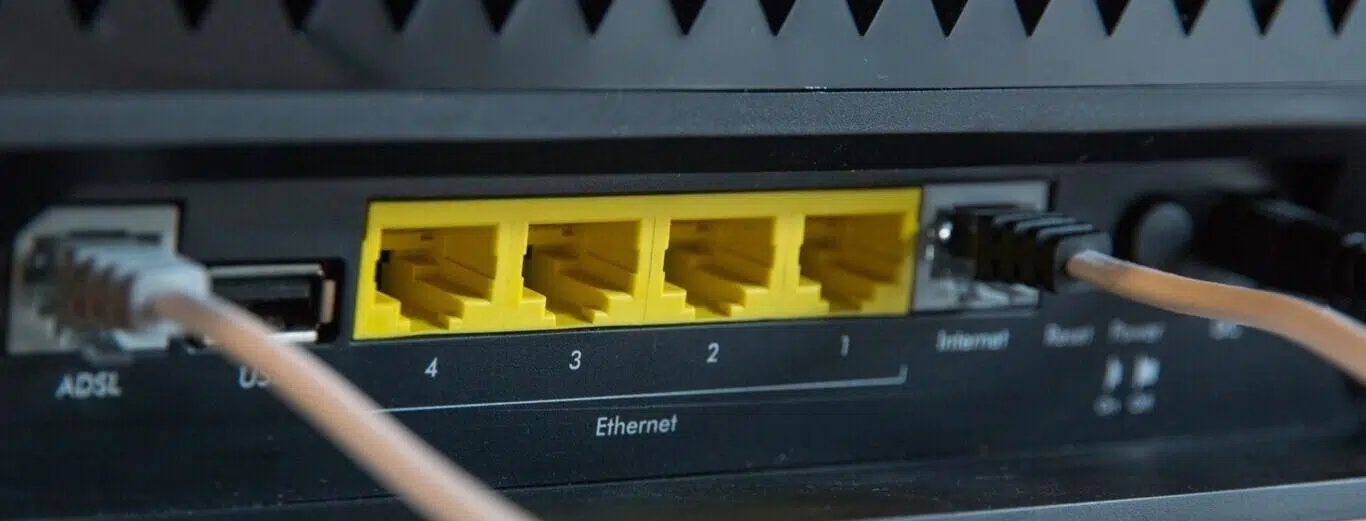
If you're using the router your internet provider gave you at home, you've probably wondered if you can replace it with your own. The short answer is "yes, but with some caveats ," because not all installations are the same, not all provider services are equally easy to configure, and, to top it all off, there's technical information that almost no company readily shares.
Before rushing out to buy a neutral router, it's worth understanding how the internet reaches your home, the role of the ONT (Optical Network Terminal), and what replacing it means for services like your provider's TV service, VoIP telephony, or VLAN management . We'll explain, in detail and without beating around the bush, what you need, what your real options are, and when it's better to complement rather than replace.
Think about whether you really need to change your router
While many ISP-provided routers are adequate, they have certainly improved in recent years. You should have compelling reasons to consider the investment and setup work: poor Wi-Fi coverage, intermittent disconnections, difficulty managing multiple devices, limitations in advanced options, or simply that your fiber optic connection is very fast and your current router falls short.
If your concerns stem from your Wi-Fi, the problem might not be so much the router itself, but rather bandwidth congestion in your building. In environments with many neighboring networks , simply changing your router doesn't always resolve the background noise. You might be better off setting up a mesh network (Wi-Fi Mesh) , using powerline adapters (PLCs), high-quality repeaters, or running an Ethernet cable to a dedicated access point.
There are also those who want extra features that the carrier's equipment doesn't include or has limited: a better management interface, a VPN server , advanced parental controls, refined QoS, USB ports , well-designed mobile apps, or even faster Ethernet ports (2,5 GbE) for demanding NAS devices. If you're going down this path, a good neutral service provider makes a difference from the very beginning.
Finally, if you're looking to get the most out of an ultra-fast fiber connection, make sure your new equipment has WiFi 6/6E, a good CPU and RAM, and VLAN/PPPoE/IPoE support . That combination is what really makes the difference when bandwidth is blazing fast.
Before you spend: what if your old router does the trick?
We all have a drawer full of "just in case" gadgets that still work. Take a look at your old routers : they might not be a complete replacement, but they could act as an access point or improve coverage in a specific area if you configure them for Wi-Fi only and connect them to the network via Ethernet cable.
Don't expect miracles if you're looking for more features than your current one, but trying it out will only take a few minutes . If the device offers better antennas or stability than your provider's, it could be a very decent temporary solution without spending a penny.
Replace or complement: which is more realistic
Disconnecting the ISP's router and plugging in a third-party router isn't the norm, however tempting it may be. The most practical approach is usually to use the ISP's router as a modem/ONT, while the third-party router handles routing, Wi-Fi, and other advanced functions.
Why? Because configuring your ISP's services isn't straightforward. Television, VoIP, internet, and VLAN management can all use different paths within the same connection, and without the correct settings, you'll lose functionality. Furthermore, if your line is ADSL or HFC, you need a compatible modem; and if it's fiber with an ONT integrated into the ISP's router, you'll need to add an external ONT to bypass the ISP's router.
Most users end up setting up their own router behind the ISP's router, in bridge mode or with settings to minimize double NAT. It works, greatly improves the user experience, and saves you from dealing with ISP secrets they're not always going to share.
Clear advantages of a neutral router
The leap in quality is usually noticeable. Better internal hardware, more memory, a more capable CPU , and next-generation WiFi reduce bottlenecks and micro-cuts, especially when dozens of devices are connected simultaneously.
In wired connections, you'll see more and better options: real Gigabit ports, 2,5 GbE, link aggregation on some models, and above all, stability when transferring large volumes of data with a NAS or a powerful PC.
The software layer also matters. Clean interfaces, mobile apps, QoS profiles, parental controls, WPA3 security , guest networks, VLAN segmentation, and gaming features with traffic prioritization make all the difference compared to closed systems provided by the operator.
If you also opt for a WiFi Mesh system or a router with good antennas, the coverage improves and is better distributed throughout the house, reducing dead zones without having to resort to compromise solutions.
Drawbacks and drawbacks you should consider
The main obstacle is the complexity of the setup when you want to completely replace your system. You need parameters and codes that the operator rarely provides , and without them you'll lose services like TV or VoIP, or you simply won't be able to synchronize at all.
The second point is cost: ISP equipment is usually "included," while a mid-range/high-end third-party provider costs money. If something goes wrong, the operator's support won't help if they detect you're using non-official equipment, and you'll have to diagnose it yourself.
Finally, there are cases where you cannot do without the operator's equipment: if the ONT is integrated into the router and you do not add a compatible external one, or if your connection is ADSL/HFC and the neutral one does not come with the appropriate modem, you will have to leave the ISP's device in the chain.
Key concepts: ONT, OLT, GPON/SIP, VLAN, PPPoE and IPoE
It's helpful to understand the context. The ONT (Optical Network Terminal ) is the device that receives the fiber optic cable in your home and converts it to Ethernet to power the router. In many ISP-provided routers, this ONT is integrated; in others, it comes as a separate box.
The operator's central office houses the OLT, which acts as the gateway to the other end. The ONT and OLT must be compatible , and not all third-party ONTs work with all OLTs. Furthermore, some operators use a leased network from another company, meaning the "real" OLT may not be the one from the brand you've contracted with.
To validate the optical connection, many installations require credentials such as GPON keys and, for telephony, SIP data . The operator almost never provides these credentials proactively; extracting them from the official equipment involves delicate technical processes that are not for everyone.
At the network level, you'll need VLAN compatibility and support for your operator's access method : IPoE (DHCP) in some cases, PPPoE in others. Even within the same company, there may be regional variations, such as 802.1po priorities and specific VLANs for internet, TV, and voice.
Three ways to use your neutral router
1) Cascaded, connected to the operator's router
It's the simplest way: you connect the WAN port of the neutral device to a LAN port on your ISP's router. This allows you to get started quickly and migrate your devices to the new Wi-Fi network smoothly. The downside is double NAT, which complicates port configuration and can increase latency.
If there's no other option, at least configure the DMZ on your ISP's router, pointing it to the IP address of the third-party server , and do the final forwarding there. It's not perfect, but it reduces headaches with games, VPNs, and exposed services.
2) Bridge mode on the operator's router
The idea here is to disable the router, switch, and access point functions of the ISP's equipment so that it acts solely as a modem/ONT and delivers the raw connection to your router. If the bridge is a true bridge, you'll need to configure VLANs and PPPoE/IPoE on the new router. Some devices create a pseudo-bridge and already deliver the unbundled internet VLAN.
The result is clean: a single router managing both your LAN and Wi-Fi . This requires accessing your ISP's device settings, enabling bridge mode, and sometimes disabling Wi-Fi and the DHCP server to avoid conflicts.
3) Direct connection to the ONT
The most efficient option: completely eliminate the ISP's router and connect the neutral ONT directly. You'll need a separate ONT if yours was integrated into an all-in-one unit. For some popular ISP models, it's relatively easy to obtain the necessary optical identifier to configure an ONT you purchase separately.
Next, configure the VLAN and access method used by your internet service provider on the router. If your provider uses IPoE, DHCP on the other side of the VLAN will suffice. If it uses PPPoE, you'll need a username and password: in some cases, generic values are sufficient, while in others (such as certain Digi profiles) you'll need to request custom credentials.
What the operators (almost) never tell you
There's sensitive information that almost no operator is willing to share: GPON keys, SIP voice data, detailed TV and VLAN parameters. Without it, a complete replacement is an uphill battle, and unless you're highly skilled, it's not worth the effort.
Another confusing point is that not all exchanges use the same OLT within the same brand. And if your provider relies on another network in your area, your ONT's actual compatibility will be with that third party's infrastructure. If you're unsure, buy the ONT from a retailer with a good return policy.
Compatibility and examples by carrier
The details change over time and by region, but there are patterns. In some Orange deployments, you can connect via IPoE without a username/password, simply by using the correct VLAN. In many Movistar/O2 scenarios, the internet connection is PPPoE, while TV and voice are handled on separate VLANs; furthermore, their HGU can act as a pseudo-bridge, delivering the internet VLAN already separated.
In the case of Digi, PPPoE credentials are often required . Support usually provides them upon request, which greatly simplifies setting up a neutral point directly behind the ONT or in bridge mode. As always, confirm with your specific service provider, as there are variations depending on the technology and region.
Practical guide to placing the neutral wire behind the operator's router
For most people, starting this way is the most sensible. Turn off both devices to make connections calmly; connect the WAN port of the neutral device to a LAN port on the ISP's router and turn on the ISP's router first, then the neutral device.
Connect your PC to the new router using an Ethernet cable and access its control panel (usually 192.168.1.1 or 192.168.0.1). Use the credentials found on the label and launch the setup wizard. If the option appears, select "Wireless router mode" to manage NAT, DHCP, and Wi-Fi.
Next, define your internet access. Cascading is usually done with a dynamic IP address on the WAN; if your ISP uses MAC address binding , enable MAC address cloning . Only adjust the rest if you know what you're doing.
Now for the WiFi part: change the SSID and password . You can reuse the name and password you used before to avoid reconnecting all your devices, as long as the default settings were already customized.
To avoid interference, access your ISP's router and disable its Wi-Fi and DHCP if you're in bridge mode, or at least turn off its Wi-Fi if you're using a cascaded connection. If it has a DMZ option, point it towards the WAN IP address of your ISP's router to minimize issues with ports and services.
Other useful modes on your neutral router
Many routers are multi-mode. Access point mode lets you convert a wired network into Wi-Fi while keeping your ISP's router as the LAN's central hub. Ideal if you just need better coverage.
In repeater mode , the device picks up the existing Wi-Fi network and rebroadcasts it to cover hard-to-reach areas. This is useful, although the cleanest solution remains using a wired connection and using it as an access point whenever possible.
Hotspot mode creates your own WiFi from a public network and isolates your devices, while mesh mode allows you to set up a unified mesh network with multiple nodes, often from the same manufacturer for seamless integration.
What to look for when buying: quick recommendations
Consider your usage and your internet speed. WiFi 6/6E, a multi-core CPU, sufficient RAM , and Gigabit ports (ideally at least one 2,5 GbE port) offer a good balance. If you play online or do intensive remote work, consider advanced QoS and VPN support.
For software, look for a clear interface, frequent updates, WPA3, parental controls , guest profiles, and the ability to configure VLANs per port if you plan to segment your network. If you enjoy fine-tuning, routers that support advanced firmware or have features like AdGuard can be very useful.
If you're going to attempt a complete replacement, confirm beforehand: ONT compatibility with your local OLT, whether your provider uses IPoE or PPPoE, which VLAN you need, and whether they'll provide credentials. And buy with a return option in case of any surprises.
Special cases: when the ONT is integrated
If your "all-in-one" router integrates both the ONT and the router, removing it will require adding an external ONT and configuring it with the correct identifiers. With certain ISP models, extracting the optical data that identifies your line is relatively easy; however, research the process thoroughly and avoid procedures you're unfamiliar with.
If you don't want to get into that mess, bridge mode on the operator's router and a good neutral router behind it is usually the best effort/benefit ratio: you keep the line working, you keep TV/voice if needed, and you get all the improvements of your new equipment.
Common mistakes and how to avoid them
- The most common mistake is trying to replace blindly without verifying requirements. Without correct VLANs, without properly configured PPPoE/IPoE, or without a compatible ONTThe network won't come up or services will be lost. Plan ahead, take notes, and proceed step by step.
- The second is to live with double NAT and forget about it. If you're stuck with cascading, use DMZ and well-executed forwarding. so that games, remote desktop, and servers work as they should.
- The third is undervaluing the firmware. Update the neutral router First of all, change your default passwords and disable any services you don't use. You'll gain stability and security.
- And of course, don't force anything with the carrier's hardware if you're inexperienced: Extracting GPON/SIP keys is delicateIt's best to choose paths supported by your provider or the community for your specific case.
It's clear there's room to improve your home network with a third-party router, either by complementing or replacing the ISP's equipment. If you start with something practical—like a bridge or well-tuned cascade configuration—you'll notice a leap in coverage, stability, and control , and you can always take further steps if your ISP and your setup allow it.


Passionate writer about the world of bytes and technology in general. I love sharing my knowledge through writing, and that's what I'll do on this blog, show you all the most interesting things about gadgets, software, hardware, tech trends, and more. My goal is to help you navigate the digital world in a simple and entertaining way.