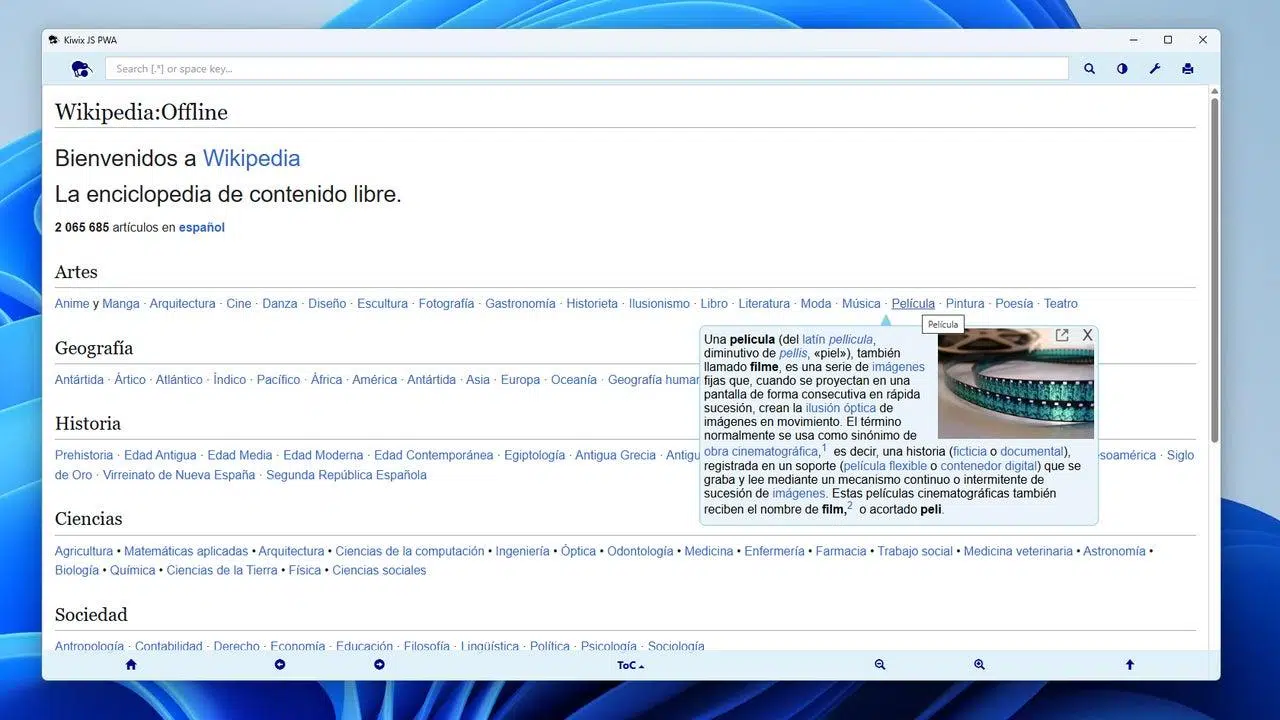
Wikipedia has become the go-to encyclopedia on the internet, accumulating a colossal amount of knowledge. Having it readily available without relying on the internet can be invaluable in situations with no coverage or limited data. Downloading the entire Wikipedia for offline use is possible , although it's not as straightforward as clicking a button on the website: you'll need tools designed for offline reading and the appropriate software packages.
This guide shows you two complementary methods: first, how to save a specific article as a PDF directly from Wikipedia, and second, the easiest and most recommended way to download the entire Wikipedia as a single ZIM file and read it offline using Kiwix. We also include a popular alternative called XOWA, official Wikimedia dumps for advanced use, and practical tips for choosing between versions with or without images and managing file size.
Save individual articles as PDFs (quick option)
If you only need a specific article, Wikipedia itself includes a feature to export any article to PDF without installing anything. Go to the entry you're interested in and look for the export option: it's usually in the left sidebar under "Print/Export" as "Download as PDF," or in newer interfaces under the "Tools" menu at the top, within "Print/Export." Clicking it will generate a PDF optimized by the platform, which you can then download with a single click.
Once downloaded, the document can be opened with any PDF reader, saved, or shared. It's ideal for offline reference , carrying on a USB drive , or saving on your phone if you're traveling and don't want to rely on data.
Download the entire Wikipedia to use offline with Kiwix
To access the complete encyclopedia, the easiest way is Kiwix, the offline reader supported by Wikimedia itself. Kiwix opens ZIM files , an open and compressed format that packages websites and metadata for offline browsing. You can download it for Windows , macOS, Linux , Android , and iOS , and it also has extensions for Chrome, Edge, and Firefox, and even runs on Raspberry Pi to set up a local server.
Kiwix offers several Wikipedia "editions" in different languages and sizes. In Spanish, the full version with images is around 36,9–37 GB , while the text-only version is around 9–9,2 GB. If you're short on space, the image-free option saves a lot . There are also other projects like Wiktionary in Spanish, which only takes up about 950 MB.
Downloads are usually available via HTTP/HTTPS and also via BitTorrent. Wikimedia recommends using BitTorrent whenever possible, because it distributes the load, speeds up transfers , and makes downloads more resilient to connection interruptions with such large files.
Key Kiwix features that make your life easier
- Dedicated reader for ZIM files, with full text search.
- Bookmarks, notes and search suggestions.
- Easily export articles to HTML or PDF.
- Kiwix-serve: HTTP server to share your ZIM on a local network.
- Download manager and capacity index ZIM to expedite consultations.
- Multilingual interface, tabs and DVD/USB launcher on Windows.
- Available Windows, macOS, Linux, Android and iOS, in addition to extensions and PWAs.
Which ZIM file to choose (with or without images, and other projects)
In the content catalog, you'll see several rows for each language. You'll typically find the "image edition" and the "text-only edition," both labeled "Wikipedia" and including the language code. For Spanish, look for the "complete" version (approximately 37 GB) if you want multimedia, or the "no images" version (around 9 GB) if you prioritize storage capacity and speed on less powerful devices. You can also add Wiktionary (eswiktionary, ~950 MB) if you're interested in the more lexicographical content.
Other educational collections are available, such as Wikivoyage, Khan Academy, Project Gutenberg, and TED , among many others. Kiwix maintains a repository with dozens of resources in multiple languages, and the catalog is updated regularly. Packages are refreshed periodically to reflect recent releases.
Install Kiwix and open your ZIM
The process is simple, even if it's your first time. Download Kiwix from its website and choose your platform: there are desktop installers, apps for Android and iOS, and extensions for the most popular browsers. On a Raspberry Pi, you can configure it as an access point or local server for an entire network.
- Install and run Kiwix on your device after downloading the corresponding version.
- Accesses catalog of content or go directly to the ZIM download page to obtain the Wikipedia file in your language (direct or torrent).
- In Kiwix, go to Settings and tap Select File all with select your .zim file Discharged.
- Confirm with Trusted Source when Kiwix asks you to and Start browsing Wikipedia offline as if you were on the web.
If you want to share your encyclopedia at home, in a school, or in a library without giving them internet access, Kiwix includes kiwix-serve to set up an HTTP server . You start it by pointing it to your ZIM, and the rest of the devices on the local network will be able to access it from their browser, without installing anything, just like a normal website.
Seamless offline reading: search, bookmarks, and export
The experience is very similar to using Wikipedia online: you can search by title or content , navigate through internal links, jump between tabs, and save pages to bookmarks. If you need to share or print, export any article to PDF or HTML with two clicks. On Android, thanks to the system's text-to-speech (TTS), it's possible to "listen" to the entries, which is helpful for those with visual impairments or young children learning to read.
On modest devices or those with limited storage , you'll see a significant improvement by sticking with the image-free version. ZIM files can be indexed , and Kiwix offers search suggestions, so browsing is fast even with large collections.
Official Wikimedia dumps: for technical uses
Another official source is the weekly Wikimedia database dumps . They aren't as "readable" as a ZIM file, but they're useful for researchers, developers, and anyone who wants to work with the data. You'll find pages-articles.xml.bz2 files with the latest revision of each article, and also pages-meta-history.xml.7z/bz2 with the complete edit history , which are much larger.
These dumps can be imported into MySQL or MariaDB for analysis and development. To manipulate them, you'll need command -line utilities and compression tools like 7-Zip. If you want to read Wikipedia as if it were a website, look into alternative parsers capable of transforming these XML files into navigable HTML; however, Kiwix remains the practical solution for home use.
XOWA: alternative for local offline wikis
If you prefer another tool, XOWA allows you to download and view wikis locally and offline. After installation, open the "Tools" menu and go to "Download Central": there you can filter by "Lang" (language) and "Type" (project) to find the Wikipedia you're interested in. Click the "+" button on the desired packages and the downloads will begin.
For reference, the complete Spanish Wikipedia with XOWA typically requires around 30 GB of storage , and the English version easily exceeds 150 GB if you include images . It's similar to using a web browser , with an area for downloaded wikis and a panel for navigating between them without needing an internet connection.
Mobile apps and browser extensions
The Wikimedia Foundation maintains official Wikipedia apps for Android and iOS , designed for online access and an optimized mobile experience. If your goal is to read offline, Kiwix for Android/iOS remains the safest bet, as it opens ZIM and offers features like exporting and bookmarking articles.
If you prefer not to install desktop programs, there are Kiwix extensions for Firefox and Chromium/Chrome/Edge , and even an HTML5 and PWA version that loads ZIM and works offline directly from the browser. In classroom or library settings, the Raspberry Pi with Kiwix option is very popular for serving content to multiple devices simultaneously.
Storage space, downloads, and performance: what you should keep in mind
Before you start, check your available storage. For the Spanish edition, reserve at least 40 GB if you want the version with images; if you choose the text-only version, 10–12 GB will be more than enough. In English, the figures increase significantly, and it's not uncommon for a complete set to exceed 100 GB (for example, 109 GB) . The faster your storage (preferably an SSD ), the smoother your search and browsing will be.
For files this large, direct downloads are often interrupted if the connection isn't stable. Using BitTorrent is a good idea because it allows you to resume downloads, verifies the integrity of the downloaded files, and tends to be faster when there are enough sources. If you download via HTTP/HTTPS, make sure you have a download manager that supports resuming downloads or downloading when the network is less congested.
Where to follow updates and additional options
Kiwix's content catalog is updated regularly (every 6–12 months in many cases) to publish the latest versions of packaged wikis. You can keep an eye on updates through channels like RSS/Atom (Planeta), official profiles on X (formerly Twitter), and recent updates pages. The download repository lists ZIMs by project and language, with direct links and torrents.
If you're looking for unusual alternatives, there's CDPedia , an Argentinian project that offers CD and DVD compilations of the Spanish Wikipedia with a specific editorial closure date. It's designed as a snapshot to give away or use offline, and can be useful when you don't need the latest updates. Keep the generation date in mind if you require recent information.
Useful reference links: ZIM file downloads , the official Kiwix website , and ZIM torrents of the Spanish Wikipedia published by the project. The official Wikipedia apps are available on Google Play and the App Store.
Serve Wikipedia on your network with Kiwix-serve and Raspberry Pi
For institutions, classrooms, or families with multiple devices, setting up a local server with Kiwix-serve is very practical: you download a single ZIM file to one computer or Raspberry Pi, and everyone else accesses it through their browser over the local network. It's perfect when you want an encyclopedia but don't want to provide open internet access, or when the connection is expensive or intermittent.
The setup is straightforward: you point Kiwix-serve to the ZIM file and open the port you're going to use. Raspberry Pi is an inexpensive and quiet option , and many organizations use it as an encyclopedic node for libraries, classrooms, or community centers.
Real-world uses and related projects
Kiwix was launched in 2006 and is now maintained by developers worldwide. As free and open-source software , it has been adopted in educational and social projects: from One Laptop per Child to installations in Swiss prisons, and initiatives by the Orange Foundation in Africa. The goal remains the same: to make knowledge accessible without relying on the internet.
In addition to Wikipedia, ZIM offers collections of other free resources : Project Gutenberg for books, TED Talks, Ubuntu compilations, and more. For students, schools, and areas with limited connectivity, having this offline ecosystem makes all the difference, especially when combined with features like exporting to PDF or voice reading on Android.
If your internet connection never fails, you might not miss it; however, for travel, areas with unreliable internet, or for building a digital library at home, saving Wikipedia locally is incredibly useful . Kiwix and XOWA offer simple options for a polished offline reading experience, and for technical users, Wikimedia's official dumps open the door to unlimited analysis and advanced uses.

Passionate writer about the world of bytes and technology in general. I love sharing my knowledge through writing, and that's what I'll do on this blog, show you all the most interesting things about gadgets, software, hardware, tech trends, and more. My goal is to help you navigate the digital world in a simple and entertaining way.