- DSC is a declarative and idempotent model: it describes the state and the engine converges to it.
- PSDSC uses MOF and LCM in Windows; The current DSC is cross-platform and uses JSON/YAML.
- Integrates with Azure Automation, WinGet, and other tools for orchestration at scale.
- Best practices: modularization, version control, testing, and alignment with NIST/FISMA.
If you manage Windows, Linux , or macOS systems, you'll inevitably encounter the concept of a desired state. PowerShell Desired State Configuration (DSC) is the most direct way to express and maintain that state over time , preventing unexpected issues, correcting deviations, and accelerating deployments. Here you'll find a comprehensive guide , with practical examples and the differences between classic PowerShell DSC and the latest cross-platform DSC.
Beyond formal definitions, think of DSC as a promise you make to your servers: 'I want you configured this way, and if you change, I'll return you to your site .' The best part is that this promise is declarative and idempotent: you describe the result, and the engine takes care of getting there and staying there, no matter how many times you run the same configuration.
What is DSC and why you might care
DSC is a declarative configuration platform. It's declarative because you describe the desired state ( active services, roles and features , packages, files, registry keys, etc.), not the minute sequence of steps to achieve it. The engine compares the current state with the desired state and makes the minimal changes necessary to converge.
Its basic unit is the resource. A DSC resource encapsulates how to 'Get', 'Test', and 'Set' the state of something : a service, a file, Active Directory , SQL Server, etc. This Get/Test/Set interface allows you to check if a node is already in the correct state and, if not, apply the change.
In classic PowerShell DSC (PSDSC), the component that acts as the glue is the Local Configuration Manager (LCM). The LCM is the engine that applies configurations, monitors them, and can periodically re-enforce them . It works in push mode (you push the configuration) or pull mode (the node downloads it from a pull server).
DSC is based on management standards such as CIM and IMO. This open foundation facilitates interoperability and allows third-party tools to coexist seamlessly , which is crucial if your infrastructure mixes different manufacturers and platforms.
Differences between PowerShell DSC (PSDSC) and the current cross-platform DSC
In recent years, Microsoft has promoted a DSC that goes beyond PowerShell and Windows. This 'new' DSC runs on Windows, Linux, and macOS and is invoked with the dsc command- line tool , without relying on PowerShell or its PSDesiredStateConfiguration module.
- PowerShell IndependenceThe current DSC does not require PowerShell. However, you can use PSDSC resources using adapters:
Microsoft.DSC/PowerShellfor resources in PowerShell classes andMicrosoft.Windows/WindowsPowerShellfor those who rely on Windows PowerShell. - Document formatIn PSDSC, configurations are compiled to MOF. In the current DSC, configuration documents and resource schemas are defined in JSON or YAML.
- Execution model: PSDSC features the LCM, which can run as a service and maintain state. Modern DSC is invoked as a command; does not include LCM or resident service.
- Multilanguage: you can write resources in bash, Python, C#, Rust or whatever you prefer. The focus is on platform, not shell.
- Vertical: The cross-platform DSC exposes JSON schemas to integrate with WinGet, Microsoft Dev Box, and Azure Machine Configuration, among other tools.
In summary, PSDSC remains key in Windows and is very mature for operating system and role management. Cross-platform DSC offers a broader, more portable, and language-independent approach, ideal for hybrid organizations.
Supported systems and requirements on Windows
The classic implementation of DSC on Windows is available natively or through the Windows Management Framework. Windows Server 2016, 2019, and 2022 are supported, as well as Windows 10 and Windows 11. The recommended package for environments not running the latest version is WMF 5.1.
There is one important exception: Microsoft Hyper-V Server (standalone product) does not include DSC , so you will not be able to manage it with PSDSC or Azure Automation State Configuration.
To operate remotely, Windows must have WinRM properly configured. You can enable it with administrator privileges by running Set-WsManQuickConfig -ForceThis prepares the computer to receive remote PowerShell commands, even if you apply settings on localhost.
If you need to diagnose, DSC events in Windows are logged in Microsoft-Windows-Dsc/Operational. They can be activated logs additional for advanced debugging when you need to go deeper.
Getting Started with PowerShell DSC on Windows
The usual approach is to start with the built-in resources and add modules from the PowerShell Gallery. The 'PSDscResources' module offers updated resources to cover common scenarios :
# Instalar recursos DSC desde PowerShell Gallery
Install-Module 'PSDscResources' -Verbose
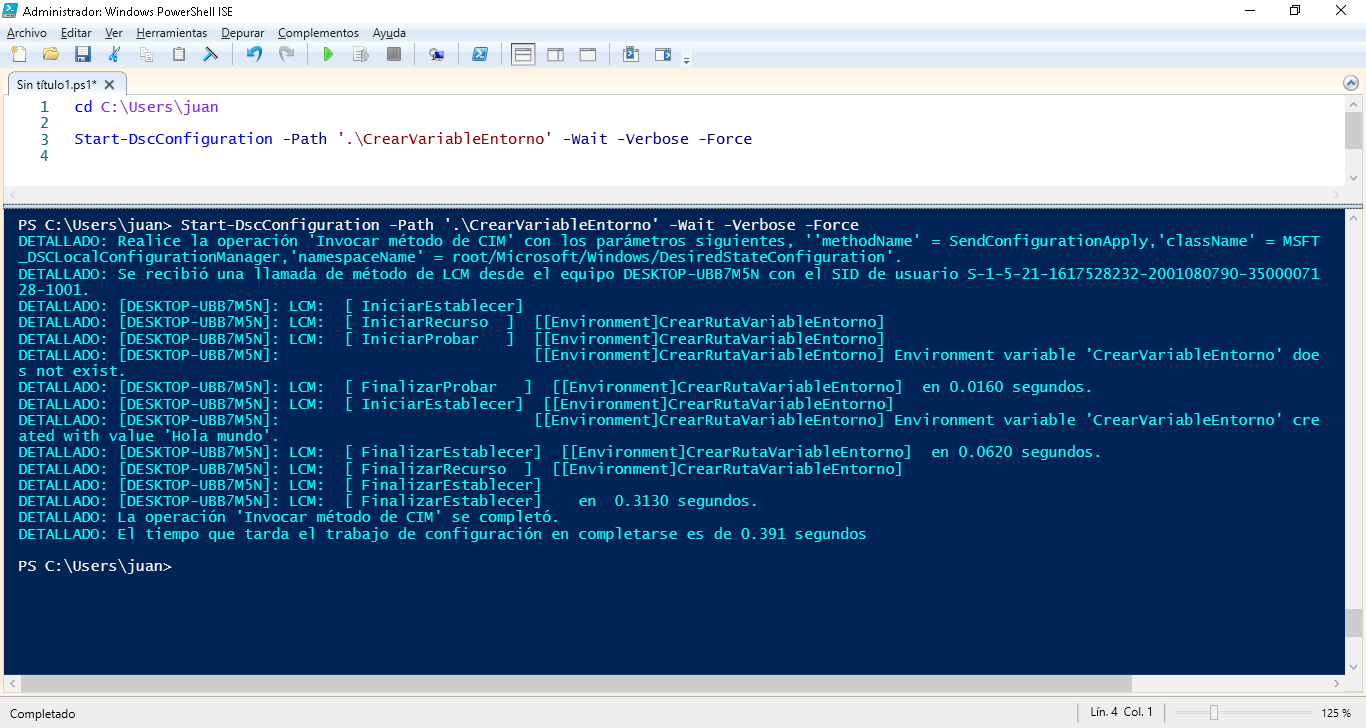
A PSDSC configuration is defined with the keyword Configuration and compiles to MOF. Below is an example that creates an environment variable and ensures it is present.:
Configuration CrearVariableEntorno {
  param ()
  Import-DscResource -ModuleName 'PSDscResources'
  Node localhost {
    Environment CrearRutaVariableEntorno {
      Name   = 'CrearVariableEntorno'
      Value  = 'Hola mundo'
      Ensure = 'Present'
      Path   = $true
      Target = @('Process','Machine')
    }
  }
}

# Compilar el MOF en una carpeta de salida
CrearVariableEntorno -OutputPath './CrearVariableEntorno'
With the MOFs generated, it's time to apply them. The cmdlet Start-DscConfiguration invokes the LCM to process the configuration and can be run in interactive mode to follow the details:
Start-DscConfiguration -Path 'C:\CrearVariableEntorno' -Wait -VerboseTo inspect how the node looks, you can check the current state that DSC sees. Get-DscConfiguration returns the actual values applied y Get-DscLocalConfigurationManager shows the current metaconfiguration:
# Estado efectivo del nodo
Get-DscConfiguration

# Metaconfiguración (LCM)
Get-DscLocalConfigurationManager
If you need to 'unpin' a configuration, there is also a way out. Remove-DscConfigurationDocument -Stage Current -Verbose deletes the applied document and leaves the node ready to receive another MOF.
In managed scenarios, you may sometimes want to apply an LCM metaconfiguration (for example, to change the refresh mode or target a Pull Server). This is done by generating a metaconfiguration MOF and applying it with Set-DscLocalConfigurationManager -Path 'c:\metaconfig\localhost.meta.mof' -Verbose.
Local Configuration Manager: Modes, Frequency, and Partial Configurations
The LCM defines how and when configurations are enforced. Parameters like ConfigurationMode (ApplyOnly, ApplyAndMonitor or ApplyAndAutoCorrect) and the frequencies RefreshFrequencyMins y ConfigurationModeFrequencyMins They control whether the node only applies once, monitors, or monitors and corrects automatically.
Additionally, you can work in push or pull mode. In pull mode, nodes query a configuration server (Pull Server) to download MOFs and modules based on their identifier. This approach is very useful at scale because it centralizes version control and compliance.
Since Windows Server 2016 (DSC v2), the LCM has supported partial configurations. This involves breaking the configuration down into independent fragments that the LCM then combines: for example, one team defines its security portion and another team defines its application portion, without overlapping.
Real-life usage scenarios
DSC is ideal for repeatable and auditable 'operating standards'. Typical applications include configuring roles and features, securing services, preparing IIS, installing packages, modifying the Registry, and defining environment variables . You can find helpful guides on how to modify the Registry with PowerShell to integrate it into your configurations.
For applications, you can automate installation, dependency configuration, site publishing, and fine-tuning. The key is that the resulting deployment is consistent across all nodes, whether in a lab or a production environment.
In terms of security and compliance, DSC is a perfect fit. Hardening policies, firewall parameters, local accounts, and auditing directives become a versioned and auditable configuration, not a manual 'recipe'.
Network management ( adapters , IPs, rules, services) is also included. If anything is changed, the engine detects it and, depending on the mode, re-establishes the state , reducing unexpected issues and support time.
As a simple idea, imagine you want a critical service to always be running. With a resource Service and ApplyAndAutoCorrect mode, if someone stops it, the LCM picks it up againYou can even rely on scheduled tasks to reinforce checking.
Integration with Azure and orchestration
DSC shines when it's part of an automation chain. Azure Automation can orchestrate provisioning (runbooks, workflows) and delegate VM configuration to DSC , both in Azure and on-premises.
A common pattern is to publish your configuration to a storage and associate it with VMs with the DSC extension. Commands like Publish-AzureVMDscConfiguration pack your script in a .zip with the necessary modules, and Set-AzureVMDSCExtension applies it in creation.
# Publicar la configuración (convierte el .ps1 y módulos en .zip)
Publish-AzureVMDscConfiguration -ConfigurationPath './MiConfig.ps1' -Force

# Asignar la configuración a una VM al desplegarla
Set-AzureVMDSCExtension -VM $vm -ConfigurationArchive 'MiConfig.zip' -ConfigurationName 'NombreDeConfig'
In IaaS deployments, the idea is simple: orchestration creates and connects cloud resources (network, storage, VMs), and DSC configures the operating system and applications within each VM . If you also version and test the configurations, you'll have reproducible environments.
Installing and using the cross-platform DSC
Modern DSC is distributed as portable binaries. You can download the latest version from the PowerShell/DSC GitHub repository, extract the files, and add the folder to your PATH . No complicated installations or extra dependencies are required.
On Windows, you can also install it from the Microsoft Store using WinGet. First, locate the package and then install either the stable or preview version.
# Buscar los paquetes publicados
winget search DesiredStateConfiguration --source msstore

# Instalar la versión estable
winget install --id 9NVTPZWRC6KQ --source msstore

# Instalar la versión preliminar
winget install --id 9PCX3HX4HZ0Z --source msstore
This DSC works with configuration documents written in JSON or YAML and with schemas also in JSON. The CLI dsc allows you to invoke individual resources, apply entire documents, and write resources in any language. In addition, the aforementioned adapters allow you to leverage existing PSDSC resources.
By standardizing the structure of documents and outputs using JSON schemas, integration with other platform tools (WinGet, Dev Box, Azure Machine Configuration) is more straightforward, facilitating modern pipelines and workflows.
Good practices and regulatory compliance
To avoid chaos, modularization is key. Divide your configurations into reusable components and create resource modules for complex parts . This allows you to maintain and scale with less friction.
Version control everything using Git. Saving configurations and resources in repositories facilitates teamwork, history tracking, and rollbacks . Using branches and pull requests will also ensure revisions and quality.
Test before deploying to production. Tools like Pester help validate resources and configurations and avoid side effects, and a pre-production environment should be part of the process.
Many organizations follow frameworks such as NIST SP 800-53 (e.g., CM-2 control over base configurations) or FISMA. DSC provides consistency and auditability to align your systems with policies and standards , reducing manual compliance effort.
Records and diagnosis
When something doesn't add up, the event log is your ally. On Windows, the channel Microsoft-Windows-Dsc/Operational centralizes what happened (resource implementation, fixes, errors, etc.). If you need more detail, enable additional debug-oriented logs.
In Azure, also review the DSC extension logs and VM diagnostics. Correlate the output of Start-DscConfiguration -Verbose with the event viewer you save time to locate the exact resource that has failed.
DSC, whether the classic PowerShell version or the cross-platform version, gives you a solid foundation for Infrastructure as a Computer (IaC) on servers and workstations. Define the state, share it as code, test it, and let the engine handle the repetitive work ; this allows your teams to focus on real value, not putting out fires.


Passionate writer about the world of bytes and technology in general. I love sharing my knowledge through writing, and that's what I'll do on this blog, show you all the most interesting things about gadgets, software, hardware, tech trends, and more. My goal is to help you navigate the digital world in a simple and entertaining way.