- Unified address bar with search and palette commands.
- Improved dual panel: Ctrl+Shift+S shortcut and separate filters.
- Properties with hash comparison and signature verification.
- Greater cloud integration and improved interface and stability.

If you use Windows daily, you know that File Explorer falls short in several areas. Many users have been requesting improvements for some time that never seem to materialize, and as a result, more and more people are trying third-party alternatives. In this landscape, Files has carved out a niche with a modern , more user-friendly approach and features that set it apart from the native tool.
The application isn't new: it's been evolving for nearly seven years and now it's launching a powerful update. We're talking about Files 4.0, a major version with significant changes in usability, stability, and performance, which also incorporates specific new features in its address bar, dual pane, Properties window, and cloud integration, among other visual and productivity improvements.
What is Files and why so many users prefer it
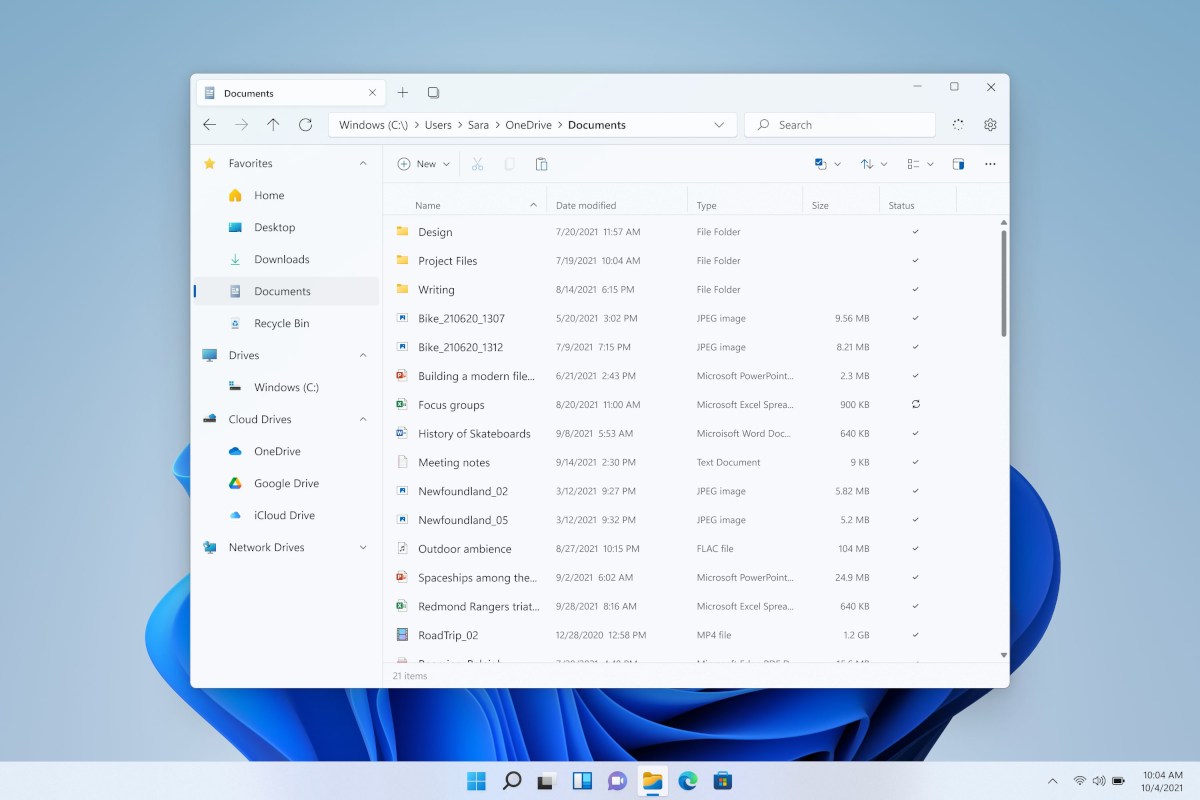
Files is a file manager for Windows 11 and Windows 10 that effectively replaces the classic Explorer experience with a clearer and more refined interface. The app adopts Fluent Design to offer a more organized, clean, and visually appealing view , and facilitates access to folders and destinations without sacrificing familiar functions.
One of its strengths is the tabbed navigation at the top , ideal for working with multiple locations simultaneously. This prevents windows from cluttering the entire screen and reduces the mess when managing documents, downloads , or photos. This approach, combined with other shortcuts and panels, tangibly improves daily workflow.
In addition, you can pin directories to a customizable sidebar and, if you like, change their color to spot them at a glance. This subtle customization helps you locate content faster, especially if you organize your PC by projects or clients.
For those who do a lot of organizing, Files integrates tags and ZIP extraction without needing external tools. And if you're someone who frequently empties the trash, you can permanently delete items without going through the recycle bin —an option that streamlines recurring tasks (with the necessary care on your part, of course).
Key new features in Files 4.0
Version 4.0 is no minor update: its main objective is to improve stability and reduce unexpected crashes . This effort to refine the core system is accompanied by internal optimizations, bug fixes, and, as an aesthetic touch, a new icon that you'll see reflected in the system.
Beyond performance improvements, Files 4.0 brings profound functional changes. The most visible improvement focuses on the address bar , which has now been redesigned to unify various controls and thus gain agility during daily use, especially when switching between paths and searching for files.
Unified address bar: path, search, and command palette
Until now, the application separated the path and the search bar. Files 4.0 introduces a new control that combines the path bar and the search box into a single location. This unification eliminates unnecessary clicks and allows you to seamlessly switch between browsing a folder and locating specific files without changing focus.
Furthermore, the app's command palette is integrated directly into this address bar. In practice, this means having direct access to contextual actions and shortcuts right where you're interacting with the path—especially useful when working with repetitive operations or batches of files.
More powerful dual panel: separate shortcuts, filters, and search
The browser's dual-pane functionality has also received some TLC. You now have a new keyboard shortcut: Ctrl + Shift + S , designed to speed up dual-pane management and move content between panels more smoothly.
To fine-tune your preferences, Files 4.0 includes a dedicated settings section for the dual panel . This allows you to adjust its behavior to your liking and, incidentally, improve consistency when switching between sorting tasks or manual synchronization.
Another very practical new feature is the separation of filtering and searching into independent controls, each with its own button. This avoids confusion, allows you to filter by specific criteria, and simultaneously perform searches without one function interfering with the other.
Properties: Hash Comparison and Signature Verification
The Properties window adds two features that advanced users will appreciate. Firstly, you can compare file hashes to confirm integrity, which is useful when validating downloads or synchronizations.
On the other hand, it's now possible to check signatures and verify authenticity from within the Properties panel. This extra step provides peace of mind when managing executables or documents where provenance and integrity are critical.
Developers: Remap “Open IDE” and Workflow
If you're a programmer, Files 4.0 lets you reassign the Open IDE command to any editor . This setting is found in Settings / Developer Tools and allows you to integrate your preferred environment with the file explorer, streamlining tasks like switching from the installation folder to the editor or IDE with a single click.
Cloud and OneDrive: more services and better integration
Another area where Files is making strides is cloud storage . The app expands the options for direct access to cloud services, simplifying working with remote files without leaving the file explorer.
In Windows 11, OneDrive also appears in the Properties window . This makes the status and relationship of files synchronized with the Microsoft service more visible, allowing you to easily access them during your daily routine.
Interface and column view: automatic adjustments and precision
The column view has been refined so that the width automatically adjusts to the file names . This behavior prevents columns that are too narrow or too wide and allows you to read at a glance without having to constantly resize them manually.
If you need to adjust them, you can drag the separators and, when you prefer, double-click on a separator so the system adapts it to the optimal width based on the content. These are small gestures that add up to better ergonomics.
You can also choose how size units are displayed: in binary or decimal . This level of control makes it easier to interpret sizes consistently, according to your preference or the standard used by your team.
Performance and stability: the silent spotlight that shows
While the visible aspects grab headlines, Files 4.0 puts a lot of effort into what's unseen: internal optimization and bug fixes to reduce unexpected crashes. This groundwork is key to making everything else look good and, above all, to ensuring the alternative browser remains reliable during long workdays.
The set of changes makes the experience more solid and predictable , something that is appreciated both on modest teams and on work machines loaded with projects and libraries.
Observed msixbundle package history
One of the lists consulted shows versions packaged as msixbundle with their corresponding dates . This history helps to understand the frequency of updates that have appeared recently.
- msixbundle 3.6.0.0 — Sep 17 2024
- msixbundle 2.5.21.0 — Aug 21 2023
- msixbundle 2.5.10.0 — Jun 29 2023
- msixbundle 2.5.1.0 — Jun 19 2023
- msixbundle 2.4.71.0 — May 18 2023
- msixbundle 2.4.70.0 — May 8 2023
- msixbundle 2.4.68.0 — Apr 24 2023
- msixbundle 2.4.62.0 — Apr 17 2023
- msixbundle 2.4.61 — Apr 10 2023
- msixbundle 2.4.40.0 — Feb 20 2023
- msixbundle 2.4.33.0 — Feb 13 2023
- msixbundle 2.4.31 — Feb 6 2023
- msixbundle 2.4.25.0 — Jan 26 2023
- msixbundle 2.4.21.0 — Jan 12 2023
- msixbundle 2.4.20 — Jan 11 2023
- msixbundle 2.4.14.0 — Jan 10 2023
- msixbundle 2.4.8.0 — Dec 29 2022
- msixbundle 2.4.4.0 — Dec 22 2022
- msixbundle 2.4.2 — Dec 15 2022
- msixbundle 2.4.0.0 — Dec 13 2022
This data does not in itself imply the availability of a specific variant, but it serves as a reference for published versions and the pace of maintenance of the project in different distribution channels.
Note on .NET Framework 4 requirements seen in the results
Among the information consulted is a set of requirements related to Microsoft .NET Framework 4 , focused on server installations. It's not something most users need to use Files on their desktop, but it's worth keeping in mind if you manage corporate machines or perform custom deployments.
For server installations, Internet Information Services (IIS) 6.0 or later is required . If you plan to use ASP.NET features, IIS must be installed with the latest security updates before installing the .NET Framework. In this context, ASP.NET is supported only on Windows XP Professional, Windows Server 2003, Windows Server 2008, and Windows Server 2008 R2.
Microsoft Data Access Components (MDAC) 2.8 or later is also recommended . And remember one important point: most users don't need a server installation ; if you're unsure, perform a basic installation instead of setting up a server environment.
Regarding the Server Core role: This version of .NET Framework 4 does not support Server Core on Windows Server 2008 and Windows Server 2008 R2 . For 2008 R2 Service Pack 1, there is a separate installer designed for that specific scenario, called Server Core.
In the same context, the package release details are listed: Release date: July 15, 2024 , filename dotNetFx40_Full_x86_x64_SC.exe , and approximate size of 48.1 MB . If you manage servers, these details help you locate the exact version you need to test or deploy.
One of the results leads to Reddit, which applies a clear cookie policy: by accepting, you consent to the use of similar technologies to provide and maintain its services and site , improve quality, personalize content and advertising , and measure the effectiveness of ads.
If you reject non-essential cookies, Reddit will still use only those strictly necessary for the platform to function. For more information, please see their Cookie Notice and Privacy Policy , which explain the details of data processing and management options.
How this all fits together if you want to try Files 4.0
If you're coming from the classic Explorer, the transition is easy. The most striking change you'll notice is the unified address bar with search and commands , followed by a greater sense of control in the dual-pane interface thanks to its dedicated preferences and keyboard shortcuts.
The Properties window, with hash comparison and signature verification , provides a layer of technical reassurance that is usually beyond the reach of the average user without external tools. In Files, it's already integrated with just one click.
For those working with repositories or projects, being able to redefine "Open IDE" to their preferred editor from Settings / Developer Tools will become a routine task. This exemplifies how the app aims to fit into real-world workflows, rather than simply adding features for the sake of adding them.
The cloud integration and OneDrive visibility in Properties, along with the smarter column view and the choice between binary or decimal units, make a noticeable difference in everyday use. These are refinements that eliminate friction and save you small seconds that, in the end, add up.
Finally, the least visible aspect— stability and fewer crashes —is what truly solidifies the experience. When an alternative browser accompanies you for hours without any issues, you adopt it without looking back.
If you're considering installing it, keep in mind that a basic desktop installation is the norm . The .NET Framework 4 requirements mentioned above apply to specific server scenarios and shouldn't affect you unless you manage Windows Server environments with specific roles.
Regarding availability, the msixbundle package listings show a version history , with numbers and dates that document the release schedule. If you were already using Files, you'll see that the jump to 4.0 includes expected improvements and others that, once you try them, you'll miss when you go back to the classic Explorer.
Anyone looking for a more modern file explorer for Windows will find Files 4.0 a natural evolution: faster, more stable, and with useful tools for both casual and advanced users. From tabs and a color-coded sidebar to labels, integrated ZIP support, and permanent file deletion, it's a coherent offering with room for growth.
Looking at the overall results—official announcements, technical details, and supplementary notes such as Reddit's cookie policy or .NET server requirements—the final picture is clear: Files 4.0 arrives with a more powerful address bar, a better-resolved dual panel, Properties with verification functions, better cloud integration , and interface adjustments that fit what many were asking for to work faster and with less friction.

Table of Contents
- 1 What is Files and why so many users prefer it
- 2 Key new features in Files 4.0
- 3 Unified address bar: path, search, and command palette
- 4 More powerful dual panel: separate shortcuts, filters, and search
- 5 Properties: Hash Comparison and Signature Verification
- 6 Developers: Remap “Open IDE” and Workflow
- 7 Cloud and OneDrive: more services and better integration
- 8 Interface and column view: automatic adjustments and precision
- 9 Performance and stability: the silent spotlight that shows
- 10 Observed msixbundle package history
- 11 Note on .NET Framework 4 requirements seen in the results
- 12 Cookie and Privacy Experience on Reddit
- 13 How this all fits together if you want to try Files 4.0
