- Key differences between the Wine compatibility layer, Proton's optimization for gaming, and advanced management using Bottles.
- Methodology for installing stable and cutting-edge versions along with configuring independent prefixes.
- Use of auxiliary tools such as Winetricks to resolve dependencies on Microsoft DLL libraries and fonts.

If you've recently switched to Ubuntu or any other Linux distribution, you've probably run into the problem of not having certain essential applications that are only available for Windows. There's no need to go through the hassle of installing a dual-boot system or burdening yourself with a virtual machine that eats up all your RAM; there are much lighter and more direct solutions to this problem, such as learning how to migrate from Windows to Linux efficiently.
This is where tools like Wine and Proton come in, essentially acting as a real-time translator . Instead of mimicking the hardware of a Windows PC, these layers translate program commands so that Linux understands them on the fly, allowing you to launch .exe files with surprising smoothness and without excessive hassle.

What on earth is Wine and how does it actually work?
To begin, it's important to clarify that WINE (Wine Is Not an Emulator) is not an emulator . While an emulator simulates an entire computer, Wine is a compatibility layer that implements Windows APIs. This means that the software thinks it's in its natural environment, but in reality, it's running natively on Linux , preventing performance from plummeting.
Within its ecosystem, there are critical components that make the magic happen. For example, the wineserver manages resources and the app lifecycle, while tools like winepath convert Windows folder paths (like C:\) to the Linux format. It also includes its own registry editor, regedit , and a file explorer called winefile so you won't feel lost.

Proton and CrossOver: The Optimized Siblings
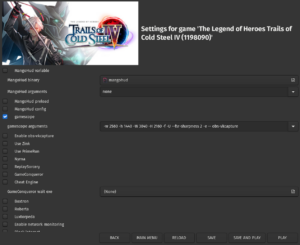
It's not all about plain old Wine. Valve has created Proton , which is essentially a heavily modified fork of Wine for gaming. It integrates directly with Steam and uses technologies like DXVK and VKD3D to translate DirectX 11 and 12 to Vulkan, making games run incredibly fast on Linux. It's the key component that makes the Steam Deck possible.
On the other hand, we have CrossOver , the paid version developed by CodeWeavers. What you pay for here is convenience and professional support , as they automate program configuration so you don't have to struggle with the terminal or search for obscure libraries online.

Step-by-step installation on Ubuntu and derivatives
To make it perfect, the first thing is to enable the support for 32-bit architecturebecause many older Windows programs require it. This is done by launching sudo dpkg --add-architecture i386 in the terminal and updating the repositories.
If you're looking for stability, go for the WineHQ-stable branch . But if you're someone who wants to try the very latest and has a bit more patience for potential bugs, the Wine Staging version is ideal, as it includes experimental patches that usually improve compatibility with modern software. To install it, you'll need to import the official WineHQ key and add the repository corresponding to your Ubuntu version (such as Jammy or Lunar) before running the installation command.
Advanced configuration and the Wineprefixes trick

Once installed, the command winecfg He's your best friend. From here you can simulate different versions of Windows (like Windows 7 or 10) depending on your program's requirements. You can also adjust the screen resolution, the DPI so the letters don't appear tiny, and configure the audio output.
A word of advice from an expert: don't install everything in the default folder. Use WinePrefixes . These are essentially isolated environments. Imagine creating a separate "bottle" for each program; that way, if one application requires a library that breaks another, you won't have conflicts between them . You can create a new one simply by defining the path in the terminal before running the Wine command.
Troubleshooting problems with Winetricks and DLLs
Sometimes, the program closes or throws an error because it is missing a piece of the puzzle, usually one DLL library or a Microsoft source. To avoid going crazy searching for .dll files online, install wine tricksThis tool allows you to install components like [components/tools] with one click. vcrun2019 (Visual C++), dotnet48 (.NET Framework) or the corefonts so that the text is displayed correctly.
If the system becomes unstable, the most radical but effective solution is delete the .wine folder from your home directory. By doing this, Wine will regenerate all the settings from scratch the next time you run it. winecfg, eliminating any trace of incorrect settings that may have caused the problem.
Graphical alternatives: Bottles and virtualization
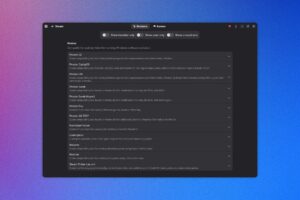
If the terminal makes you nervous, Bottles is the perfect solution. It's an application with a modern interface that visually manages Wine prefixes. It lets you choose "Gaming" or "Software" templates and manage dependencies without writing a single line of code. It's recommended to install it via Flatpak to keep your system clean, following a guide on how to use Bottles on Linux.
However, let's be realistic: some software simply won't work , such as certain antivirus programs, very specific printer drivers, or programs with aggressive anti-cheat systems (like Denuvo). In these cases, the only solution is virtualization with VirtualBox or VMware , where you install a full Windows installation. It consumes more resources, but compatibility is 100%, although it's useful to compare dual booting versus virtualization to choose the best option.
Safety and maintenance of the environment
Don't forget that, even though Linux is rock solid, running an .exe file opens a door. Malware designed for Windows might not break your Linux kernel, but it could delete your personal files inside the Wine folder. Be careful what you run.
To keep everything clean, if you decide to uninstall Wine, it's not enough to just... apt remove. You must manually delete hidden folders configuration and cache in .local/share/applications y .config/menus so that no phantom shortcuts remain in your start menu.
The ability to run Microsoft software in open environments has evolved from a rudimentary tool to polished ecosystems like Proton or Bottles. Mastering the creation of independent prefixes and the use of Winetricks allows you to transform a Linux system into a versatile workstation where the .exe format barrier practically disappears, provided you prioritize the stability of official versions and have a virtualization alternative for the most challenging cases.

Passionate writer about the world of bytes and technology in general. I love sharing my knowledge through writing, and that's what I'll do on this blog, show you all the most interesting things about gadgets, software, hardware, tech trends, and more. My goal is to help you navigate the digital world in a simple and entertaining way.