To view PowerPoint presentations on your iPad , you need to transfer the PowerPoint data in PPT format from your PC to your iPad. Below are the steps to transfer PowerPoint screenshots to your iPad or iPhone.
Transfer PowerPoint Screens to iPad or iPhone
All you have to do to transfer PowerPoint screenshots from your PC to your iPad or iPhone is connect your iOS device to your PC and use the iTunes and Paperwork or PowerPoint app to transfer the PPT data to your iPhone.
iTunes must be installed on your computer and the Paperwork or PowerPoint app must be installed on your iOS gadget.
As for the computer, it can be a Mac or a PC, since the process of transferring PPT data to the iPhone is virtually the same on all home Mac and Windows computers.
Transfer PowerPoint Recording Data from PC to iPhone or iPad
Get and set up Request for Procedures on your iPhone/iPad and follow the steps below to transfer your PowerPoint presentation data from your PC to your iPhone or iPad.
1. Connect iPhone to your PC's USB port .
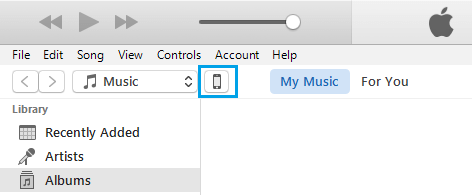
2. Open iTunes on your PC and click on the phone icon because it appears in the main iTunes menu bar.
3. Next, click the Share Files option button in the faceted menu > choose Stationery or the Keynote app and click the Add a File button.

4. On the next screen, navigate to the location of the PowerPoint file on your laptop > choose the PPT File option , which you just have to change to iPhone and click Open.

5. Then, make sure that Presentation File is selected and tap Reached.

When you click Done, the chosen PowerPoint file in PPT format can be transferred to your iOS gadget (iPhone or iPad).
Learn how to view PowerPoint presentations on iPad or iPhone
Once the PowerPoint file has been downloaded to your iOS gadget, you can follow the steps below to open and view PowerPoint screenshots on your iPad or iPhone.
1. Open the Paperwork app on your iPhone.

2. Once the application is open, click on iTunes registration data.

3. On the next screen, click on the button of your choice: Presentation File.

Once the PPT file opens in the Documents app, you can view your PowerPoint presentation on your iPad or iPhone just like you would on your PC.
