- ClickUp offers views, reporting, automations and IA; Trello shines in simple Kanban.
- For complex and scalable projects, ClickUp delivers more value per dollar invested.
- If you're looking for speed and visual clarity, Trello is ideal for simple flows.

Choosing the right project management tool can be as complicated as solving multiple Rubik's Cubes at once . Between minimalist apps , all-in-one platforms, and no-code solutions, the options are numerous, and the choice directly impacts team productivity and collaboration.
To clear up any doubts, we're putting two leading platforms head-to-head: ClickUp and Trello . We'll thoroughly review their features, automations, views, pricing, and public ratings (including feedback circulating on Reddit) so you can make an informed decision about which best suits your workflow.
Trello at a glance
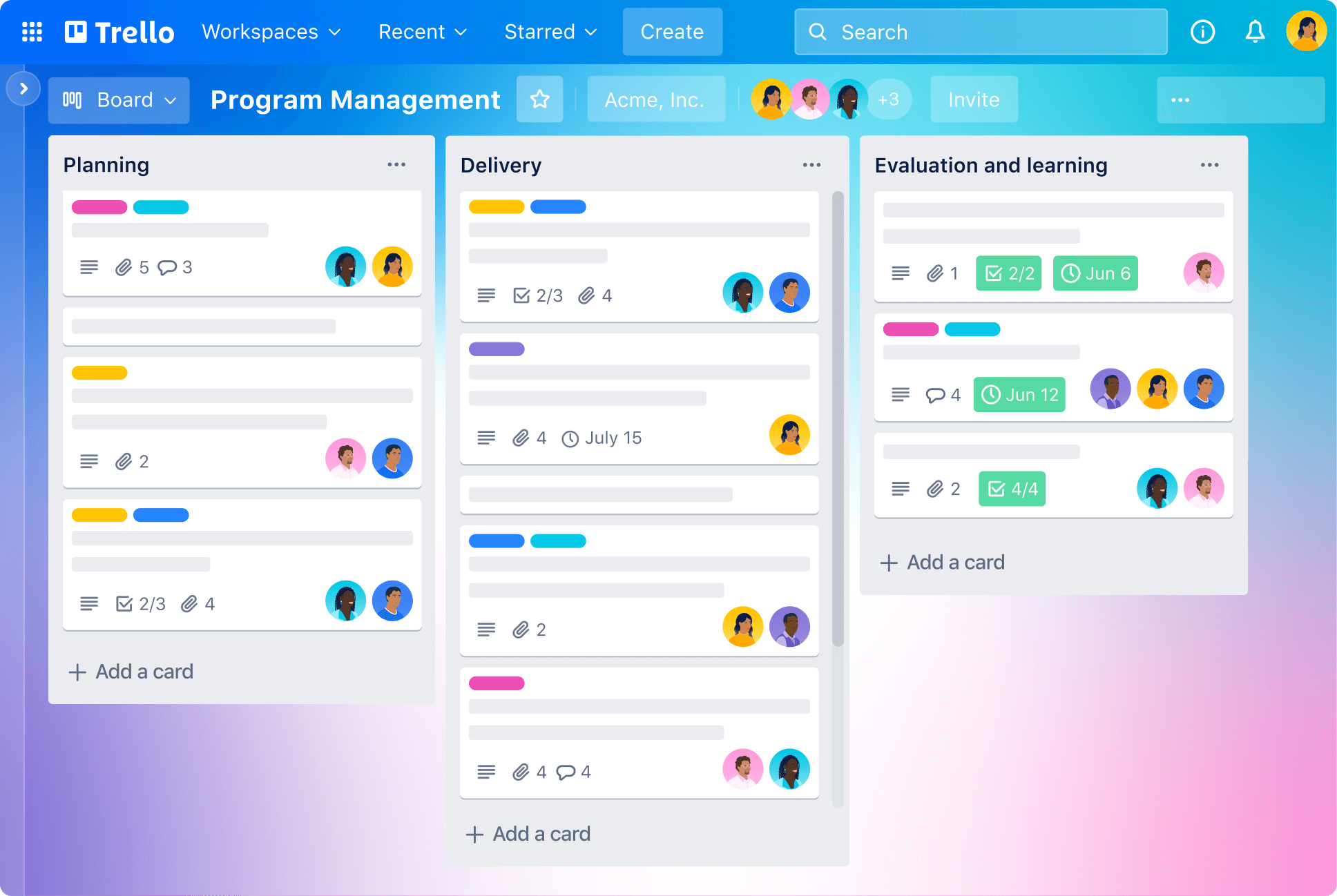
Trello is a collaboration tool that organizes work using boards, lists, and cards . At a glance, you can see what's being done, who's doing it, and where each task is in the workflow, all with a very visual and simple interface.
It's especially popular among small teams and freelancers due to its low learning curve , and since its integration into the Atlassian ecosystem, it has benefited from more integrations and add-ons. Even details like dark mode and the addition of more free Power-Ups (for example, the Planyway calendar) have encouraged users to return to it after years of inactivity.
Trello Key Features
- Boards, lists and cards to represent projects, stages and tasks.
- Drag and Drop to move tasks between lists with total ease.
- Customizable flows adaptable to each project and team.
- Power-Ups to extend functions (calendar, custom fields, etc.).
- Basic collaboration: assignment, dates, attachments and comments.
- Mobile apps complete to manage on the go.
- Butler Automations with rulers, buttons and commands scheduled.
The default view is Kanban , but higher plans add views such as calendar, timeline, table or even map, as well as collections of boards to group and improve flow visibility.
ClickUp at a glance
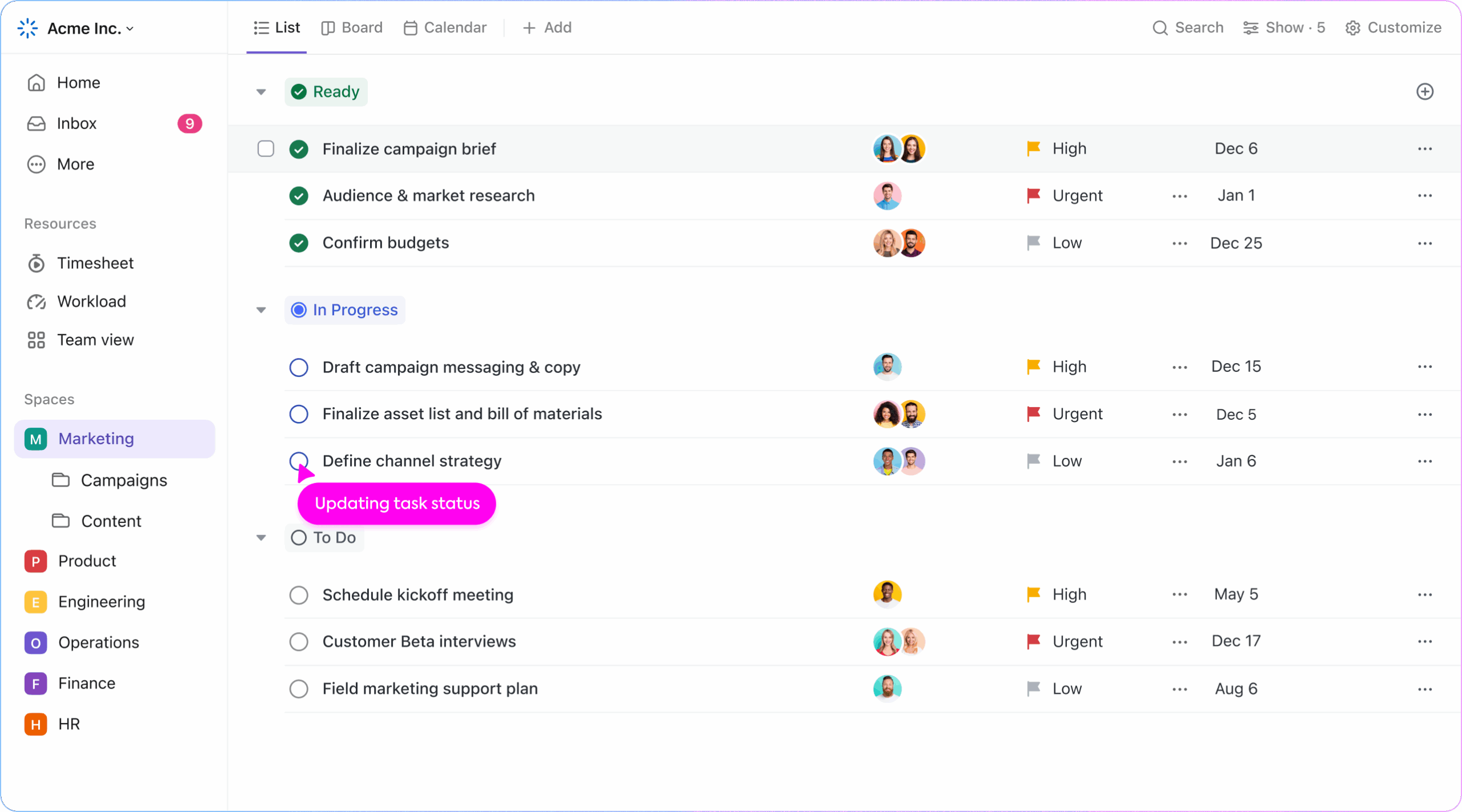
ClickUp defines itself as “ one app to replace them all ”: it not only manages tasks, but also integrates documents, reminders, goals, calendars, inbox and more, with a deep level of customization so that any team can configure its ideal way of working.
Its all-in-one approach covers everything from simple functions (Kanban, task management and time tracking ) to advanced automations, multiple views and utilities with generative AI to accelerate summaries, subtasks and updates effortlessly.
Key Features of ClickUp
- Multiple views: list, board, box, calendar, Gantt and more.
- Personalization.: custom states, fields, and priorities.
- Integrated Docs to centralize knowledge.
- Time management: estimation and recording within each task.
- Goals and OKRs to align efforts and measure progress.
- Reminders and Inbox so that nothing escapes.
- Automations + AI to eliminate repetitive work and generate content.
ClickUp also stands out for its robust API and an ecosystem of integrations that links with tools such as Google Drive, Slack or GitHub, and for an interface that makes it very easy to create and assign tasks, edit documents collaboratively in real time and work with an " Everything View " that brings all the work together in a single panel.
Similarities between ClickUp and Trello
Both platforms share a solid foundation of task management and collaboration features, with permissions, comments, attachments, and mobile options for working from anywhere.
- Task management with assignment, dates and progress tracking.
- Collaboration in cards/lists, attachments, and comments.
- Customizable flows for different project requirements.
- Integrations with popular apps (e.g., Slack, Google Drive).
- Mobile apps to manage on the fly.
- Automations that reduce manual labor.
- Intuitive interfaces and easy to use.
Key differences
Where they really diverge is in scope: Trello focuses on the simplicity of Kanban , while ClickUp covers complex scenarios with integrated views, reporting, and documentation.
- Complexity: Trello is straightforward for simple projects; ClickUp covers complex cases.
- Degree of customizationClickUp goes further (statuses, fields, views); Trello relies on Power‑Ups.
- Views: Trello focuses on boards; ClickUp offers lists, calendars, Gantt charts, etc.
- Native documentsClickUp includes them; Trello requires integrations.
- Time and estimates: ClickUp has it built in; it's not native to Trello.
- Goals/OKRsClickUp integrates goals; Trello doesn't.
- Learning curve: Trello is quicker to master; ClickUp requires setup.
Pros and cons
Before choosing, it is advisable to weigh the strengths and weaknesses of each one in your team and project context.
Trello
Advantages
- Simple and intuitive interface.
- Very clear Kanban-type visual design.
- Very fast start-up.
- Extensive catalog of Power-Ups to expand functions.
- Ideal for small teams and simple projects.
Drawbacks
- Limited advanced project features.
- Without advanced native time tracking.
- Dependence on Power-Ups that can make the package more expensive.
- Less suitable for complex scenarios.
Click Up
Advantages
- Very versatile, with many views and customization.
- Powerful feature set for complex management.
- Integrated documents and time tracking.
- Native goals and performance tracking.
- Scalable from small teams to enterprises.
Drawbacks
- It may be overwhelming at first due to its functional richness.
- Steeper learning curve.
- Some capabilities are unnecessary if the use is very simple.
- Setup and tuning takes some initial time.
Typical use cases
Choosing well involves aligning the tool with the type of project and team you manage today and the one you expect in a few months.
- Trello: Perfect for small teams and individuals with simple projects, visual management, and Kanban flows; useful for freelancers and personal or client tasks.
- Click Up: It shines on medium and large teams with complex projects, a need for multiple views, customizable workflows, time tracking and integrated documentation, as well as goals and OKRs.
Kanban: the direct comparison
Both offer quality Kanban, but ClickUp enhances it with Everything View (global view), custom groups by assignee or date, and AI-powered board generation.
Trello retains the charm of classic Kanban with its agile lists and cards , priority tags, and collections for organizing boards; however, the free plan limits the total number of boards (depending on the source and time, between 5 and 10 per workspace ), while ClickUp allows unlimited boards in its Free plan.
If you're looking for "pure" Kanban and the most refined experience, Trello is very convenient; if you want Kanban + global vision + AI , ClickUp has the advantage.
Automations
Automation reduces repetitive tasks and connects ecosystems. ClickUp combines a library of predefined automations , rule creation with over 50 triggers/actions, and an AI assistant to summarize, suggest subtasks, or draft updates.
In Trello, Butler allows rules, buttons, and scheduled commands, as well as integration with apps like Slack or email, and can be activated manually from the cards.
In terms of power and scope, ClickUp's automation + AI duo offers more possibilities and flexibility, especially in changing scenarios.
Project management
ClickUp adopts an "all-in-one" approach: subtasks, checklists, dependencies, time tracking , Sprints, Gantt charts, Timelines, and more, all centralized and without leaving the platform.
Trello maintains a simple approach to Kanban and adds views (calendar, table) in higher plans, but without ClickUp's wide range for agile frameworks or advanced reporting.
If you manage multiple projects with dependencies, workloads, and goals, ClickUp is a powerhouse ; for limited projects and simple workflows, Trello is lightweight and effective.
Collaboration
At ClickUp you can comment with @mentions, use native chat , send emails from the app and record video clips without resorting to third parties, which speeds up synchronous and asynchronous communication.
Trello focuses the conversation on comments per card ; for chat, approvals or voting, third-party Power-Ups are usually needed, which adds cost and integration friction.
ClickUp's native collaborative experience is more complete, although Trello can come close through well-chosen add-ons.
Reports and analytics
ClickUp incorporates customizable dashboards and charts, progress roll-ups , conditional goals, and centralized visual tracking.
Trello does not offer advanced native reporting; external integrations or exports are usually used for analysis.
If you need to measure OKRs, workloads, or time spent without leaving the tool, ClickUp is ahead of the curve.
Prices and value for money
Comparing plans helps you see where you get the most features per euro, depending on your situation.
ClickUp: Plans
- Free Forever: Unlimited boards, Sprint management, guests, calendar view, in-app chat and video recording, collaborative docs.
- Unlimited ($7/user/month): storage and unlimited integrations, Gantt, email and time tracking.
- Business ($12/user/month): Unlimited teams, advanced customization, timesheets, mind maps, and workload management.
- Enterprise (Business Contact): Features like conditional logic in forms, unlimited custom roles, and team spaces.
- ClickUp AI on paid plans: $5/Workspace member/month.
ClickUp maintains 24/7 support on all paid plans and provides documentation and team management without requiring you to purchase additional apps.
Trello: plans
- Free: Up to 10 boards per workspace, unlimited Power-Ups and integrations, activity logging, and unlimited storage (with a 10MB upload limit).
- Standard ($5/user/month): Advanced checklists, guests per board, and custom fields.
- Premium ($10/user/month): Advanced views, dashboard collections, and easy data export.
- Enterprise ($17,50/user/month): Unlimited workspaces, organization-level management, multi-board guests, and attachment permissions.
Although Trello starts at a lower price, it offers fewer features at each tier ; for documentation or advanced management, it usually requires Confluence or Jira (at an extra cost). 24/7 support in Trello is reserved for Enterprise.
Public ratings and reputation
The aggregated opinions reflect overall satisfaction and perceived value.
- Click Up: G2 4,7/5 (9.200+ reviews) and Capterra 4,7/5 (3.900+ reviews).
- Trello: G2 4,4/5 (13.400+ reviews) and Capterra 4,6/5 (23.000+ reviews).
In many reviews, ClickUp stands out for its value for money and range of features; Trello for its clarity and speed of setup.
Security and integrations
Both platforms host data on AWS , encrypt with AES-256 and TLS at rest and in transit, and comply with SOC 2 and ISO in restricted access infrastructure environments.
At the access level, they offer 2FA and, in higher-tier plans, SAML SSO. Native integrations include over 50 in ClickUp and 23 in Trello, with the possibility of expanding to thousands via Zapier ; Trello also has open-source contributions on GitHub.
ClickUp boasts a robust API and connectivity with over 1.400 applications, opening the door to advanced workflows between tools.
Desktop and mobile apps, and ease of use
ClickUp and Trello have apps for Windows , macOS, Android , and iOS ; if you're looking for Apple options, check out project management software for Mac , as well as full web applications, so you can work without always relying on a browser.
On mobile, ClickUp goes a step further by allowing collaborative document editing ; in both cases you can create and assign tasks, add dates, update statuses, upload files and communicate.
ClickUp's interface is functional and powerful; some users find its whiteboards or mind maps somewhat clunky, but the platform compensates with videos, articles, and ClickUp University. Trello, on the other hand, is one of the most beginner -friendly options , and its YouTube channel and knowledge base help answer questions on the fly.
Real opinions (including Reddit)
Among users who have tried various tools, it is repeated that ClickUp provides a flexibility that satisfies diverse tastes within the same team, although that versatility can complicate the initial learning curve.
It is also noted that ClickUp offers the best "bang for the buck" : many features and customization for the price, compared to Trello which often needs paid plugins to match.
Those who migrate from Trello are usually looking for more than just a Kanban board ; several people say that the team was satisfied when they switched to ClickUp when the business grew and they needed more powerful views, reporting, and automations.
However, some users return to Trello because they value its visual clarity and dislike the "noise" of options in more complex tools. For simple projects, Trello remains a blessing; its limitation is its lack of complexity when the context demands it.
Recommendations based on what you are looking for
If you want to collaborate fully, measure performance, and adapt methodologies, ClickUp is the better choice ; if you prioritize speed, low cost, and impeccable Kanban, Trello is a great option.
- Choose ClickUp if you need: Integrated chat and email, Gantt charts, dependencies, advanced dashboards, AI to accelerate workflows, and the best overall value.
- Choose Trello if you prefer: The best Kanban experience, unlimited integrations (even in Free), and a simple, affordable, and hassle-free tool.
Other alternatives to consider
Not everything is black and white: there are options that balance simplicity and flexibility . One example is Nuclino, which unifies knowledge, documents, and projects with views in nested lists, Kanban boards, tables, or mind maps.
In Nuclino, each card is a collaborative document with goals, decisions, to-dos, dates, and embedded files, and you can comment with mentions. Its clean interface reduces the learning curve, placing it between the power of ClickUp and the lightness of Trello.
Taking all of the above into account, if your team needs more than just a pretty Kanban board—documentation, reporting, automation, goals, and rich collaboration— ClickUp is a perfect fit . If you're looking for frictionless task visualization and want to get started in minutes, Trello remains an excellent choice. Consider the actual complexity of your projects, how much you want to scale, and your total budget (including Power-Ups), and you'll have a much clearer idea of which way to lean.


Passionate writer about the world of bytes and technology in general. I love sharing my knowledge through writing, and that's what I'll do on this blog, show you all the most interesting things about gadgets, software, hardware, tech trends, and more. My goal is to help you navigate the digital world in a simple and entertaining way.
Table of Contents
- 1 Trello at a glance
- 2 ClickUp at a glance
- 3 Similarities between ClickUp and Trello
- 4 Key differences
- 5 Pros and cons
- 6 Typical use cases
- 7 Kanban: the direct comparison
- 8 Automations
- 9 Project management
- 10 Collaboration
- 11 Reports and analytics
- 12 Prices and value for money
- 13 Public ratings and reputation
- 14 Security and integrations
- 15 Desktop and mobile apps, and ease of use
- 16 Real opinions (including Reddit)
- 17 Recommendations based on what you are looking for
- 18 Other alternatives to consider