
Recently there have been many reports of users being unable to access any live stream and getting a message saying Twitch error 5000: Content unavailableIn this article, we will discuss some of the reasons due to which this error can be triggered and provide you with viable solutions to ensure complete eradication of the problem.
Twitch is a live video streaming platform. It was introduced in June 2011. The site primarily consists of live video streams. video games, esports streams, music streams, and recently a trend of “in real life” streams has started on the platform. The site’s content can be viewed live or via video on demand.
What is Twitch Error 5000?
Twitch Error 5000 is a standard Twitch error that we can see. The error usually appears as Twitch Error 5000: Content Not Found.
The error It usually appears when you try to stream on Twitch. But you can't do it because of some plugins or Chrome extensions integrated with your browser.
And in most cases, this is just the flash player. But the problem is not related to any specific extensions plugin.
The culprit could be any other plugin or extension.
What causes Twitch error 5000?
There could be many reasons why you are seeing the twitch error 5000. And some of the main reasons could be:
- Cache and cookies: Browser caches are one of the main reasons why you might see the problem. Browser caches are a kind of application that focuses on reducing loading times. However, sometimes the cache file gets corrupted. As a result, you get the twitch error code 5000.
- Extension: Extensions are one of the main reasons why you might see the Twitch error. Extensions are quite powerful in controlling the performance of websites on our browsers. And it could be causing the problem. One example is the “Ghostery” extension which is known to cause this problem.
- Browser: Sometimes, the main culprit is just the browser. So, it is possible that the browser you are using is having some issues.
- DNS Problem: In the end, it may be a DNS issue that is causing the main problem. DNS is like a phone book for your internet service. It translates the website name into an IP address and then connects to the website. And in some cases, DNS gets corrupted and you end up seeing the twitch error code 5000.
Fix Twitch Error 5000
Each cause of this error has a solution. Below we give you the steps you need to follow to try to solve this problem yourself:
Solution 1. Clear browser cookies and cache
Cookies and cache are used to reduce There loading when you open a browser or app. However, once the cookies and cache become corrupted, you may encounter a problem loading some sites like Twitch.
To get rid of Twitch error code 5000, follow the steps below to clear corrupted cookies and cache:
- Open your browser and click the button Menu in the upper right corner.
- Click on the option Configuration from the submenu.
- Scroll down to the section At the beginning and click Advanced.
- Scroll down and click on the option Clear browsing data at the end of the section Privacy & Security.
- Then change the Time Intervals to All the time, select the check box to Cookies and other site data, and Cache images and files. Now, click on the option Delete data.
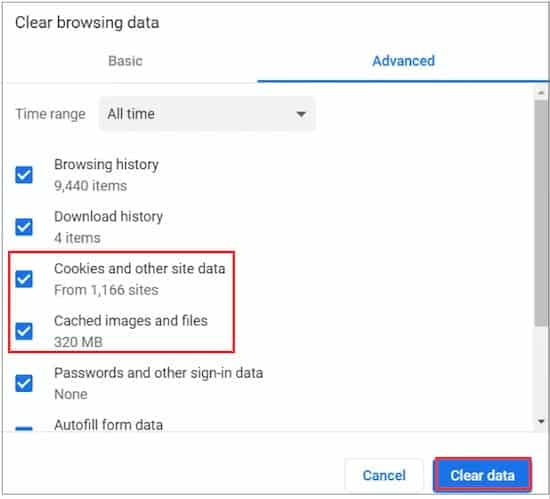
Now, you can restart the Navigator and try browsing the site to check if the Twitch error 5000 goes away.
Solution 2. Disable all extensions
Sometimes, a certain extension in the browser can also cause the Twitch network error. So, you can disable all extensions so that they cannot interfere with Twitch. Here's how:
- Click on the Browser menu and select the option More tools from the drop-down menu.
- Select option Submenu Extensions to open all extensions installed in the browser.
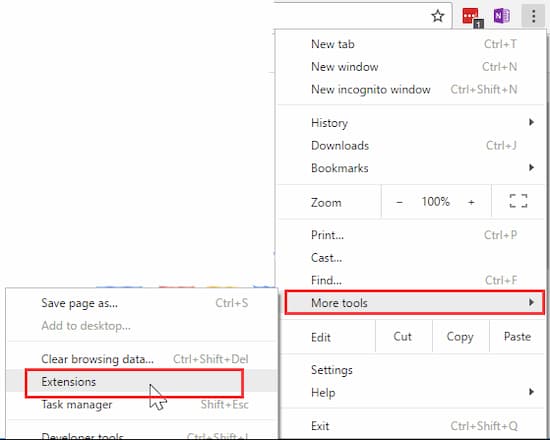
- In the pop-up window, disable all extensions, especially for Ghostery.
- Please access the site again and see if the Twitch error code 5000 still persists.
Solution 3. Flush DNS cache
Your browser uses DNS to translate a site's IP address. If the DNS gets corrupted, you may encounter some issues when loading a website. If that happens, you can try flushing the DNS cache to fix the problem. To do that, follow these steps:
- Press the keys Win + R to open the Run dialog
- Then write cmd on it and press the keys Ctrl + Shift + Enter to open a symbol of the system high.
- Write the command ipconfig / flushdns in the elevated command prompt and press Enter.
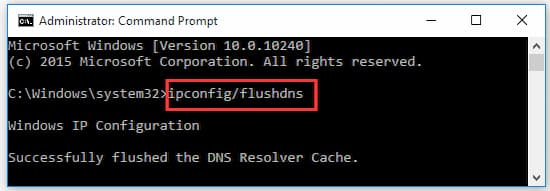
This operation will reset the DNS cache completely. After that, you can try connecting to the site and check if the “Twitch content not available” issue is resolved.
Solution 4. Switch to another browser
If all the above methods do not work, you may consider switch to other browsers. This is because the browser you are using may be experiencing some issues. For example, you can change the Google Chrome to Firefox or other browsers. If you are interested, you should know the 8 Best Browsers for Windows 10
Final words
El Twitch error 5000 It is a fairly common problem for users of this platform, the good news is that it is not that difficult to solve. What you should do is try these solutions that we have made available to you. In this way we ensure that this error will not appear again.

My name is Javier Chirinos and I am passionate about technology. Ever since I can remember, I have been interested in computers and video games, and that passion has turned into a job.
I have been publishing about technology and gadgets on the Internet for over 15 years, especially in mundobytes.com
I am also an expert in online marketing and communication and have knowledge in WordPress development.