- The SSDT acts as a bridge between user calls and core services. Windows.
- Its manipulation is a fundamental technique both in protection and in attacks (rootkits, antivirus).
- The structure and protection of the SSDT have evolved to prevent malicious modifications.
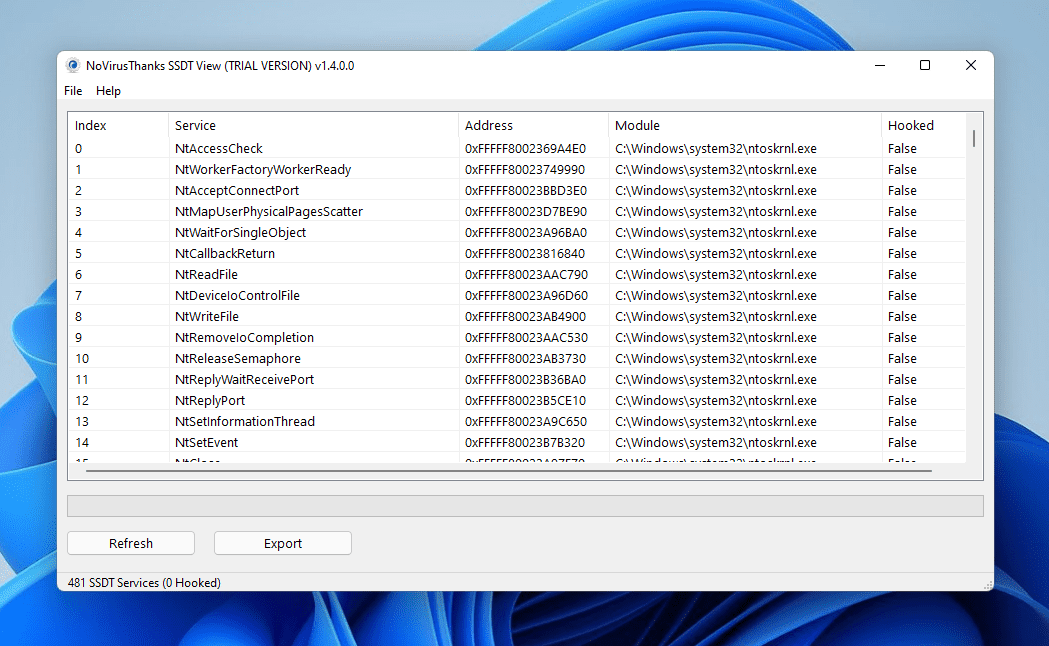
Understanding the inner workings of OS modern is essential for any IT professional, especially when it comes to issues related to security, development drivers or reverse engineering. One of the key concepts in this field is the System Service Descriptor Table (SSDT), a fundamental structure in the core of Windows systems that, although it often goes unnoticed by the average user, plays a vital role in the interaction between the software and the hardware, in the management of system calls and, unfortunately, also in certain attack and defense techniques in the world of malware and antiviruses.
This article offers A complete and detailed overview of what SSDT is, how it works in different versions and architectures of Windows, what its role is in executing system calls (syscalls), how it can be used by both rootkits and legitimate security tools, and what techniques allow it to be inspected, manipulated, or its integrity protected. If you are involved in driver development, forensic analysis, ciberseguridad or you're simply passionate about the heart of Windows systems, this guide will serve as an essential reference.
What is the System Service Descriptor Table (SSDT)?
La System Service Descriptor Table, also mentioned as System Service Dispatch Table and known by its acronym SSDT, is a special table maintained by the Windows kernel (ntoskrnl.exe) that contains pointers to kernel functions responsible for processing system calls made from user space. In other words, it is a kind of "bridge" that connects requests made by applications or user libraries (such as ntdll.dll) with the internal services of the operating system kernel.
En 32-bit systems, the SSDT is simply an array of absolute addresses to the kernel functions. In 64-bit filesFor security and efficiency reasons, the table stores relative offsets from a known base within the kernel. This detail is important because it influences how paths to internal functions are resolved and how they can be analyzed or manipulated by debuggers or analysis tools.
How SSDT works in practice
The flow of a system call from user space to its handling in the kernel can be summarized as follows:
- A user program or process requests, for example, the opening of a file using a Windows API function, such as CreateFile.
- This call ends up calling a function of ntdll.dll , the NtCreateFile, which is responsible for preparing the associated system call (syscall).
- The function of ntdll.dll executes an instruction syscall (on x64) or int 0x2e (on x86), where an index is passed as a parameter that uniquely identifies which system service is required.
- Already in kernel mode, that index is used to search the SSDT the offset or address of the corresponding kernel function, and control is transferred to that function (e.g., nt!NtCreateFile).
Through these actions, the SSDT It acts as a jump table that allows hundreds of kernel functions to be made available in an orderly and efficient manner, as well as providing a clear separation between user space and the protected kernel space.
Internal structure of the SSDT and its representation in memory
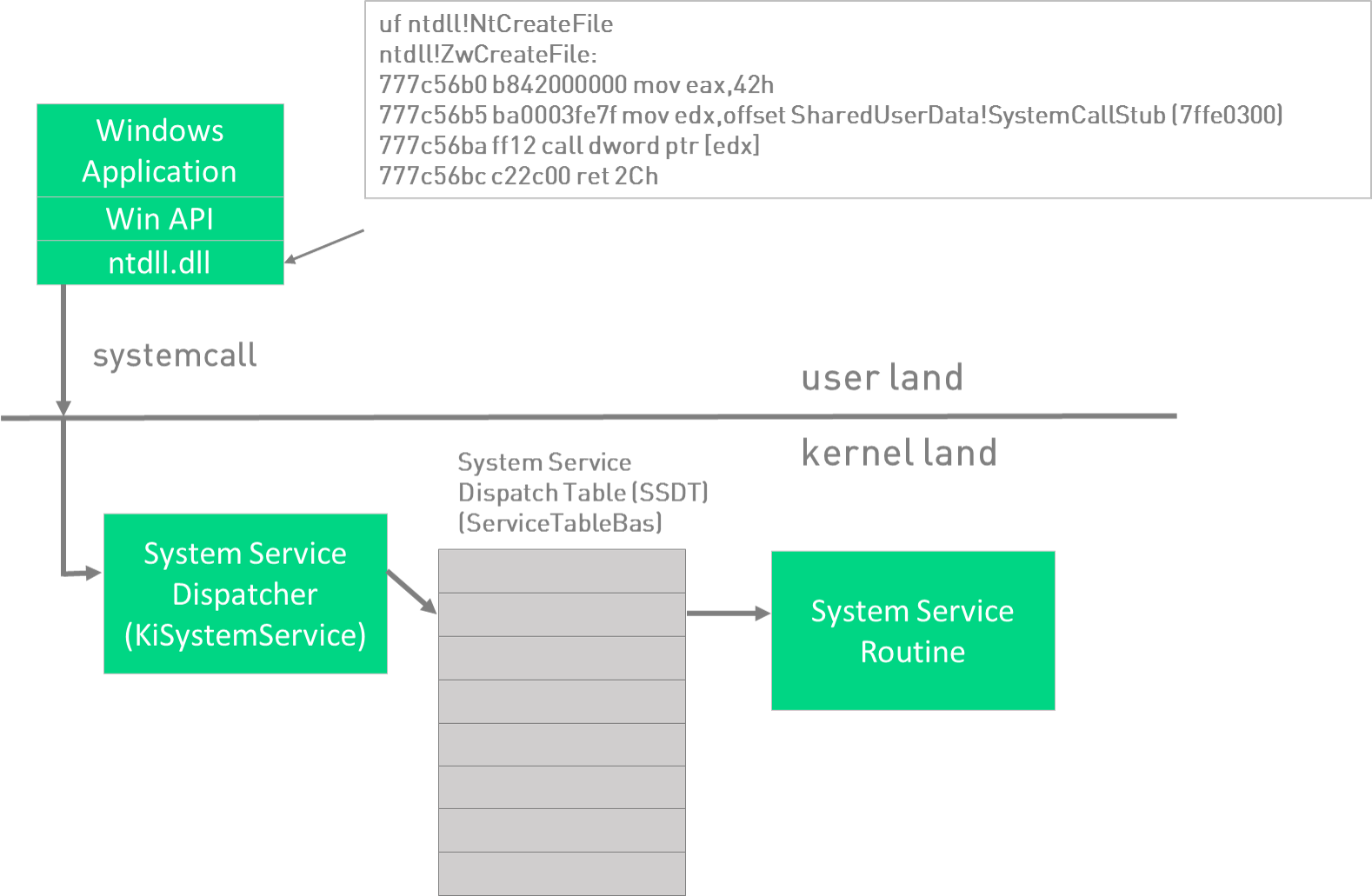
In the Windows kernel, the SSDT is accessible through a structure called KeServiceDescriptorTable, exported by himself ntoskrnl.exe. This structure contains key information about the table, including the table base (KiServiceTable), the number of services and other metadata.
The way to access the SSDT and interpret its inputs varies between architectures:
- En x86 (32-bit), KiServiceTable It is an array in which each element points directly to the absolute address of a kernel function.
- En x64 (64-bit), the elements are relative displacements (offsets) with respect to the base, so to obtain the real address it is necessary to apply a formula taking said base and adding the corresponding displacement, normally after a bit adjustment to the right (offset >> 4).
Let's look at a real example using the WinDBG debugger to illustrate how the table is formed in memory:
0: kd> dps nt!KeServiceDescriptorTable L4
fffff801`9210b880 fffff801`9203b470 nt!KiServiceTable
fffff801`9210b888 00000000`00000000
fffff801`9210b890 00000000`000001ce
fffff801`9210b898 fffff801`9203bbac nt!KiArgumentTable
The first element points to KiServiceTable, that is, the SSDT itself. The third element usually indicates the number of services available. When inspecting KiServiceTable, we will see a series of values that are, each one, the displacements or addresses towards each kernel function exported by the SSDT.
Variations on the tables: SSDT and SSDT Shadow
En modern versions of Windows In addition to the main table, there is a "shadow" table called KeServiceDescriptorTableShadow. This second table is usually used for more specific services, such as those related to the graphical interface of the system (for example, calls to win32k). The system determines in real time, through parameters from the calling process, which of the two tables should be used to resolve a given syscall.
Example: Resolving kernel calls and functions using SSDT
Suppose a developer or analyst wants to know which kernel function a particular syscall number corresponds to, for example, the one associated with NtCreateFileThe process would be as follows:
- We identify the index of the syscall by looking at the code in ntdll.dllFor example, it could be 0x55.
- Each entry of the KiServiceTable (the SSDT) occupies 4 bytes, so for the syscall 0x55 we access the position KiServiceTable + 4*0x55.
- We extract the displacement and, applying the appropriate formula, we solve the absolute direction of the function.
- We can disassemble the function in the debugger to check that this offset actually points to the code in question. nt!NtCreateFile.
This system ensures that every syscall made from the user is efficiently and securely routed to the appropriate internal function, maintaining system integrity and optimizing performance.
SSDT analysis and manipulation techniques
Access and analysis of the SSDT It is essential for both the development of legitimate drivers and the detection of rootkits and malware. For example, in WinDbg All absolute addresses of the functions in the table can be extracted by scripts that traverse the SSDT and resolve the names of the APIs associated with each address. Example of a snippet script:
.foreach /ps 1 /pS 1 ( offset {dd /c 1 nt!KiServiceTable L poi(nt!KeServiceDescriptorTable+10)}){ r $t0 = ( offset >>> 4) + nt!KiServiceTable; .printf "%p - %y\n", $t0, $t0 }This technique allows you to list and analyze possible modifications, identify if functions have been hooked, and detect possible infections.
SSDT Hooking: Legitimate Use and Malware Abuse
Modify the SSDT, a technique known as SSDT Hooking, consists of replacing table entries to redirect certain system calls to own functions, usually from third-party drivers. This allows certain operations to be intercepted, modified or blocked, something that has been used by antivirus y firewalls to protect the system in real time.
However, this same technique has been widely exploited by rootkits and advanced malware to camouflage their presence, hide processes, files, or connections, or even facilitate the execution of arbitrary code in the kernel. SSDT hooking can be especially dangerous because it grants complete control over critical system events, and once altered, it's difficult to detect modifications without the appropriate tools or a clean system reference.
A clear example can be seen when comparing the state of the SSDT before and after the installation of a rootkit:
| With rootkit | No rootkit |
|---|---|
| … f7c38486 … | … 8056f074 … |
The rootkit has replaced the legitimate address with its own. Using the command ln In WinDbg, it is possible to identify which legitimate function has been spoofed (for example, NtQueryDirectoryFile), and what the malware is trying to hide (such as malicious files or directories).
For both reasons, SSDT hooking is a double-edged sword: it allows for the implementation of advanced security solutions, but it also provides highly effective mechanisms for evasion and clandestine control of systems.
Limitations, protections and evolution of SSDT
Over the years, Microsoft has strengthened the security of the table to prevent third-party drivers or malware from freely modifying its entries. For example, with the arrival of PatchGuard (Kernel Patch Protection) on x64 systems, automatic monitoring of the SSDT integrity is implemented, and any attempt to alter it outside of the permitted mechanisms invariably ends in a crash of the system (blue screen).
Furthermore, the latest versions of Windows encourage developers to use documented APIs and techniques rather than directly accessing or modifying the SSDT, thereby reducing the attack surface and avoiding future incompatibilities. However, there are still scenarios (forensic analysis, malware investigation, driver compatibility) where it is necessary to understand how it works and how to secure or inspect it.
Differences between SSDT and other system tables
Although SSDT is often confused with other service or interrupt descriptor structures, it is important to differentiate it from, for example, the Interrupt Descriptor Table (IDT). While SSDT handles system calls (kernel services) from user space, IDT It is responsible for resolving hardware and software interrupts that reach the CPU, directing them to the appropriate interrupt service routines (ISRs). Each has its own structure, function, and protection mechanisms, but both are essential for the stability and security of the operating system.


Passionate writer about the world of bytes and technology in general. I love sharing my knowledge through writing, and that's what I'll do on this blog, show you all the most interesting things about gadgets, software, hardware, tech trends, and more. My goal is to help you navigate the digital world in a simple and entertaining way.