- Mobile services for seniors combine simple devices, emergency functions, and family or professional support.
- Options such as Maximiliana, Orange or Cuidum offer remote control, technological support and specific tele-assistance.
- Choosing between a basic mobile phone or an adapted smartphone depends on the abilities, needs, and willingness to learn of each senior citizen.
- SOS button, long battery life, good readability and cyber protection are key to safe and comfortable use in old age.
Nowadays, Living without a mobile phone is almost impossible for us.But for many grandparents, the telephone remains a complicated, unintuitive gadget, or simply something they prefer to avoid. However, they are giving up a lot of advantages: talking to family, make video calls with the grandchildrento ask for help if something happens or, simply, to entertain oneself.
Fortunately, Mobile services have emerged specifically designed for older peoplewhich combine very simple devices with extra help: technological support, remote assistance from a watch, cyber protection against scams, Basic mobile phones with large keys, adapted smartphones with special apps… If you're looking for a mobile service for seniors and don't know where to start, here's a very detailed guide with all the options that are already working in Spain.
What is a mobile service for seniors and what problems does it solve?
When we talk about mobile service for seniors We're not just talking about a phone, but a suite of solutions designed to help older adults communicate, stay safe, and enjoy technology without stress. This includes the device (mobile phone or watch), the plan, support, training, and, in many cases, the option for family members to help manage everything remotely.
It's normal for them to appear with age. visual, auditory or motor limitationsIn addition to insecurity with modern mobile phones: fear of making a mistake, of touching something they shouldn't, of deleting contacts, of not knowing how to answer a video call… The traditional telephony market often does not take these difficulties into account and offers overly complex interfaces.
That's why they have emerged mobile phones and services adapted to the elderlyThese features greatly simplify use, add emergency functions, and allow family members to rest easy knowing that the elderly person is locatable and protected. In addition, there are technology support initiatives and workshops so that seniors can learn, at their own pace, to use mobile phones, tablets, computers, and everyday apps.
In this context, several different solutions coexist: Basic mobile phones with large keys, simple smartphones, specially designed phones like Maximiliana, telecare watches like those from Cuidum and SaveFamilyCybersecurity services like Orange's, or even apps that transform a normal smartphone into a very easy-to-use mobile phone.
Maximiliana: a special mobile phone for seniors with total family control
Maximiliana is a Mobile phone designed from scratch for seniorsIt's not a conventional mobile phone where you just change a few things: everything is designed so that the elderly person hardly has to worry about anything and, at the same time, the family can help them remotely.
The interface is extremely simple: To make a call, simply touch the contact's face on the screen.No complicated menus or endless lists; family members can upload large photos of each person so the elderly person only has to recognize the face and press.
One of the features that provides the most peace of mind is that The mobile phone can automatically answer calls and video calls.without the elderly person having to touch anything. So, if someone calls them via video and the elderly person is unsure how to accept, the call can still go through, greatly facilitating daily contact.
The service does not stay on the device. Maximiliana includes a SIM card with 25 GB of data and unlimited callsThis allows seniors to talk and make video calls without worrying about battery consumption. The pack also includes everyday accessories, such as a protective case and a magnetic charging pad, which makes it much easier to place the phone on the charging pad without having to fumble with cables.
The key point of the service is its family monitoring appFrom this app, children, grandchildren, or other relatives can fully configure and manage the elderly person's mobile phone: add and edit contacts, adjust the volume, change settings, install or remove apps, update data, see location in real time, make video calls, activate special features and much more.
In practice, this means that The older child doesn't have to struggle with menus or complex settings.If something goes wrong or a setting needs changing, a family member can do it from their own phone in a matter of seconds, even from hundreds of kilometers away. This drastically reduces the need for in-person visits just to "fix the phone."
Regarding the price, Maximiliana offers herself as monthly subscription serviceThere are two main options: a monthly fee of €29,90 and a basic package for €24,90 per month. In both cases, the most noteworthy feature is that There is no down payment or commitment period.It can be cancelled at any time if the service is no longer needed or does not fit with the family.
Orange: technological support, cyber protection and mobile phones for seniors
Orange has developed a set of specific services aimed at older peoplefocused on two main areas: helping them use technology in their daily lives and protecting them from online threats. All of this is complemented by affordable rates, adapted devices, and entertainment.
Free in-store technology support service
One of the pillars of Orange's proposal is its Technological Support ServiceThe training is offered in person and is completely free of charge at the company's stores. The goal is for seniors to gain confidence and learn, at their own pace, how to use mobile phones, tablets, computers, and smartwatches.
This support is offered in two complementary ways. On the one hand, there are the individual in-store customer service sessions, lasting about 30 minutes, in which a specialist agent sits down with the elderly person and helps them with everything related to their devices: initial setup, network connection, application installation, customization of settings, transfer of photos from the old mobile phone, creation of an email account, etc.
In addition, Orange staff resolves doubts about rates and invoicesThis is something that often causes considerable anxiety among older people. These sessions are free, and you can book an appointment online to visit your chosen store at your convenience.
On the other hand, Orange organizes workshops for seniors in small groupsThese are practical training sessions led by an instructor, in which seniors learn to use common applications: email, social media, video calls, messaging tools, internet browsing, etc. These workshops also teach participants how to recognize scams, manage their privacy, and handle everyday tasks (such as confirming their tax return, scheduling appointments at the health center, or purchasing tickets). All of this is offered free of charge to participants.
The combination of individual sessions and group workshops ensures that Many older people are losing their fear of mobile phones and apps.and they begin to use technology as an ally and not as a constant problem.
Customer service channels designed for seniors
Orange makes it available to older users multiple nearby and accessible customer service channelsYou can contact us by phone (number 1470 for individual customers), by WhatsApp at 653 85 00 85, by email (clientes.particulares@orange.es), through the My Orange app or via social networks such as Facebook and X.
The idea is that each person can choose the channel that is most convenient for themMany older people still prefer the telephone, but others are starting to use WhatsApp or even the operator's app, and appreciate having several ways to ask for help or resolve doubts without having to travel.
Orange Cyber Protection: security against fraud and malicious websites
One of the risks of older people using the internet without training is the possibility of falling into online fraud, malicious websites or virusesTo reduce these dangers, Orange offers a specific service called Cyber Protection, which works automatically to block suspicious pages.
When the Cyber Protection service is activated, The customer doesn't need to touch anything else.The protection applies to the user's mobile line and all lines included in their package, as long as they are connected to the Orange mobile network. Any malicious, suspicious, or fraudulent website is automatically blocked, preventing the customer from accessing it and avoiding dangerous purchases or actions.
If the user wants to be protected also when connecting to other networks (for example, Public WiFi or connections outside the home), simply install the Cyber Protection app on your devices. This way, security is maintained even when you're not using the Orange mobile data network.
Some Orange convergent tariffs (for example, “TV Initial 2”, “Cinema and Series 2”, “Cinema and Series Total 2/4”, “Football 2”, “Football Total 2/4”) They include Cyber Protection at no extra cost.In these cases, activation is done through the Security Center in the My Orange app. For other plans, the service can also be activated through the app, with the advantage that the first month is usually free.
When the client tries to access a dangerous website with the service active, A blocking page appears warning that access is not secureIf the senior citizen has difficulty installing or configuring the Cyber Protection app, they can request a free in-store support session, where they will be helped to install it and have it explained to them how it works.
Devices, insurance, and entertainment for seniors
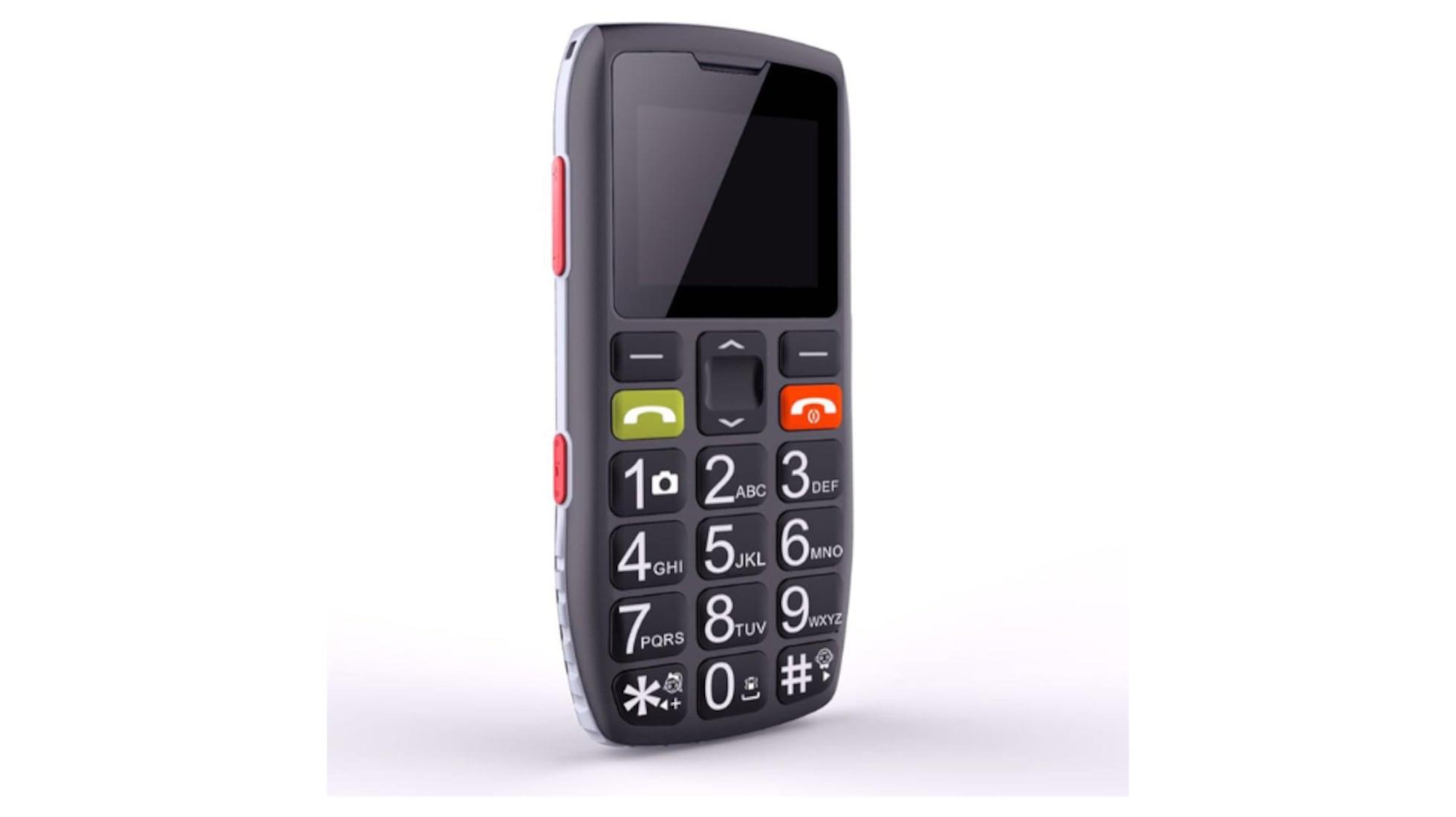
Orange also takes into account that Not all older people are comfortable using a smartphone.That's why their catalog includes more basic mobile phones at affordable prices, featuring a physical keyboard and very easy use, designed specifically for those who prefer something "traditional".
In addition, the company has signed an agreement with Zurich Insurance to offer its customers a Home insurance with comprehensive coverage at a competitive price, something that can also bring extra peace of mind to the family environment.
For the leisure sector, Orange markets Rates that include all football (League, Champions League, international competitions), other sports such as Formula 1 or MotoGP, and access to multiple movie and series platforms (Netflix, HBO Max, Disney+, Amazon Prime, Filmin, FlixOlé, Cazavisión, etc.).
In this way, the elderly person can enjoy from home classic films, family movies, popular series, or children's content to watch with the grandchildrenThis helps to transform the telecommunications service into something more than just "a simple mobile phone," integrating it into their everyday leisure activities.
Mobile telecare with watch: the "Don't Worry" service from Cuidum and SaveFamily
Another way to offer a mobile service for seniors Tele-assistance via watch, without the need for a smartphone, is Cuidum's offering with its "Don't Worry" service, developed in collaboration with SaveFamily.
The main objective of Cuidum is helping older people maintain their independence safelyTo achieve this, it relies on a special tele-assistance watch that functions like a very simple telephone, always available on the user's wrist.
This clock does more than just tell time. It allows you to make and receive calls easily.This ensures that seniors are always connected to their surroundings without needing to take a mobile phone out of their pocket or search for it around the house. It also includes remote assistance features to quickly request help if something happens.
By combining Cuidum's knowledge in elderly care with SaveFamily's technological expertise, the following is achieved: every user feels protected and supported at all timesFor families, knowing that their relative is wearing such a device on their wrist provides great peace of mind, especially in cases of people at risk of falls or who live alone.
Mobile apps and smartphones adapted for older people
Beyond specific services, there is a very interesting approach: Take a regular smartphone but adapt it with specific applications.This allows the elderly person to enjoy all the advantages of a smartphone without being overwhelmed by a complicated interface.
Apps for seniors can serve various purposes. One of the most useful is... adapt the mobile interfaceWith just one application, you can completely change the look of your phone to display larger icons, simplified menus, enlarged text, and very clear shortcuts to the functions you actually use (calls, WhatsApp, camera, flashlight, etc.).
Another key help is the voice activationMany older adults struggle to type messages or search the internet because they find it slow or have difficulty using a touchscreen keyboard. With voice commands, they can dictate messages, perform searches, or even ask the assistant to call a contact by name, all through simple verbal commands.
La geolocation using GPS It also plays a very important role in elderly care. Thanks to certain apps, family members can know the user's location at all times, which is especially useful if the person becomes easily disoriented or begins to experience memory problems. If the senior gets lost or has an accident outside the home, the family can locate them and come to their aid quickly.
There are also apps that incorporate a virtual emergency buttonThey work similarly to the physical buttons on mobile phones for the elderly: when the button on the screen is pressed, the phone sends an alarm signal, makes a call to a pre-configured number, or connects to a professional telecare service.
A good example is the Atenzia telecare app, which offers an interface adapted for the elderly, an emergency call button available 24 hours a day, 365 days a year, and geolocation to increase the safety and peace of mind of the family.
Types of mobile phones for seniors: basic vs. smartphones
When choosing a mobile phone for an elderly person who doesn't get along well with technologyThe question often arises: is a basic mobile phone preferable to a simple and affordable smartphone? Each option has advantages and disadvantages, and it's worth knowing them before deciding.
Basic mobile phones for seniors: maximum simplicity
Basic mobile phones for seniors are designed specifically for those with little to no technological experienceThey focus on the essentials: making and receiving calls, sending and receiving text messages, and, in some cases, activating an SOS button. Nothing more, but nothing less either.
Its main advantage is the usabilityThese individuals don't have to deal with screens cluttered with icons, complex menus, or advanced settings. The device omits everything unnecessary for basic phone use, which is especially important when cognitive abilities or memory begin to decline.
Another key feature is the large, widely spaced keysThis reduces errors when dialing numbers and makes it easier to see what is being pressed, which is essential for those who suffer from presbyopia or other age-related vision problems.
In many cases, these mobile phones They do not have internet accessIt may seem like a limitation, but for certain profiles, it is a real advantage: it prevents them from accessing dangerous websites, getting hooked on online gambling, or installing applications that could put their privacy or their money at risk.
Regarding the payment method, many of these devices are sold as unlocked mobile phones with prepaid SIM cardsThis combination has clear advantages: if the mobile phone is lost or stolen, the financial loss is limited; in addition, family members or caregivers can top up the balance whenever they want, and the user will never get a shock in their bank account due to an exorbitant bill.
Smartphones for seniors: more features and personalization
Smartphones, for their part, offer many more customization options and extra featuresThey can be a very good option for older people who are still reasonably comfortable with technology or who are willing to learn little by little.
One of its advantages is the large screenLoss of near vision is very common with age, and having a large screen where letters and icons can be enlarged makes daily use much easier: reading messages, viewing photos, browsing the internet or using applications.
The great advantage of smartphones is customization. They can Increase text size, raise volume, enable subtitles, install simple launchersCreate shortcuts to frequently contacted users and even add an SOS button to the home screen. This transforms a standard mobile phone into a device tailored to the needs of each senior citizen.
Another very valuable advantage is the real time geolocationFor caregivers and family members, knowing the exact location of the elderly person in case of disorientation, a fall, or an accident makes all the difference. While no one wants to think about emergencies, having this information provides great peace of mind.
In addition, some smartphones include Extra features such as a built-in flashlight, voice dialing, or quick access to emergency contactsThese small aids make everyday life easier and reduce dependence on others for simple tasks.
In the area of well-being, smartphones also play an interesting role thanks to the cognitive stimulation and entertainment appsThere are memory games, mental exercises, audiobooks, apps for listening to music or radio, and platforms for receiving photos and videos from family. All of this helps seniors feel active and connected with their loved ones.
Essential features and functions in a mobile phone for seniors
Regardless of whether you choose a basic mobile phone, a modified smartphone, or a specific device like Maximiliana, there are certain Features to always look for in a mobile phone for seniorsbecause they make a difference in comfort and safety.
One of the most important is the emergency button or SOS buttonWith a simple press, the phone can send an alarm signal, call a pre-set number, or contact a professional emergency service. In situations involving falls, dizziness, or any other unforeseen event, this button can be crucial.
The software design must be as simple and intuitive as possibleIdeally, all important functions should be visible and easy to understand without having to memorize complex steps. Many older people manage well with mobile phones if, after a brief explanation, everything is very clear and doesn't change frequently.
The large keys and a legible screen These are another almost mandatory requirement. Large letters, good contrast, clear icons, and adequate brightness help compensate for vision problems. On mobile phones with physical keyboards, large, well-spaced keys reduce typing errors.
It's also worth paying attention to the volume and hearing aid compatibilityMany seniors use hearing aids and need the phone to have a loud, clear volume, without interference, and to be compatible with their devices to hear calls clearly.
Drop and shock resistance is important for users with mobility or coordination problemsA robust mobile phone, with a resistant casing and, if possible, protection against splashes or dust, will better withstand daily use and minor accidents.
Among the most useful extra features are the integrated flashlight, FM radio and a long-lasting batteryThe flashlight helps you move around in poorly lit areas, the radio offers uncomplicated entertainment, and a battery that lasts for several days minimizes the need for constant recharging.
Finally, it is interesting to consider whether the device allows remote intervention by family members or caregiversWhether through a comprehensive management app, as in Maximiliana's case, or via remote assistance tools, being able to adjust things remotely without having to physically go to the senior's home saves time and avoids many headaches.
With all these options on the table, from basic mobile phones with large buttons to complete services like Maximiliana, Orange's offerings with support and cyber protection, or the telecare watches from Cuidum and SaveFamily, it's much easier today for an elderly person to be connected, accompanied and safe without needing to become a technology expert, simply by choosing the device and service combination that best suits your situation and preferences.


Passionate writer about the world of bytes and technology in general. I love sharing my knowledge through writing, and that's what I'll do on this blog, show you all the most interesting things about gadgets, software, hardware, tech trends, and more. My goal is to help you navigate the digital world in a simple and entertaining way.