- Key functions: SOS, Search, roadside assistance and, depending on the region, Satellite Messages, with variable sending times.
- Compatibility focused on iPhone 14 or later; availability depends on the country and the operator.
- iOS Version 18 integrates the Connection Assistant and a demo for practice; iOS update is essential.
- Privacy: encrypted messages, location sharing based on function, and limited retention for emergencies.
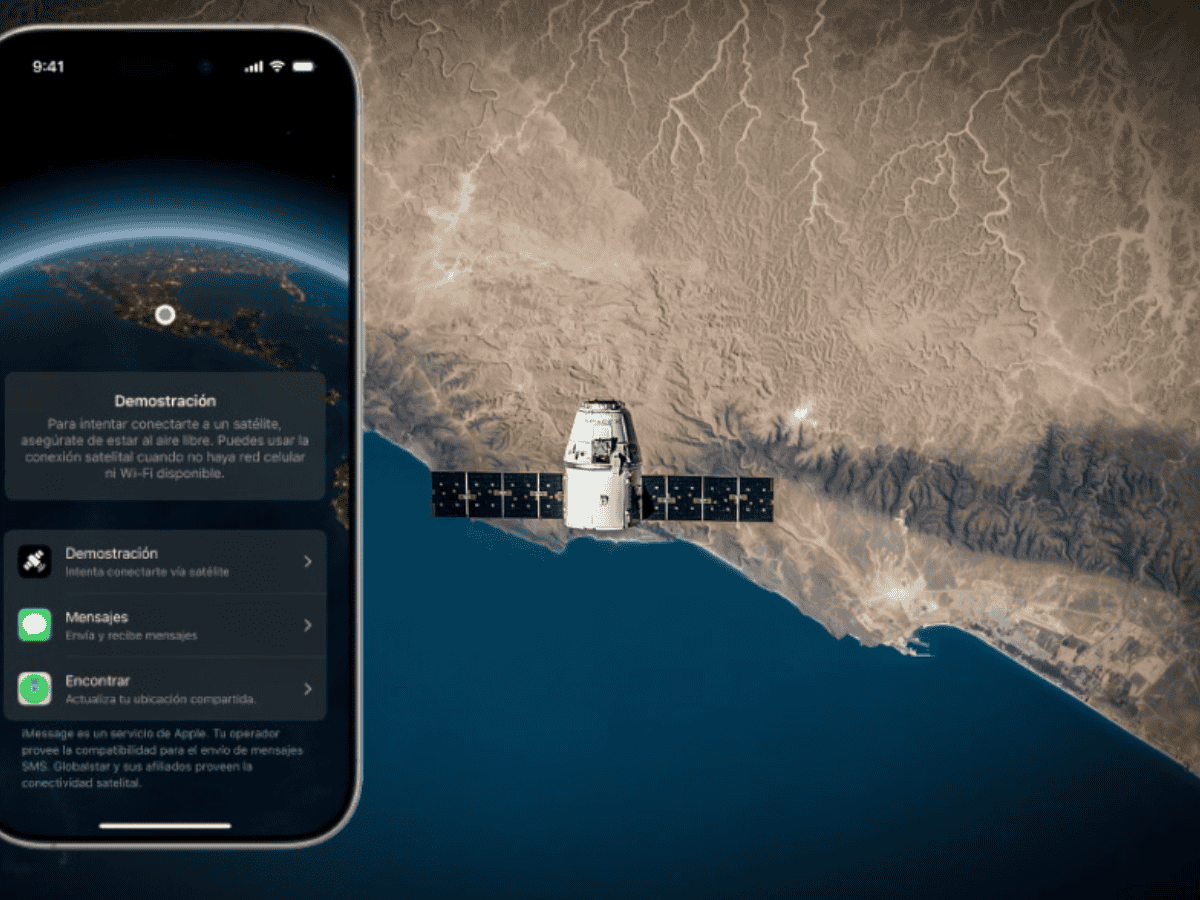
The iPhone's satellite connectivity has gone from a novelty to a critical resource when you lose cellular or Wi-Fi coverage. If you have an iPhone 14 or later , you can use satellites to send messages to emergency services, request roadside assistance, share your location, or, in certain regions, communicate via Messages, with clear usage guidelines and very specific limitations.
First of all, it's important to understand that low-Earth orbit satellites are very far away, move quickly, and have limited bandwidth. The experience is nothing like using 4G or Wi-Fi : you'll need clear skies, patience, and to follow the iPhone's instructions precisely to align the antenna. With that in mind, this guide gathers and rewrites everything you need to know: what it allows, which countries it's available in, which models are compatible, how to activate it, how to access the demo, shipping times, privacy, and even what Apple has planned for the future.
What exactly does the iPhone's satellite connection allow?
The iPhone can communicate via satellite when there is no cellular network or Wi-Fi available for various scenarios. Key features include : sending text messages to emergency services (Emergency SOS via satellite), requesting roadside assistance, sharing your location with Find My, and, in select regions, using Messages (iMessage and SMS) via satellite.
This connectivity is designed for specific, critical situations. It's not suitable for browsing the internet , making regular calls, or transferring large volumes of data. In fact, some media outlets have documented real rescues in disasters and remote environments where this feature made all the difference.
The system compresses the data to speed up transmission and guides you to point your phone at the correct satellite. The iPhone interface displays instructions if you need to turn or move slightly to avoid obstacles and maintain the signal.
In certain countries, in addition to Emergency SOS and Find My, features like Satellite Messaging or Roadside Assistance may be enabled. Availability depends on your physical location , not where you purchased the iPhone.
Compatibility by model: which iPhones have it and which don't
Satellite connectivity debuted with the iPhone 14 family and has been maintained in subsequent generations. Compatibility lists from various sources include series such as the iPhone 14, iPhone 15, and iPhone 16, as well as associated models (Plus, Pro, and Pro Max). There are also mentions of the iPhone 16e and future models like the iPhone 17 and Pro variants, and even a hypothetical iPhone Air.
Regarding older devices, the consensus is that iPhone 13 and earlier models are not compatible with Apple's satellite features because they require specific hardware . However, other documentation indicates that certain carriers may offer satellite network capabilities for several models, in which case compatibility would depend on the carrier, their plan, and local support.
If your carrier enables this type of connectivity over its own satellite network, your iPhone may display " SAT " in the status bar when you're within carrier satellite coverage. For Apple's native satellite features (Emergency SOS, Find My, etc.), the standard reference is iPhone 14 or later.
Availability by country and regional nuances
Apple has been progressively expanding its territories. The list cited by various publications includes countries such as the United States, Canada, the United Kingdom, France, Germany, Ireland, Italy, Australia, New Zealand, Portugal, Austria, the Netherlands, Belgium, and Spain, among others, with periodic additions.
It's crucial to understand that the exact functions vary by region . In Spain, for example, it's reported that Emergency SOS via satellite and Search via satellite are currently operational, while Roadside Assistance and Messaging via satellite have not yet been implemented. Other sources indicate that, in Spain, communication with emergency services is handled by phone call and that sending messages between individuals is not yet available, highlighting differences in implementation and services across different regions.
If you travel to a country where the feature isn't enabled, you won't be able to use it even if your iPhone is compatible . Availability is determined by your physical location.
Actual performance: times, obstacles, and physical limits
The satellites are hundreds of kilometers away, and the link has limited bandwidth. Therefore, transmission times and stability are highly dependent on the environment. Under ideal conditions, with clear skies and a clear horizon, a message can be sent in about 30 seconds; under light or medium tree cover, it typically takes more than a minute.
- Under dense foliage or between tall obstacles (buildings, canyons, mountains) the connection may be severely compromised or impossible.
- Times also vary because message size, the state of the satellite network and the availability of satellites at that moment.
- The connection can be maintained even with the locked screenwhich helps save battery without cutting the link.
- There are geographical limitations: above approximately 62° latitude (for example, areas of northern Alaska), connectivity may not work.
To improve the experience, the iPhone will ask you to be outdoors, with a clear view of the sky, and to hold the device naturally. There's no need to hold it above your head ; simply hold it in your hand, outside of pockets and bags, and follow the on-screen instructions to move a few degrees if the signal is blocked.
Prerequisites and preparation before losing coverage
For everything to work, your iPhone needs to be up-to-date with the latest software. Update to the latest version of iOS before hitting the road or traveling to remote areas. This ensures compatibility, bug fixes, and access to the latest Connect Assistant improvements in iOS 18.
Apple also states that with the activation of an iPhone 14 or later, Apple Satellite features are included free for two years. Alternatively, your carrier may offer its own satellite services ; it's advisable to check with them to see if there are any compatible plans or if satellite connectivity is included in your data plan.
If your carrier offers satellite network connectivity, there may be a " Satellite " switch in Settings > Mobile data > Mobile data options (and, with dual SIM, you'll first need to select the line). From there, you can manage the use of that satellite network and, in some cases, disable it.
Connection Assistant in iOS 18: How to Access and What It Does
With iOS 18, Apple adds the Connection Assistant to help you find and connect to satellite when you're out of cellular and Wi-Fi coverage. Opening it provides step-by-step instructions and a visual guide for pointing your iPhone at the sky.
There are two main ways to access the Connection Assistant when you've lost your network. From Control Center : swipe down from the top right corner, tap the Mobile Data button on the right side, then tap Satellite and choose the feature you want to use.
You can also access it through Settings. Go to Settings and tap Satellite to access the available options. In both cases, the system will guide you through the adjustments to optimize the signal.
How to practice: the official iPhone demo
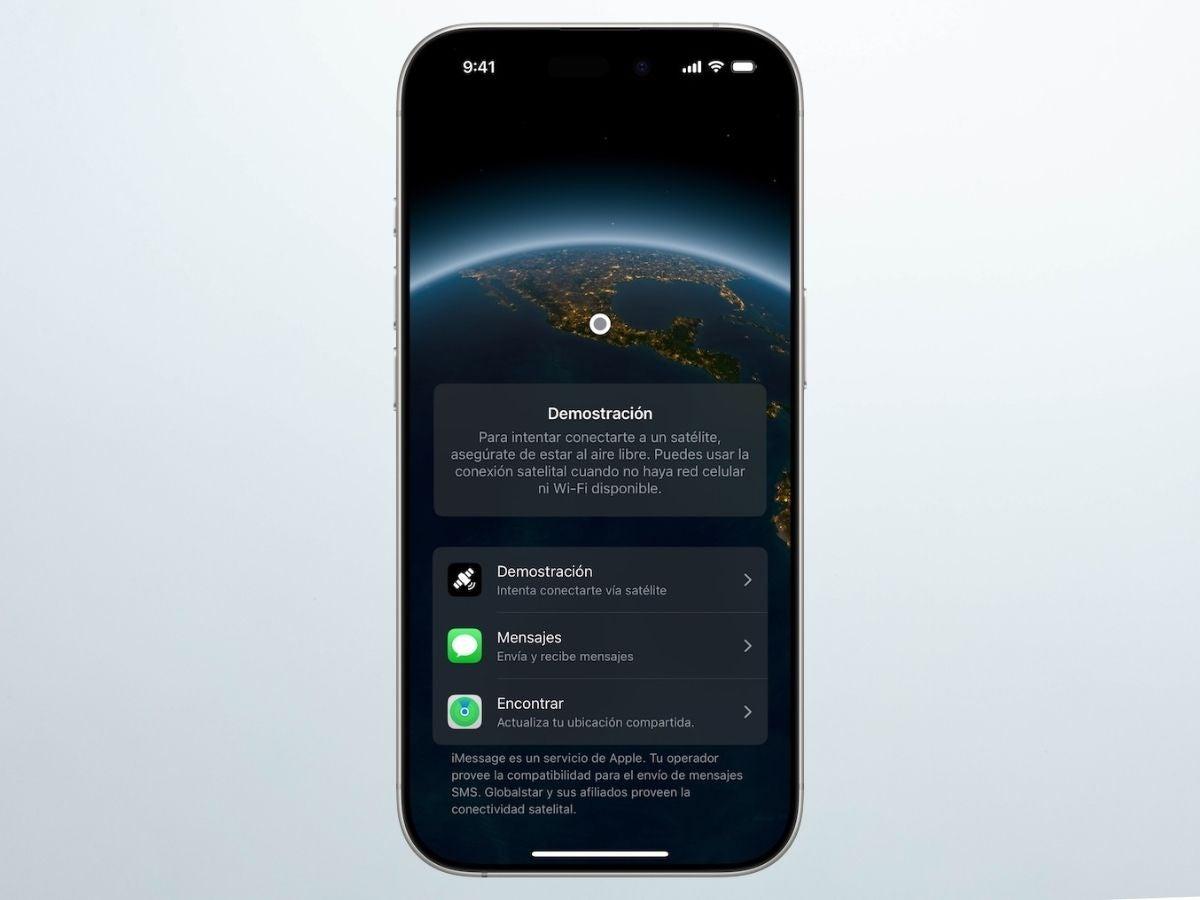
It's highly recommended that you try the demo to familiarize yourself with the process in a controlled environment. You need to be outdoors with a reasonably clear view of the sky. Light tree cover can slow down the connection, and tall obstacles can block it.
If the demo asks you to enable Location Services for Satellite Connection, accept to continue . The practice shows you the same interface you would see in a real emergency, but without contacting emergency services.
- Open Control Center (swipe in from the top right corner) and tap Mobile Data.
- Tap Satellite and then Try Demo. Choose what you want to practice.:
- Test satellite connection to learn the correct orientation. It's the ideal way to understand how to "point" the iPhone.
- Try Emergency SOS via satellite to see how information is collected and sent. There is no real contact with emergencies in the demo.
- You can also tap any satellite function to get more details about its use.
- Follow the instructions on the screen to Practice until you complete the link..
Additionally, there are shortcuts to open specific demos: from Settings > Emergency SOS you can access the Emergency SOS satellite demo; and from Settings > Apps > Messages, scroll down to Satellite connection demo for the Messages section.
How to use it in a real emergency
If you lose coverage and need help, your iPhone will offer the option to use Emergency SOS via satellite when you try to contact emergency services (112/911). The process involves answering a quick questionnaire (type of incident, location, whether there are injuries, etc.) to compress data and speed up transmission.
Keep in mind that this option only appears when there is truly no network . If you have coverage, you won't see the option to access Apple's satellite connectivity. Some guides suggest that, if you want to observe the behavior, disconnecting the SIM card or activating airplane mode doesn't necessarily mean the system will "lose network access"; therefore, the official demo is the safest way to practice.
In compatible regions, you can also initiate features such as satellite roadside assistance from your iPhone to manage a breakdown outside of coverage.
Practical tips to improve your connection
Follow these guidelines to make the connection more reliable. Being outdoors with a reasonable view of the sky and horizon is essential.
- Avoid trees with dense foliage and stay away from tall structures or canyons that may block the line of sight.
- Hold the iPhone naturally; There's no need to raise your armTake it out of your pocket or backpack.
- If your iPhone asks you to turn left or right or take a few steps, listen to him to avoid blocked areas.
- It's okay if the screen locks: the connection remainsHowever, the phone must remain switched on.
- Remember that above all 62° latitude The connectivity may not work.
Privacy and security: what data is sent and how
When you use Satellite Emergency SOS, messages are sent encrypted and Apple decrypts them to forward them to the appropriate emergency center or relay station. These centers may retain the messages to improve their services, within applicable regulations.
To route communication and make it easier for others to contact you, your location is shared with Apple and the relay provider when you use Satellite Emergency SOS. For Satellite Roadside Assistance, your location is temporarily shared with Apple and the provider until help arrives, and then it stops being shared.
If you share your location in the Find My app using satellite, the transmission is end-to-end encrypted , so Apple cannot access that information. In Messages via Satellite, iMessage is end-to-end encrypted during transit between devices.
Apple processes information in accordance with its Privacy Policy . In regions where a relay center is used, this data is managed to expedite care.
Operators, 5G NTN and the “SAT” indicator
In addition to Apple's own satellite features, some carriers are incorporating satellite connectivity into their networks through agreements with providers like Starlink and others. In these cases, the iPhone may display "SAT" in the status bar when using the carrier's satellite network, and could enable very limited data for certain compatible apps (with possible additional charges).
In Settings > Mobile data > Mobile data options, you may find a Satellite toggle to manage your carrier's satellite connectivity. If you don't see this option, your carrier may not offer it, or your plan may not include it; it's best to check directly with your carrier.
Looking to the future, compatibility with 5G NTN (Non-Terrestrial Networks) is being considered, which would integrate satellite coverage into the 5G ecosystem to expand availability without relying so heavily on conventional towers.
State in Spain: what works today and what's to come
In Spain, according to the information gathered, Emergency SOS via satellite and Find Me via satellite are currently available for compatible iPhones. As for Roadside Assistance via satellite and Messages via satellite, sources indicate that they are not yet available.
Some sources indicate that, currently in Spain, emergency communication is handled by phone call and that messaging between individuals is not yet available. While the rollout is progressing, it's advisable to check the Apple website or your iPhone's Settings to see which features are available in your specific location.
Price and free periods
When the first features were launched, Apple mentioned a limited free period after device activation. Currently, several sources indicate that this free access has been extended over time , and specifically, a target date of November 2026 has been set to maintain free access for iPhone 14 and later users.
An additional year of free access has also been announced for iPhone 14 and iPhone 15 users activated before September 9, 2025, at 09:00 AM in supported countries, while iPhone 16 and iPhone 17 users will remain within their initial free period. No final pricing has been announced for the future of Apple's native service, so the policy may change over time.
On the other hand, if your carrier provides satellite connectivity (not Apple's, but the carrier's own), there may be specific fees or plan requirements. It's essential to review your contract and the fine print to avoid surprises.
Devices and ecosystem: Apple Watch and more
In addition to compatible iPhones, it has been reported that the Apple Watch Ultra 3 will incorporate satellite connectivity, which aligns with its focus on athletes and adventurers. These kinds of ecosystem expansions suggest that Apple is reinforcing the value of connectivity outside of the traditional network.
In parallel, Apple collaborates with Globalstar for the iPhone's current satellite functions. There have been reports of industry developments (talks, potential acquisitions, and agreements with third parties like SpaceX) that could accelerate infrastructure capacity and, therefore, service quality and availability .
Where is iPhone satellite connectivity headed?
Various news reports indicate that Apple is working on a new wave of features. Among them is the potential compatibility with 5G NTN to use satellite infrastructure in 5G networks in future generations of iPhones.
Another improvement under development would be enabling the sending of photos via satellite messaging, expanding upon the current text. There is also talk of a satellite framework or API to allow third-party apps to integrate this connectivity in a controlled manner and with varying compatibility.
A key objective is to simplify the connection process, so that the user doesn't have to manually point the iPhone to connect to the satellite, including a more "natural" use even next to windows or without perfect alignment.
The arrival of Apple Maps with satellite connectivity is also being considered , offering basic navigation and maps even without cellular coverage. While there are no confirmed plans for calls or video calls over Apple's native satellite network, the industry is evolving, and some carriers are exploring agreements for satellite voice and video; Apple, for now, doesn't appear to have this on its direct roadmap .
Finally, remember that in compatible regions you can connect to emergency services even by dialing the local number (112/911), and the system will suggest using satellite if there is no coverage . If you just want to practice, use the official demo: it's private, doesn't generate real alerts, and prepares you for when you really need it.
With all of the above in mind, the key is to have clear expectations: it works, but with its own set of rules . If you keep your iPhone updated, practice with the demo, know what's available in your country, and follow the on-screen instructions, satellite connectivity can be that technological lifeline that allows you to call for help, share your location, or coordinate a rescue when the conventional network fails you.


Passionate writer about the world of bytes and technology in general. I love sharing my knowledge through writing, and that's what I'll do on this blog, show you all the most interesting things about gadgets, software, hardware, tech trends, and more. My goal is to help you navigate the digital world in a simple and entertaining way.