- NVMe to PCIe x16 adapters allow you to mount high-performance M.2 SSDs in PCIe x16, x8 or x4 slots, even on motherboards without native M.2.
- Models like the Reagle RY5NVME1 offer speeds of up to 64 Gbps over PCIe 4.0, twice that of the SATA standard, with plug and play installation.
- These adapters combine wide format compatibility (2230 to 2280, M and B+M key) with heatsinks, thermal pads and surge protection.
- Brands like VOANZO and Reagle compete with single or multi-port NVMe solutions, while also keeping the final price down through tight commercial policies.
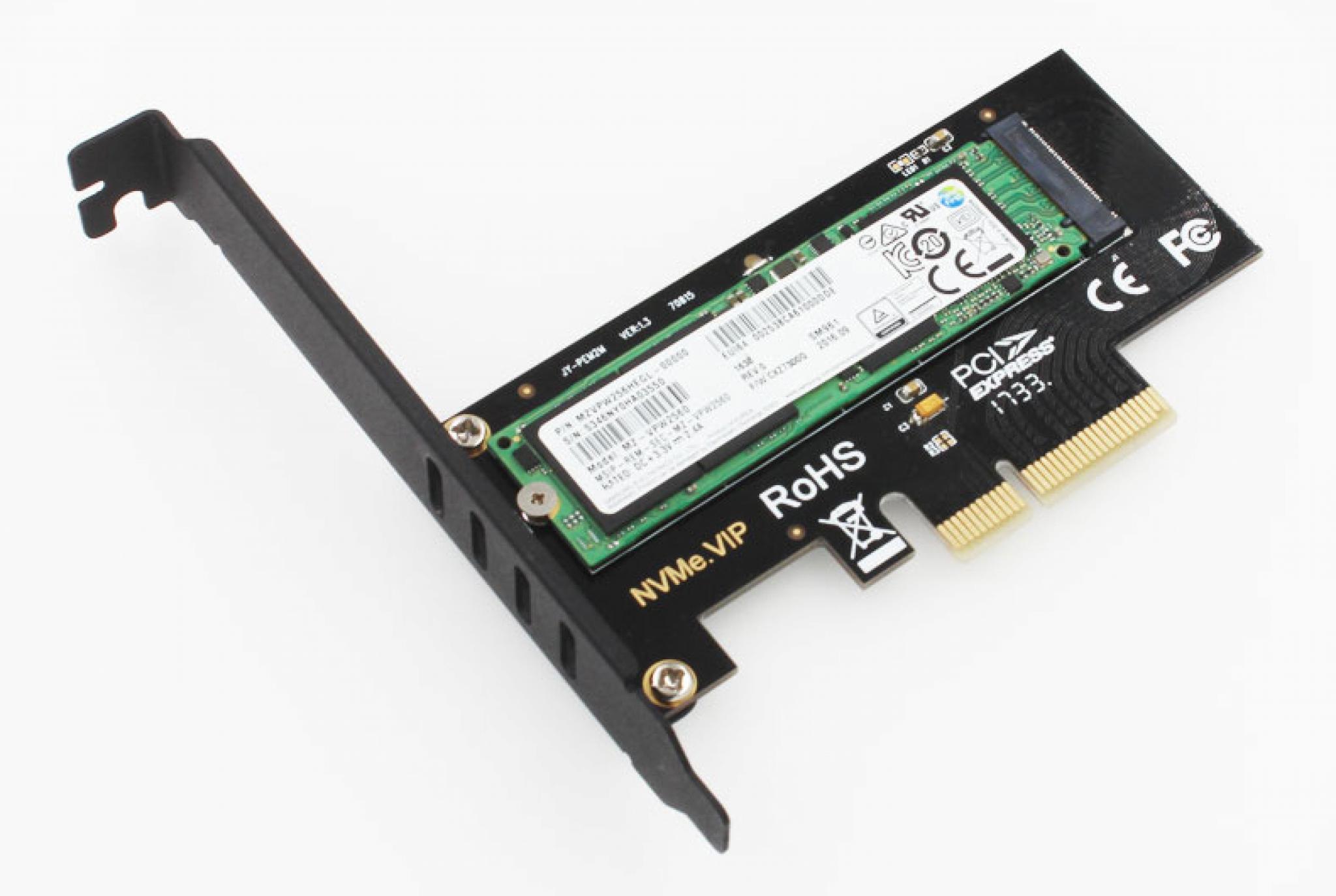
If you're thinking about getting the most out of your PC's performance, the NVMe to PCIe x16 adapters They have become a very interesting solution for taking your M.2 SSDs to the next level. These types of expansion cards allow you to take advantage of free PCI Express lanes to install one or more NVMe drives and achieve blazing-fast speeds, even in systems not originally designed for them.
In the following lines we will calmly break down what these adapters offer, how they work, and what differences exist between models such as those of VOANZO and Reagle (model RY5NVME1)And what you should look for before buying one. The idea is that, when you finish reading, you'll be absolutely clear on whether it's worth making the switch and what type of card is best for your computer.
What is an NVMe to PCIe x16 adapter and what is it used for?
An NVMe to PCIe x16 adapter is basically a expansion card that is installed in a PCI Express slot of the motherboard and offers one or more M.2 slots specifically designed for NVMe SSDs. Put more simply, it turns a PCIe slot (like the one you'd use for a graphics card) into a connector where you can plug in your high-performance M.2 drives.
These adapters typically take advantage of the enormous bandwidth capacity of the slots. PCIe x16, x8 or x4These are the same technologies used by modern graphics cards. This allows you to install NVMe SSDs that operate at full speed, with transfer rates far exceeding those of a traditional SATA SSD.
In the case of models like the Reagle RY5NVME1 adapter or VOANZO expansion cards, we're talking about solutions designed to introduce one or more M.2 NVMe drives into a standard PCIe card form factor, all with cooling systems and additional components that improve the stability and electrical protection.
This type of card is very useful both in older desktop computers that lack M.2 slots, and in modern PCs where you have already filled all the M.2 connectors on the motherboard but want to continue expanding storage without sacrificing NVMe speed.
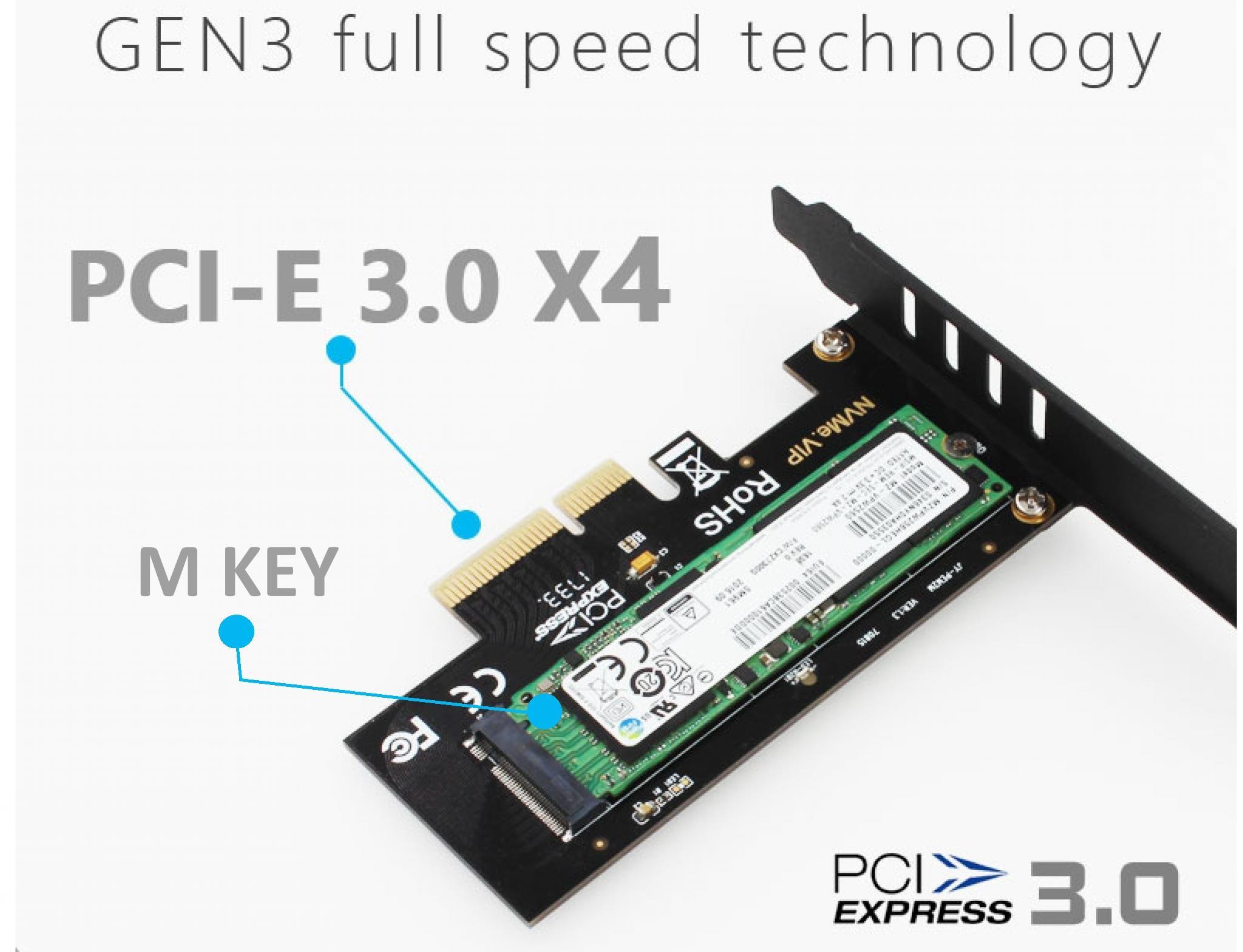
Key features of NVMe to PCIe x16 adapters
To fully understand what you're buying, it's helpful to review the most important features of these adapters. Although at first glance they may seem like just a board with an M.2 connector, they actually incorporate several elements that make a difference in compatibility, performance and durability.
First, the best-designed models, such as the Reagle RY5NVME1, incorporate support for a wide range of NVMe SSD form factorsThis type of card usually accepts drives with M key and also with B+M key, which covers the vast majority of NVMe SSDs on the current market.
On the other hand, support for different SSD lengths is essential. Adapters like the one from Reagle allow you to mount drives in various formats. 2230, 2242, 2260 and 2280This nomenclature refers to the width and length of the M.2 module (for example, 2280 means 22 mm wide and 80 mm long). Thanks to the various mounting points and included screws, the unit is securely attached in any of these sizes.
Another important point is the card's compatibility with different motherboard slot configurations. The RY5NVME1, for example, can be installed in PCIe x16, x8 and x4 slotsAlthough it physically has the shape of an x16 card, it also works in slots with fewer lanes as long as the motherboard allows it, which provides a lot of flexibility when mounting it in very different PCs.
Finally, it is important to consider the presence of extra elements such as LED activity indicators or circuits protection against short circuits and voltage spikeswhich help to extend the lifespan of the SSD and reduce the risk of failures in the controller or the motherboard itself.
Performance and transfer speeds
One of the main reasons to opt for an NVMe to PCIe x16 adapter is the enormous speed boost compared to traditional solutions. A model like the Reagle RY5NVME1, based on the PCI Express 4.0 standardIt can reach a maximum theoretical transfer speed of up to 64 Gbps, which translates to several thousand MB/s in read and write speeds depending on the SSD you install.
If we compare it to a SATA drive, whose speed is usually limited to around 6 Gbps, we're talking about a performance that can be approximately Twice as fast as the SATA standard in the user's experience. This translates into much shorter loading times, instant opening of demanding applications, and a more responsive system overall.
In systems that use these types of adapters for professional tasks, such as 4K video editing, working with huge photo libraries, or virtualization environmentsThe improvement is very noticeable. Large file transfers become much faster and smoother, reducing storage bottlenecks that often hinder performance in heavy projects.
It's important to note that the final speed will depend not only on the adapter, but also on the PCIe version supported by your motherboard and the SSD you install. A PCIe 4.0 adapter, like the RY5NVME1, will also work on PCIe 3.0 motherboards, but will be limited to the speeds supported by the interface. In any case, you'll still get a significant performance increase compared to classic SATA solutions.
Furthermore, the fact that it doesn't require specific drivers (being a plug and play device) means that the operating system will recognize the NVMe drive as if it were connected to a native M.2 slot, allowing you to enjoy the maximum sequential and random read and write performance that the SSD itself offers.
Compatibility with M.2 NVMe drives and PCIe slots
Before buying an adapter, it's advisable to confirm that it will be fully compatible with your components. In the case of the Reagle RY5NVME1 and similar cards from brands like VOANZO, support covers M.2 NVMe SSD with M key and with B+M keywhich are the most common formats for high-performance drives.
These cards allow you to mount SSDs in several standard sizes: 2230, 2242, 2260 and 2280Thanks to the different screw positions and the included screws, you can securely fix the module, preventing it from moving or bending over time due to vibrations or temperature changes.
Regarding the connection to the motherboard, the card's physical connector is of the type PCI Express x16However, models like the RY5NVME1 also guarantee compatibility with PCIe x8 and PCIe x4 slots. This means you can plug the card into virtually any modern expansion slot, as long as it has the necessary PCIe lanes to power the NVMe drive at a good speed.
Compatibility also extends to the operating system level thanks to its plug-and-play nature. You don't need to install dedicated drivers: simply mount the card, connect the SSD, and let the system detect the new drive. Support for this technology is available in both Windows and many current Linux distributions. NVMe over PCIe is integrated as standard, so the process is very straightforward.
On older computers, it's advisable to check in the BIOS or UEFI if the motherboard supports it. boot from NVMe drives connected via PCIe. While there are usually no problems using it as a secondary drive, if your idea is to use it as main boot unit You may need a firmware update or to check compatibility in the manufacturer's documentation.
Thermal management and heat dissipation
NVMe SSDs, especially the fastest ones, generate a considerable amount of heat under heavy load. That's why many quality adapters include specific cooling solutions to keep the M.2 module temperature under control and avoid performance drops due to thermal throttling.
The Reagle RY5NVME1 stands out precisely for incorporating a aluminum heat sink A dedicated heatsink for the NVMe drive, along with thermal strips or pads placed between the SSD and the heatsink. These thermally conductive strips facilitate heat transfer from the memory chips to the aluminum block, which in turn dissipates the heat through contact with the air inside the case.
The included heating pads not only help control the temperature, but also contribute to physically protect the modulepreventing it from being exposed to air or directly to dust. The pressure from the heatsink and screws keeps the entire assembly solid and stable during operation.
In addition to the heatsink, the card itself offers a small extra layer of protection against dust and dirt, acting as a kind of shield that covers part of the area where the SSD is mounted. This dual cooling system (direct contact plus an external heatsink) allows the drive to operate at high speeds for longer periods without reaching critical temperatures.
Finally, the presence of a operating status LED The RY5NVME1 makes it easy to check at a glance whether the drive is connected and working. A solid blue light indicates that the card is properly powered and detected, while a flashing blue LED indicates read and write operations in progress—very useful for diagnosing activity and potential crashes.
Experience of use, installation and electrical protection
One of the attractive features of these adapters is that their installation is very similar to that of any other conventional PCIe cardSimply release the chosen slot on the motherboard, insert the card, aligning the connector, and secure it with the chassis screw. Then, mount the M.2 drive onto the card following the manufacturer's instructions.
In the case of the RY5NVME1, the package itself includes a small kit with everything needed: screwdriver, screws, heat sink and thermal tapeIt also includes a user manual. This makes assembly much easier, even for those without much experience tinkering with hardware, as there's no need to search for additional screws or tools.
The plug-and-play philosophy means that once the card is installed and the SSD is connected, the operating system will recognize the new drive almost immediately. In most cases, simply accessing Disk Management to initialize and format the new volume will suffice. configure it as a boot disk if your motherboard and firmware allow it.
An interesting aspect of the RY5NVME1 design is the inclusion of protection against short circuits and sudden voltage variationsThis system acts as a safety barrier between the motherboard and the SSD, reducing the risk of a power surge damaging the memory chips or the disk controller. It's a detail that, while not immediately visible, is appreciated for extending the overall lifespan of the system.
In terms of overall stability, the use of a dedicated PCIe slot provides a very robust connection. In intensive use scenarios, such as continuous transfers of large amounts of data or running disk-intensive virtual machines, this type of adapter offers reliable performance. consistent and reliable provided that the airflow inside the case is acceptable.
Example specifications: Reagle RY5NVME1 and VOANZO cards
To put all this information into perspective, it's helpful to look at specific details of real products. Reagle RY5NVME1 It is a PCIe to M.2 NVMe adapter aimed at those looking for a reliable and well-equipped solution to mount an NVMe drive in expansion card format.
Its most notable features include a connector compatible with PCI-E x16, x8 and x4It supports M.2 NVMe SSDs with M and B+M keys, and is compatible with 2230, 2242, 2260, and 2280 form factors. It operates over a PCIe 4.0 interface, with a maximum data transfer speed of up to 64 Gbps, allowing it to double the typical performance of a SATA connection.
This model comes in black with a compact design, approximately 40 mm wide, 119 mm long and 7 mm thickThe package includes the adapter card itself, an aluminum heat sink, two thermal strips, a screwdriver, a small set of seven screws, and a user manual, so it comes quite complete for assembly right out of the box.
On the other hand, there are expansion cards from brands such as VOANZO These solutions feature a multi-zone approach, offering up to four NVMe SSD ports on a single PCIe x16 card. They are particularly interesting for home servers, workstations, or PCs designed for high-speed mass storage, where installing multiple NVMe drives simultaneously is desirable.
Although the operating philosophy is similar (converting PCIe lanes into M.2 slots), bandwidth management and cooling become even more critical in 4-port cards. These higher-end models typically integrate optimized PCB designs and larger heatsinks to manage the heat of several units at full performance.
Commercial aspects and competitive pricing
Beyond the technical specifications, the brands that sell these adapters usually focus on price. In the case of some distributors, the user is encouraged to Please let us know if you find a lower price. in another store, whether physical or online, with the aim of maintaining a competitive pricing policy.
These forms usually state that It's not always possible to match all offers Customers submit this information, which is used internally to adjust prices and avoid falling behind the competition. Customers are typically asked to specify where they found the lowest price, including details such as the store and, if it's a physical store, the province in which it's located.
This approach has a dual effect: on the one hand, it allows the seller to have a clearer view of the real market and what other stores are doing; on the other hand, it gives the buyer a certain peace of mind knowing that there is an explicit interest in maintaining the prices within a reasonable range and in accordance with what is happening on the Internet and in local establishments.
For the end user, this translates into the possibility of acquiring NVMe to PCIe x16 adapters, such as those mentioned from VOANZO or Reagle, with the feeling of paying an amount in line with the rest of the market, especially in products where competition is strong and there are multiple brands offering similar solutions.
In any case, it's always advisable to compare features, included accessories, and warranty policies, as sometimes a slight price difference is offset by a better overall package: more screws, a better heatsink, stronger technical support or easier returns process if something doesn't go as expected.
Looking at the whole package, from the speeds they allow, through compatibility with different M.2 formats and PCIe slots, to the cooling and electrical protections included, these NVMe to PCIe x16 adapters have established themselves as a very practical way to Take advantage of high-performance SSDsThis applies both to new equipment and to PCs that are a few years old but can still gain a good dose of speed with a relatively modest investment.

Passionate writer about the world of bytes and technology in general. I love sharing my knowledge through writing, and that's what I'll do on this blog, show you all the most interesting things about gadgets, software, hardware, tech trends, and more. My goal is to help you navigate the digital world in a simple and entertaining way.