- VHLK is a preconfigured HLK on VHDX, ready to boot into a VM.
- To certify you must align the HLK version with the target OS.
- Recent revisions add tests (e.g., LE Audio) and correct typos.
- Playlists, filters, and add-on ISOs streamline submissions.
When working with drivers and devices for Windows , you'll hear a lot about VHLK and HLK. The Windows Virtual Hardware Lab Kit (VHLK) is essentially a pre-built HLK in a bootable VHDX image , and you can create and configure the VM in Hyper-V to get it up and running quickly. The traditional HLK, on the other hand, is the testing framework you install on a server. Both are part of the Windows Hardware Compatibility Program and, when used correctly, can save you time, frustration, and hassle.
This guide gets straight to the point: what VHLK is, how it differs from HLK, which versions you need for certification, what's new in the latest revisions , and how to quickly deploy it in a virtual environment with Hyper-V. You'll also see key aspects such as test playlists, filters (errata), additional content (ISOs), network and security requirements and settings that often make the difference between a clean shipment and a long night of debugging.
What is Windows Virtual Hardware Lab Kit (VHLK)?
VHLK is the most direct way to start testing without setting up a server from scratch: it's a complete, pre-installed, and pre-configured hardware lab kit in a VHDX file , ready to run as a virtual machine. With it, you can skip the HLK driver installation , quickly set up the environment, and run the Windows Hardware Certification directly from a VM.
Among its advantages: it's ready to boot and use, runs the HLK driver as a virtual machine , and allows you to host the HLK driver VM on developer machines (possible with nested virtualization in Hyper-V ) instead of using dedicated hardware. If you prefer a guided onboarding process, Microsoft's own documentation recommends consulting the VHLK Getting Started Guide with Hands-on Notes.
Practical details worth knowing: VHLK is distributed as a 64-bit VHDX , and Microsoft has occasionally published specific guidance for particular guest VMs (for example, recommendations for Windows 10, version 1903, as a guest VM). Additionally, the VM's system and environment languages can affect studio operation and component support.
HLK vs VHLK and the Hardware Compatibility Program (WHCP)
The Windows Hardware Lab Kit (HLK) is Microsoft's official testing framework for Windows 11, Windows 10, and Windows Server (2016 and later) drivers and devices . To qualify for the Windows Hardware Compatibility Program , products must pass the HLK test suite and submit the results as part of their submission package.
VHLK offers the same purpose but in a virtualized format : it's designed for environments with VMs and automated labs , eliminating the need to dedicate physical hardware just for the kit's controller. Simply put: HLK is the "what" (the framework and the tests) and VHLK is the "how" (the ready-to-boot virtual distribution).
For certification, it's critical to use the correct HLK version for the target OS . Microsoft maintains version alignment; simply put, if you attempt an unsupported combination, you won't start the tests . Here's a rewritten, practical summary of the certification version matrix:
| Certification objective | Recommended kit |
|---|---|
| Windows 11, version 24H2; Windows Server 2025 | Windows HLK 24H2 (updated July 2025) o VHLK 24H2 (updated July 2025) |
| Windows 11, versions 23H2 and 22H2 | Windows 11 HLK 23H2 / HLK 22H2 |
| Windows Server 2022 | Windows HLK for Windows Server 2022 |
| Windows 10 22H2, 21H2, 21H1, 20H2 and 2004 | Windows HLK for Windows 10, version 2004 |
| Windows 10 1809; Windows Server 2019 | Windows HLK 1809 |
| Windows Server 2016 | Windows HLK 1607 |
Beyond the kit version, Microsoft publishes resources that make your life easier: the official WHCP playlists , to run exactly the necessary HLK tests by category, and the HLK filters (errata) , which allow you to justifiably skip tests with false positives or recognized problems, applying them directly from HLK Studio.
You also need, in some groups, additional test content (ISOs) to complete media, graphics, or MTBF tests. Microsoft provides images such as HLK_DXVA.iso , HLK_HMFT.iso , and HLK_PERF.iso in variants that cover Windows 11 (21H2/22H2/23H2/24H2) and multiple versions of Windows 10 (1607 → 2004, 1903, 1909, 1803, 1809) . If a test requires it, mount the appropriate ISO to ensure the case passes reliably.
Relevant news from recent reviews
Microsoft has refreshed the HLK and VHLK for Windows 11 24H2 and Windows Server 2025 , replacing the original RTM from May 2024. In the May 6, 2025 communication and subsequent updates, it is highlighted that these revisions include bug fixes, removal of obsolete test cases, and the addition of new sets that improve quality by reducing the triage of known bugs.
Two improvements stand out in particular: new tests for Bluetooth LE Audio (relevant for validating the latest audio devices) and better support and performance with Generation 2 virtual machines in VHLK , which speeds up fully virtualized labs and automated deployments.
Important for compliance: the updated versions replace the previous ones . If you rely on HLK/VHLK for WHQL signatures (or for your own internal validations even if you use Attestation for signing), you should migrate to these kits to maintain compatibility with current Windows 11 and Server builds. According to the release notes, the updated VHLK is usually released shortly after the HLK , so keep an eye on the official website.
Taken together, these revisions help ensure that devices and drivers function as expected on launch day , reducing surprises and support tickets in production. For detailed information, Microsoft refers to its official hardware blog and the HLK/VHLK documentation.
Requirements, architecture and key documentation
A typical HLK environment consists of a Controller, Studio, and Client(s) . The Controller and Studio can coexist on the same machine, but Microsoft recommends that the server OS be Windows Server x64 (English version ) for compatibility with the kit and its dependencies. The clients are the target systems for testing (where you install the driver/device you are going to validate).
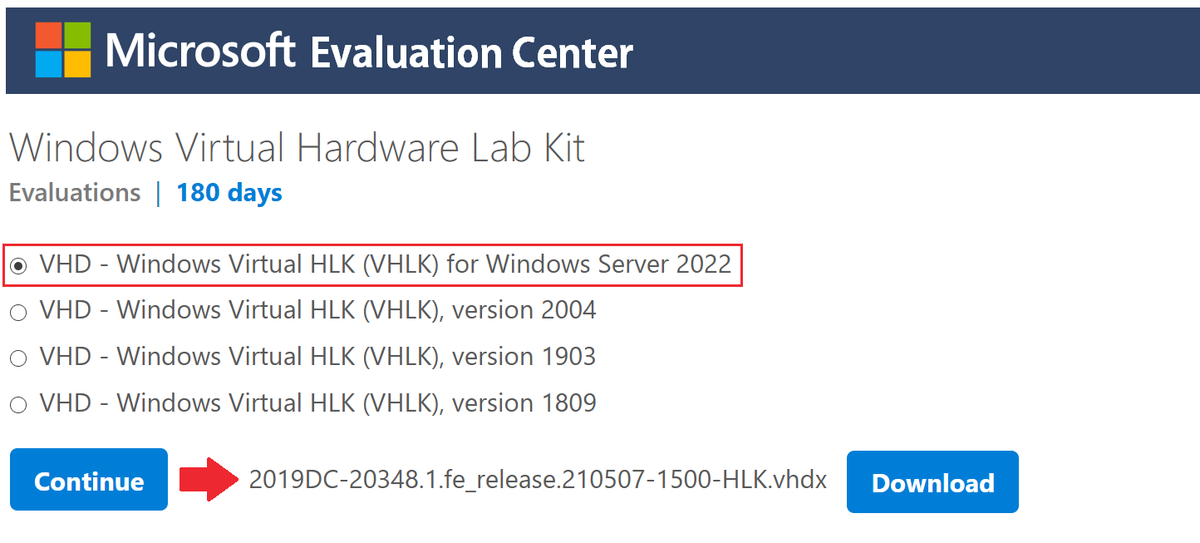
If you opt for VHLK, note the recommended host requirements: an 8-core CPU with SLAT, at least 8 GB of RAM, active virtualization in BIOS/UEFI, and approximately 120 GB of free disk space . Download VHDX from the Microsoft Evaluation Center, connect it to a VM, and boot; the advantage is the time you save on manual installation and configuration.
The HLK and VHLK documentation is kept up-to-date. Microsoft publishes a downloadable PDF with the latest documentation (click the "Download PDF" button in the online document sidebar), and includes dedicated sections for playlists , filters/errata , and supplementary content . Having these readily available saves you time and effort.
Regarding signatures and submissions: With the changes of recent years, the Attestation signature (with EV) covers many cases without running HLK, but exceeding HLK remains key to WHQL and ensuring true compatibility . Many manufacturers continue to adopt HLK for the depth and reliability of its tests , even when signatures are not the primary motivation.
Quick Start: HLK and VHLK Step by Step
If you choose a classic HLK installation, download the installer (usually named HLKSetup.exe ). Helpful tip: rename it after downloading if you're managing multiple versions, as they share the same name. During the installation wizard, select Controller + Studio , agree to open the necessary ports for Controller/Client communication, and continue with the installation.
In modern HLK kits designed for Windows 11, SQL Server 2019 is automatically installed and configured . If you are upgrading from older kits or have previous instances, uninstall any incompatible SQL versions before running the setup to avoid conflicts. Once finished, you will see HLK Studio in the Start menu (Windows Kits) and you will be able to create and manage projects/tests.
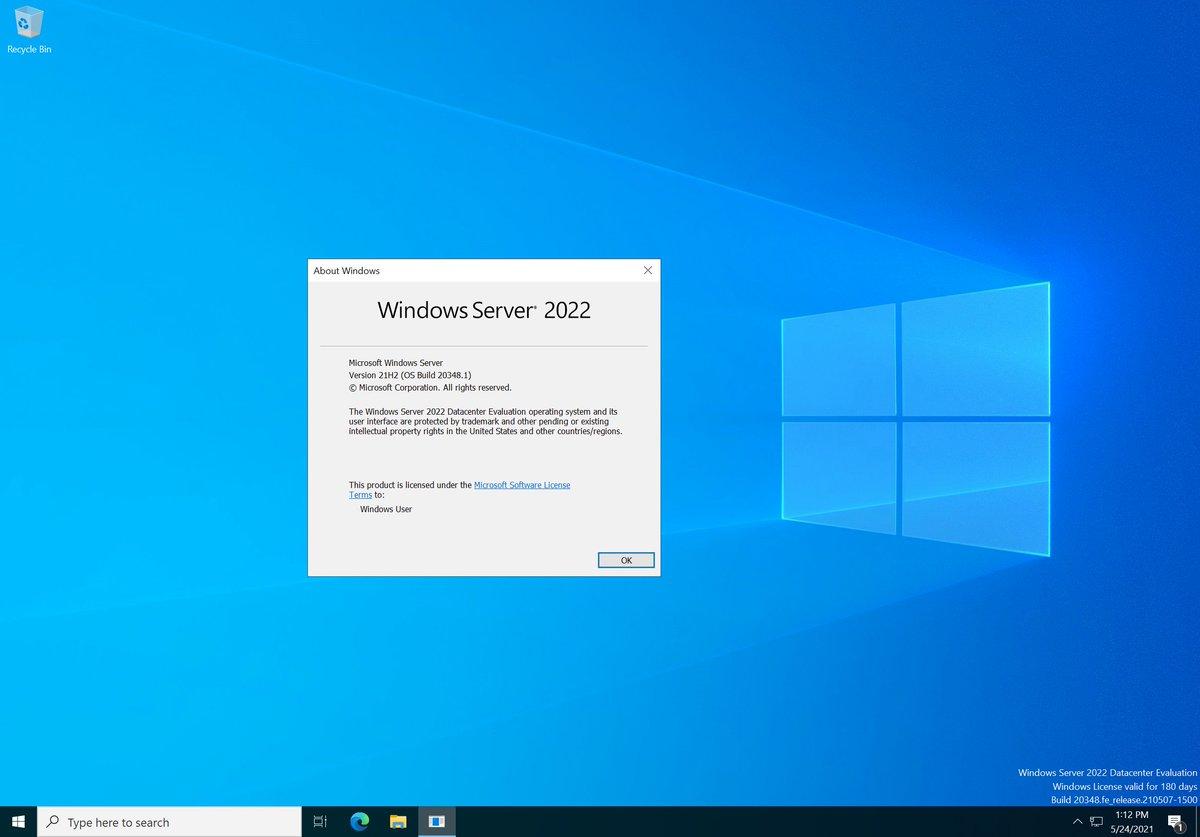
If you choose VHLK, the process is even simpler: in Hyper-V, create an external virtual switch if you don't already have one, create the VM, and attach the VHLK VHDX as an existing disk . On the first boot , you'll go through the regional settings screen; then you can set the password for the HLKAdminUser (don't use Administrator for testing). It works in WORKGROUP if you don't have a domain, which speeds up pilots and small labs.
With the driver ready (installed or virtualized), the next milestone is the client. Microsoft documents the process as "Step 2: Install Client on the Test System(s)" ; essentially, you install the HLK agent on the target systems , join them to the project from Studio, and assign the appropriate playlist to run the relevant tests (and apply filters if necessary).

Hyper-V Lab Best Practices: Network, Security, and Performance
In virtual environments, the network is almost everything. Hyper-V offers three types of virtual switches : external (access to the physical network/Internet), internal (VM↔host communication), and private (only between VMs). The default switch can get you by using NAT, but if you need policies, routes, or direct LAN access , create and assign a well-defined external switch. For more details on network topology, see the Hyper-V network types.
To segment traffic, enable Virtual LAN Identification (VLAN) on the VM's network adapter: each VLAN separates traffic at the logical level. When sharing a host with multiple teams and projects, limiting bandwidth per VM helps prevent a single overloaded test from impacting the rest of the lab.
Enable hardware acceleration optimizations when your NIC supports them: VMQ distributes the packet load between cores and IPsec offloads encryption from the CPU to the NIC, improving latency and stability in intensive testing.
In terms of network security, Hyper-V offers some gems: dynamic or static MAC addressing (fix one if you need stable network rules), MAC spoofing for specific tests, and protections like DHCP Guard , Router Guard , and Protected Network to nip inappropriate behavior in the virtual network in the bud. If you're doing inspections, port mirroring (source/destination) lets you capture packets for a probe. And if you need resilience or throughput, NIC Teaming within the guest host can be your ally.
For guest boot and security, use Secure Boot with the appropriate profile: Microsoft Windows for Windows VMs, Microsoft UEFI CA for most Linux distributions , and Open Source Shielded VM when shielding Linux. If necessary, enable virtual TPM and state and migration encryption to protect secrets and snapshots in transit; note that full shielding disables management capabilities such as the console or PowerShell Direct.
In memory management, it combines fixed allocation with dynamic memory management to absorb spikes: it defines minimum/maximum values and a reasonable buffer (e.g., 20%). With multiple VMs competing, it adjusts memory weighting and CPU controls (reserve, limit, and priority) to ensure critical VMs don't run out of resources. If the host is large, NUMA differentiates: it respects the topology to minimize memory jumps.
For storage , the SCSI controller lets you add VHD/VHDX disks and DVD drives (to mount ISOs like HLK_DXVA/HMFT/PERF when required by a test). Check the boot order in the firmware to boot first from the ISO during guest installation and then from the disk. Checkpoints are a lifesaver before major changes, but remember they take up disk space; use them wisely, and in migration scenarios, you can clone the virtual machine to Hyper-V.
Finally, fine-tune the lifecycle: decide on the automatic startup action (start when the host powers on or not) and the shutdown action (clean shutdown, save state, or disconnect). In shared labs, these settings prevent surprises and ensure a VM doesn't run in the background unnecessarily; you can also automate the startup of virtual machines for repeatable scenarios.
If something goes wrong, start with the basics: ensure sufficient resources (CPU/RAM/disk) , check the Host Event Viewer for Hyper-V/HLK logs , verify VHD/VHDX integrity , confirm the VM is attached to the correct switch , and try temporarily disabling the firewall to isolate connectivity issues. In OS installations, errors often point to corrupted ISOs or missing drivers.
A side note: Some articles covering the HLK/VHLK refresh news include promotional hosting blocks or widgets ; these do not affect the use of the kit, but it is advisable to focus on official Microsoft sources for versions, prerequisites, and downloads.
Remember that you might need official WHCP playlists to run exactly what you need, the errata filters in HLK Studio to remove known errors, the additional ISOs for media/graphics/MTBF, and the offline PDF documentation for offline reference. And VHLK is a very effective shortcut when you don't want to (or can't) deploy a dedicated server just for the kit's driver.
Table of Contents
