- Intel DTT dynamically adjusts turbo, power and thermals, and even attenuates RF interference.
- The DTT driver can install the "Intel(R) Innovation Platform Framework Service".
- APO is a DTT profile for specific games on certain 14th gen Cores (K/KF) via BIOS and app.
- On Arc A350M, disabling DTT resulted in doubling fps; it depends on profiles and drivers.
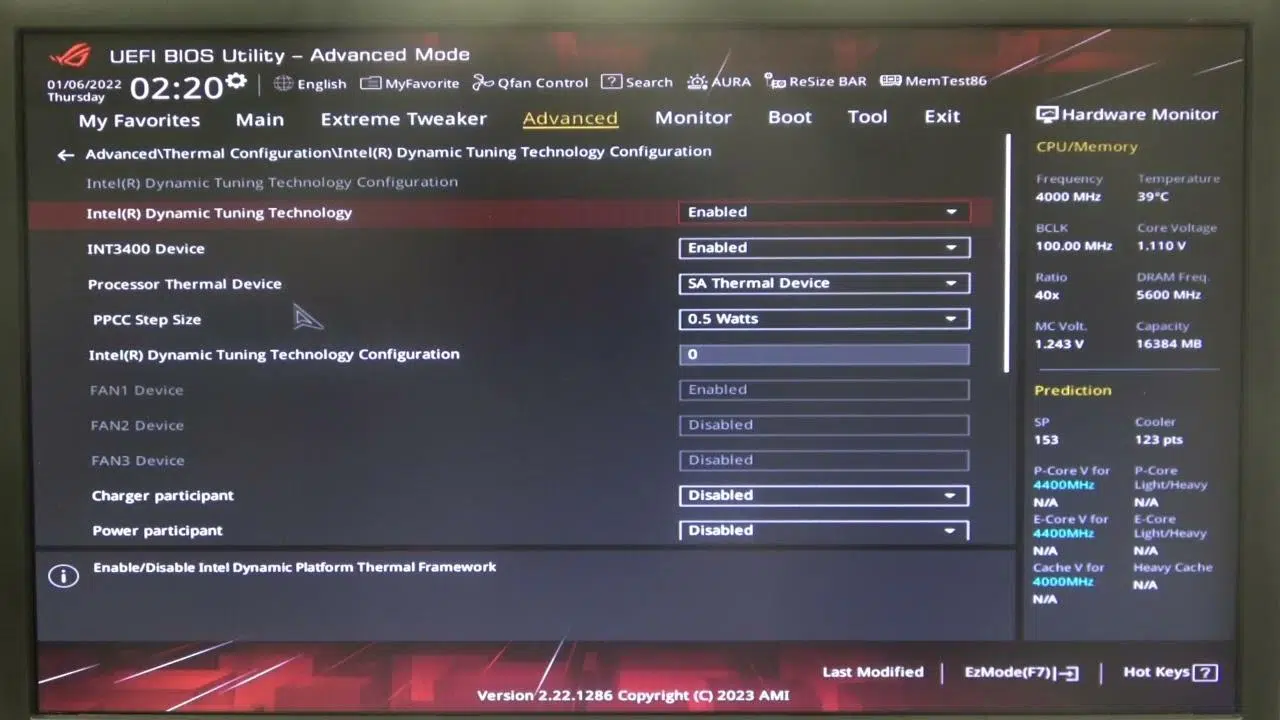
If you've ever seen a package called the Intel Dynamic Tuning (DTT) driver appear on your motherboard's product page and wondered what was going on, you're not alone. More and more desktop users are seeing it alongside the typical chipset drivers and wondering whether they should install it, what it's actually for, and if it affects performance, especially in games. This question is understandable because, historically, this set of drivers and services has been primarily associated with laptops and compact devices like Intel NUCs.
In parallel, with the arrival of Intel APO (Application Optimization Overview) in certain 14th generation Core processors for the LGA 1700 socket, the term Dynamic Tuning (DTT) is making a strong comeback. APO is a feature within the DTT ecosystem that promises double-digit performance gains in specific games, but it also demands very specific hardware , software, and BIOS requirements. Furthermore, tests have emerged on laptops with Intel Arc A350M processors showing that disabling DTT significantly increased performance in some cases, further fueling the debate about when it's advisable to use it and when it's not.
What is Intel Dynamic Tuning (DTT) and why is it on your motherboard?
Intel describes DTT as a set of drivers and applications that system manufacturers can use to fine-tune how the system behaves to maximize its potential without exceeding power and temperature limits. In practice, this is a software layer that applies dynamic policies to the processor and platform to balance performance, power consumption, and acoustics—something especially valuable in laptops and thermally optimized designs.
According to Intel's own definition, DTT allows, among other things, on-the-fly optimization of the processor's turbo states and the system's power and temperature states to sustain the best possible performance. Furthermore, it can adjust the processor's peak power based on the system's power delivery capacity at that moment, ensuring the smoothest possible user experience without causing throttling due to electrical or thermal limitations.
A third, lesser-known pillar of DTT is its ability to dynamically mitigate radio frequency interference (RFI) . This can translate into improved performance of Wi-Fi or other communication subsystems by reducing electromagnetic interference in environments prone to it. This nuance is more relevant in the compact chassis typical of the portable world than in desktop towers with greater physical separation between components.
The real case: drivers that appear, services that are installed
It's not uncommon to see several packages listed under Chipset when visiting the drivers section of your motherboard (for example, an ASUS motherboard for the Intel Z690 platform). These usually include Intel Serial IO Software , Intel Management Engine Interface (MEI) , the Intel Chipset Driver , and, more recently, the Intel Dynamic Tuning Technology (APO) Driver . Installing the latter can add a service called "Intel(R) Innovation Platform Framework Service" to Windows , which many people find unfamiliar.
This service is part of the framework that DTT uses to apply and coordinate dynamic hardware policies. Even if you don't install additional Intel software, the service may remain running in the background, waiting for profiles or instructions on how to manage resources. The mere fact that it's active doesn't mean it will necessarily reduce performance; its effect depends on the active policy and the device in question (laptop versus desktop, for example).
A user with a "KF" series CPU (without an integrated GPU) and a Z690 motherboard noticed that the driver had reappeared on their motherboard's website after years of absence and wondered if it was necessary to install it. Another curious detail is that a friend with a similar PC , but a different motherboard, didn't have the "Innovation Platform Framework Service," indicating that they probably hadn't installed DTT. Both situations make sense: manufacturers can choose whether or not to offer DTT on their websites and, even within the same platform, change their recommendations over time.
How DTT works under the hood and how it compares to other technologies
To better understand it, it's helpful to compare DTT with equivalent solutions. Essentially, the approach is reminiscent of AMD's SmartShift or NVIDIA 's Dynamic Boost . The idea is that, without altering the voltage (that is, without entering a traditional Boost state that could excessively increase power consumption and heat), the system intelligently redistributes the power budget between the CPU and GPU, or between different blocks, depending on the current load, providing the agility to prioritize what's most efficient at any given moment.
On desktop computers, where there is usually thermal and electrical headroom, these mechanisms have less visible impact ; on laptops, however, the correct strategy might involve maintaining a high GPU frequency for longer at the expense of reducing the CPU frequency, or vice versa. DTT acts as an arbiter to ensure the system doesn't exceed its limits, modulating the frequency and, consequently, sustained performance.
An important point is that, even though we're talking about dynamic optimization, DTT relies on profiles and rules predefined by the system manufacturer or other Intel software components. This layer of profiles explains why behavior can vary so much from one system to another, and why sometimes a BIOS or driver update drastically changes the experience.
The Intel Arc A350M case: when disabling DTT increases FPS
Tests have surfaced of the Intel Arc A350M , a laptop GPU, showing a significant performance jump when Dynamic Tuning is disabled , even doubling in some scenarios. In these screenshots, GPU usage with DTT enabled hovered around 50% ; disabling it boosted usage to over 90% , which is the expected behavior for maximizing GPU capacity (see the analysis of dwm.exe and its GPU usage ). Simultaneously, CPU load decreased when DTT was disabled.
It was also observed that GPU frequencies were somewhat lower with DTT enabled. This suggests that, in that specific hardware and driver combination, the active DTT policy was being overly conservative , either due to excessive caution or a suboptimal configuration. It's worth noting that the Arc A350M integrates 6 Xe cores and 6 Ray Tracing units , with a graphics clock of 1150 MHz that can easily exceed 2 GHz in games; in our tests, peaks of 2,2 GHz were reached with DTT disabled.
The most likely explanation is that the drivers and profiles for that batch weren't fully optimized yet . In fact, graphical glitches and stability issues have been reported in some titles with Arc GPUs in their early stages. Under these circumstances, it's reasonable to expect Intel to improve its drivers and policies to get more out of its Alchemist GPUs with future updates.
What is Intel APO and why does it go hand in hand with DTT?
Under the name Intel APO (Application Optimization Overview) lies, for now, a feature exclusive to certain 14th generation Intel Core desktop processors with LGA 1700 sockets based on Raptor Lake Refresh. The officially supported models are the Core i9-14900K , Core i9-14900KF , Core i7-14700K , and Core i7-14700KF . It's not purely a hardware feature , but rather a set of specific profiles and rules that optimize how CPU resources are used in particular applications.
Compared to other optimization layers, the closest parallel is that of GPU drivers that include per-game profiles . APO operates at that level: for compatible titles, it forces a thread and frequency allocation strategy that maximizes performance within power constraints. And this is where DTT comes in: APO is, in effect, a profile within Dynamic Tuning that dictates how to distribute workloads and adjust core clocks in real time.
This approach coexists with Intel Thread Director , which suggests to the operating system how to distribute threads between performance cores (P-cores) and efficiency cores (E-cores). The difference is that, while Thread Director recommends , APO imposes a specific strategy on applications for which a profile exists. Thus, it can increase the frequency of the important P-core and reduce the frequency of the E-cores if they are not contributing, achieving higher frame rates in single-threaded scenarios without spikes in voltage or temperature.
Why APO accelerates so much in some games (and not in others)
Intel announced initial APO support for two well-known titles: Metro Exodus and Rainbow Six Siege . Both are older games and, crucially, are DirectX 11 -based . This choice is not accidental. DX12 typically handles multiple command queues , allowing workload to be distributed across multiple threads and cores. DX11, on the other hand, tends to concentrate more work on a single command list that relies on a single, powerful thread, so increasing the frequency of the P-core that handles that thread usually yields direct performance gains.
In this context, APO identifies the core that handles the critical load and boosts it , while reducing the rest as needed to stay within the performance envelope. It's logical, therefore, that we see double-digit improvements in DX11. It remains to be seen whether the benefit is as significant in more modern APIs like DX12 or in older ones like DirectX 9 , which are also prone to single-threaded bottlenecks. The expectation is that, over time, more compatible profiles and games will become available.
Requirements and activation: BIOS/UEFI, app and manufacturer support
To take advantage of Intel APO, you need to meet several conditions. First, a compatible processor (at the time of writing, limited to the four models mentioned from the 14th generation K/KF series). Second, support in the motherboard and its BIOS : the option related to Dynamic Tuning/APO must be available and enabled, which may require a firmware update depending on the model.
The third ingredient is the software: the application must be downloaded from the Microsoft Store in Windows 11. Intel does not offer it for direct download from its website, nor is it currently available for other operating systems . From this app, you can enable APO globally or, better yet, manage it on a per-application basis to limit it to titles with validated profiles and avoid side effects in unsupported programs.
Once activated and with a compatible game, you'll have the option to have APO applied automatically or manually for each title. Intel warns that, while the goal is to improve performance, it cannot guarantee that crashes or errors won't occur in all scenarios. Therefore, it's advisable to test each game and keep your drivers and BIOS up to date to benefit from bug fixes and new profiles.
Should you install DTT on a desktop? Practical considerations
If you're using a desktop PC with good cooling and ample power supply, DTT isn't usually essential . In many cases, the benefit is marginal because the platform has plenty of thermal and electrical headroom, and the motherboard firmware already handles turbo states well. Even so, some motherboards list it to offer compatibility with future features (like APO), so it might make sense to keep it enabled if you plan to use those optimizations.
Conversely, if you've read about cases like the laptop with the Arc A350M chip where disabling DTT doubles performance, you should understand that this result is based on a very specific hardware, profile, and driver scenario . On different systems, DTT can help prevent thermal throttling and maintain a more stable frequency. The sensible approach is to test, measure, and decide: if you notice significant drops in GPU or CPU usage with DTT enabled in an environment that matters to you, and you're not relying on APO, you can consider disabling it.
A practical point: If, when installing the Intel Dynamic Tuning Technology (APO) Driver , the " Intel(R) Innovation Platform Framework Service " appears and you don't use the app or need profiles, you can uninstall or disable the package from Windows as you would with any other software, or revert to the previous step. However, if you plan to activate APO later, you will need it again.
Typical list of chipset drivers you can see
When visiting the drivers and tools section of your motherboard, and clicking on Show all within Chipset, you will often find these four packages, which many users download to ensure they don't miss anything:
- Intel Serial IO Software
- Intel Management Engine Interface (MEI)
- Intel Dynamic Tuning Technology (APO) Driver
- Intel Chipset Driver
Installing all four isn't strictly required, but it ensures you have everything you need . Specifically, the Dynamic Tuning plugin is the one that introduces the aforementioned Innovation Platform Framework Service . If you notice any unwanted changes in your workflow or games after installing it, you can remove it and see if things revert to their previous state.
Relationship between P-cores and E-cores: the role of DTT/APO
In 14th generation Core processors, DTT and APO can manage not only the distribution of processes between performance and efficiency cores, but also their relative frequencies within the power envelope. Without adjusting voltage, it's possible to prioritize a P-core that handles the critical queue of a game and reduce the frequency of underutilized E-cores so they don't waste thermal resources (you can see how to adjust core parking with ParkControl). This fine-tuning philosophy explains the occasional performance gains in compatible titles.
If APO is a Dynamic Tuning profile, it means you should see options related to DTT/Dynamic Tuning in your BIOS and enable them. Each motherboard manufacturer presents these options differently, so it's crucial to check the manual and website for your specific model. If your motherboard doesn't offer this option, check for a firmware update that adds it.
Can DTT slow down gaming performance?
The short answer is: it can happen , but it depends on the hardware, the active profile, and the drivers. The Arc A350M example showed a policy that limited GPU usage to approximately 50%, and disabling it increased usage to over 90% with a significant improvement in FPS. This isn't a universal rule, but it illustrates that an overly conservative DTT profile can throttle excessively due to prioritizing power consumption/temperature or because of a bug.
If your absolute priority is performance in specific games and you don't use APO or other related features, it's worth testing with and without DTT, measuring CPU/GPU usage, frequencies, and FPS. If with DTT you see lower thermal peaks and less noise without any noticeable performance drop, you might prefer to leave it enabled; if, on the contrary, you notice a drop in performance , disabling it may be the best temporary solution until the manufacturer releases improved profiles or drivers.
Good practices and recommendations for use
First, keep your motherboard's BIOS/UEFI and chipset, DTT, and GPU drivers up to date. Many of the behavioral differences you see online are due to different firmware and software versions . Second, if you're going to use APO, do it on a per-application basis and focus on titles that Intel has validated, at least initially.
Third, if you install the Intel Dynamic Tuning Technology (APO) Driver just to have the package "just in case" and notice new background services, verify its actual impact using Task Manager and game benchmarks. Don't assume that its presence will worsen performance; often its footprint is minimal unless a specific profile strongly activates it. Measuring before deciding is key.
Finally, on desktop computers with generous thermal and electrical headroom, the benefit of DTT may be small, but if you plan to experiment with Intel APO on the i9-14900K/KF or i7-14700K/KF , you should keep the ecosystem installed, enable the option in BIOS, and then manage which applications benefit from the profiles using the Windows 11 app.
Intel Dynamic Tuning is much more than a simple driver : it's a layer of power, frequency, and load-sharing policy management that, when properly tuned, helps maintain performance within safe limits and serves as the foundation for optimizations like APO. Its actual impact depends on the system context , the user profiles in use, and the maturity of the drivers, so it's wise to test, update, and make a decision based on the available data.


Passionate writer about the world of bytes and technology in general. I love sharing my knowledge through writing, and that's what I'll do on this blog, show you all the most interesting things about gadgets, software, hardware, tech trends, and more. My goal is to help you navigate the digital world in a simple and entertaining way.