Nowadays, Internet technology is developing rapidly. As a result, web browser developers are not lagging behind and try to optimize their products for the latest devices and installed operating systems.
One of the most interesting new features today is the browser Vivaldi.
Users' comments on the new software available on the Internet are clearly divided. Many love it, while others are wary of so many features. Here we will take a look at everything related to this Vivaldi browser, which is already on the lips of many.
What is Vivaldi
Vivaldi is a software Web navigator Free and cross-platform developed by Vivaldi Technologies, a company founded by Opera's historic co-creator and former CEO, Jon Stephenson von Tetzchner.
The browser aims to meet the connectivity needs of tech-savvy users, heavy Internet users, and former Opera browser users who are not happy with the recent transition.
Vivaldi aims to revive Opera's old, highly popular features and introduce new, more innovative ones. The browser is regularly updated and has gained popularity since its first preview released on January 27, 2015.
The interface uses HTML5, Node.js, React.js web technologies and is therefore displayed using the Blink HTML rendering engine, which is also used to display web pages.
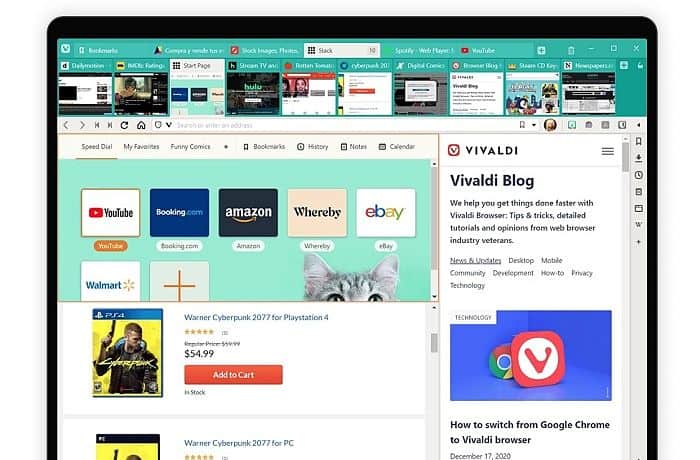
Vivaldi It has a side panel to manage bookmarks, downloads, manual or copied notes from pages visited, contacts, messaging and web pages chosen by the user.
Tabs can be pinned, stacked, and display web page preview thumbnails. commands Quick shortcuts allow you to access searches, history, open tabs, or certain settings.
The speed dial that opens with each new tab allows you to manage certain bookmarks visually, in groups that can also contain folders. Vivaldi supports Chrome extensions and Opera extensions.
It also has a private browsing mode, which allows you to leave no browsing traces locally.
What can Vivaldi be used for?
Vivaldi It consists of a simple, flat design but with a customizable graphical interface, which allows you to hide or move most of the elements. By default, the interface is colored with the dominant color of the visited site.
Let's see what you can use Vivaldi for.
1. Web Browsing
This, of course, is its main function. The central idea of Vivaldi is to provide the user with all the necessary tools to make browsing the Internet easier.
As we have already said, Vivaldi is aimed at intensive users, who spend hours online every day, whether for work or for a hobby. It is currently on version 3.7, which shows signs of being much faster than its predecessors, and is a serious competitor to Chrome and Opera.
2. You can stack the lashes
When we browse the web we usually have several tabs open to move from one site to another, but sometimes we have too many tabs and it is clearly a mess.
To solve this problem, Vivaldi offers the function Stacking tab which groups tabs into folders like a stack of apps on smartphones.
The usage is simple, just drag and drop tabs on top of each other. For example, you can stack your tabs into folders called “work,” “games,” “videos,” etc., and this allows you to focus on the same topic instead of getting scattered.
You can also do it automatically, stacking tabs by Hosts, stacking tabs from the same domain.
3. You can have multiple sites in one tab
This feature is different from the tab folders we just looked at. This allows you to open multiple sites in the same tab, meaning the tab display is split by the number of sites you have open.
If some are “responsive”, they will automatically switch to mobile mode. To open multiple sites on the same page, all you have to do is press the CTRL key.
4. You can use trash can for your tabs
Sometimes it happens that you close tabs too quickly, and that's why Vivaldi has a trash can feature. You can reopen the last 19 tabs that were closed by using the CTRL + SHIFT + T key combination or by simply clicking on the trash can icon.
5. Personalized results
Vivaldi is inspired this time by a function available in Mac, Spotlight, and the mix with the auto-complete system offered by Chrome.
Basically, you start typing in the navigation bar and thanks to the F2 key, Vivaldi offers you a result according to your search, your history or your favorites. Note that it is also possible to create your own shortcuts from the application settings.
6. Mouse movement shortcuts
Jon Von Tetzchner which is at the forefront of Vivaldi, has decided to integrate shortcuts using mouse movement, that is, by making certain gestures or rather traces with your mouse, it is possible for example to open or close a tab, refresh a web page, access your history, etc.
To use this feature, simply hold down the right mouse button and draw a previously saved diagram to perform an action. A very useful feature.
7. You can use its built-in notepad
Here's another pretty handy feature. You're browsing the web and an idea pops into your head, you can immediately jot it down using Vivaldi's built-in notepad hiding in the left sidebar.
It's also useful when you're giving a presentation and just want to gather information. It's not just annotating a web page, but rather a stand-alone note that you can refer to at any time.
Vivaldi Features
- Easy and intuitive installation.
- The software has a high level of customization.
- Tabs allow stacking for easy navigation through a large number of open pages.
- Mini tabs allow for better multitasking, allowing you to view multiple tabs side-by-side.
- Extremely useful note-taking tool integrated into the browsing experience.
- Version 3.7 is much faster than its previous versions.
- Vivaldi can be used on Macs with M1 processors.
- Sidebar for social networks, bookmarks and favorite websites.
- It has mouse shortcuts. A great addition.
- Vivaldi does not monitor or track your web activity.
Advantages
- Well designed to be visually appealing and customizable.
- With each version, very useful new features are introduced.
- Quite stable and fast.
- High level of customization.
- It is always constantly improving.
- Vivaldi works on Windows, macOS, Android y Linux.
- Use Chrome extensions.
- Status bar with several very useful extras.
Disadvantages
- Vivaldi is not available for iOS, although yes for macOS.
- Has no client VPN integrated, something Opera excels at.
- Although its performance is very good, it is still behind the competition.
- Some features overlap in functionality.
Plans and Prices
The Vivaldi browser is completely free. Just go to its official website and download it. It is currently at version 3.7.
How and where to download Vivaldi
As we said above, Vivaldi is compatible with Windows, Mac and Linux. And on mobile phones, with Android. Let's see each download process separately.
Download Vivaldi on Windows
- In her official download page, you will have the option to choose the operating system of your machine, in this case Windows, and click the green button.
- The executable file will be downloaded to your machine, in this case, it is an .exe. Once the download is complete, open it.
- When you open it, the installer will appear, accept the license agreement and click install.
- After the installation is complete, the Vivaldi browser opens automatically.
- Start customizing and making adjustments to your liking.
- Done, you now have Vivaldi on your Windows.
Download Vivaldi on Mac
- In her official download page, you will have the option to choose the operating system of your machine, in this case Mac, and click the green button.
- The executable file will be downloaded to your machine, in this case it is a .dmg. Once the download is complete, open it.
- The license agreement will appear, accept it.
- Then, the Vivaldi icon will appear in the .dmg window, take it to “applications”.
- After the installation is complete, Vivaldi opens automatically.
- Start customizing and making adjustments to your liking.
- That's it, you now have Vivaldi on your Mac.
Download Vivaldi on Linux
- In her official download page, you will have the option to choose the operating system of your machine, in this case Linux, and click the green button.
- The installation package will be downloaded to your machine, in this case it is a .deb or .rpm. Once the download is complete, open it.
- When you open it, click install.
- Enter your password.
- Once the installation is complete, you can open the Vivaldi browser and make any customizations and adjustments you wish.
- Done, you now have Vivaldi on your Linux.
Download Vivaldi on Android
- Open the Google Play Store on your mobile.
- Look for Vivaldi, you will recognize it by its logo.
- Tap “Install”.
- Once it finishes downloading, open the app.
- Accept the “Terms of Use”.
- You can now use Vivaldi on your Android.
Opinions from users who have used Vivaldi
Below we present several opinions from users who have downloaded Vivaldi and tested its functionality and features.
- Christopher Fair:
“I’ve been using Vivaldi for about a year now, it’s quite difficult for me to use other browsers. It’s fast, flexible and customizable. It’s hard to believe this is free.”
- Chris Cummings:
“Excellent browser! Palemoon is my default choice and Waterfox is a backup. Vivaldi has won for both ease of use and customizability.
If Vivaldi had a password manager like palemoon and waterfox, it would be my default. This browser is an incredible improvement, IMHO, from the other big name browsers.
The only thing I really like is the ability to TURN OFF search suggestions and the annoying dropdown menu with ease. I stopped using Firefox, Edge, and others because of this. Opera is fine. Sure there are some negatives, but overall it's great.
- Ken:
“I switched to Vivaldi a few months ago mainly because: 1) Syncing across devices is great, 2) UI takes a bit of getting used to, but is feature rich! 3) I like the Page Tiling feature, 4) Very fast on the Linux box compared to Chrome, (though speed is mediocre on Android) and lastly 4) It’s not owned by the Chinese!”
On the downside: 1) Android's speed dial icons look absolutely terrible, compared to Opera, 2) the webmail feature is too basic to be of real-world use. 3) The bookmark manager can be confusing.
- Catweazle:
“It is true that the default UI is not one of the best, but the great advantage of Vivaldi is precisely that you can customize this UI more than in any other browser, adapting it to the millimeter to your personal preferences. No 2 users have the same Vivaldi”
Vivaldi Browser Alternatives. Top 5 of This Year
Vivaldi It is still a valid option in these times, especially for people who use the Internet continuously and for a long time. People who are connected most of the time will make better use of it than the occasional user.
However, for those who have not wanted to install Vivaldi or did not find it sufficient, here are several alternative browsers.
1. Google Chrome
Google Chrome is one of the best and most popular web browsers for all operating systems. It is the most popular web browser for many reasons.
First of all, it is the fastest web browser for Windows 10/8/7 and it is also very easy to use. Google Chrome browser comes with Google security and is trusted by millions of people around the world.
Most people have a Google account through which they use Google services like Gmail, Google Maps, and many others. Google Chrome also makes it easy to sync Google apps.
It allows you to continue where you left off while working. Google shows personalized data to the user that gives them a certain specialty.
It also has many other features such as incognito mode, and the number of extensions that you can download to make your browsing much more enjoyable.
It's no wonder that Google Chrome tops the charts of web browsers worldwide.
2. Mozilla Firefox
Mozilla Firefox is the second most popular web browser and has always been a mainstay in the browser industry. It is considered to be the most secure internet browser available on the market.
There are many spies operating on the Internet. Web browsers track your information as you read an article on a website. The Mozilla Firefox web browser offers the assurance of protecting your data from these hackers.
It has browsing features that protect you from cyber attacks. By using Mozilla Firefox, you can easily browse Wikipedia, YouTube, and many more websites. There are also many visual tabs and add-ons.
Did you know that Firefox is open source software? Mozilla Firefox is one of the most appreciated open source web browsers developed by the Mozilla Foundation.
Considering all the above features, it surely has to be at the top of your list of internet browsers.
3. Opera
The web browser Opera It is also a great web browser that you can consider using. Before Chrome and Mozilla came along, almost everyone used Opera as their primary web browser.
The web browser Opera It has VPN features that allow you to access the web discreetly. It also comes with a crypto wallet that can work with cryptocurrencies, .
The Opera web browser is easy to use and has a simple form. It comes with 2 themes, the dark mode and light mode. You can also pick up where you left off, thanks to its sync feature. Lastly, it also offers a personalized news panel.
Another reason to choose Opera web browser is the built-in apps. Opera browser offers you some built-in apps like WhatsApp e Instagram that you can easily use without having to go to their website.
Apps are located on the left side panel of the browser. This built-in app feature makes it unique and puts it at the top of the best browsers.
4. Microsoft Edge
The web browser Microsoft Edge is gaining a lot of popularity these days. The browser was first developed for Windows 10/8/7 operating system and then in 2017 it was released for Android and iOS devices.
Microsoft Edge is a reliable web browser developed by Microsoft and has millions of users worldwide. Anyone can easily use this web browser, thanks to its interesting features and design.
Microsoft's new browser has a lot of features to offer. Its appearance makes it one of the best web browsers for Windows 10.
And like its competitors, it has a safe or private browsing mode, and a vertical tab setup that makes things easier, and gives it a certain originality.
5. Duckduckgo
Currently the browser DuckDuck is not available for the Windows 10 operating system, but is available as a Chrome extension that gives you the same look and feel. Together with the Chrome extension, the DuckDuckGo It is also available for mobile devices.
The Chrome extension comes with all the features that DuckDuckGo browser has, such as ad-blocking. Although Google Chrome and Mozilla Firefox are the most popular web browsers and top the list of best web browsers, many users still avoid using them due to other privacy concerns, such as ad-blocking.
Duckduckgo browser is a privacy browser. It promises to keep your browsing process safe and secure by using encryption techniques that block ads on websites.
A unique feature of this web browser is that it displays your privacy rating for each site. The fire key can clear all tabs in one go.
You can browse the Internet privately without sharing your data. Unique encryption makes it one of the most secure web browsers available on the market. If you want to not be tracked by Google or other websites, DuckDuckGo is the best web browser.
FAQs
Many users who have not yet used Vivaldi have some of the following questions.
How good is the Vivaldi browser?
Vivaldi is a great browser with few drawbacks. It's fast and gives users a lot of control over the browser experience, while also including some useful features. Plus, it does well with both privacy and security.
Is Vivaldi based on Chromium?
Yes, Chromium is the basis for the Vivaldi browser and other browsers.
Is Vivaldi safe?
Vivaldi is considered one of the most secure browsers out there right now. Its updates are kept up to date and on a regular basis. Vivaldi is based on Chromium, and they maintain major versions of Chromium to keep the platform secure.
How is Vivaldi better than Chrome?
Vivaldi It has a tiled view, which gives you a great advantage when browsing. Also, you can stack tabs, and you can view multiple tabs within another tab. This is something that Chrome doesn't have.
Conclusion
You may also like What is Recuva? Uses, Features, Reviews, Prices
Vivaldi is a great browser with few drawbacks. It features impressive customization and access to Chrome's vast library of extensions, while being fast and light on RAM consumption compared to other browsers.
It also includes quite a few useful features, such as notes, tab stacking and sorting, and the ability to permanently pin websites to the sidebar.
When it comes to security and privacy, Vivaldi once again receives top marks. It is updated frequently and does a good job of blocking malicious websites.
It also collects little data about its users and presents a clear overview of which third-party services you should disable if you want to maximize your privacy.
The only drawback of the browser is the lack of an iOS version. The developers have stated that this is something they are working on, but due to Apple's strict requirements for browsers on the platform, it will take some time to release.

My name is Javier Chirinos and I am passionate about technology. Ever since I can remember, I have been interested in computers and video games, and that passion has turned into a job.
I have been publishing about technology and gadgets on the Internet for over 15 years, especially in mundobytes.com
I am also an expert in online marketing and communication and have knowledge in WordPress development.