
Step by Step Guide: How to set up a Chinese radio? you know how to do it. The idea of this article is to teach you those Tricks that you may not know yet.
Driving cars has had great innovation and therefore a huge advance Over the years, adding new and better technologies on each occasion, in previous years our radio was only used to listen to music on CD or listen to some type of station, but this has been changing drastically, reaching today to the point of being able to perform searches on Google from our own radio.
New radio models feature a operating system AndroidThis is due to the excellent compatibility that this operating system brings, and that it is very simple and easy to develop new applications, and install them through an APK or from the store itself.
This software tends to be a bit archaic due to the constant release of different mobile devices at an almost breathtaking speed scale, this is why you are required to know how you should and can update your radio.
We invite you to read: 6 Alternatives to Mario Kart Tour: Adventure, Racing and Vehicular Combat Games
How to set up a Chinese radio with WIFI?
This will depend on the specific model of your device, with which you may have the ability to connect to a WIFI network, making it much easier and simpler to install applications, and in our case, updates to the system itself.
These updates are important and transcendental when using our device, since they correct errors or failures, in terms of earnings, security, performance or visual section, if you have the option to update do not hesitate to do so, to carry out this procedure you must be connected to a WIFI network.
Once you have this, turn on your radio and go to the settings section, here go down and look for the option “about”, there you must enter and in the update section click, here you can see if there are new updates or not, in case of having any, click lightly where it says "install".
It will immediately ask you to accept the installation terms and you will get a warning not to turn off the radio or disconnect it from the power supply, so that the process can finish as quickly as possible.
How to update a Chinese radio externally via USB?
In order to update your radio externally, you mainly need your computer and the help of a memory. USB, on the internet there is a huge library that can help you with the Chinese radios update, you just have to search for your specific model in the search bar and you will find the files.
In this same way you can do the APKs installation on your device, but you should be careful when downloading any kind of content, first of all since the application can end up being fake, which can cause serious damage to your computer or even fill it with some kind of nasty virus, which means that you will have to do a more tedious procedure afterwards.
Once you get and download the update file you need, you should know that these usually They do not weigh more than 10mb, you simply do this from your own computer, the file will come in compressed format and you will have to decompress it, then after copying the file “.img” to the root of your USB flash drive.
Then proceed to connect the USB to the computer and go to the settings section, and where it says updates, we tap on it and it will ask us for the new installation file, we look for it and choose the one that has the format “.img”, and we proceed to accept, with this, you will start the automatic installation process and it will be finished.
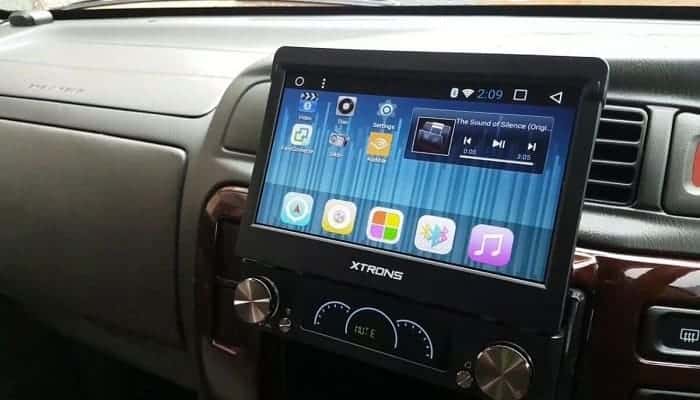
Things to consider before doing this procedure
How to set up a Chinese radio? at the time certain things come out updates For our devices, they rarely decline experience, since these as we already know are always to correct errors or add more functions than those that already existed, in the case of our radio, or playback device, these error corrections can be intended for the interface.
To do this series of steps you need to know that the car must be on and in the minimum state, just turn it on and leave it like that, while you perform the update, it is extremely important that there are no power outages during the process, because this can lead to total damage to your sound equipment.
If you already had APKs previously installed and you want to keep them, you can perform a support from their relevant installers To have them as a kind of insurance and avoid bad times, the duration of the update will depend on the model and style of the radio, since if it is a very old model it will be more delayed, but generally this takes us more than 20 minutes to achieve.
If you have any questions or want to know a little more about what the upgrade, You can find out the name of the module online along with the update and check the inventions and whether it is really worth installing.
Android Auto It has been considered in our times as the latest innovative element of this peculiar company, which every day needs a new way to optimize the usability and effectiveness of the equipment, containing its capabilities.
Working hand in hand with the Google Assistant, this is about a program that will allow users to manage very important applications on the device. while they stumble while handling or inside their car.
Thanks to all of the above, many drivers will not have to worry about diverting their concentration to use their mobile phone, since now they will be able to perform the most frequent tasks through arrangements using the voice.
Step by step to achieve wireless Android Auto connection to the vehicle.
How to set up a Chinese radio? You should know that the latest generation of cars have acquired a wide range of capabilities that allow the use of other connectors while manipulating, in order to make the driving experience a real pleasure.
This is why, to achieve synchronization of the mobile device of your choice with your own car, you will have to make the decision What is the peculiarity of the connection that you love the most?, and then execute it in the most comfortable way possible.
Nowadays, connections with wireless features are the most notable, since they allow the total independence of both devices, which saves a revealing amount of time for those users who use both.
By following all the steps above, you will be able to automatically synchronize this vehicle to the android auto app: Turn on the car, activate the Bluetooth on your mobile device and press on the device that identifies the car to link it with your cell phone.
Once you have reached it, you must proceed to open the application already indicated on the phone and wait for the notification to appear automatically on the car screen, so that when you select it, the synchronization between both devices is completed.
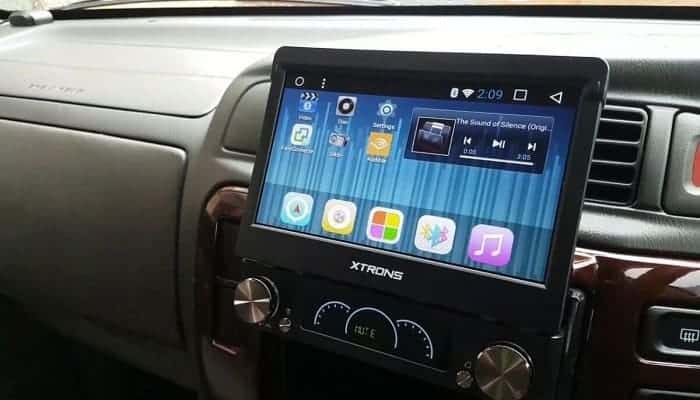
Use Android Auto to search while driving.
One of the greatest advantages of this type of program is that it allows you to do an endless number of tasks with simply express the sequence with the appropriate words and tone, including browsing the Internet.
Whether you want to search for a colorful image using Google, or simply get the most important information within the browser while you are driving, you should know that thanks to this app all this is possible. To achieve this, you have two options that we will describe below.
1.- Use Google through its assistant to control the Chinese radio in your car.
We had previously suggested that Android Auto works hand in hand with Google's assistant, since by keeping the car driving, it is much more effective to communicate verbally with the device to achieve tasks.
At the bottom of the basic program interface you can find the microphone icon, which will allow you to interact directly with “Ok Google”, simply by expressing the order you want and letting the assistant do all the work, handling certain things including your vehicle's radio.
2.-Through the program's favorite tensions.
There is also the possibility of using the Google search engine by using the preferences established by the Android program, since its interface also has direct access to those applications that the consumer uses frequently within the car.
Once the Android Auto application is open, you must Try to set the Google search icon among the most prominent ones, so that you only need to press on it to navigate.
In this way, and clearly stating the orders with the correct form and tone, you can proceed to browse to obtain relevant information or look for a game like Pacman so that your companions can entertain themselves during the journey.
As far as tasks are concerned, there is no limit that can stop you from using any other type of application in the car, as you can even work with the music player, the radio, the calendar, Google Maps, among others.
It is very important to mention that Android Auto works based on the provisions determined by each user, so in case your children also want to navigate within this application, we advise you to use the children's search engine that the Google company has planned for them.
In conclusion, and thanks to these new utilities, you will no longer have to stop to use the browser or the app of your choice, nor will you have to risk an accident by using your phone to configure a Chinese radio.
Finally we invite you to read: Facebook Games Not Working. Causes, Solutions and Alternatives

My name is Javier Chirinos and I am passionate about technology. Ever since I can remember, I have been interested in computers and video games, and that passion has turned into a job.
I have been publishing about technology and gadgets on the Internet for over 15 years, especially in mundobytes.com
I am also an expert in online marketing and communication and have knowledge in WordPress development.