- Samsung Magician allows you to check if a Samsung SSD is genuine using its database and the authenticity status associated with the serial number.
- Counterfeit 990 Pro cards can match performance in short tests, but they fall apart in long transfers and use different controllers without DRAM.
- In addition to the software, it's advisable to check the physical details of the SSD, the color of the PCB, and only buy from authorized channels to reduce the risk of counterfeiting.
- Older versions of Magician or driver issues can cause false positives, so it's crucial to update and also check with official support.
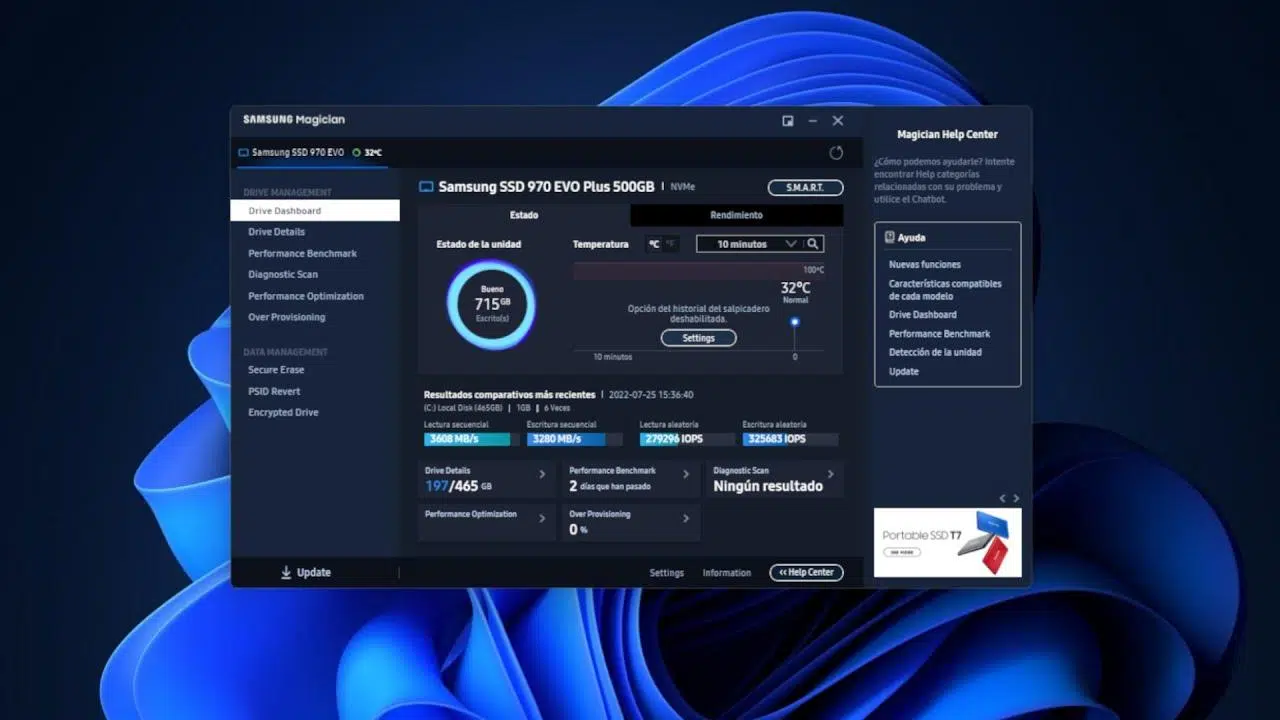
If you're thinking about building a new PC and have your eye on a Samsung SSD , it's normal to worry about ending up with a counterfeit drive that passes itself off as an original model . The market is flooded with very well-made copies, some so good that they perform almost identically to the genuine product… at least in initial tests.
Furthermore, it's increasingly common to buy hardware from marketplaces or third-party sellers, where genuine products, returns, and counterfeit goods are mixed together. Fortunately, if you'll be able to connect the SSD before paying or already have it installed in your computer, you have several ways to verify the authenticity of a Samsung SSD using Magician and other fairly simple checks.
Why are there so many fake Samsung SSDs and why are they so dangerous?
Recently, Samsung has been forced to issue a public statement because counterfeit 1TB Samsung 990 Pro SSDs have begun circulating that, at first glance, appear completely genuine. The problem isn't just that they bear the Samsung sticker; the deception goes much deeper.
These clones offer remarkably close performance to the original model. A genuine 990 Pro can reach around 7.453 MB/s in sequential reads , while some copies hover around 7.255 MB/s. In write speeds, the original is around 6.953 MB/s , compared to approximately 6.090 MB/s for some fakes. In other words, in quick benchmarks or short tests, the difference may seem minimal.
To complicate matters further, many of these counterfeit drives also advertise a 1 TB capacity , as promised on the box and in the operating system. We're not talking about those cheap scams that claim to have 1 TB but only deliver 128 GB; here, the storage figure matches, leading many people to lower their guard and assume everything is legitimate.
The most unsettling aspect is that Samsung Magician's own software identifies these SSDs in its interface as "990 Pro ," using the actual model name. The crucial difference is that, alongside the device information, the program clearly states that "it is not a Samsung product" and completely disables diagnostic functions and tools specific to genuine drives.
To make matters worse, there isn't just one clone, but several versions of counterfeits with vastly different qualities : from units that offer acceptable performance to others that are a disaster, extremely slow, or even completely unusable. This further complicates detection, because not all cases behave the same way.
How Samsung Magician detects if your SSD is genuine
Samsung includes an official tool called Samsung Magician with its SSDs , which is used to manage, update, and diagnose the brand's drives. Among its functions, one of the most important today is authenticity verification.
On models that explicitly include this feature, when you connect a compatible Samsung SSD and open Magician, the program's main screen displays the drive's serial number along with an indication such as "Genuine" or "Not Genuine" (the wording may vary slightly depending on the version and language, but the general idea is the same). This is what many buyers use to verify if their drive is genuine.
If the SSD is genuine, you'll clearly see next to the serial number that the product is authentic (Samsung's way of saying it's genuine) . However, if Magician detects that the drive isn't in its database or that there's something wrong with its internal identification, it will display a message indicating that it's not genuine and will typically prevent you from running advanced tests, applying certain optimizations, or updating the firmware.
In the specific case of the 1TB 990 Pro copies, Magician labels them as "990 Pro" because the information reported by the controller is manipulated to impersonate that model. However, when the software compares this information with its internal database, it detects that the drive is not manufactured by Samsung and blocks the diagnostic tools, making it clear to the user that something is amiss.
Therefore, if you have any suspicions, the first thing you should do is install the latest version of Samsung Magician from the official website , connect only the suspected SSD (if possible), and check what message appears on the main screen next to the model and serial number.
Technical differences between a real 990 Pro and a fake
Regardless of what Magician says, counterfeit Samsung 990 Pros have significant internal differences compared to genuine ones. The key difference lies in the controller that manages the NAND memory . While the authentic model uses Samsung's own optimized controller with dedicated DRAM cache, some copies use controllers like the Maxio MAP1602-DB , which lacks integrated DRAM.
This means that in short tests or synthetic benchmarks that don't fill the cache, the fake drive can "fake" very high performance , similar to the original. However, when faced with long, sustained transfers, the story changes completely, and the deception becomes apparent.
In the case of the detected clones, once the SLC cache (the fast part that acts as a buffer) is full, the write speed can plummet to around 100 MB/s . On a genuine 990 Pro, the drop occurs when the cache is full, but it's not as dramatic, and performance remains significantly higher.
A very illustrative example: when copying a file close to 400 GB in size , a genuine 990 Pro completes the operation in less than 4 minutes, while the clone can take around 25 minutes. This difference is so significant that, if you run this type of test, the fraud becomes immediately apparent.
The problem is that most buyers of these high-end SSDs are gamers who install games, load save files, and use their PCs "normally." In that scenario, with occasional installations and relatively light workloads, the fake SSD can perform fast enough that no one will suspect anything ... at least in the short term.
Physical and visual details to identify a fake Samsung SSD
Another way to try and distinguish a genuine drive from a copy is to look at the external details of the PCB, the label, and the overall finish of the SSD . Although there are very convincing counterfeits, in many cases they miss some detail.
Some Samsung 990 Pro clones have been found to have a blue PCB (circuit board) , whereas the genuine 990 Pro typically has a black PCB. This might go unnoticed by the average user, as not everyone is familiar with the exact appearance of the real model, but it's an important visual clue.
The difficulty lies in the fact that counterfeit versions have also been found with black PCBs to better imitate the original . Here, color alone is no longer enough: you have to look at the screen printing, the printed codes, the quality of the labeling, the alignment of logos and text, and generally anything that raises suspicion (poor finishing, unusual fonts, inconsistent serial numbers, etc.).
Furthermore, as we mentioned earlier, there isn't just one type of counterfeit. We've seen everything from SSDs with fairly decent performance to units that barely work or fail after a short time. We've also found products where old motherboards have been recycled, with a printed sticker affixed to make them appear to be newer models.
On general marketplaces, there have been cases of people buying an SSD and receiving practically anything: from a broken device to a disguised old motherboard . The deception relies on the fact that, at first glance, they have a Samsung sticker and a somewhat convincing appearance, but internally they have nothing to do with the product you think you're buying.
Official Samsung recommendations to avoid counterfeit goods
Samsung is aware that the problem of counterfeit products is largely beyond its direct control. Therefore, its official stance is quite clear: they recommend always using Samsung Magician to verify that your SSD was manufactured by the brand , and purchasing drives only through authorized sales channels.
If you already own a 990 Pro SSD (or any other model from the brand) and want to verify its authenticity, the company recommends downloading the latest version of Magician from their website , connecting the drive, and checking the authenticity information provided by the program. This gives them a centralized tool for validating drives in circulation.
Regarding purchases, Samsung simply recommends official stores and distributors . The problem is that, even when buying from large platforms like Amazon, there are cases of product swaps during returns: someone returns a counterfeit product, it gets mixed in with the stock, and another buyer ends up receiving it believing it to be new and genuine.
In recent months, we've seen many similar scams, not only with SSDs but also with RAM . Users ordering DDR5 RAM have received DDR4, defective modules, or even disguised older DDR2 modules. Sometimes, something as absurd as a piece of aluminum foil arrives inside the packaging. All of this demonstrates that even when buying from a supposedly reliable store, zero risk is impossible.
Therefore, in addition to buying from reputable sites, it is increasingly important for the user to take a few minutes to verify the authenticity of the SSD with Magician and perform some basic tests as soon as they receive the product, without waiting until the end of the return window.
Common problems with Samsung Magician recognizing drives
When verifying authenticity, something disconcerting can happen: you might have a completely genuine Samsung SSD and Magician might not recognize it properly or, in some cases, not detect it at all. There are several real-world examples in forums and technical communities that are worth considering to avoid jumping to conclusions.
One of the most common reasons Magician fails to recognize a genuine SSD is a compatibility issue with the system's SATA or NVMe controller , BIOS modes, or Windows drivers . For example, a user with an ASUS ROG Strix G laptop (model G531GT) installed a 500GB 970 EVO Plus, which the motherboard theoretically supported without issue.
The BIOS detected the SSD without issue, the operating system recognized it correctly, and programs could be installed and run normally . However, Samsung Magician did not show the 970 EVO Plus in the list of drives, while it did recognize a hybrid drive and a USB flash drive connected to the same computer.
After checking the settings, the user confirmed that SATA mode was set to AHCI , the BIOS was updated to the latest version, and the most recent edition of Samsung Magician was installed. Furthermore, in Device Manager, the drive appeared to be controlled by the correct AHCI driver, with no visible errors. Even so, Magician continued to ignore the SSD, leading the user to question whether the problem lay with Samsung, Windows, or the laptop itself.
In other cases, the problem stems from Magician not actually being up-to-date , even though the program itself indicated that it was. Some users, after upgrading an SSD (for example, from a Samsung 850 to an 860), have found that Windows and the BIOS recognize the new model, but Magician continues to display the old one or doesn't even appear in the interface.
One user reported that after cloning the 850 drive to the 860 and physically removing the 850 from the computer, Windows continued to identify the drive with the old name, and the same occurred in Magician. Only the BIOS correctly displayed the installed SSD as the 860. The solution in this case involved uninstalling the disk controller from Device Manager , restarting the computer, and allowing Windows to detect the SSD again.
After this step, the operating system displayed the correct model (860). Magician, however, still didn't recognize it. The user then went to the Samsung website, manually downloaded the latest available version of Magician (newer than the one they had installed), and upon running it, the software finally detected the 860 SSD and allowed them to use all its tools.
False positives of “not genuine” and old models
Another curious scenario is that of false positives : genuine units that, for some reason, Samsung Magician flags as unofficial. This could be because the model is very recent or, conversely, too old compared to the version of the program you're using.
In a Reddit thread, a user who had been using a Samsung SSD for over four years began to suspect its condition after seeing Magician's diagnostics. He compared his drive to another SSD from a different brand and noticed that the read, write, and IOPS (input/output operations per second) values were quite different, seemingly worse on the Samsung model.
When it passed the authenticity test, Magician identified the drive as "unofficial ," which further raised concerns. However, several users pointed out important nuances: firstly, after four years of use, it's normal for an SSD to not perform as smoothly as it did initially, especially if it has been used intensively (installing and uninstalling games, programs, etc.).
On the other hand, it was also mentioned that, in some cases, the failure could be due to that specific SSD model not being correctly included in Magician's database , either because the program was older than the SSD's release date, or because it was a unit from a less common series. Under these circumstances, the program might incorrectly flag it as non-genuine or fail to display complete data.
In a situation like this, the sensible thing to do is check Samsung's warranty conditions for that model. If, for example, the coverage is for 5 years and you're still within that period, you can contact technical support to have them check the unit, verify the diagnosis, and, if necessary, arrange for a replacement. If the warranty has expired and the capacity is relatively small (for example, 500 GB), the losses for the retailer or manufacturer are less significant, but it's still advisable to report it so they're aware of a possible identification error.
In short, a "not genuine" message in Magician should always be taken very seriously, but it's not advisable to rely solely on that isolated piece of information : you should update the software, check drivers, verify actual performance, and if doubts persist, contact official Samsung support with the unit's serial number.
Practical tips if you're going to buy a Samsung SSD in person
If you're buying the SSD in person and have the opportunity to connect and test it immediately , you're in an ideal position to minimize risks. There are several quick checks you can perform before paying to ensure you're not getting a counterfeit.
The first thing to check is the external appearance: label, model, serial number, and PCB. A 990 Pro with a blue PCB instead of black should already raise a red flag. You should also be suspicious if you see poor-quality stickers, badly printed text, distorted logos, or any detail that doesn't match what's shown on the official Samsung website.
Next, once the SSD is connected to a compatible computer, install (or boot from a drive where it's already installed) the latest version of Samsung Magician and see if the drive appears correctly. Check the model, serial number, and, very importantly, the authenticity indicator. If it doesn't display "Genuine" or equivalent, seriously consider not buying that drive.
You can also perform a demanding file copy or transfer , for example , moving tens or hundreds of gigabytes , and see if the speed drops drastically after a few seconds (a typical case of copies using a cheap controller without DRAM). A genuine 990 Pro should maintain very high speeds for most of the operation, without falling to levels typical of a mechanical hard drive. If, after cloning, the speed is not as expected, it's worth looking into how to recover the SSD's speed.
Finally, it's important to consider who you're buying from . Even if the price is tempting, if it comes from a seller with no references, no invoice, or no clear warranty, the risk of getting a counterfeit increases significantly. The wisest course of action is to stick to specialized stores or recognized distributors, even when making an in-person purchase.
In a market where SSDs and RAM prices have risen significantly, it's understandable that attempts at deception are proliferating. These days we've seen it all: from memory modules replaced with older ones, to SSDs "filled" with old parts and a simple sticker printed on paper . That's why taking a few minutes to verify authenticity with Magician and run basic performance tests can save you a lot of trouble in the long run.
Ultimately, understanding how Samsung Magician works, what exactly it means for an SSD to appear as genuine or not genuine, what internal differences exist between a real model and a copy, and what physical and performance signs you should watch out for, is the best way to navigate safely in a market where counterfeits are increasingly sophisticated and, often, are only distinguishable from the real thing by a few key technical and visual details.


Passionate writer about the world of bytes and technology in general. I love sharing my knowledge through writing, and that's what I'll do on this blog, show you all the most interesting things about gadgets, software, hardware, tech trends, and more. My goal is to help you navigate the digital world in a simple and entertaining way.