
The repair can be done in different ways:
- Combining two of the same items on a workbench. Enchanted items thus lose their enchantment(s).
- Combining two of the same items on an anvil. Items retain their enchantment(s) this way, but it costs experience.
- Combining a damaged item with its material used to make it, on an anvil.
- Combining two of the same items on a wheel. Enchanted items lose their enchantment(s), but a certain amount of experience is refunded for each of them.
- Absorbing experience if the item to be repaired has the Repair enchantment
Repairing objects in Minecraft (bench or grindstone)
Items can be placed anywhere on the workbench grid or on the grindstone, but they must be of the same type and material for this to work. The wear rate of the obtained item depends on the wear rate of the items used, i.e. the remaining durability of the two items.
You might also be interested in reading about: How to Make Crystals in Minecraft – Tutorial
This system allows for slightly more uses of the repaired item than the two items used separately, thanks to a 5% repair bonus. Only two items can be combined at a time.
When you repair enchanted items in Minecraft using a crafting table, the enchantment disappears. This happens even if both items have the same enchantment. However, the resulting item can be re-enchanted.
The millstone allows you to disenchant and repair an item while regaining a certain amount of experience associated with the enchantment(s) it had.
Algorithm for repairing objects in Minecraft
The formula applied to Repair objects in Minecraft is the following:
- Name of uses = Remaining durability of object A + Remaining durability of object B + (maximum durability / 20)
This increases the overall durability by adding a number of uses depending on the material (and item).
The third term of the operation, ( Maximum Durability / 20 ), which can also be written as ( Maximum Durability * 5% ), is the 5% maximum durability repair bonus , which adds a number of additional uses to the combined durability of the two input items. The value of this bonus is rounded down.
The new durability will never be higher than the item's maximum durability.
Example
Combine two stone axes with a remaining durability of 10 and 45 uses . A new stone axe has a maximum durability of 132 uses.
- 10 + 45 + 132 / 20 = 55 + 6,6 = 61
The stone axe obtained has a new durability of 61 uses. Or in percentages (simplified):
- 7,5% + 34% + 5% = 46,5%
The obtained stone axe has a new durability of 46,5%.
To benefit from the full repair bonus, we recommend repairing two items with a combined durability of less than ±95%, regardless of their individual durability, which could be 47,5% each, or even 94% for one and 1% for the other.
It should be noted that repairing a stone tool grants a bonus of 6 uses, which is equivalent to 6/132 = 4,5% of the maximum durability. The precise combined durability values for effective repairs are shown in the tables below.
Combining items with a combined durability greater than 100% actually wastes more resources than just using them until they are destroyed.
Repairing objects in Minecraft (tools)
| Object | Bonds (%) | Bonds (uses) | Combined durability (%) | Combined Durability (Uses) |
| golden tools | 3,0 % | 1 | 97,0 % | 32 |
| wooden tools | 5,0 % | 3 | 95,0 % | 57 |
| stone tools | 4,5 % | 6 | 95,5 % | 126 |
| iron tools | 4,8 % | 12 | 95,2 % | 239 |
| diamond tools | 5,0 % | 78 | 95,0 % | 1484 |
| carrot on a stick | 3,8 % | 1 | 96,2 % | 25 |
| Lighter | 4,6 % | 3 | 95,4 % | 62 |
| Rod | 4,6 % | 3 | 95,4 % | 62 |
| Scissors | 4,6 % | 11 | 95,4 % | 228 |
| Bend down | 4,9 % | 19 | 95,1 % | 366 |
Repairing items in Minecraft (armor)
| armor piece | Bonds (%) | Bonds (uses) | Combined durability (%) | Combined Durability (Uses) |
| leather helmet | 3,6 % | 2 | 96,4 % | 53 |
| Leather boots | 4,6 % | 3 | 95,4 % | 59 |
| Leather leggings | 4,0 % | 3 | 96,0 % | 72 |
| leather bib | 4,9 % | 4 | 95,1 % | 77 |
| golden helmet | 3,9 % | 3 | 96,1 % | 74 |
| golden boots | 4,4 % | 4 | 95,6 % | 87 |
| Golden leggings | 4,8 % | 5 | 95,2 % | 100 |
| Golden breastplate | 4,4 % | 5 | 95,6 % | 108 |
| Mesh helmet | 4,8 % | 8 | 95,2 % | 157 |
| Mesh boots | 4,6 % | 9 | 95,4 % | 186 |
| Mesh leggings | 4,9 % | 11 | 95,1 % | 214 |
| coat of mail | 5,0 % | 12 | 95,0 % | 229 |
| iron helmet | 4,8 % | 8 | 95,2 % | 157 |
| Iron boots | 4,6 % | 9 | 95,4 % | 186 |
| Iron tights | 4,9 % | 11 | 95,1 % | 214 |
| iron breastplate | 5,0 % | 12 | 95,0 % | 229 |
| Diamond helmet | 5,0 % | 18 | 95,0 % | 327 |
| diamond boots | 4,9 % | 21 | 95,1 % | 408 |
| Diamond leggings | 4,8 % | 24 | 95,2 % | 471 |
| Diamond breastplate | 4,9 % | 26 | 95,1 % | 502 |
Repairing objects in Minecraft (anvils)
The Anvil allows you to repair items in Minecraft in two different ways: by stacking them or by recrafting them.
In both cases, enchanted items thus repaired retain their enchantment(s).
Mending at the Anvil consumes experience levels; the number of levels required to repair an item depends on the number of repairs already performed on that item. Furthermore, if the number of levels required reaches or exceeds 40, the message " Too expensive !" will appear and repair will no longer be possible ( except in Creative mode ).
Cumulative repair
By placing two identical objects in the corresponding slots, the anvil will accumulate the durability bars of both objects. This is the same algorithm used for repairs at the workbench (see the "Algorithm" section ), but it requires paying two experience levels.
Enchanted items retain their enchantments, and if the enchantments of the two items being repaired are different, the enchantments will be cumulative for the repaired item (with some exceptions).
Cost of experience
- In the anvil interface, the item placed on the left will be repaired by adding the remaining durability points of the item placed on the right, plus a bonus calculated according to the algorithm described above, up to 12% of the maximum durability. The durability of the repaired item cannot exceed its maximum durability, i.e. when the item is new. This repair costs 2 experience levels.
- If the item placed on the right has enchantments, the repair will attempt to add its enchantments to the item on the left. Even if the enchantments on the right item do not modify those on the left item, the experience cost is the same: it depends on the enchantments present on the two items. For each enchantment on the right item:
- if the item on the left already has this enchantment, and…
- If the enchantment level on the correct item is higher, then the repaired item will have the enchantment level of the correct item.
- if the enchantment level on the correct item is the same, then the repaired item will have that enchantment level, increased by 1 (unless the enchantment is already at its maximum level)
- If the enchantment level of the item on the right is lower, then the repaired item will have the enchantment level of the item on the left.
- If the item on the left does not have this enchantment, then the repaired item will have the enchantment level of the item on the right, unless this enchantment is incompatible with one of the other enchantments already present on the item on the left.
- if the item on the left already has this enchantment, and…
For the record, the incompatible enchantments are as follows:
- Sharpness, Smite and Bane of Arthropods for swords
- Fortune and Silk Touch for tools
- Protection, Fire protection, Projectile protection and Explosion protection for armor
- Water Agility (Depth Strider) y Frost Soles ( Frost Walker ) for boots
- Riptide and Loyalty or Channeling (Loyalty and Channeling can be combined, but not with Pulse, which will always be alone) for the trident
Additionally, if the correct item is enchanted, the following additional costs apply:
- For each enchantment on the item placed on the right in the anvil interface:
- if the enchantment is not applicable on the left object, then it is ignored (for example: Protection on a sword)
- If the enchantment is not compatible with one of the enchantments on the left item, then it will not be present on the item when it is repaired, but the repair costs an additional level of experience.
- If the enchantment is compatible with all enchantments on the left item, it will be present on the item once it is repaired, and the repair costs one or more additional experience levels, as listed below:
Table of additional experience costs for repairing enchanted items per stack
- Different types of Protection are not compatible.
- Slash, Smite and Arthropod Blight are incompatible.
- Silk Touch and Fortune are incompatible.
In total, the cost in experience per accumulated repair is the sum:
- If the object on the right has already been repaired, the penalty for previous repairs of the object on the right
- If the object on the left has already been repaired, the penalty for previous repairs of the object on the left
- If the item is renamed during this repair, the additional cost of the name change (only 1 level in 1.9)
- If the item on the right is damaged, repair costs 2 additional experience levels
- If the item on the left is enchanted, the cost to stack enchantments
Repair objects in Minecraft (OVERHAUL)
Placing a damaged item in one slot and the material used to build it in the other slot of the anvil interface will repair the item.
- Example: Placing a diamond sword in the left space and a diamond in the right space will partially repair the diamond sword.
The materials that can be used are:
- Leather
- Stone
- Iron
- Mesh
- Gold
- Diamond
- Netherite
- elytra
- SeamTurtle
Please note that the Bow, Crossbow, Horse Armor, Lighter, Scissors, Fishing Rod, Carrot on a Stick, and Crooked Mushroom on a Stick cannot be repaired this way.
Material cost to repair objects in Minecraft
It is possible, if the item is badly damaged, to place the material multiple times. For each unit of the material placed, the item will gain approximately 25% durability.
Therefore, it takes 4 units to fully repair an item, which can be beneficial for most armor, but useless for tools that only need 3 materials or less to craft, unless they are enchanted and the player wishes to retain their enchantments.
- Example 1: An unenchanted diamond helmet with 121/363 durability requires 3 diamonds to fully repair it. A single diamond sets it at 211/363 and 2 diamonds at 301/363.
- Example 2: Repairing an unenchanted and badly damaged diamond shovel requires several diamonds, but crafting a new shovel (with new durability) only costs one diamond.
- Example 3: Repairing a damaged diamond shovel enchanted with Silk Touch requires several diamonds, but a new shovel crafted at a workbench will not be enchanted. If the player wants to keep this enchantment, they can either repair this shovel by paying diamonds, or make a new shovel and then enchant it (which can be more complex if the player wants a rare enchantment like Silk Touch).
Experience cost to repair objects in Minecraft
This section is empty, incomplete, insufficiently detailed or outdated. Your help is welcome!
Repairing an item on an anvil costs 1 experience level per material used, plus the penalty for previous repairs. An item cannot be repaired more than five times.
Penalty for previous repairs
It's impossible to repair items in Minecraft indefinitely with an anvil: the experience cost increases each time the item is repaired. This additional experience cost, called the " pre -work penalty , " doubles and increases each time the anvil is used, whether it's for a simple item rename, stack repair, or overhaul repair.
The formula that determines the cost of the penalty is as follows:
- Pénalité = (Pénalité précédente × 2) + 1, which gives the following table (beyond 39 levels, it is impossible to repair the item):
| Number of previous uses | 0 | 1 | 2 | 3 | 4 | 5 | 6 and |
| Additional experience penalty | 0 | 1 | 3 | 7 | 15 | 31 | «Too expensive» (" Too much expensive! ") |
Since development version 15w42a and official version 1.9 , simply renaming an object in the anvil no longer affects the penalty amount for previous repairs.
Repairing objects in Minecraft with the repair enchantment
Swords, bow, picks, shovels, axes, hoes, shears, lighter, helmets, breastplates, greaves, boots, elytra, fishing rod, and carrot on a stick can all have the Mending enchantment, using an enchanted book and an anvil.
This enchantment allows you to repair the item by accumulating experience.
- When a damaged item with this enchantment is equipped (in the main or off hand, or in armor slots for armor pieces), the orbs of experiencecollected will repair the item up to 2 points of durability per experience orb, rather than being added to the player's total. experience gauge.
- If multiple equipped items have the enchantment and need to be repaired, one is chosen at random for each orb of experience(No item or location has priority for repair.)
- If no equipped items need to be repaired, the experience is added to the player's total experience gauge as usual.
Mending and Infinity are mutually exclusive. If commands are used to apply these enchantments to the same item, the effects will stack.
Version history for repairing objects in minecraft
| Java version | |||||
| 1.0.0 | 1.9pre3 | Added repair. | |||
| 1.4.2 | ? | Traditional repair bonus reduced from 10% to 5% of maximum durability. | |||
| 12w41a | added the anvil The existing repair system is not modified. | ||||
| 1.14 | 18w48a | Grinding wheel added . | |||
| console version | |||||
| AT7 | CU1 | 1.0 | Patch 1 | Added repair. | |
| AT15 | 1.05 | Prevented repair of enchanted tools via inventory (enchantment loss). This is possible in the PC version both in the inventory and at the workbench, resulting in the loss of the enchantment. | |||
| Alpha portable version | |||||
| 0.12.1 | build 1 | Repair added with the addition of the anvil . | |||
Another method to repair objects in Minecraft
It is worth noting that Minecraft is a sandbox game that was first released over a decade ago. Over the years, the player base has grown tremendously and the game has received many updates.
Guide to repairing objects in Minecraft
Since the game has so many things to go through, beginners miss out on some interesting and useful features. One of the most useful features that newbies may not know about is that tools, weapons, and armor can be repaired in Minecraft.
Using a crafting table or grinding wheel to repair objects in Minecraft
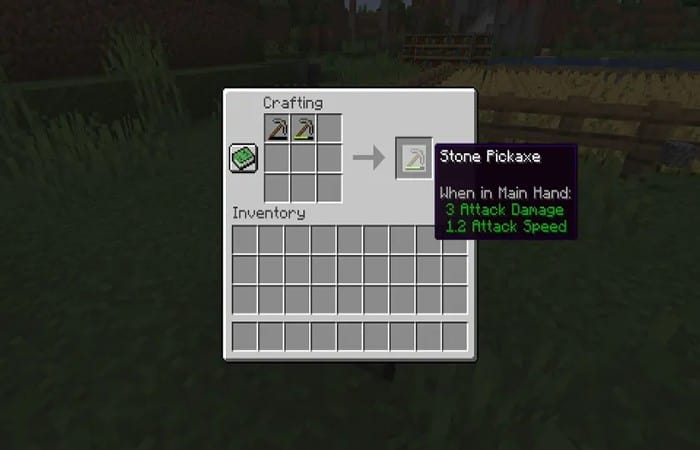
The process of repairing a tool is the same for both the Grinding Wheel and the Crafting Table. To do this, players need to place the damaged tool and another tool of the same type on the crafting grid, as shown in the image above. The only drawback is that the repaired item will not retain the enchantments.
Use an anvil to repair objects in Minecraft such as tools
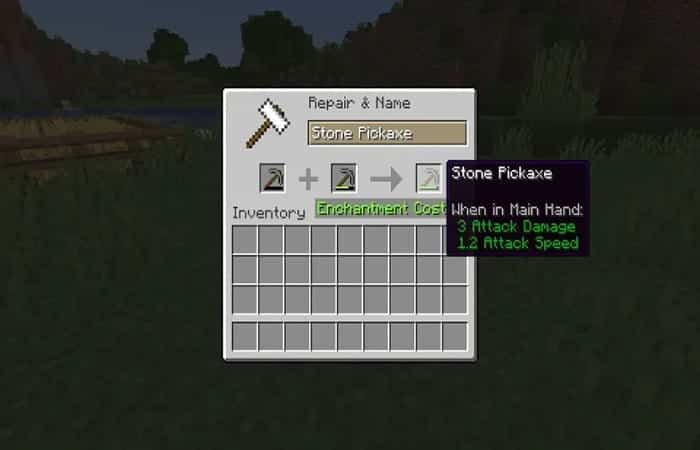
Anvils are a bit expensive to craft, requiring three iron blocks and four iron ingots (thirty-one iron ingots in total).
To repair an item on the anvil, players must place the same type of item on it that they would place on the crafting table or grindstone. However, unlike the grindstone, mending on an anvil does not remove enchantments from the tool.
The repaired item may gain new enchantments from the other sacrificed item. If both tools had the same enchantment, the repaired tool may have the same enchantment of a higher level.
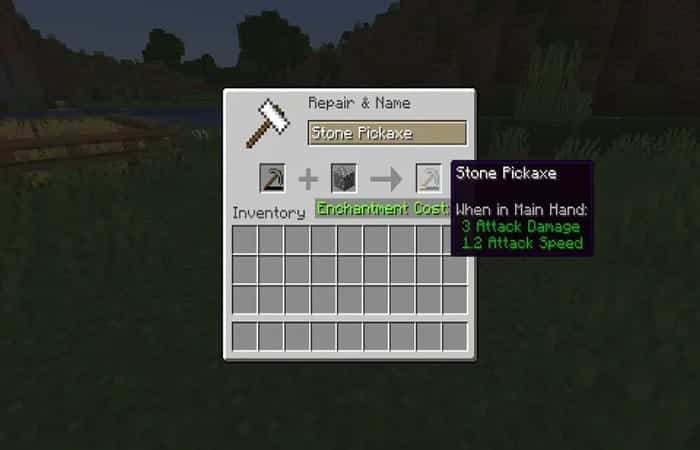
Players can also place the base material used to craft the tool to increase its durability points.
- E.g., the base material for making wooden tools is wooden boards, and for a diamond tool, diamonds.
By adding more base material, players can continue to increase the tool's durability until it is fully repaired.
Here you can learn about: How to Make a Minecraft Blast Furnace?
Conclusion
As you can see, these are the ways you can use to repair objects in Minecraft. Each of these basic tips can help you improve the quality of your tools so that your gaming experience is the best. We hope we have helped you with this information.

My name is Javier Chirinos and I am passionate about technology. Ever since I can remember, I have been interested in computers and video games, and that passion has turned into a job.
I have been publishing about technology and gadgets on the Internet for over 15 years, especially in mundobytes.com
I am also an expert in online marketing and communication and have knowledge in WordPress development.