- La IA It allows you to summarize eBooks and PDFs in minutes and extract key ideas.
- Tools like ChatPDF, Xmind AI, and Algor Education automate summaries and Q&A.
- Good prompts and the structure of the summary determine the quality of the result.
- Combining summaries, mind maps, and questions improves comprehension and memory.
If you've ever faced an endless eBook, an unreadable PDF , or a tome of notes and thought, "I don't have enough time to read all this," the good news is that you're no longer alone: artificial intelligence has become the perfect ally to summarize, query, and understand long documents in very little time.
Today you can upload a digital book, a PDF, an HTML file, or even photos of your notes and let AI do the heavy lifting: summarizing, extracting key ideas, generating questions and answers, creating mind maps, and even putting together a complete study plan. However, to truly benefit from it, you need more than just pressing a button: you need to know which tools to use and how to interact with them using effective prompts.
Why it makes sense to summarize eBooks and documents with AI
The race for the best AI tools has sparked interest in automating tedious tasks like reading, highlighting, and summarizing large volumes of information. It's no longer just about "saving time," but about changing the way you study or work with complex texts.
Summarizing a book in the traditional way can easily take between 10 and 20 hours of writing alone , plus another 5 to 10 hours of careful reading, analysis, and organizing ideas. If the book is dense, technical, or in another language, the number increases even more.
With current tools, AI can read, analyze, and condense hundreds of pages in a matter of minutes . It not only saves time , but also helps you focus on what matters: main themes, key arguments, characters, concepts, and practical applications, whether it's fiction or nonfiction.
Furthermore, a good summary is not just a “shorter text.” A well-structured summary improves your understanding, helps you remember what you've studied, and serves as a foundation for discussions, exams, academic papers, or professional decisions based on extensive documentation.
Think of book summaries as condensed versions that maintain the meaning of the original : works like “Rich Dad Poor Dad”, “The Four Agreements”, “1984” or “One Hundred Years of Solitude” can be reduced to a few pages that capture key themes, messages, characters and twists without spoiling the reading experience if you don't want it to.
Basic options: Use ChatGPT and upload PDFs or text
One of the first questions is usually whether you can directly upload a PDF to ChatGPT . In many cases, you can copy and paste text from the PDF or paste the document's URL if it's accessible online so the model can analyze the content and start working.
Even so, when the document is very long or full of tables, images, or unusual formatting, the experience may not be ideal. That's why specialized tools have emerged that rely on ChatGPT or other models to manage large documents and make interaction much more convenient.
The advantage of this "basic" approach is that you need almost nothing more than a good prompt : you explain to the AI what kind of summary you want, how many words, what you'll use it for, and what level of detail you need. From there, you can ask follow-up questions to clarify doubts or delve deeper into specific chapters.
A very simple example of an effective prompt could be something like: “Summarize this text in 300 words, highlighting the main themes and adding bullet points with 5 key ideas at the end .” The more specific you are, the better the result and the fewer adjustments you’ll need later.
However, when we talk about entire books, technical manuals, or large collections of PDFs, that's when it really makes sense to make the leap to document-centric tools that automate not only summarizing but also querying the content.
ChatPDF: Question and summarize your PDFs as if you were talking to the document
If we imagine ChatGPT specialized in documents, the result would be something very similar to ChatPDF . This tool turns your PDFs into a kind of "smart chat" with which you can have a conversation about the file's content.
In practice, ChatPDF acts as a PDF summarizer on steroids : it not only condenses content, but is also able to answer specific questions, paraphrase sections, explain difficult concepts, or extract key points from specific pages.
Its interface is very simple: basically a search bar or chat box where you type your questions or requests. That's where the "prompts" come in; these are the phrases you use to tell the AI what you need at any given moment.
To get the most out of it, it's essential to learn how to ask clear and specific questions . You can range from general questions, such as requesting an overall summary of the document, to very specific inquiries about pages, chapters, or sections.
Some very useful examples of prompts you can use in ChatPDF would be:
- What are the main arguments of this PDF? (perfect for getting an overview before going deeper).
- Summarize this PDF into a one-page text maintaining the essential points.
- List the main points from pages 4, 7 and 10 to focus on specific sections.
- Paraphrase the conclusion of the PDF. using simple and clear language.
Before you start asking questions, it's a good idea to be clear about exactly what you're looking for : Do you want a general overview? Do you need to extract specific data? Are you interested in preparing a presentation or an exam? The better you know your objective, the more precisely you can adjust your prompts.
However, there is a sensitive aspect that cannot be overlooked: the privacy of the documents you upload . Many AI tools, including ChatPDF, can store or process your information on their servers to improve the service, so it's not a good idea to upload PDFs with confidential data, sensitive information, or critical internal company documents.
For students, professionals, or anyone who works with large amounts of PDFs ( scientific articles , manuals, contracts, reports), ChatPDF and similar tools can save hours of repetitive reading and make documentation much more manageable.
What makes a good book summary and why does its structure matter?
When we talk about “summarizing an eBook with AI”, we are actually trying to achieve the same thing as with a good traditional summary: a condensed version that preserves the message, tone and logic of the original , but without the noise or dispensable details.
An effective book summary takes hundreds of pages and transforms them into a clear overview . To achieve this, it's not enough to simply cut text; you need to know how to organize, prioritize, and synthesize the ideas—something AI can greatly assist you with if you give it the right instructions.
The key elements that must be included in a good book summary are:
- Main topics and messages that the author wants to convey, whether conceptual (in non-fiction) or symbolic (in novels).
- Important characters, key events, and settings In the case of fiction, they help to follow the plot.
- Central arguments and evidence In non-fiction works: how the author supports their ideas.
- ObjectivityThe summary should describe, not judge; personal opinions are reserved for reviews or critical analyses.
Classic book summaries typically range from 100 to 250 words , although complex works may require more space. In any case, it's important that the summary uses your own words , as this demonstrates genuine understanding and avoids plagiarism.
Furthermore, the structure of the summary makes all the difference between a clear text and a chaotic one. Poor organization can cause the reader to get lost, become frustrated, and give up. In contrast, a well-organized summary facilitates comprehension, improves memory, and transforms the content into an ideal review tool.
It's also helpful to distinguish between a book summary and a book review : a summary focuses on the facts, while a review adds your assessment, critique, context, and recommendation. AI excels at the objective aspects; critical analysis is best left to humans.
Traditional method vs AI: how the process has been transformed
Before AI became popular, summarizing a book involved reading with a pen, underlining, taking notes, and painstakingly synthesizing the information. This approach is still useful for better understanding the content, but it's incredibly slow.
The classic method usually begins by identifying main themes, characters, and plot points . In fiction, you look at the protagonist's journey, the relationships between characters, the conflicts, and how all of this supports the major themes (good versus evil, redemption, freedom, etc.).
In nonfiction, you focus on how the author constructs their thesis : examples, data, studies, analogies, and conclusions. Active reading involves asking yourself "how" and "why" questions as you read, something essential in complex books like "One Hundred Years of Solitude" or "1984."
A common strategy is to create chapter summaries of one or two sentences each. These serve as building blocks for constructing a well-structured overall summary that runs throughout the book without losing its logical order.
To organize even better, there are methods like BRIEF (Background, Relevant Points, Important Details, Essential Message, Final Review) or SQ3R (Explore, Question, Read, Recite, Review) that turn reading into a more active and structured process.
The difference is that now, AI can do much of that work automatically : reading, identifying main ideas, grouping information, and proposing an initial structure. Your role becomes that of an editor: refining what the AI gives you, correcting nuances, and adapting it to your needs.
Summarize books and eBooks with Xmind AI and mind maps
One of the most interesting tools for combining summaries with visualization is Xmind AI. Instead of simply generating plain text, it focuses on organizing information into hierarchical mind maps , which aligns perfectly with how the human brain processes information.
Mind maps allow you to see, at a glance, how the concepts, chapters, characters, and themes of a book connect . This is especially useful in works with many threads and subplots, such as "1984" or "One Hundred Years of Solitude," where simply following the linear text can be overwhelming.
With Xmind AI , the typical workflow for summarizing a book with the help of ChatGPT could be:
- Generate a summary in Markdown format with ChatGPT or other AI, well structured by chapters, topics or sections.
- Import that Markdown file into Xmindwhich will automatically turn it into an organized mind map.
- Apply colors, icons, and images to distinguish themes, characters, main plots and subplots.
- Adjust the structure dragging nodes, adding your own notes, or expanding ideas with AI functions like “AI Reorganize” or “AI Explain”.
In addition, Xmind AI includes an option called “Create with AI” that further simplifies the process: you can directly paste a block of text, upload a file (such as a PDF) or enter a URL, and the tool automatically generates the mind map from the key ideas.
Once you have the map ready, Xmind makes it very easy to share and present the result : you can export it as a PDF, image or presentation, share it via link with study partners or use it as a visual aid in an exhibition or book club.
This visual approach is especially powerful for books that lend themselves well to a branching structure, such as the summary of "Rich Dad Poor Dad" (with financial education as the core and branches on assets, liabilities, cash flow, mindset, etc.) or "Get Things Done" productivity methods, with clear phases that are broken down into steps and examples.
How to write good prompts to summarize an eBook with AI
Whether you use ChatGPT, ChatPDF, Xmind AI, or any other platform, the quality of the summary depends heavily on how you phrase the prompt . The same book can produce very different summaries depending on your requirements.
A helpful prompt for summarizing an eBook should include, at a minimum, these key elements:
- Full title of the book and authorto provide context.
- Desired length of the summary (number of words or paragraphs).
- Type of information you want: themes, characters, plots, practical applications, chapter structure, etc.
- Output format: running text, bullet points, sections by chapter, comparative table, etc.
For example, simply saying “Summarize The Four Agreements” is very vague. Instead, a prompt like: “Create a 200-word summary of 'The Four Agreements' by Don Miguel Ruiz. Include the main principles, key ideas, and practical applications in daily life. Organize the text into one paragraph per agreement” gives the AI clear instructions and produces a much more useful output.
The great thing is that you can always iterate with follow-up questions : ask it to expand on a specific chapter, simplify the language, provide new examples, or reorganize the information into bullet points or tables. The idea is to treat the AI like an assistant that you guide toward the final result you need.
Algor Education: Summaries, Q&A, and a complete AI-powered curriculum
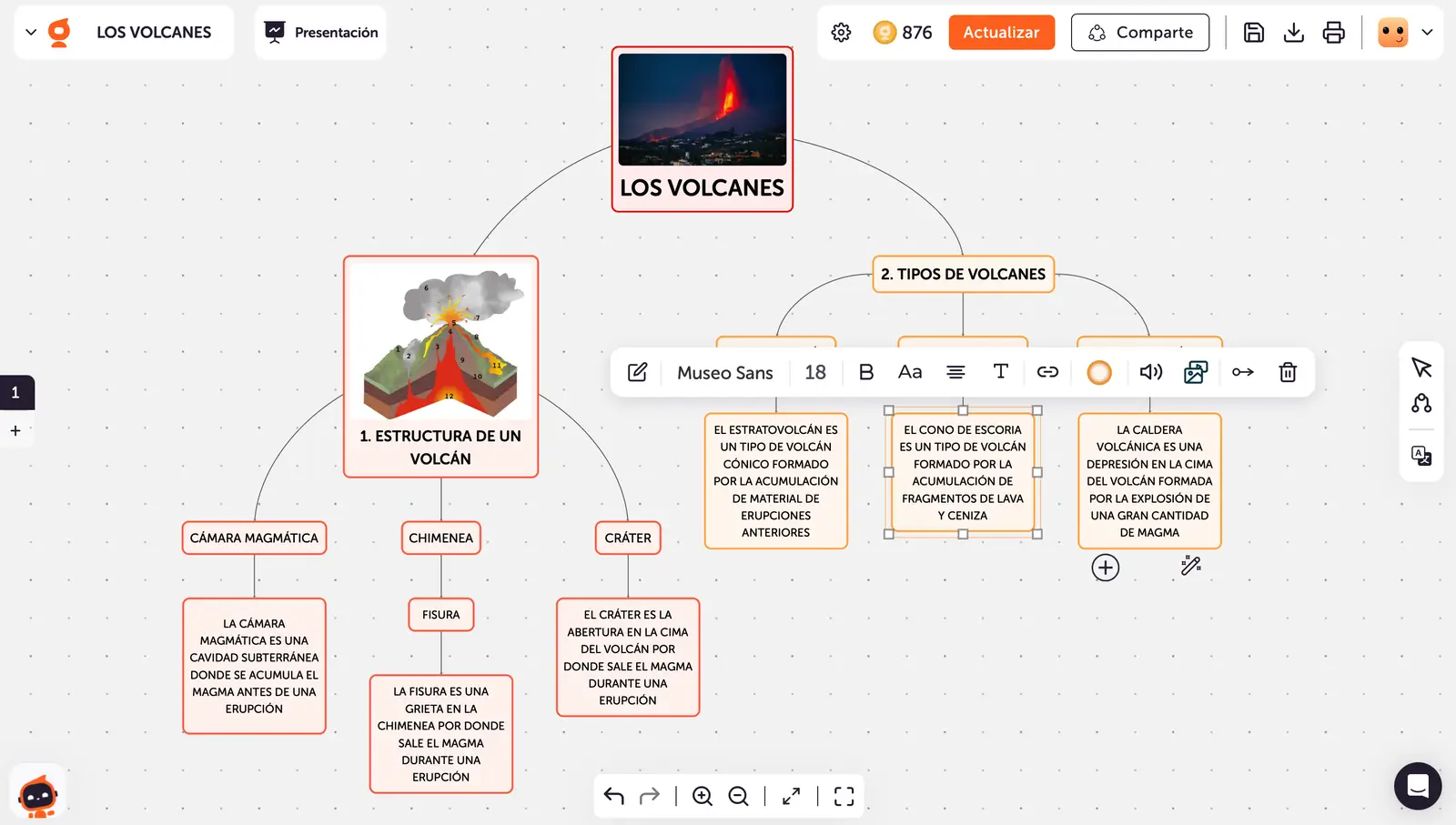
While some tools focus on generating only a summary, others like Algor Education go a step further and become complete AI-powered study platforms . They not only condense information but also organize it so you can study more actively and effectively.
Algor's philosophy is simple: transform your material into an interactive study set . You give it PDFs, plain text, scanned books, or photos of notes, and the tool takes care of processing them and generating various complementary resources.
The typical workflow with Algor Education would look something like this:
Step 1: Create an account and log in
The first step is to register or log in to the platform, a quick process you can complete in a moment. From there, you can start using Algor as an online book summary generator and study resource manager.
Step 2: Upload your materials (PDF, text, or photos)
The tool allows you to upload virtually any format useful for studying: PDFs, text documents, exported eBooks, and even photos of printed books or handwritten notes . The latter is especially useful if you still study on paper or have notebooks full of notes.
The "Create from Photo" feature transforms these images into readable and navigable digital content. You can scan a QR code with your phone to take photos directly and upload them, or upload images already stored on your device. AI handles text recognition and initial organization.
Step 3: Generate the complete studio set
Once you've uploaded your content, Algor processes the material and generates a comprehensive set of resources that go far beyond a typical summary. These include:
- Concise summaries organized by sections or topics, to get to the point without losing sight of what's important.
- Questions and Answers (Q&A) Based on the actual content of your materials, ideal for reviewing as if it were an exam.
- Mind and Concept Maps for those who learn best visually and need to see connections between ideas.
- Flashcards and quizzes to practice active memory and check what you have retained.
The beauty of it all is that it's based on YOUR own material , not a generic syllabus. Algor respects the original content, doesn't invent anything strange, and simply reorganizes and condenses it to make it more digestible.
Summarize without chaos: how Algor structures your texts
One of the biggest problems when studying is ending up with the entire book highlighted in a high-visibility pen, unable to distinguish what was actually important. Algor tries to avoid precisely that by organizing texts by topic and allowing you to navigate the content as if it were a dynamic index.
Instead of displaying a block of plain text, the tool divides the information into expandable sections . Each section can be opened or closed, allowing you to quickly navigate to the part you're interested in at any given time.
This translates into a kind of "distraction-free mode," where you only see the portion of the summary you need , not a thousand paragraphs in a row that you end up not reading. For exams, competitive exams, or deadlines, this makes a significant difference.
Another clear advantage over other summary generators is that Algor doesn't alter the core content : it doesn't embellish or get creative with the data. Its goal is to present the original message in a more organized and understandable way, without inventing theories or conclusions that weren't in the text.
Q&A function: Question the eBook as if it were a teacher
Passively reading a summary over and over again has a limited effect; what really fixes knowledge is interacting with the information , asking questions, trying to remember, and checking if you were right.
Algor Education's Q&A tool leverages this: it analyzes your documents and automatically generates relevant academic questions based on the content you've uploaded. It doesn't just present ideas; it encourages you to actively engage with them.
Each question is presented in a FAQ-style format: you can try to answer it yourself and, whenever you want, display the AI-generated answer for comparison. This approach activates your memory, improves long-term retention, and quite effectively simulates an oral exam or test.
Furthermore, it saves you the task of creating potential exam questions from your notes, something that usually requires time and some experience. Since the questions are based directly on the material you've provided, they accurately reflect the crucial points of the syllabus.
In this way, studying goes from being a passive process (read-summarize-read) to becoming an active experience in which you read, answer, fail, correct and end up reinforcing the content much more.
Smart study: combining summaries, mind maps, and extra resources
If we put all of the above together, the winning strategy for summarizing and quizzing an eBook with AI usually involves combining several tools and formats: a good textual summary, a clear mind map, and a system of questions and practice.
For example, you could use ChatPDF to quickly understand a long PDF and ask it specific questions , then generate a structured summary with ChatGPT, and then import it into Xmind AI to transform it into a mind map that serves as a visual outline.
If you need to prepare for exams or classes, Algor Education comes into play to convert that same material into navigable summaries, flashcards, and Q&As , so that you have both quick review and intensive memory practice covered.
For those who work with professional documentation, studies, contracts, scientific articles, or company manuals, this hybrid approach allows you to move from information overload to control : you know what the document says, where the key points are, and how to explain them to others if necessary.
Even if your goal is simply to choose which book to read, review a classic, or prepare for a debate, AI-generated summaries can give you a very reliable overview in minutes , without replacing the full reading if you feel like enjoying it.
Leveraging AI to summarize and quiz eBooks means letting the machine handle the repetitive parts—reading, highlighting, structuring, generating questions—while you focus on what really matters: understanding, connecting ideas, making decisions, and applying knowledge in your daily academic, professional, or personal life.


Passionate writer about the world of bytes and technology in general. I love sharing my knowledge through writing, and that's what I'll do on this blog, show you all the most interesting things about gadgets, software, hardware, tech trends, and more. My goal is to help you navigate the digital world in a simple and entertaining way.