- En Linux There are console tools (fdupes, rdfind, fclones, yadf) and graphical tools (FSlint, dupeGuru, Czkawka) to locate duplicate files by content.
- Modern utilities such as fclones and yadf allow filtering by size, patterns, and number of copies, as well as offering simulation modes to prevent accidental deletions.
- Graphical applications make it easy to visually review results and select what to delete, move, or link without having to remember options. terminal.
- It is essential to test first on test routes, use dry-run modes, and maintain backups before deleting duplicates en masse.
If you use Linux daily, sooner or later you'll encounter the typical " low disk space" warning, even though you swear you barely save anything . Backups, repeated downloads , huge photos and RAW images, videos, documents duplicated countless times... it all adds up until the system starts running low on space.
The good news is that GNU/Linux offers a wealth of utilities, both command -line and graphical, for detecting and safely removing duplicate files. The bad news is that if you're not entirely sure what you're doing, you could accidentally delete something important. Therefore, we'll explore all the classic and modern tools, how they work, and what precautions you should take.
Why it's worth searching for duplicate files in Linux
Hard drives are relatively inexpensive these days, but the amount of data we store keeps growing, and much of it consists of large files like RAW photos, high-resolution videos, and entire backups . If you also have multiple copies of the same file scattered across different folders, the wasted space can be enormous.
In shared environments, such as file servers in a school or company, it's very common for each user to make their own copy of shared documents, instead of using symbolic or hard links to point to the original file . The result is a storage area full of duplicates, with the system desperately needing more space.
Besides wasting space, duplicates also affect organization. It's easy to end up with multiple versions of the same file in different locations and not know which is the original, which is the good copy, and which should be deleted . That's why it's so important to have tools that look at the content of files, not just their names.
Approaches to detecting duplicates: console vs graphical interface
In Linux, we can tackle this problem with terminal utilities or graphical applications. Console-based tools like fdupes, rdfind, fclones, or yadf integrate very well with scripts and advanced workflows , and are usually faster and more flexible when filtering results.
On the other hand, if you want to calmly review your photos on a 500GB external hard drive and decide what to delete without fear, you'll probably find it much more convenient to use graphical interfaces like FSlint, dupeGuru, Czkawka, Krokiet, or fclones-gui , where the results are displayed in lists, with checkboxes to select and deselect.
fdupes: the classic tool for finding duplicates from the terminal
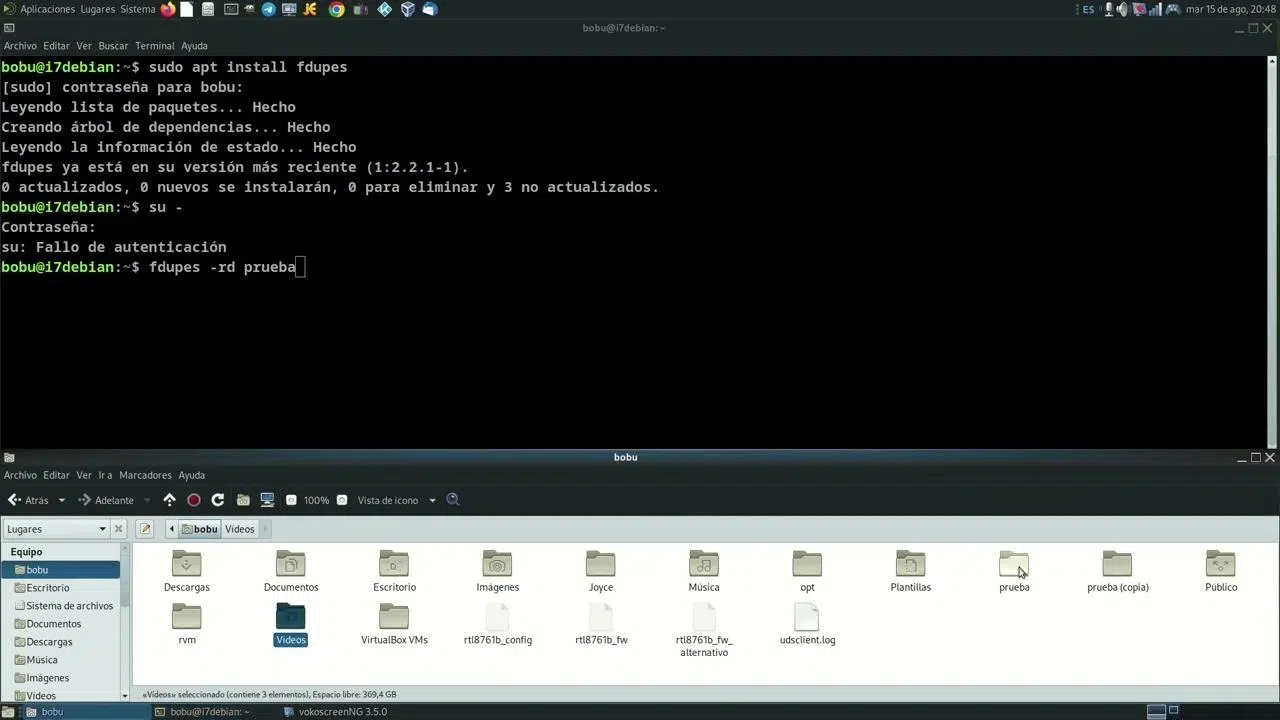
fdupes is one of the oldest and most widely used tools for locating duplicate files in Linux from the command line . It is written in C, is free software, and can be found in the repositories of virtually every distribution.
Its methodology is quite robust: first, it compares file sizes, then calculates partial MD5 hashes, then full MD5 hashes, and finally performs a byte-by-byte comparison to ensure that two files are identical. This avoids false positives based solely on hashes or names.
On Debian, Ubuntu and derivatives you can install it with:
sudo apt-get install fdupes
In Red Hat-type distributions and derivatives you would use:
sudo yum install fdupes
Fedora (dnf) or Arch Linux also have packages available:
sudo dnf install fdupes

sudo pacman -S fdupes
Once installed, basic usage for listing duplicates within a directory, such as your downloads folder, is as simple as:
fdupes ~/Descargas
If you want the analysis to be recursive and include all subdirectories , add the -r option:
fdupes -r ~/Descargas
To avoid including empty files that only clutter the list , you can use:
fdupes -n <ruta del directorio>
When you want to know how much capacity your system is wasting on duplicates, you have the -S option, which shows the size of the repeated files :
fdupes -S <ruta del directorio>
And if you need a report to process later with other tools, you can always redirect the output to a text file:
fdupes <ruta del directorio> > output.txt
Remove duplicate files with fdupes (very carefully)
fdupes not only finds cloned files, it can also help you clean them up. With the -d option, the program will ask you, group by group, which files you want to keep and will delete the rest.
fdupes -d <ruta del directorio>
It is possible to further automate the process with parameters such as –delete, –noprompt or -N, which force the deletion of duplicates while keeping only the first file found , but in practice it is extremely risky to use them blindly.
If you want to be on the safe side, a highly recommended approach is to use fdupes only to generate a list of duplicate file paths and then move them to another location with mv . This way you can review that "quarantine" before performing the final deletion.
fdupes -r <ruta> > duplicados.log
It's also worth considering the -m option, which provides a summary of the number of duplicate files and the total space they occupy, very useful for assessing how much you'll gain from the cleanup :
fdupes -m <ruta del directorio>
Finally, be very careful with the -s parameter, which causes fdupes to follow symbolic links . If you combine it with deletion options, you could end up affecting files outside the path you intended to scan, because the links lead to other areas of the file system.
rdfind: searching for redundant data with an intelligent approach
rdfind (redundant data find) is another very popular utility for detecting duplicate files in Linux . It is also free software and is available in the main repositories: apt, yum, dnf, pacman, etc.
Its philosophy is similar to fdupes, but it incorporates its own sorting algorithm to decide which file it considers "original" and which are duplicates . The priority rules it uses are:
- If file A was located while parsing input arguments before B, then A has priority over B.
- If A is at a lower depth level than B (closer to the scanned root directory), A takes priority.
- If both criteria are tied, it stays with the one that was found first during the scan.
To install it on Debian or Ubuntu, simply:
sudo apt-get install rdfind
CentOS/RHEL usually requires the EPEL repository:
sudo yum install epel-release

sudo yum install rdfind
It's also available packaged in Fedora and Arch Linux:
sudo dnf install rdfind

sudo pacman -S rdfind
Basic usage isn't complicated. To analyze your personal directory, you would do something like this:
rdfind /home/usuario
The program will write a file called results.txt to the directory from which you ran it , containing all the duplicate groups it detected. You can review this file to decide what to do manually or automate subsequent actions.
If you want a first pass without touching anything, the `-dryrun` option is your ally. It generates the duplicate report but without applying any changes to the file system.
rdfind -dryrun true /home/usuario
A very interesting feature of rdfind is that it allows you to replace duplicate files with hard links instead of deleting them , thus maintaining a single physical copy of the data on disk:
rdfind -makehardlinks true /home/usuario
If you want to directly remove duplicates, you can invoke it like this (again, it's best to test it first in a test folder):
rdfind -deleteduplicates true /home/usuario
fclones and yadf: modern and very fast tools
In addition to the classics, new utilities like fclones and yadf have emerged in recent years . Written in Rust, they offer outstanding performance on large disks . They are designed for speed, considering file sizes, hashes, and byte-by-byte comparisons only when absolutely necessary.
fclones: groups, links, moves, and deduplicates
fclones is defined as a tool to find and remove duplicate files from the terminal , but its power goes far beyond that: it identifies groups of identical files and allows different actions on them, from deleting them to replacing them with links or deduplicating them using copy-on-write capabilities of the file system.
On Arch Linux and derivatives you can install it from the AUR with:
paru -S fclones
In other distributions, the developer recommends compiling it from source code using cargo:
cargo install fclones
After installation, it's very useful to enable autocomplete based on your shell by adding a line like this to your configuration:
- Bash:
eval "$(fclones complete bash)"en~/.bashrc - zsh:
source <(fclones complete zsh)en~/.zshrc - Fish:
fclones complete fish | sourceen~/.config/fish/config.fish
fclones divides operations into several subcommands, forcing you to clearly separate the moment you detect duplicates from the moment you modify or delete them :
- group: identifies groups of identical files and outputs them to standard output.
- remove: removes redundant files based on the output previously generated by group.
- link: replaces duplicates with "hard links" or symbolic links.
- move: moves duplicates to a destination directory you specify.
- dedupeIn file systems with copy-on-write, it deduplicates data without deleting files, sharing internal blocks.
To locate duplicates in the current directory, the simplest command would be:
fclones group .
If you're interested in filtering by size, for example, only files larger than 10 MB, you would add:
fclones group -s 10M .
You can also limit yourself to files that have more than a certain number of copies , for example more than five occurrences:
fclones group . --rf-over 5
And of course it supports naming patterns, ideal when working with sets of photos or images:
fclones group . --name '*.jpg' '*.png'
Once you have the list of duplicates (for example, in a file called duplicates.txt), you can apply different actions. For example, replacing duplicates with hard links would be:
fclones link <duplicados.txt
If you prefer symbolic links:
fclones link -s <duplicados.txt
To send all duplicates to another "quarantine" folder:
fclones move target_dir <duplicados.txt
And to delete directly:
fclones remove <duplicados.txt
In all these cases you can also chain commands using pipes , for example, to group and delete at the same time:
fclones group . | fclones remove
Although this works, it's much more sensible to incorporate the `--dry-run` option to see what will happen without touching anything, for example:
fclones group . | fclones remove --dry-run
That simulation mode will save you more than one headache, especially if you work on disks with important data.
yadf: Yet Another Duplicate Finder
yadf (Yet Another Duplicate Finder) is another modern tool written in Rust for locating duplicates , with a fairly clean syntax and a step-by-step analysis strategy: first it groups by size, then it calculates hashes only where needed, and finally it confirms equality with byte-by-byte comparisons.
Its use is really straightforward. To find duplicates in the current directory, simply run:
yadf
If you want to compare two specific paths, for example Documents and Images, you could do the following:
yadf ~/Documents ~/Pictures
It can also be used with depth 0 to compare specific files without going down to subdirectories , which is useful when you suspect that two specific files are the same:
yadf --depth 0 file1 file2
To limit the search to the current directory without going down, adjust the depth:
yadf --depth 1
One of yadf's strengths is its excellent integration with other utilities like fd. For example, you could first filter directories or files by name and then pass the list to yadf:
- Search for directories containing an "a" and then search for duplicates without recursion:
fd --type d a | yadf --depth 1 - Search for files containing "a" and check for duplicates:
fd --type f a | yadf
As for filters, you have several interesting options:
- Duplicates of at least 100 MB:
yadf --min 100M - Duplicates under 100 MB:
yadf --max 100M - JPG files only:
yadf --pattern '*.jpg' - Files whose name begins with "g":
yadf --regex '^g' - Files with more than 10 copies:
yadf --rfactor over:10 - Files with fewer than 10 copies:
yadf --rfactor under:10 - Unique files (no duplicates):
yadf --rfactor equal:1
It also allows you to format the output for integration into other scripts or tools. According to the author's own tests, yadf is usually slightly faster than fclones in certain scenarios , although you should run your own benchmarks on your system and with your own data.
Graphical tools for finding duplicates in Linux
If the terminal isn't your thing, or if you're dealing with huge photo collections and want to preview thumbnails before deleting anything, the easiest solution is to use applications with a graphical interface . There are several well-established options in the Linux ecosystem.
FSlint: Simple interface and CLI version included
FSlint is a veteran tool for locating and cleaning "junk" in the file system : duplicates, empty directories, temporary files , broken symbolic links, obsolete binaries, and other bits and pieces that are left over.
It's in the repositories of many distributions. In Ubuntu, for example, you can install it from the Software Center or via the terminal with:
sudo apt-get install fslint
When you open the graphical application, you'll see that the "Duplicates" panel is selected by default, and your home directory is marked as the initial search path . Simply click "Search" for FSlint to scan the folder and display a list of duplicate files.
From that list, you can select which items to delete, merge, or otherwise process. A double-click lets you preview a file before deleting it , which is very useful for photos and important documents.
FSlint also includes a console component which, however, is not designed to be invoked directly as a binary in the PATH, but as a script in its own path:
/usr/share/fslint/fslint/fslint carpeta
This command simply lists duplicates and leaves the subsequent action (deleting, moving, etc.) up to you. If you need to see all the options, you can always consult the help:
/usr/share/fslint/fslint/fslint --help

man fslint
dupeGuru: multiplatform, fast, and quite secure
dupeGuru is another well-known graphical application for locating duplicate files on Linux, Windows , and macOS . It can scan by both name and content and supports a fuzzy matching algorithm that detects similar names, ideal when you have thousands of songs or photos with nearly identical names.
Its interface is quite straightforward: you select one or more folders to scan, choose the mode (general files, music, or images), and let it do its work. Once finished, it shows you groups of duplicates where you decide what to keep and what to delete by checking boxes.
On Debian, Ubuntu and derivatives you can install it from a PPA maintained by the project:
sudo add-apt-repository ppa:dupeguru/ppa

sudo apt-get update

sudo apt-get install dupeguru
In Arch Linux it is available in the distribution's repositories:
sudo pacman -S dupeguru
One of dupeGuru's biggest advantages is that it's designed to minimize the risk of deleting things you shouldn't , although, as always, the final click is yours. That's why it's still essential to have backups and carefully review what you select.
Czkawka and Krokiet: a modern engine with two different interfaces
Czkawka is a modern application written in Rust that finds and removes duplicates, empty files, temporary files, large files, and other unnecessary items . It is cross-platform and its main goal is to be fast and efficient.
Internally, it uses the same engine as Krokiet, another graphical interface that prioritizes a lighter and faster design . Czkawka relies on GTK and offers a more complete interface, while Krokiet uses Slint and simplifies the presentation somewhat, in exchange for lower resource consumption.
In both cases, the workflow is similar to what we've seen with other graphical tools: you choose folders to scan, launch the duplicate search, and then work with a grouped list, marking what to keep and what to delete . It's much more convenient than remembering console options if you only want to clean up occasionally.
If you're looking for something active and with a fairly dynamic development, Czkawka is one of the most recommended options; if you prefer lightness, Krokiet fits very well on modest computers.
fclones-gui: a simple interface for fclones
For those who have tried fclones but prefer not to struggle with the command line, there's fclones-gui, a very simple graphical interface that takes advantage of the fclones engine . It doesn't display all the advanced options, but it does show the most common ones.
It's very simple: select the directory to scan, adjust the basic search options, and click the button to find duplicates . Once finished, you can choose which files to process and what action to take (delete, move, link, etc.).
The only drawback is that fclones-gui's development pace seems slower than that of other graphical alternatives like Czkawka or Krokiet, so if you highly value ongoing maintenance, you might prefer the latter. Even so, if fclones-gui meets your needs, it's a perfectly valid option.
"Handcrafted" solutions using find, sort, uniq, and md5sum
If you prefer to do things manually or don't want to rely on additional tools, you can also combine classic Unix utilities like find, md5sum, sort, and uniq to locate duplicate files . The basic idea is to generate a hash for each file, sort by that hash, and then keep the entries that are repeated.
For example, you could iterate through your home directory, generating MD5 checksums for each file and writing the results to a file:
find /home/usuario -type f -print0 \

| xargs -0 md5sum \

| sort > /tmp/archivos-duplicados.txt
Then, using sort and uniq, you can locate hashes that appear more than once, indicating groups of files with the same content . From there, it's just a matter of processing the list to decide what to do with each path.
One curious detail is that, if you do a echo From an MD5 hash, you'll notice that It appears to have 33 bytes instead of 32That's because `echo` adds a line break at the end, so to truly measure the size you should do without that carriage return (for example with printf).
This "handmade" approach doesn't offer the convenience or advanced features of specialized tools, but it's very useful for understanding how many duplicate detectors work internally and for putting together very specific scripts tailored to your needs.
Usage recommendations and best practices when deleting duplicates
Regardless of the tool you choose, there are a number of guidelines worth following to avoid accidentally deleting files you actually needed :
- Work first on test directories or copies of your data until you feel comfortable with the tool.
- Whenever it exists, use the mode dry-run or simulation (fclones, rdfind, etc.) before executing destructive actions.
- When possible, opt first for move duplicates to a quarantine folder instead of deleting them directly.
- Avoid automating deletion with options like –noprompt or -N If you haven't thoroughly checked how they work, they can be very aggressive.
- Be careful with symbolic links (-s, –symlinks)because they can cause you to end up deleting files outside the directory tree that you thought you were cleaning.
- Always keep a recent backup before performing large cleanups on disks containing important data.
Finding and deleting duplicate files in Linux isn't complicated if you know the right tools: from classics like fdupes, rdfind, and FSlint to more modern options like fclones, yadf, Czkawka, Krokiet, or dupeGuru, you have a huge arsenal to free up space, organize your folders, and reduce the chaos of duplicate copies . Choose the command line or graphical interface whichever you prefer, combine size filters and naming patterns to refine the results, and above all, take your time to review what you're going to delete. With a little care, your system will breathe much easier without putting your important data at unnecessary risk.

Passionate writer about the world of bytes and technology in general. I love sharing my knowledge through writing, and that's what I'll do on this blog, show you all the most interesting things about gadgets, software, hardware, tech trends, and more. My goal is to help you navigate the digital world in a simple and entertaining way.
Table of Contents
- 1 Why it's worth searching for duplicate files in Linux
- 2 Approaches to detecting duplicates: console vs graphical interface
- 3 fdupes: the classic tool for finding duplicates from the terminal
- 4 rdfind: searching for redundant data with an intelligent approach
- 5 fclones and yadf: modern and very fast tools
- 6 Graphical tools for finding duplicates in Linux
- 7 "Handcrafted" solutions using find, sort, uniq, and md5sum
- 8 Usage recommendations and best practices when deleting duplicates