- Google AI Studio is the web environment for prototyping with Google models, fine-tuning prompts, and exporting code with the AI API. Gemini:.
- Includes Chat, Stream (Gemini Live), Generate Media (Veo), and Build, plus advanced settings like structured output and function calls.
- It offers free use in AI Studio and a free tier of the Gemini API, in addition to multiple free tiers on Google Cloud.

If you're looking to finally understand what Google AI Studio is and why everyone's talking about it, you'll find a complete and straightforward explanation here. This Google web platform serves as a testing ground for its generative AI models and shares features with Google's AI mode , focusing on rapid prototyping, prompt refinement, and direct export to code for integration into real-world apps . You don't need to be an expert to get the most out of it, and many of its features are free to use.
Beyond the typical chatbot, AI Studio lets you experiment with system instructions, security parameters, tools like function calls and structured output, and, once you've fine-tuned it, you can click a button and get the code ready for your favorite language. It's a perfect entry point for testing Gemini and other multimodal models (text, image, and soon audio) , and deciding with data whether it's worth deploying it to production with Google Cloud services.
What is Google AI Studio and what is it used for?
Google AI Studio is a browser-based environment designed to help you explore and design experiences with Google AI models in a convenient way. Its goal is to let you test prompts, adjust parameters, and validate ideas without having to set up infrastructure . Here you can chat with models, create audio and video streaming flows , generate media, and even build simple AI -powered applications.
One of its strengths is its integration with the Gemini API: from AI Studio, you can create your API key and start integrating models into your projects immediately. Google offers a "free tier" of the Gemini API with frequency limits intended for testing, and confirms that using Google AI Studio itself is completely free in all countries where it's available. Furthermore, there are initiatives like AI Overviews in Europe.
The ecosystem surrounding AI Studio also brings good news: NotebookLM remains in beta and is currently free to access , and Firebase Studio offers three free workspaces during the preview. All of this points to a clear focus: making it easy for you to experiment and build directly in your browser.
What if you're coming from consumer-grade tools, like the Gemini app? AI Studio isn't meant to replace that general-purpose user experience, but rather to give you the technical lab to customize behavior, reproduce results, and export them to code. It's the difference between using AI "as is" and shaping it to fit your specific use case.
AI Studio vs Gemini, ChatGPT Custom GPTs and OpenAI Playground
A common question is why choose AI Studio instead of simply chatting with the Gemini app or alternatives like ChatGPT or Claude. The key lies in its purpose: AI Studio is a design and prototyping tool , not a generic chatbot optimized solely for everyday conversation.
Compared to ChatGPT Custom GPTs, AI Studio stands out for its direct integration with the Google ecosystem and its native use of multimodal models without requiring any programming. Custom GPTs are excellent for encapsulating behaviors in highly customized assistants; however, if your plan is to bring the result to a custom app using Google models, AI Studio saves you many intermediate steps.
If you compare it to OpenAI Playground, the difference lies in the focus. Playground is a highly configurable testing ground for OpenAI models , ideal if you already have a firm grasp of those parameters and APIs. AI Studio, on the other hand, concentrates its efforts on the Gemini family and associated Google models, with a seamless transition to its API and Google Cloud services when it's time to scale.
Conclusion of this section: choose according to your goals. If you want to explore, create, and ultimately integrate into the Google environment, AI Studio is a perfect fit ; if you prefer customizing assistants independently of Google, Custom GPTs can be your ally; and if you're looking to experiment with advanced OpenAI model parameters, Playground is a great testing ground.
Interfaces and workflow in AI Studio
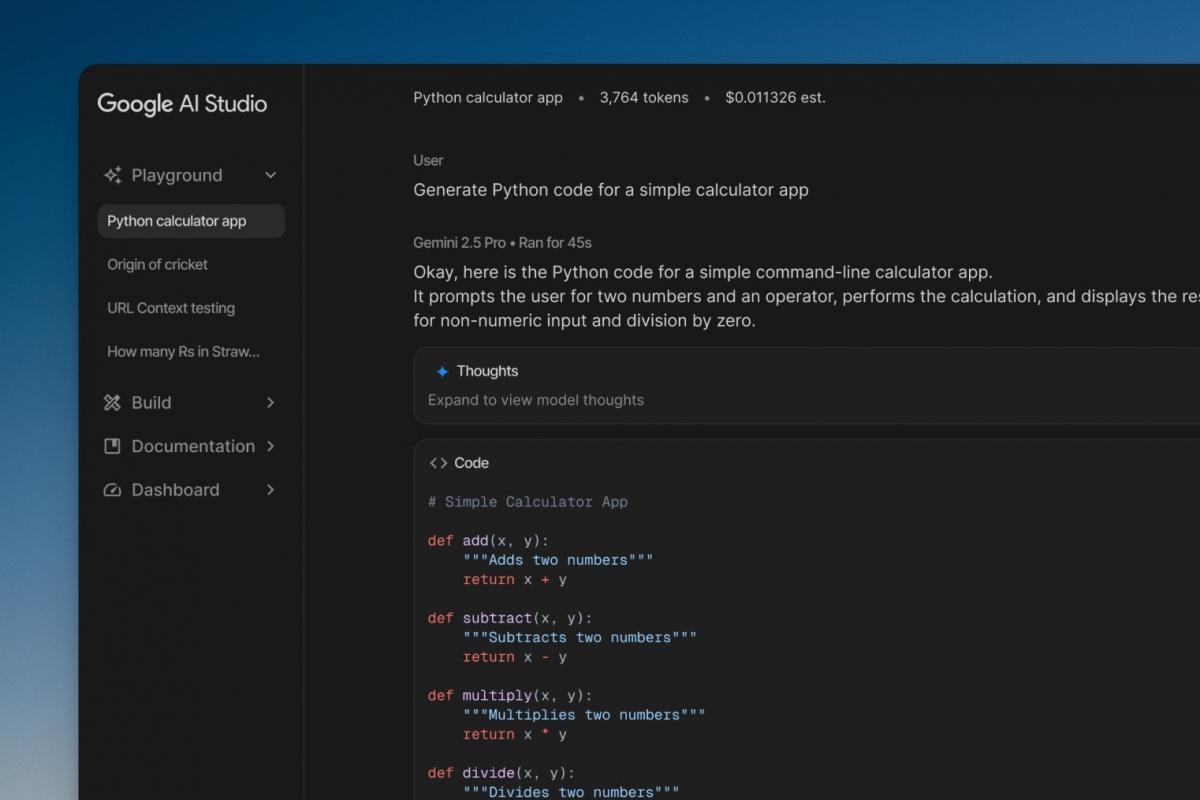
AI Studio organizes its experience into several views to suit different use cases: Chat, Stream, Generate Media, and Build . This division allows you to jump from a multimodal conversation to a real-time audio session, or enter a video generator, without losing sight of the purpose of each interface.
In Chat you'll find the most familiar elements: text and image input, with a template selector on the side. This is where you can adjust the "temperature" to control creativity and variation , and where it most closely resembles a classic chatbot (but with enhanced configuration options).
The Stream section provides access to Gemini Live: voice chat, microphone use, screen sharing , and camera activation to add visual cues to the interaction. It's ideal for practicing languages, requesting contextual help while working, or testing quick visual detections in real time.
Generate Media is where the creative side comes into play: Veo 2 lets you generate videos from text , including vertical formats for social media. Although Veo 3 wasn't yet available at the time described in several guides, Veo 2 already offers very solid results for experimenting and understanding the model's limitations.
Finally, Build provides templates and examples for creating small AI applications directly in your browser. It's perfect for learning complete workflows without setting up a backend : you can start with a pre-existing app (for example, one that generates GIFs using an image editing model) and adapt it to your needs with instructions.
Guided example: from idea to specialized chatbot
To see AI Studio's philosophy in action, nothing beats an example. Several Google resources illustrate how to move from a single prompt to consistent behavior using "system instructions ." Think of a bot that speaks like a specific character and sticks to a very specific topic.
In this case, the classic example imagines an assistant who "lives" on Europa, a moon of Jupiter, and responds to any query with that background. The idea isn't roleplaying for fun, but rather demonstrating how small instructions change the tone, style, and scope of the model.
- Open AI Studio and, in the Chat interface, expand the System Instructions area. Write a statement that defines the role of the assistant, For example:
Actúa como un ser que habita en Europa (la luna de Júpiter) y habla desde esa perspectiva. - In the text box, ask a question like this:
¿Qué tal el "tiempo" por allí?and run the test. The model (e.g., gemini-2.5-pro) will respond with a contextual narrative, integrating the setting you have given.
Does it seem too open? Add some restrictions. You can ask for answers of fewer than three paragraphs, in a cheerful and direct tone , and repeat the same question to see the difference. That combination of "who you are" + "how you answer" + "what limits you have" is the foundation of a consistent experience.
When you're satisfied, use the "Get code" button to generate the skeleton in your preferred language. This shortcut saves you headaches when moving from prototype to integration and helps keep the configuration consistent with what you validated in the study.
Run settings and advanced functions
AI Studio includes a configuration panel called Run settings with very useful options for serious development. From there you can adjust model parameters (temperature, top-k, top-p), security rules, and activation tools such as structured output (JSON), function calls, code execution, or grounding with external data.
Structured output is invaluable if you need validated and easy-to-parse responses. Instead of plain text, the model returns JSON with the schema you define , making it perfect for APIs, smart forms, or data pipelines.
Function calls allow the model to "request" information from your system (for example, the stock of a product) and return a response based on those results. It's the bridge between natural language and your app's actual services , without losing traceability.
Regarding practical limitations, remember that the conversation accumulates context. If the thread gets too long, you might reach the token limit of the model . In that case, open a new chat or summarize the history. Also, there's a logistical detail: conversations are temporary by default, and if you want to save them or create videos, you'll need to connect to Google Drive.
Featured models and interesting features: Nano Banana, Veo 2 and Gemini Live
Among the models that have generated the most buzz, "Nano Banana" stands out for its highly precise image editing capabilities. It doesn't recreate the image from scratch, but rather allows for targeted changes while preserving the rest , enabling "surgical" editing workflows. In AI Studio, you'll frequently see it as the default model in certain image views.
Veo 2, as we mentioned, is Google's offering for text-based video. It's ideal for experimenting with scenes, styles, and vertical formats , although it's advisable to write detailed prompts for better results. Add to that the ability to adjust parameters, and you can iterate content ideas very quickly.
Gemini Live, accessible via Stream, completely transforms the relationship with the model by incorporating real-time voice and vision. Speaking to it, sharing your screen, or activating the camera opens up possibilities such as contextual technical support , hands-on practice with immediate feedback, and interactive demonstrations.
A handy tip: in many sections you can run the prompt with the keyboard shortcut "Control + Enter" for faster progress. Small touches like this make a big difference when you're iterating a lot and want to compare responses with minimal changes.
Keys to integrating into your apps: API, exporting code, and Vertex AI
AI Studio is designed as a launchpad, so it makes it easy to jump straight into coding. In addition to "Get code," you can generate a Gemini API key and start calling models from your application in minutes.
For growing projects, Google Cloud is the natural path. Vertex AI offers the production environment to train, deploy, evaluate, and monitor models with enterprise-level scalability, cost control, and security. Simply put: AI Studio for prototyping and learning; Vertex AI for large-scale operations.
If you're integrating into productivity suites or specific environments, the landscape already offers examples: Synology NAS incorporates a console to integrate Gemini into Synology Office , and similar integrations can be considered in OnlyOffice or other tools, always starting from your API key and respecting usage limits.
To monitor usage and avoid surprises, rely on the usage dashboard associated with your account. You'll see statistics, limits, and estimated spending , essential if your prototype starts to gain traction or if you're in a pilot test with real users.
Free and comparative offers in the Google ecosystem
In addition to free use of AI Studio and the free tier of the Gemini API for testing (with frequency limits), the Google ecosystem offers several ongoing, non-expiring offers and other notable promotions. Here are some of the most frequently mentioned :
- Cloud Translation: Real-time translation and localization with over 100 language pairs. First 500.000 characters free per month, with no expiration date. It also supports batch translation of text and formatted documents, custom template creation, and romanized output. The documentation compares features with rival services like AWS (e.g., Polly for voice or Translate for language).
- Cloud Vision: Detects faces, properties, landmarks, logos, text, and more in images. First 1.000 units free each month, with no expiration date. Often compared to AWS Rekognition for vision capabilities.
- Speech-to-textSpeech-to-text conversion with domain-specific models for increased accuracy. The first 60 minutes per month are free, with no expiration date. Often compared to AWS Transcribe for quality and cost.
- Text-to-SpeechText-to-natural speech with human intonation. First 4 million characters (standard) and the first 1 million characters in WaveNet voices, with no expiration. AWS Polly is often mentioned in comparisons.
- natural language: Entity and sentiment analysis in unstructured text. First 5.000 units free each month, no expiration date. Often compared to AWS Comprehend.
- Video IntelligenceDetects objects, faces, celebrities, explicit content, logos, text, and more in video. First 1.000 minutes per month free, no expiration. Frequently compared to AWS Rekognition Video.
- Conversational agents: Creating virtual assistants with conversational AI. New customers receive a $600 credit, which expires after 12 months. Often works face-to-face with AWS Lex.
- Compute EngineAn e2-micro instance in US regions with no monthly cost and no expiration. Typically compared to AWS EC2 in the free tier.
- Cloud Storage: 5 GiB of storage regional per month in the US, with no expiration. Typical comparison with AWS S3 in the free tier.
- Firebase Studio: During its preview, it's available with three free workspaces. It fits nicely with the idea of rapidly building and deploying AI-powered app prototypes in the browser.
As you can see, there's plenty of room to experiment without having to pay immediately. However, if your usage grows or your project scales, check official prices and updated limits because costs can vary depending on the region, model, and volume.
AI Studio has earned its place as Google's "testing ground" for generative AI, striking a compelling balance between simplicity and power. If you enjoy experimenting, validating ideas, and bringing the results to life in a real app using the Gemini API , few tools offer such a streamlined path from prototype to code. With Google Cloud's collection of free offerings (translation, vision, speech, video, NLP, compute, and storage), free trial NotebookLM, and free storage space in Firebase Studio, the ecosystem encourages confident building. And if you're interested in comparing it to other platforms, keep the focus clear: AI Studio for exploring and building on Google's models; Custom GPTs for bespoke assistants; and Playground for OpenAI parameters. With that compass, it's hard to go wrong.


Passionate writer about the world of bytes and technology in general. I love sharing my knowledge through writing, and that's what I'll do on this blog, show you all the most interesting things about gadgets, software, hardware, tech trends, and more. My goal is to help you navigate the digital world in a simple and entertaining way.