- BleachBit, Stacer, and CCleaner share the goal of cleaning temporary files, caches, and program remnants to free up space.
- BleachBit and Stacer are free and open source, while CCleaner combines a free limited version with paid and ad-supported editions.
- BleachBit focuses on cleaning and privacy, Stacer adds service management and startup on Linux, and CCleaner acts as a complete suite for Windows.
- The choice depends on the operating system, the desired level of control, and the importance you place on respecting privacy versus extra features.
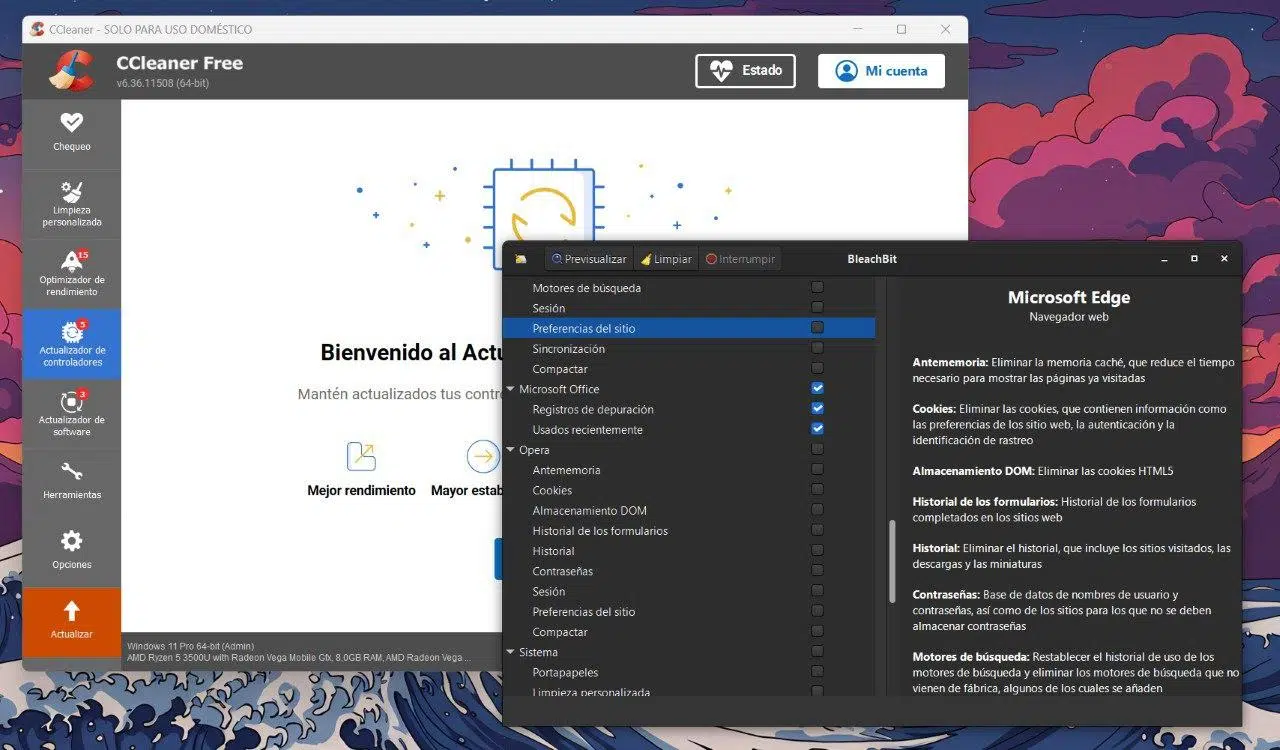
If you've noticed your computer running slower, taking forever to boot up, or constantly having a full hard drive, it's normal to consider installing a system cleaner. BleachBit, Stacer, and CCleaner are three of the most frequently mentioned programs when searching for something to delete junk files, free up space, and hopefully improve performance.
However, when you scratch the surface, you realize they're not all in the same league. CCleaner has become a kind of "all-in-one suite" for Windows , Stacer clearly targets Linux users, and BleachBit aims to be the simple, free, and open-source alternative that gets the job done without being intrusive. In this guide, you'll see how they're similar, how they differ, and in which cases it's more advantageous to choose one or the other depending on your operating system, your budget, and, above all, your level of concern for privacy.
What do BleachBit, Stacer, and CCleaner have in common?

Although each has its own philosophy, all three share a basic objective: to eliminate unnecessary files from the system to reclaim space and make the computer lighter. Under the hood, they all work with a similar idea.
On the one hand, they allow you to clean up temporary files and caches . We're talking about remnants left behind by Windows or Linux, browsers (history, cache, cookies, sessions), programs that generate logs no one looks at, or residual files from uninstallations. This data isn't essential for everything to work, yet it can take up several gigabytes on a computer that hasn't been cleaned up in a while.
Furthermore, BleachBit, Stacer, and CCleaner are designed as tools to save the average user from having to search through folder by folder. The idea is to offer a graphical interface where you check boxes, scan, and then delete what you want . In other words, they simplify tasks you could do manually with some patience, but consolidate them into a single utility.
Finally, there's one important point they all share: working with these applications involves some risk if you select the wrong options. Deleting things you shouldn't (for example, sensitive registry entries or configuration files) can break programs or even make your system unstable. In all cases, it's best to proceed with caution, carefully read each option, and, if possible, keep backups.
BleachBit: deep cleaning, open source, and a focus on privacy
BleachBit is probably the best option for those who value transparency and avoid ad-heavy programs or aggressive offers. It's an open-source and completely free project , available for both Windows and GNU/Linux distributions, with no "cut-down" versions or features locked behind a subscription.
The fact that it's open source means that any developer can review its code to ensure it doesn't include suspicious components, hidden data collection, or unnecessary modules. This provides an important layer of reassurance for a type of program that, by definition, has very deep access to the file system.
In terms of usability, BleachBit offers a very simple and minimalist interface : the left panel lists the various components and applications (system, browsers, compatible programs, etc.), and you choose what to scan. Once you run the scan, a summary appears showing the space you can free up, and then you decide what to actually delete. It has no frills or flashy wizards, but that's precisely why many find it so straightforward.
Among the most interesting features is the option to securely delete files and overwrite free disk space. This not only removes files but also makes their recovery with forensic tools much more difficult. For anyone who takes privacy seriously or handles sensitive data, this is a key advantage.
Another very practical feature is the portable version of BleachBit . You can carry the program on a USB drive and run it on any Windows PC without installing anything. This is incredibly useful if you want to do a quick cleanup on a family member's computer, a work computer, or a public PC where installing additional software isn't practical.
Compared to other more "all-in-one" utilities, BleachBit focuses primarily on file cleaning and removing traces of usage. You won't find a driver manager, a boot optimizer, or modules to check the overall system health here . It's a more straightforward approach: what it does, it does well, but it doesn't try to be a Swiss Army knife.
CCleaner: veteran, powerful, but with privacy and ad issues.
CCleaner is one of the most well-known names in the Windows world. For years, it was the go-to program for cleaning PCs , recommended in forums and guides for deleting junk files, handling temporary files, and fine-tuning the system. Over time, however, it has changed, and not always to the liking of the most demanding users.
In its current version, CCleaner offers much more than a simple cleaner. It includes maintenance and optimization tools such as a program updater and, in certain editions, a driver updater, a quick system health check module, a startup manager to control which applications load with Windows, and utilities to clean the system registry or uninstall software.
Its interface, compared to BleachBit's, is more cluttered and has more sections . For users who want a "little bit of everything," it might be convenient to find a panel that centralizes almost everything, but if you were just looking for something to delete temporary files, so many options can be a bit overwhelming. Even so, the learning curve isn't difficult, and most options are described reasonably clearly.
One of CCleaner's weak points is its business model. There's a fairly limited free version , and then paid plans with "Pro" features. In practice, this means that some of the more advanced or automated tools (like real-time monitoring, more aggressive optimizations, or automatic updates) are reserved for those who pay.
Furthermore, the free version often includes ads, product recommendations, and offers for additional software . The installer frequently comes with suggestions for adding more programs (antivirus, extra utilities, etc.), so you should carefully read each screen if you don't want to end up with things you didn't ask for.
Since its acquisition by Avast, privacy concerns have arisen , particularly regarding the collection of usage data and some past incidents. While the program remains effective at cleaning up leftover files, not everyone is equally comfortable delegating their system maintenance to a tool that relies in part on that information and constant upselling.
Another point to consider is that many of the extra features CCleaner offers are already covered by Windows itself . For example, Windows Update updates drivers, and the operating system includes tools to check startup applications, uninstall programs, and delete temporary files. CCleaner integrates everything into a more user-friendly interface, yes, but it's not essential in as many cases as it used to be.
Stacer: the CCleaner alternative designed for Linux
If you're a Linux user and have been missing something similar to CCleaner, you've probably come across Stacer. It's a utility with a modern interface, written in Electron , that offers various administration and cleaning tools for GNU/Linux distributions, with a particular focus on Ubuntu and its derivatives.
The first thing you see when you open it is a panel or dashboard with system information : CPU usage, RAM, disk space, basic statistics, and some graphs that give you a quick overview of the computer's status. It's not that you can't achieve the same thing with other system monitors, but having it integrated into the same maintenance tool is always a plus.
The key feature, compared to BleachBit and CCleaner, is its System Cleaner module . From here, you can clear application caches, empty the Recycle Bin, delete error reports, system logs, and other non-essential files. It works similarly to Windows cleaners: you choose which categories to scan, Stacer analyzes, and then shows you what you can remove to free up space.
In addition, Stacer includes a Startup Apps section that allows you to manage which programs launch at login. Disabling unnecessary services or applications can significantly speed up the startup of some distributions, especially if you've been installing things without paying much attention to what they left running in the background.
The tool doesn't stop there: it includes sections like Services , for listing active services and visually enabling or disabling them, and an Uninstaller module that simplifies uninstalling packages and applications you no longer need. All of this is housed in a well-designed interface, with a much more modern feel than other classic cleaners.
Compared to BleachBit, Stacer is more comprehensive and more similar to CCleaner's philosophy , but focused on the Linux ecosystem. BleachBit does a great job cleaning caches and application remnants, while Stacer adds a system management layer (services, startup, packages) that makes it a more complete maintenance solution.
In the specific case of Ubuntu, Stacer even has official repositories to facilitate its installation and updating , and is a highly recommended option for those who want to have the cleaning section and various performance settings readily available in a single window without having to use the terminal.
Other alternatives and general context of cleaners
To better understand where BleachBit, Stacer, and CCleaner fit in, it's helpful to take a look at the overall landscape of system cleaners. Windows has a veritable jungle of such tools , while Linux offers a somewhat smaller selection, but it's growing with some interesting projects.
On the Windows side, in addition to CCleaner, we find suites like Advanced SystemCare , Glary Utilities, WinOptimizer, Wise Disk Cleaner, and free tools such as Total PC Cleaner, System Ninja, OneSafe PC Cleaner, PrivaZer, and Razer Cortex (more focused on gaming). Each one tries to stand out with a specific module: improved connection, gaming optimization, registry error repair, duplicate file detection, and so on.
Many of these utilities share a common pattern: a free version with basic features and a more advanced paid edition . Typically, the truly powerful features (aggressive automations, task schedulers, permanent file deletion, real-time analysis, etc.) are reserved for the premium plans. This means that if you're not clear on what each module does, you might end up paying for things that often overlap with what Windows already offers by default.
There are also open-source projects like Czkawka , which focuses on finding duplicate files, empty folders, or huge files that are consuming disk space, and works on Windows, Linux, and macOS. Or scripts like Windows10Debloater , designed to remove pre-installed applications, reduce Windows telemetry, and disable rarely used features, although they require a bit more technical knowledge because they run from PowerShell.
In the Linux field, alongside BleachBit and Stacer, we find other small utilities like Sweeper (typical of KDE environments and present in Kubuntu), which focuses on removing browsing traces, thumbnail cache, and some application histories. Although Linux already automatically cleans many temporary files (the /tmp folder , for example, empties over time), there is still room for tools that simplify the cleanup of accumulated remnants.
Given this situation, it's easy to fall into the trap of using a string of different cleaners . However, the sensible approach is to choose a tool that suits your actual needs and learn at least a little about how it works, instead of trying one after another without any clear strategy. That's where a good comparison between BleachBit, Stacer, and CCleaner comes in, helping you decide which niche each one fills.
Direct comparison: BleachBit vs Stacer vs CCleaner
To narrow down the options, it's worth comparing the key features of the three programs and seeing what role each plays depending on how you use your computer and operating system. There's no single winner for every situation , but there are profiles for whom one or the other is a better fit.
In terms of licensing and cost , BleachBit plays fair: it's free and open source, with no ads or hidden extras. Stacer is also free and open source, designed for Linux. CCleaner, on the other hand, combines a limited free version with paid editions, and includes advertising and in-app promotions in the free version.
Looking at system coverage , CCleaner focuses on Windows, BleachBit is available for both Windows and Linux, and Stacer is a tool geared towards the Linux world (especially Ubuntu and its derivatives). This point alone either eliminates or prioritizes options depending on the system you use daily.
Functional focus is another crucial aspect. BleachBit is almost exclusively dedicated to cleaning temporary files, caches, and program remnants, with the added benefit of secure deletion and privacy protection. CCleaner has become a maintenance suite that, in addition to cleaning, updates software, checks drivers (in certain versions), analyzes system health, manages startup, cleans the registry, and much more. Stacer falls somewhere in between: it performs system cleaning but also allows you to manage startup applications, services, and uninstalls.
Looking at the interface and user experience , BleachBit is simple and straightforward: few sections, clear options, no frills. CCleaner offers a window with several categories, side panels, and wizards—a bit more complex but user-friendly for many Windows users who are already familiar with it. Stacer, on the other hand, boasts a modern interface, with an informative main panel and side menus for switching between cleaning, startup, services, and more.
Regarding advertising and privacy , BleachBit fares particularly well: being open source and not relying on an aggressive freemium model, it doesn't display ads or try to sneak in other programs. Stacer maintains a similar approach, focused on its core function, without banners or additional installations. With CCleaner, you need to be more cautious, both during the installation process (to avoid extra software) and in daily use, due to the presence of internal promotions and the management of usage data.
A very practical differentiating factor is portability . BleachBit offers a portable version for Windows, allowing you to use it on any computer from a USB drive without modifying the system. CCleaner, in its most popular current versions, is installed in the traditional way and is more easily left running in the background if you enable its background modules. Stacer, being designed for Linux, is usually installed from repositories or dedicated packages.
Which one should you use depending on your situation?
Choosing between BleachBit, Stacer, and CCleaner isn't so much a question of "which one is the best" as it is about what kind of user you are and what you expect from the tool . It's worth asking yourself a few questions before installing anything.
If you use Windows and just want to clean temporary files, caches, and program remnants without any fuss, the most logical choice is something lightweight and transparent. In that scenario, BleachBit makes perfect sense: it does virtually the same thing as the cleaning module in the free version of CCleaner, without ads, without installing extra software, and with the added benefit of being able to run it from a USB drive.
If, on the other hand, you're drawn to the idea of a suite that bundles more Windows maintenance tasks (boot control, registry checking, updating certain components, quick "PC health" checkers), CCleaner is a better fit. However, you do have to accept its drawbacks: a paid intermediary to unlock everything, constant promotions, and less transparency regarding data.
For those who regularly work with Linux, the choice is somewhat clearer. BleachBit handles pure cleaning very well , especially if you're concerned about privacy and want to take advantage of its secure deletion and compatibility with many applications. But if you also want to manage services, startup applications, and uninstall packages from a unified graphical interface, Stacer offers an experience closer to a "CCleaner for Linux."
In any case, it's important to remember that none of these programs are a magic bullet for speeding up an older computer . They can free up space and slightly reduce the initial load, but if the hardware is underpowered or the system is heavily used, the performance boost will be limited. Sometimes it's more worthwhile to review which programs you actually use, uninstall what you no longer need, or consider upgrading to an SSD before relying solely on a cleaner.
It's also wise to be cautious with more aggressive options, such as cleaning the registry in Windows or deleting certain logs and configurations in Linux. Checking boxes haphazardly can render applications unusable or break system integrations . The sensible approach is to test sections one by one, reviewing what is being proposed for deletion, and if something seems suspicious, it's best to leave it as is.
Ultimately, by understanding the focus of each tool and the implications of its use, it's much easier to fit BleachBit, Stacer, or CCleaner into your maintenance routine so they can lend a hand without becoming an added burden.


Passionate writer about the world of bytes and technology in general. I love sharing my knowledge through writing, and that's what I'll do on this blog, show you all the most interesting things about gadgets, software, hardware, tech trends, and more. My goal is to help you navigate the digital world in a simple and entertaining way.