- ReFS prioritizes integrity and availability with online repairs and proactive verifier.
- It performs especially well in virtualization: block cloning, VDL and levels with S2D.
- Scales to tens of petabytes; shares features with NTFS, but lacks quotas, ODX and compression.
- Use it for S2D, VM repos, and backups; maintain NTFS for the system, EFS for the client, and legacy support.
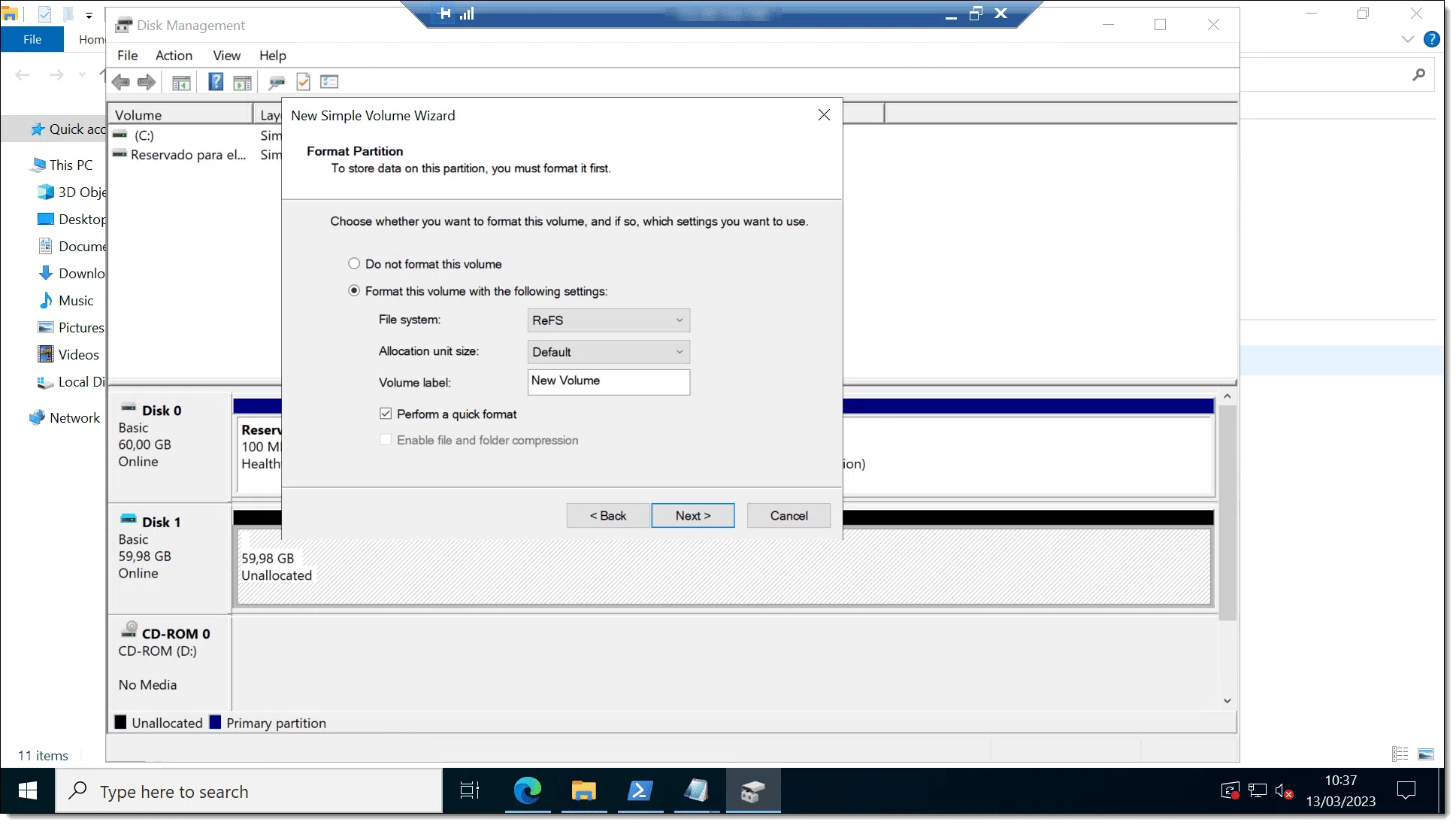
For those who manage data in Windows , ReFS (Resilient File System) is the name that comes up every time we talk about data integrity, scalability, and high availability. It was created to address today's challenges in a modern way: larger data volumes, increased virtualization, and reduced tolerance for downtime.
This guide explains in detail what ReFS is, how it works, how it outperforms NTFS , what limitations it still has, and in which scenarios it's best suited for deployment. You'll also see why it excels in virtualization and backups , how it integrates with Storage Spaces, and what key differences you should understand before choosing between ReFS and NTFS.
What is ReFS and design goals
ReFS is a modern file system created by Microsoft with three main goals: maximizing data availability, scaling effectively, and protecting against corruption. It debuted in Windows Server 2012 and has evolved with 3.x versions in subsequent editions of Windows Server and Windows 10/11 for business environments.
Its architecture is based on several key ideas: continuous integrity verification , self-healing when redundancy is present, online maintenance, and internal structures that facilitate scalability. ReFS is designed to integrate with Storage Spaces and Storage Spaces Direct , allowing it to automatically repair corrupted data if alternative copies exist within the pool.
Internally, ReFS uses B+ trees for metadata and data, tables to organize both (similar to a database), and a hierarchical allocator that manages free space by block size. Metadata includes 64-bit checksums , and file data can be optionally protected with integrity streams (enabling copy-on-write to data). This combination reduces the need to run chkdsk and speeds up recovery from failures.
In its recent evolution, ReFS 3.4 (Windows Server 2019) significantly improved performance in real-world use cases; ReFS 3.7 (Windows Server 2022) expanded support for features such as page files ; and Windows Server 2025 adds EFS (encrypted file system) support on top of ReFS. Features such as file-level snapshots (Windows Server 2022 and later) and deduplication (since Windows Server v1709) were also incorporated .
Key benefits: resilience, performance, and scale
ReFS's design revolves around three pillars: resistance to corruption , high performance under demanding loads, and massive scalability with the least possible impact.
Resilience that prevents downtime
ReFS incorporates integrity streams and checksums into metadata (and optionally data) to reliably detect corruption . If a block doesn't match, the system accurately identifies it and can take action without dismounting the volume.
When deployed alongside Storage Spaces (mirroring or parity), ReFS can automatically repair damage using the good copy of the data. Repairs are localized and online , so the volume remains available and the entire system isn't penalized by a single issue.
If there is no replica for a damaged block, ReFS can "save" the volume by removing that entry from the namespace, preserving the rest of the operating system and operational data while the incident is handled. Only in exceptional cases should the volume be handled offline.
In addition, there is a proactive verifier (data integrity scrubber or "debugger") that periodically scans the volume, detects latent corruption, and triggers repairs before they affect applications. This maintenance reduces reliance on manual tasks and prevents unexpected issues.
Performance designed for virtualization
ReFS offers several optimizations that shine in environments with virtual machines and I/O-sensitive workloads :
- Mirror-accelerated parity: ReFS divides the volume into logical levels (tiers of performance and tier of capacity). Always write to the fast tier and move large, cold fragments to the capacity tier in real time. Typical examples: SSD mirrored + parity HDD, mirrored SSD + parity SSD, or mirrored SSD + mirrored HDD.
- Optimized readings: In hybrid configurations (flash + HDD), the cache Storage Spaces Direct accelerates reads and mitigates the fragmentation inherent in virtualized workloads; in all-flash deployments, reads are also satisfied from the performance tier.
- Block cloning: Accelerates checkpoint copies and merges in Hyper‑V by referencing metadata instead of physically moving data.
- Sparse VDL (Valid Data Length): allows you to “zero out” files very quickly, reducing the creation of fixed VHD/VHDX from minutes to the 2nd.
- Cluster sizes 4KB to 64KB flexible: 4K is usually the general recommendation; 64 KB best suited for large sequential I/O.
In Windows Server, mirror-accelerated parity is only supported with Storage Spaces Direct . Microsoft recommends using it for archiving and backup ; for random and demanding virtualized workloads, triple mirroring is generally preferred due to latency and consistency.
Scalability without sacrificing availability
ReFS is designed to handle very large volumes and files without performance degradation in proportion to scale. Current Microsoft documentation sets practical limits of 35 PB for file and volume size , with paths up to 32.000 Unicode characters and filenames of 255 characters. Higher theoretical limits with 64KB clusters have been cited in technical literature, but in practice, we should adhere to the figures documented by the manufacturer.
This capability makes ReFS very attractive for file servers with massive file sets or archives , VM repositories, or backup destinations with high retention requirements. All this while maintaining the advantages of data integrity and online maintenance.
Supported implementations and usage scenarios
While NTFS remains the general-purpose "wildcard," Microsoft supports ReFS for scenarios requiring high availability, resilience, or specific scalability. However, the hardware must be listed in the Windows Server Catalog and meet the application requirements.
Storage Spaces Direct (S2D)
It's the natural habitat of ReFS for virtualized workloads or network storage . With S2D you get mirror-accelerated parity, hybrid read caching, block cloning for .vhdx files, and integrity benefits (integrity streams, online repairs, alternate data for reconstruction) all working in a coordinated manner.
Storage Spaces with shared SAS cabinets
It works very well for archive data and user documents . It leverages integrity, online repairs, block cloning, and scalability. Storage Spaces supports direct non-removable connection via SATA, SAS, NVMe, or HBA (RAID in passthrough mode).
Basic discs
It's interesting when applications already implement their own resilience and availability through software . In this case, you can use integrity streams, block cloning, and the large scale of ReFS without adding redundant layers.
Backup destination
For backup repositories with applications and hardware that manage their own high availability, ReFS provides integrity, block cloning, and scalability . If the SAN environment requires thin provisioning, TRIM/UNMAP, or ODX , then NTFS is preferable on that volume for compatibility.
ReFS vs NTFS Comparison: Features and Limits
Both share a large number of capabilities, but there are important differences that influence the choice for each use case.
Limits (typically documented by Microsoft)
| Feature | Refs | NTFS |
|---|---|---|
| Maximum file name length | 255 Unicode characters | 255 Unicode characters |
| Maximum route length | 32.000 Unicode characters | 32.000 Unicode characters |
| Maximum file size | 35 PB | 256 TB |
| Maximum volume size | 35 PB | 256 TB |
Although higher figures have been cited theoretically for ReFS with large clusters, these are the current practical limits that you will see in Microsoft's documentation and support.
Functions available in both
ReFS and NTFS share: BitLocker , ACLs, USN Journal, change notifications, symbolic links and junction points, mount and re-analysis points, volume snapshots , file identifiers, oplocks, sparse files , named streams, CSV support (with nuances), and paging file support (in ReFS since 3.7).
Relevant notes: Deduplication in ReFS is available in Windows Server v1709 and later; in CSV, with Storage Spaces/S2D/SAN, direct I/O is not used ; EFS over ReFS is supported from Windows Server 2025; and thin provisioning and TRIM/UNMAP in ReFS are limited to Storage Spaces.
Only in ReFS
- Block cloning to speed up copies and VM operations.
- Dispersed VDL for ultra-fast creation of still files (VHD/VHDX).
- Reflex accelerated parity with S2D to combine performance and capacity.
- File-level snapshots (Windows Server 2022+).
Not available on ReFS (or with restrictions)
- Transactions (TxF), object identifiers y ODX.
- Short names 8.3 (generally no; some scenarios are simulated with links).
- Disk Quotas, file system compression and, except for Windows Server 2025, EFS.
- Removable media support y Boot of the system (boot) not generally supported.
- Reduction volume not available.
Internal operating details
ReFS stores metadata and data in B+ trees and organizes both into tables. Free space is managed by a hierarchical allocator that separates large, medium, and small chunks to optimize allocation.
Metadata uses copy-on-write : changes are written to new blocks and only when committed are they "linked" as the current version. If you enable integrity streams on data, this policy also applies to files, minimizing the risk of corruption from power outages or mid-write failures.
Thanks to independent (64-bit) checksums on metadata and, if enabled, on data, the system can detect alterations and take action. When mirrored/parity storage spaces are present, ReFS repairs online using the good copy; otherwise, it removes the corrupted item from the namespace and keeps the volume operational.
The cleaning or "scrubbing" process periodically reads all copies (mirrors) and checks checksums to replace any damaged ones without intervention. This reduces the need to run traditional tools and avoids prolonged downtime for checks.
ReFS in virtualization and backups
In Hyper-V environments , ReFS has shown tangible improvements: creating a fixed VHDX on NTFS could take minutes; with sparse VDL , it takes only seconds. This accelerates deployments, automation, and rapid scaling.
Block cloning also makes a difference. By relying on metadata, operations such as VM cloning, merging checkpoints, or performing synthetic fulls on backup repositories benefit from pointers instead of moving data, reducing I/O, time, and disk wear.
In real-world scenarios, many virtualization backup solutions generate synthetic copies without rehydrating data, leveraging ReFS's ability to efficiently reference existing blocks. The result is less traffic, lower latency, and more manageable backup chains.
If you combine ReFS with Storage Spaces Direct and suitable (validated) hardware, you get a data plane that combines resilience, speed, and capacity , especially useful in Hyper-V clusters with CSV.
Best practices, limitations and compatibility
Before formatting a volume in ReFS, it is advisable to evaluate the use case and be aware of its current limitations and recommendations.
- System/Boot Volume: Not a general boot option for Windows; NTFS remains the standard path for OS partitioning.
- In-place conversion from NTFS to ReFS: not supported; you have to migrate data.
- Consumption of resources: ReFS may require more RAM/CPU and IOPS on large arrays than NTFS.
- Installing apps: Not generally recommended for ReFS volumes; there is no file system compression and, except for WS 2025, there is no EFS.
- Short names 8.3, quotas, and ODX: absent; assess impact on legacy tools.
- Support on Windows client: Historically, in Windows 10 it was linked to Storage Spaces; evidence has been seen in Windows 11 with ReFS options on clean installs, but for production it is best to stick to paths supported by Microsoft.
Regarding versions, the 3.x branches arrived with Windows Server 2016 ; ReFS 3.4 matured in Windows Server 2019, and ReFS 3.7 (Windows Server 2022) added pagefile support and other improvements. Data deduplication for ReFS has been available since Windows Server v1709, and file-level snapshots since Windows Server 2022. EFS on top of ReFS was introduced in Windows Server 2025. Hard links are supported in ReFS from the 3.5 branch onward in specific scenarios.
Cluster size and recommendations
Cluster size affects performance and space efficiency . In ReFS you can use from 4K to 64K; 4K is usually the default and recommended option for general use, while 64K may be better for workloads with large sequential I/O (e.g., very large files).
In NTFS, 4K is also the norm; sometimes 64K clusters are used to reduce fragmentation or overcome certain limits with very large volumes. If you're coming from NTFS and plan to move a dataset to ReFS, test the cluster size in a pre-production environment with your actual workload.
ReFS vs. NTFS: When to Choose Each
Choose ReFS if you need proactive integrity, online repairs, block cloning, sparse VDL, and mirror-accelerated parity in S2D, or if your volumes/files are going to grow significantly. It's an especially good choice for VM repositories and backup targets.
Choose NTFS if you require features such as file system compression, EFS (on clients), transactions , quotas, ODX, or broad compatibility with legacy applications and removable media, and for the OS system/boot partition .
In mixed environments, it is common to use NTFS for the OS and certain data , and ReFS for virtualized workloads, repositories or archiving , benefiting from the best of each without forcing total replacements.
If you need SAN features like ODX or rely on thin provisioning/TRIM outside of Storage Spaces, keep those volumes on NTFS. When the goal is resilience and scale with S2D, ReFS is the better choice.
Ultimately, the decision depends on your availability, security, performance, and compatibility requirements . Validating the hardware in the Windows Server Catalog and testing the load in a lab will save you from surprises.
ReFS positions itself as a robust, agile storage layer , well-suited for large datasets and virtualization, while NTFS maintains its role as a versatile and widely compatible system. By combining them judiciously, you can achieve an optimal balance of integrity, performance, and support in your Windows deployments.

Passionate writer about the world of bytes and technology in general. I love sharing my knowledge through writing, and that's what I'll do on this blog, show you all the most interesting things about gadgets, software, hardware, tech trends, and more. My goal is to help you navigate the digital world in a simple and entertaining way.