- Resource Hacker is a free resource editor and compiler for Windows which allows you to view, extract and modify icons, menus, dialogs and text strings in executables and libraries.
- The tool works with Win32 and Win64 files (.exe, .dll, .cpl, .ocx, .res, .mui), offers a graphical interface and a command line. commands, and integrates a script compiler with advanced directives.
- Despite its uneven development and limitations with packaged or 16-bit applications, it remains a reference for customizing and analyzing programs, always respecting its license and legality.
Si Te gusta tinkering with WindowsWhether you're looking to change icons, translate dialog boxes, or understand how programs are structured internally, you've probably heard of Resource Hacker. This small utility has been circulating on the internet for years, and although its development has been somewhat inconsistent, it remains one of the classic tools for manipulating the resources of Windows executables without going crazy.
Before panic sets in: Resource Hacker is not a "magic" program for illegally hacking software.It's not a program, but a resource editor designed to view, extract, modify, and compile the visual and text elements contained within files like .exe, .dll, or .cpl. It's widely used for customizing systems, changing icons, translating interfaces, or analyzing how certain applications are built. However, it must always be used in accordance with its license and the laws of each country.
What is Resource Hacker and what is it used for in Windows?
Resource Hacker (ResHacker or ResHack) It is a free resource editor and compiler for Windows created by Angus Johnson in the late 90s. Its main function is to allow you view, extract and modify internal resources of Win32 and Win64 executable files, as well as libraries and compiled resource files.
When we talk about “resources” in Windows, we are referring to all those elements integrated within an executable that are not, strictly speaking, the program code: icons, bitmaps, cursors, menus, dialog boxes, text string tables, message tables, keyboard accelerators, Borland forms, or version informationAll of that is packaged within many .exe and .dll files, and that's exactly what Resource Hacker lets you manipulate.
The tool works with both executable files (.exe, .dll, .cpl, .ocx, .scr) As with compiled resource files (.res, .mui)You can use its classic graphical interface or pull in a powerful command line to automate processes, which is very useful if you have to repeat the same modification in several files.
Brief history and evolution of development
Resource Hacker was first launched in December 1999Angus Johnson wrote it in Delphi 3.02 and, for the first three years, released updates quite frequently, polishing its operation and adding features that made it the de facto reference for resource editing in Windows.
Around March 2002 The program reached version 3.4.0, considered for quite some time to be the last stable version. From then on, its author announced that he had no intention of continuing to develop the tool or releasing its source code. As has been mentioned many times, Upgrading the project to modern versions of Delphi meant rewriting or adapting a large part of the code.Something Angus was not willing to accept.
For years he responded very clearly to those who asked him to continue with the development: I didn't plan on updating Resource Hacker or selling the code.Even so, the program's popularity continued to grow, especially in Windows customization forums and reverse engineering communities, to the point of exceeding several million. downloads.
Although it initially seemed "abandoned," the author surprised everyone with some sporadic new versions. In November 2009, version 3.5.2 beta was released., with support for 64-bit executables and PNG image display. In Version 3.6.0 arrived in September 2011which added support for icons in PNG format, something key to integrating well with modern versions of Windows.
Subsequently, further revisions have been published with compatibility improvements and visual tweaks: the later 4.xy branch They incorporated improved Unicode support, better handling of RC files, and minor cosmetic tweaks, reaching versions such as 4.0.0, 4.1.5, 4.2.5, and subsequent updates (4.6.32, 4.7.34, and 5.1.1). Although the pace is not frenetic, The program has continued to receive occasional refinements..
License, terms of use and recommended alternatives
Resource Hacker is freeware softwareYou can use it for free under clear license conditions that its author maintains on the official website. It is not open source, it is not distributed with its source code, and Angus has made it clear that He will never publish the code or sell it..
Hay two key points in its terms of use, which you should keep in mind when you're wondering what Resource Hacker is for in Windows:
- Redistribution of the program is not permitted. from any domain or by any means without prior written authorization from the copyright holder.
- The software cannot be used to illegally modify applications.For example, by bypassing protections, altering licenses, or violating copyright.
At the time, and given the insistence of many users who wanted access to the code, Angus recommended XN Resource Editor as an "open source" alternative. He later also mentioned other actively developed resource editing tools as good options for those needing something more modern or with ongoing maintenance.
Although it is not free, the author has proven to be quite open to reasonable uses. For example, when asked for permission to Redistribute Resource Hacker translated into Spanish From an independent website, his response was a simple and polite “Yes. Thanks for asking.”, provided that his license and copyright were respected.
Key features of Resource Hacker
The charm of Resource Hacker lies in the fact that, without being a gigantic application, It focuses on the exact functions you need to edit resources in Windows.Whether you're a user who just wants to change an icon or a developer who wants to automate changes to dozens of executables.
Visualization and exploration of resources
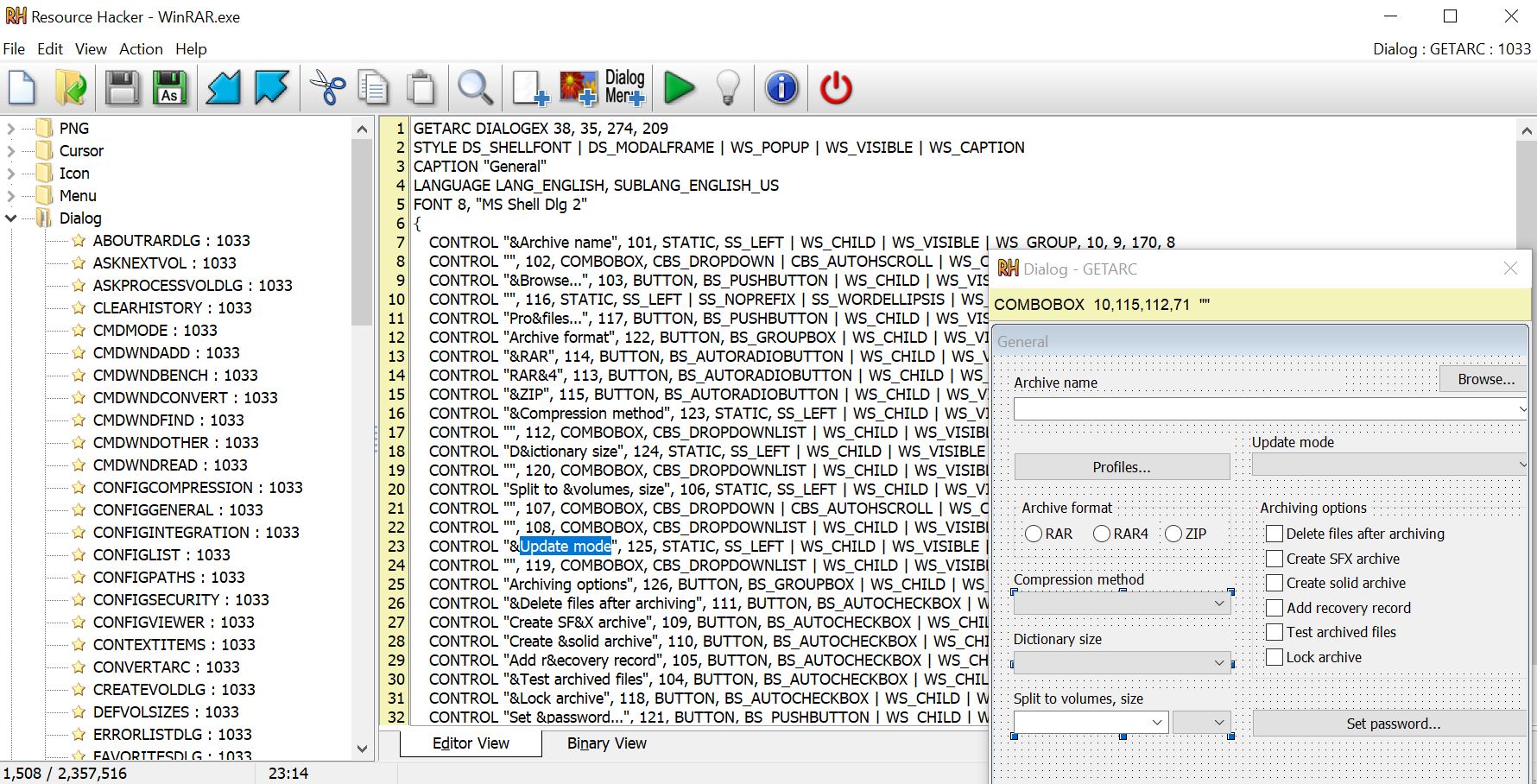
When opening a file with Resource Hacker, the main window displays the following in the left panel: a resource category treeThese folders may vary from file to file, but it is common to find entries like:
- REVIEWS: contains animations and videos in AVI format integrated into the executable.
- Cursor: groups the cursors used by the application.
- Bitmap: includes bitmaps (.bmp) that are used, for example, for backgrounds or internal graphics.
- Icon: saves the individual icons of the application.
- Icon Group: encompasses sets of icons in different sizes and color depths.
- Menu: compiles the program's menu structures.
- Dialogue: stores the dialog boxes you see when using the software.
- String Table: contains tables of text strings, very useful for translating or modifying messages.
- Accelerators: define keyboard shortcuts associated with certain actions.
- Version info: provides file version data: product name, company, build number, etc.
When selecting each resource, The right panel displays it as an image or as text.Depending on the type. Binary resources that it does not recognize are displayed as read-only binary text, which at least allows for quick inspection.
Extraction and export of resources
One of the most used functions is to extract resources from an executableResource Hacker allows you to save icons, bitmaps, cursors, menus, dialogs, and string tables in various formats:
- .res files, keeping the compiled resource.
- Individual images, such as .ico, .cur or .bmp, to edit them with any external graphics editor.
- Resource scripts .rcdecompiling the content into readable and editable text.
This capability is very useful if you want to, for example, retrieve a program icon, analyze the texts of an application or clone the appearance of a dialog box to reuse it in your own project.
Editing and compilation of resources
In addition to viewing and exporting, Resource Hacker lets you directly edit a large part of the resources and recompile them to integrate them back into the original file. Among the most common operations are:
- Rename or replace resources, both graphics and text.
- Modify icons, cursors, and bitmaps, replacing them with images from .ico, .cur, .bmp, other .res files or even other .exe files.
- Edit Borland dialogs, menus, string tables, accelerators, and forms using the internal script editor.
When you change the script From a dialog, menu, or string table, the program incorporates a “Compile Script” button which recompiles that resource on the fly with the modifications you've made. Another button, "Show Dialog", allows Preview how the dialog box will look After compiling, something very practical for adjusting the positions of controls and text.
You can also add new resources to an executable. This allows, for example, providing a program with multilingual support by introducing new localized string tables or dialogs, or inserting a corporate icon or logo in a specific window.
Similarly, Resource Hacker facilitates remove unused resourcesMany compilers add elements that the application never needs; deleting them can reduce the size of the final file, something that was quite relevant in its day.
Command line and automation
Almost all of Resource Hacker's functions can be invoke from the command linewithout needing to open the graphical interface. This feature is especially powerful for automating repetitive tasks, such as replacing the same icon in a set of executables or injecting a table of strings into multiple versions of an application.
The resource compiler integrated into the program supports directives similar to those of classic compilersCommands such as #INCLUDE to leverage definitions in header files, and others like #DEFINE, #UNDEF, #IF, or #ELIF to control which parts of the script are included based on certain conditions. Additionally, strings can include escape characters and commentsThis allows for writing fairly elaborate and maintainable resource scripts.
Common uses: customization and visual “hacks”
In practice, many users approach Resource Hacker because they have seen that someone has changed the appearance of Windows or an application to your likingA very famous case at the time was that of Modify explorer.exe to change the word “Start” from the taskbar button in Windows XP for anything else.
The procedure is usually always similar: The executable is opened with Resource Hacker, and the text strings or specific graphic resource are searched for. (an icon, a bitmap, a menu), is edited or replaced with another, and the resource is recompiled before saving the changes. The same applies to lighthearted jokes and more serious customizations, such as adapting imprecise menu texts or translating parts of a program that do not offer a separate language file.
One very popular application is the change the icon of an .exe that you use daily. The typical workflow involves converting the desired image to .ico format (for example, to 256x256 size), backing up the original .exe, opening the file with Resource Hacker, locating the “Icon” or “Icon Group” branch, using the icon replacement option, and finally save the result as a new executable to pin it to the taskbar or Start menu.
It is also common for developers and companies to use Resource Hacker as auxiliary tool for retouching visual details of their own applications: polish a dialog box, adjust overflowing text, incorporate an updated logo, or add a string table for another language without recompiling the entire project, especially when the complete source code is not at hand at that moment.
Technical considerations, limitations and compatibility
Although Resource Hacker is very flexible, it has some limitations and technical features which should be clear to avoid surprises.
Firstly, It cannot open or edit 16-bit applicationsIt is designed for Win32 and Win64 environments, so very old programs (from the Windows 3.x era) are not compatible.
Furthermore, many current applications, especially those most concerned with final size, are subjected to compression or packaging processes of executables Once compiled, using compressors like UPX or other commercial packaging systems. When you try to open one of these compressed executables with Resource Hacker, sometimes You will only see the general resource structure and namesHowever, you won't be able to edit its contents normally until the file is unpacked, which may be necessary in cases of files such as bootres.dll.
Another major limitation stems from its own history: the Resource Hacker core is compiled with Delphi 3.02That has meant that, with Thereappear specific problems when working with applications developed in more modern versions of Delphiespecially in the compilation and decompilation of resources with new syntax. For it to be fully compatible, it would need to be recompiled with a recent version of the compiler and large parts of the code would need to be modified, something its author has ruled out.
There are also specific notes on interaction with the visual styles of Windows XP to Windows 7Adding a manifest resource to Resource Hacker (the editor's own executable) can cause intermittent problems when viewing or editing dialogs, so using custom manifests on top of ResHacker itself is discouraged.
Precautions when modifying system files
Modifying internal resources of .exe and .dll files, especially if they are operating system filesThis involves risks. The main one is that any mistake could render the modified executable unusable or cause unexpected behavior in Windows.
The first thing is always to do backupMany guides recommend duplicating the file before opening it with Resource Hacker (for example, explorer_backup.exe) and leaving the original intact. Additionally, the program itself usually creates a backup file with the suffix. "_ORIGINAL" The first time you save changes to an executable. If you try again and get the error message “Cannot create file…”, it's likely that backup The previous one is blocking the operation and you have to delete it manually in the same folder.
In classic versions of Windows, the system file protection (Windows File Protection, WFP) It can prevent you from saving changes to certain executables or libraries. In such cases, specific tools like "WFP Patcher" were used to temporarily disable this protection, although nowadays this type of maneuver is considered risky and you have to carefully weigh whether the risk is worth it.
Another consequence of modifying an executable is that loses its original digital signatureIn Windows' view, it ceases to be a file signed by its publisher and is now considered to be from an "Unknown Publisher." This can trigger security warnings and, in some cases, break the integrity check of the System File Checker, which will attempt to restore the official version from the CD or from the system image.
Therefore, it makes perfect sense to reserve system file editing for advanced users who assume the riskFor minor customizations of third-party applications or personal projects, the consequences are usually much more manageable.
Versions, compatibility and platform
Resource Hacker was originally conceived for Windows 95, 98, Me, 2000 and XPHowever, the latest versions have adjusted compatibility to also include later systems such as Windows Vista, Windows 7 and 64-bit editions.
The program works without the need for traditional installation: Simply unzip it and run it.It doesn't create any unusual entries in the Windows registry, which many users appreciate when they want to try it without "cluttering" the system. The license is completely free for personal and professional use, provided the aforementioned conditions are met.
Regarding development, it is considered that Version 3.4.0 marked the end of its first stageFrom there, versions 3.5.x, 3.6.x, and later the 4.x and 5.x branches were released with specific improvements: 64-bit support, PNG icons and graphics, Unicode, refinements in RC file handling, and minor cosmetic changes. Although it lacks a public roadmap and constant updates, it remains downloadable from its website. official website and remains fully functional for what is expected of a classic resource editor.
As of today, with all its virtues and limitations, a very useful tool for anyone For those who want to better understand what lies hidden inside Windows executables, customize visual details of their programs, or work with resources without having to recompile entire projects; provided it is used sensibly, respecting its license and making the appropriate backups, it offers a very successful balance between simplicity, power, and control over icons, menus, dialogs, and other elements that shape the graphical experience in the Microsoft system.


Passionate writer about the world of bytes and technology in general. I love sharing my knowledge through writing, and that's what I'll do on this blog, show you all the most interesting things about gadgets, software, hardware, tech trends, and more. My goal is to help you navigate the digital world in a simple and entertaining way.