- Running in the browser with React and TensorFlow.js using COCO-SSD for live detection without a backend.
- YOLOv3/YOLOv8 for webcam and video, with multi-object tracking using ByteTrack or BoTSort.
- Key data and metrics: PASCAL VOC, MS COCO, mAP and IoU, and training flow per transfer.
- Deployment as a static site or at the edge (ESP32Cam/Jetson) and no-code options to accelerate production.
Real-time object detection from a webcam has evolved from a laboratory experiment to an everyday capability thanks to the maturity of computer vision and deep learning. Today, it's possible to build a working prototype that analyze the live video without relying on a server, and even deploying it as a static site. From browsers with TensorFlow.js to edge devices like ESP32Cam or Jetson platforms, the range of options is vast.
Working with the webcam provides immediacy and reduces friction: you can test on your equipment, capture data and do demonstrations without hardware extra, for example use your mobile as a webcamWith TensorFlow.js it is possible to run a detector in the browser, and with engines like YOLO in Python you can squeeze the GPU to process video at high speedThis versatility adds value to prototypes, POCs, and lightweight deployments.
What do we mean by object detection and why do it from the webcam?
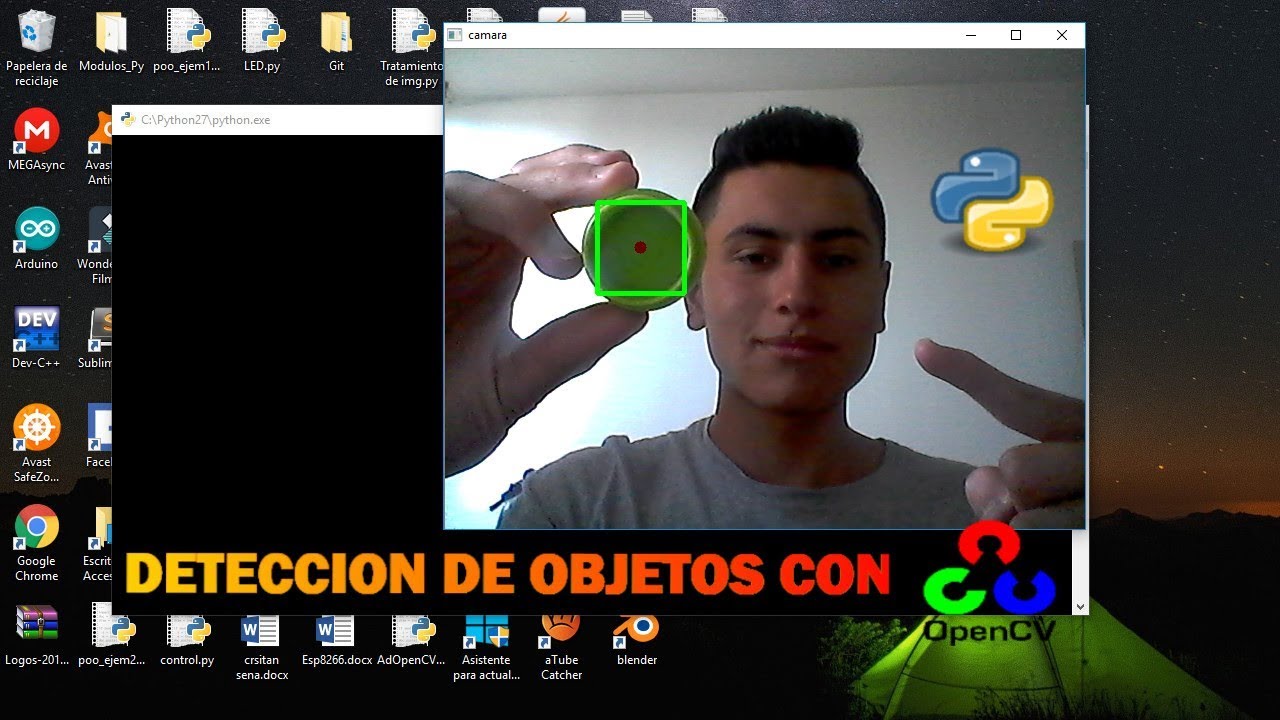
Object detection identifies and locates elements within each frame of an image or video, adding bounding boxes and class labels with a confidence level. Unlike classification, which labels the entire image, here we need to locate the position. Models such as YOLO, SSD or Faster/Mask R-CNN have promoted this task until There real in contexts as diverse as security, retail or autonomous driving.
Working with a webcam provides immediacy and reduces friction: you can test on your computer, capture data, and demonstrate without any additional hardware. With TensorFlow.js, you can run a detector in the browser, and with engines like YOLO in Python, you can squeeze the GPU to process video at high speedThis versatility adds value to prototypes, POCs, and lightweight deployments.
Browser Detection with React and TensorFlow.js (COCO-SSD)
A straightforward way to get started is to create a SPA with React that takes the webcam stream, runs a pre-trained model in the browser itself, and paints results. The COCO-SSD model recognizes dozens of common classes and is relatively lightweight, making it perfect for an agile demo with live detection.
Initial project setup with Screw and dependencies. Create the React skeleton and add TensorFlow.js along with the COCO-SSD model package:
npm create vite@latest kinsta-object-detection --template react
cd kinsta-object-detection
npm i @tensorflow-models/coco-ssd @tensorflow/tfjs
In the application define a component that manages the camera permission, Boot and stop the stream, and paint the video, and if you need to save screenshots there are programs to take photos from the PCIt is convenient to manage the state with React and store a reference to the element to assign the flow of MediaDevices.getUserMedia.
Basic interface and flow. In the main component, you can compose a header and an ObjectDetection component. This component will include: a webcam start/stop button; the video element; and a container where you'll then draw frames and labels. When started, it will ask for permission and assign the stream to 'videoRef.current.srcObject'; when stopped, it will go through each track of the stream to stop tracks and release resources.
Detection logic. Import the model and TensorFlow.js, and prepare a state to store the predictions. Load COCO-SSD with 'cocoSsd.load()' and call 'model.detect(videoRef.current)The result is an array with class, score, and bbox coordinates. This data is used to overlay a rectangle and label for each object identified in the live image.
Inference frequency. To invoke detection periodically, you can use 'setInterval' when the webcam is activated and 'clearInterval' when it stops. A typical interval is 500 ms, although you can vary it. Higher frequency means better fluidity but higher browser usage; with modest hardware, lowering the frequency prevents memory and CPU spikes.
Styles. Add rules CSS to position labels and markers on absolute layers above the video. A label with a semi-transparent background and a dashed border make the real-time detection easier to read. Remember to keep the style light so as not to penalize rendering performance.
Static deployment. Once your app is ready, you can build and publish your site as static. Kinsta allows you to host up to 100 static sites for free from GitHub, GitLab, or Bitbucket. In the dashboard, authorize the Git provider, select the repo and branch, assign a name, and configure the build ('npm run build' or 'yarn build', Node '20.2.0', publish directory 'dist'). After creating the site, 'Visit Site' will take you to the URL. With the static approach, your static site detector will COCO-SSD and TensorFlow.js runs in the user's browser, without a backend.
If you prefer more control, Kinsta's Application Hosting adds scaling, custom Dockerfile deployments, and real-time and historical analytics. And if you're working with WordPress, their managed hosting includes unlimited migrations, 24/7 support, integrated Cloudflare, and cloud infrastructure. Google Cloud and global coverage in dozens of data centers; it is a stable ecosystem for projects that will mix web and computer vision.
Models and families: from R-CNN to YOLOv8 via SSD
The evolution of detection has gone from two-step pipelines to single-pass solutions. R-CNN and variants (Fast, Faster, and Mask R-CNN) rely on region proposals to detect and then classify, with Mask R-CNN also extending to pixel-wise segmentation. SSD and YOLO, meanwhile, directly predict frames and classes in a single inference, making them ideal for real time.
YOLO brings a holistic view of the entire image to every assessment, capturing context and reducing false positives in complex scenes. Versions like YOLOv3 and YOLOv4 marked a leap in performance; later, YOLOv5 and YOLOv8 further refined speed and accuracy. Its 'You Only Look Once' philosophy fits with webcams and streaming by demanding low latency and high frame rates.
For multi-object tracking, detectors are combined with trackers. With YOLOv8, it's common to integrate ByteTrack, known for its balance of accuracy and robustness, or alternatives like BoTSort. In Python, launching parallel threads allows for multiple simultaneous streams, with each thread managing its own detection and tracking instance for surveillance cameras or analysis of several sources in parallel.
If you're working in VS Code, the experience is straightforward: load the model (e.g., a medium-sized YOLOv8), set up the backend (CPU/GPU), and run inferences on pre-recorded video or directly from the webcam. Switching from source to live capture allows you to test behavior against occlusions, lighting changes, and camera movement, which are key to real-world performance. dynamic scenarios.
Data, annotation, and metrics: the foundation of performance
Without good data, there is no reliable detection. The PASCAL VOC, MS COCO, and ImageNet sets have been fundamental for training and evaluating detectors. Each image is annotated with classes and boxes; diversity (backgrounds, sizes, lighting conditions) is crucial for the model to generalize. When we don't have sufficient data, transfer learning on pre-trained models is the most effective way. cost-efficient.
In training and evaluation, the most common metrics are mAP (mean average precision) and IoU (intersection over union). mAP measures averaged precision at different IoU thresholds; in reference benchmarks, some models exceed 60–70% mAP in COCO. In addition, for production, it is important to measure latency, throughput, and stability, especially if the objective is streaming in real time.
Semantic and instance segmentation goes a step further by labeling pixels. In tasks where the exact shape matters (e.g., medical or industrial), Mask R-CNN can accurately delineate contours. This isn't always necessary for webcams, but it adds value when the area of the object, and not just its presence, is relevant. decision-making.
The typical pipeline starts with preprocessing (resizing, normalizing, augmenting), goes through the convolutional network to extract features, and finally predicts boxes and classes. In live applications, optimizing this chain and reducing redundant computation makes all the difference in maintaining a smooth experience on devices with modest resources.
YOLOv3 in action: webcam, video, and personalized training
If you prefer Python and PyTorch, YOLOv3 remains a solid choice for webcam and video. There are repositories that allow you to run detection on live streams and files, with instructions for installing dependencies, downloading pre-trained weights, and setting up a reproducible environment. When using a GPU, you can use YOLOv3 to run detection on live streams and files. NVIDIA, the speed gains in inference result very notable.
Environment and dependencies. You can create a specific Anaconda environment (e.g., 'objdetect' with Python 3.6) and install the packages listed in the project's 'requirements.txt'. This avoids version conflicts and ensures that PyTorch and the rest of the libraries are compatible with your project. hardware and system.
Pre-trained weights. Download the official weights to save the cost of training from scratch. Place them in the appropriate directory (e.g., 'weights/') so that the script detect and load the checkpoint. This way you can launch webcam detection immediately without pre-training phase.
Execution via webcam or video. The repo usually includes commands or flags to choose the source: live webcam or a video file. Changing the parameter or camera index will start the detection on the desired source. With GPU, you will see how the number of FPS increases and latency decreases, maintaining frames and labels of stable form.
Train your classes. If you want to detect your own categories, label images in VOC format and generate the network configuration ('.cfg' file) for transfer learning. The typical data structure is 'data/custom/images' for images and 'data/custom/labels' for annotations, with one '.txt' for each '.jpg'. Define 'data/custom/classes.names' with one name per line and list paths in 'train.txt' and 'valid.txt'. From there, the training script will adjust the model weights to your needs. specific domain.
Object detection with YOLOv8 and multi-object tracking
The YOLOv8 release of Ultralytics facilitates a modern workflow with integrated detection and tracking. Setting up a medium-sized model usually provides a good balance; if you have capable hardware, even larger models can run in real time. The typical tutorial shows how to launch inference, visualize results, and switch from video to webcam without complications.
Common Trackers. ByteTrack is a strong candidate for its accuracy and reliability, although BoTSort is another established alternative. The unique object identifier helps with tracking despite occlusions or trajectory changes; in live demos, it's easy to verify the robustness of the system when the subject crosses paths. other elements or enters and exits the frame.
Multistream. When the task requires monitoring multiple cameras, the Python threaded approach allows you to launch one instance per stream. Each thread launches its detector and tracker, maximizing core utilization and maintaining pipeline independence. This is a practical pattern for control centers, retail, or urban analytics.
Edge AI: ESP32Cam, Jetson and no-code platforms
Not everything is a browser or a server. At the other extreme are embedded devices, where processing is done on the same computer that captures the data. Examples of ESP32Cam abound, although many articles actually delegate the computation to a PC and use the module as a simple camera. If viewing on a computer is required, there are tools to do so. view IP cameras from your PC. There are autonomous projects (for example, reading QR codes on-device) and the community is actively looking to decode barcodes without relying on a backend as well.
If you need more muscle at the edge, the NVIDIA Jetson ecosystem (Nano Orin, NX Orin, AGX Orin) lets you turn virtually any camera into a camera with IAThere are solutions that integrate field-ready detection and tracking models, including commercial tools that promise to transform any flow in actionable analytics. For those who don't want to write code, vision platforms like 'visionplatform.ai' support loading models and running detection/tracking without touching a line, reducing integration time.
This range of options covers everything from in-browser demos to industrial deployments. Choosing between browser, Python with GPU, or edge depends on budget, target latency, available connectivity, and the need for data privacy on the device.
Use cases and cross-cutting applications
Object detection is used in surveillance and access control, with video surveillance software (people detection, face recognition), retail (behavior and inventory analysis), automotive (pedestrian and vehicle detection), healthcare (anomalies in medical images), or agriculture (crop and pest monitoring). The key is to combine classification and bounding box to understand the context and make decisions in changing environments.
In smart cities, real-time detection facilitates counting, path tracking, and alerts. In factories, it helps with quality control and workplace safety. And in consumer products, it's integrated into AR experiences and utilities like code scanners. Choosing the right model (e.g., YOLO for low latency) and fine-tuning the data pipeline defines success at scale. productive.
Going into production and additional considerations
If you're publishing a web demo, in addition to hosting (e.g., free static sites on Kinsta from your Git repository), keep in mind camera permissions and the associated UX. It's also common to see cookie banners informing you about the use of cookies. storage local and analytical; these notices help to comply with regulations and explain what data is handled in the user's browser.
In Python deployments, document the CUDA version, the drivers and the version of PyTorch/TensorFlow, and see guides on peripheral recognition problemsMaintaining a clear 'requirements.txt' and startup scripts saves you hours of replicating environments. If you're training, automate the creation of 'train.txt' and 'valid.txt', and ensure consistency between 'classes.names' and your annotation labels to avoid subtle errors.
All of the above converges into a landscape where you can start with a React app running COCO-SSD in the browser, jump to YOLOv3 or YOLOv8 with webcam and GPU tracking, or move to the edge with ESP32Cam/Jetson and no-code solutions. The choice depends on your requirements for accuracy, latency, cost, and ease of operation, but the path from idea to prototype and from prototype to viable product it had never been so short.
The essence of webcam detection is that you can combine rapid deployment with real power: a SPA with TensorFlow.js for validation, YOLO for performance squeeze, well-annotated datasets for custom training, and a deployment that, depending on your case, can be as simple as a static site or as robust as an application with multi-track tracking on a GPU or an embedded device; with these building blocks, setting up practical solutions is a matter of hours rather than weeks, while maintaining control of the real-time experience.

Passionate writer about the world of bytes and technology in general. I love sharing my knowledge through writing, and that's what I'll do on this blog, show you all the most interesting things about gadgets, software, hardware, tech trends, and more. My goal is to help you navigate the digital world in a simple and entertaining way.