- Flexible co-management to move workloads from ConfigMgr to Intune without business disruption.
- Integrated capabilities: deployments, compliance, security, and analytics with native Microsoft integrations.
- Intune Suite adds remote help, privileges, analytics, and cloud PKI for enhanced security.
- Clear requirements: Entra/Intune licenses, versions Windows supported and appropriate roles for each action.

Microsoft Endpoint Manager (MEM) brings together Microsoft Intune and Configuration Manager (ConfigMgr) to provide modern device management in the cloud and on-premises without traumatic migrations or complicated licensing. The idea is clear: take advantage of the best of your existing infrastructure while you incorporate cloud capabilities at your own pace.
The result is a unified platform for managing PCs, servers, mobile devices and applications., with Consistent security, regulatory compliance, and more efficient operations. Additionally, the current branch of Configuration Manager is part of the Microsoft Intune family., allowing workloads to gradually move to the cloud while maintaining control from a single console.

What is Microsoft Endpoint Manager (Intune + ConfigMgr)
Microsoft Endpoint Manager is a hybrid (Cloud + On-Premises) endpoint management and security solution. that protects data and devices wherever they are. Integrates services and tools to monitor and manage mobile devices, desktop computers, Virtual machines, embedded devices and servers, combining the mature experience of ConfigMgr with the agility of Intune.
The goal is to reduce manual tasks, improve IT productivity, and give users the software they need on time.With MEM you can deploy applications, update OS, apply security policies and execute actions in real time, both on internal computers and those on the Internet.
Key components and services within the Microsoft Intune brand
Intune provides modern cloud-based management for Windows, iOS, Android and macOS. Allows MDM (device management) and MAM (application management), conditional access and compliance, with native integration with Microsoft Sign In ID.
Microsoft Endpoint Configuration Manager (ConfigMgr) it's still the on-prem cornerstone all with manage software, inventory, updates, and operating systems. Integrates with Intune for co-management and with other services such as WSUS, SQL Server and IIS.
Microsoft Sign In ID (formerly Azure AD) provides Identity, security, service location, and user and device discovery. Is glue that links users, devices and applications to enable access control and compliance.
Prerequisites and permits
Licenses: you need Microsoft Enter ID P1 or P2 and at least an Intune license for the administrator which accesses the administration center.
Configuration manager: use a current compatible branch; you can connect multiple ConfigMgr instances to an Intune tenant. Co-management does not in itself require incorporating the site into Entra ID, but for Internet-based clients you will need to Cloud Management Gateway (CMG), which does require the site to be incorporated into Entra ID.
Windows: update to Windows 11 or Windows 10 supported by Intune and takes the approach of Windows as a service for predictable update cycles.

User interfaces: Console and Software Center
Configuration Manager console: After installation, this is the main tool for configuring sites, clients, and administration tasks, with support for multiple sites and role-based administration to limit the scope of each operator.
Software Center: Application installed with the ConfigMgr client on Windows. Users search and install apps, updates and new versions of the system, they consult request history y they see the fulfillment from your device. In addition, custom tabs can be added depending on needs
Co-management with Intune and Configuration Manager
Co-management connects your ConfigMgr environment to the cloud. Microsoft 365 y unlocks capabilities like conditional access. The same Windows 10/11 device can be managed by both ConfigMgr and Intune., choosing which workloads move to the cloud.
Workload control: you decide whether to move Compliance directives, Windows Update, Resource Access, Endpoint Protection, Device Configuration, Office Apps Click‑to‑R cannot remain in disconnected mode.
Safe pilots: Test a workload with pilot collections before expanding it, evaluating impact and results.
Prerequisites and permits
Licenses: you need Microsoft Enter ID P1 or P2 and at least an Intune license for the administrator which accesses the administration center.
Configuration manager: use a current compatible branch; you can connect multiple ConfigMgr instances to an Intune tenant. Co-management does not in itself require incorporating the site into Entra ID, but for Internet-based clients you will need to Cloud Management Gateway (CMG), which does require the site to be incorporated into Entra ID.
Windows: update to Windows 11 or Windows 10 supported by Intune and takes the approach of Windows as a service for predictable update cycles.

Supervision and panels
The joint administration panel allow review co-managed devices, with graphics that help detect equipment that needs attention now make data-driven decisions.
MDM and MAM: Device and App Control
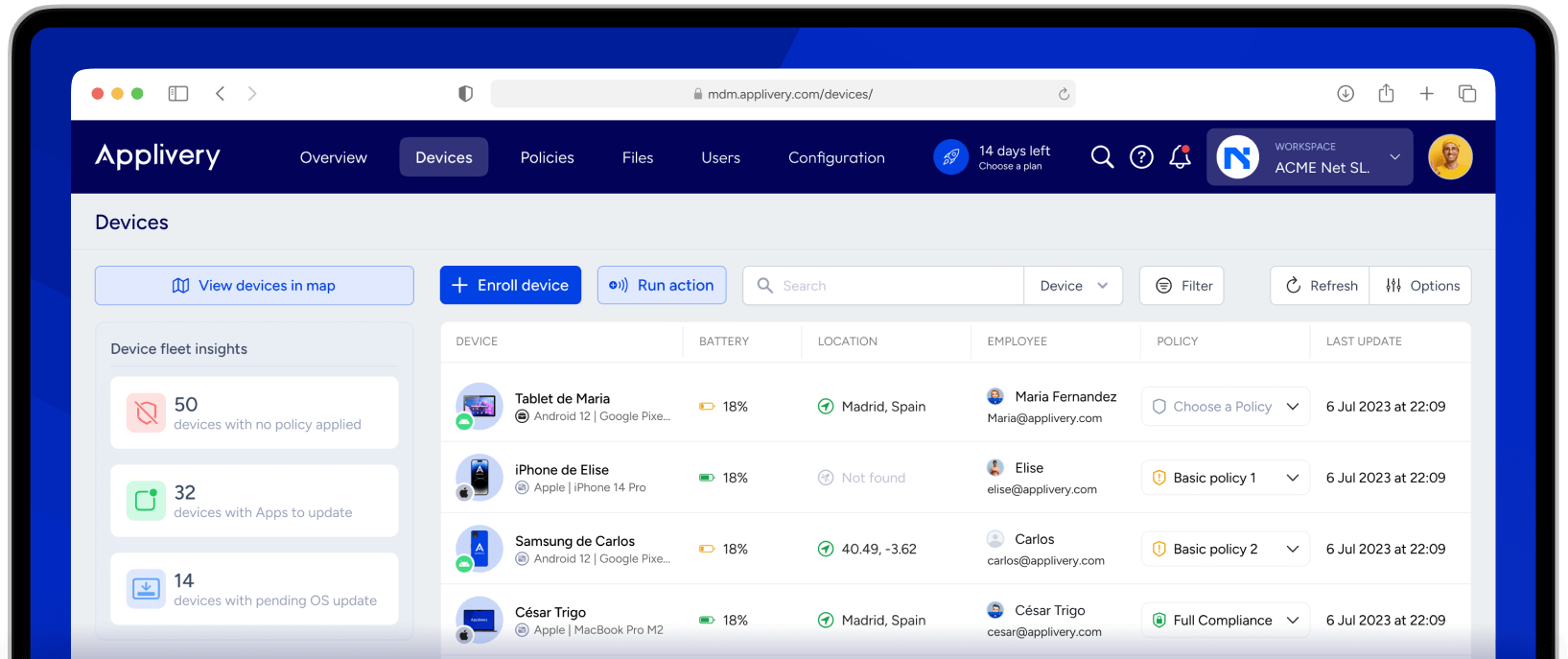
Management mobile devices (MDM): define default settings, VPN, access policies, emits certificates, monitors usage and performs pursuit. In BYOD, you can apply controls in Microsoft apps to protect data without invading the personal sphere.
Mobile Application Management (MAM): applies app policies to protect business information both in corporate and personal devices. Along with compliance and conditional access, isolates corporate dataAllows encryption y selective deletion in case of loss or theft.
practical benefits: you deploy security policies and updates centrally, you enable conditional access by compliance level (e.g. OS version, AV status, localization), and you keep the user privacy in BYOD scenarios.
Intune Suite: Advanced Security and Management
Intune Suite unifies workflows and endpoint management solutions to simplify IT operations and security. Strengthen your security posture with Microsoft Signals and advanced capabilities to mitigate cyber threats and protect data.
Cost reduction: by consolidating suppliers and licenses, you increase efficiency and productivity on all devices. The products in the suite fit perfectly with Microsoft 365 and Microsoft Security.
What includes: Intune Remote Help, Endpoint Privilege Management, advanced analysis, Enterprise Application Management, PKI in the cloud and functions Intune Plan 2 Advanced Features. Required Intune Plan 1 subscription as a basis.

Passionate writer about the world of bytes and technology in general. I love sharing my knowledge through writing, and that's what I'll do on this blog, show you all the most interesting things about gadgets, software, hardware, tech trends, and more. My goal is to help you navigate the digital world in a simple and entertaining way.