- A good code editor should offer syntax highlighting, autocomplete, advanced search, and good Git integration.
- Visual Studio Code, Notepad++, Vim, Emacs, and Bluefish stand out as free, cross-platform, or highly versatile options.
- IDEs like JetBrains, Eclipse, NetBeans, or WebStorm provide advanced debugging, refactoring, and tools for large projects.
- Cloud solutions like AWS Cloud9 and collaborative editors make teamwork easier and reduce the need for powerful machines.

If you work in software development, sooner or later you realize that choosing a good code editor or IDE It makes the difference between a smooth workflow and a choppy one. It's not just about "where to write," but how the program itself helps you detect errors, navigate the project, and work faster.
In the following lines you will find a very complete guide with code editors and development environments For all types of users: from those just starting out and wanting something simple, to teams needing cloud collaboration or professional-grade tools for large projects. The idea is to give you a comprehensive overview, show you what each option offers, and help you choose the ones that truly fit your needs.
What is a code editor and how does it differ from an IDE?
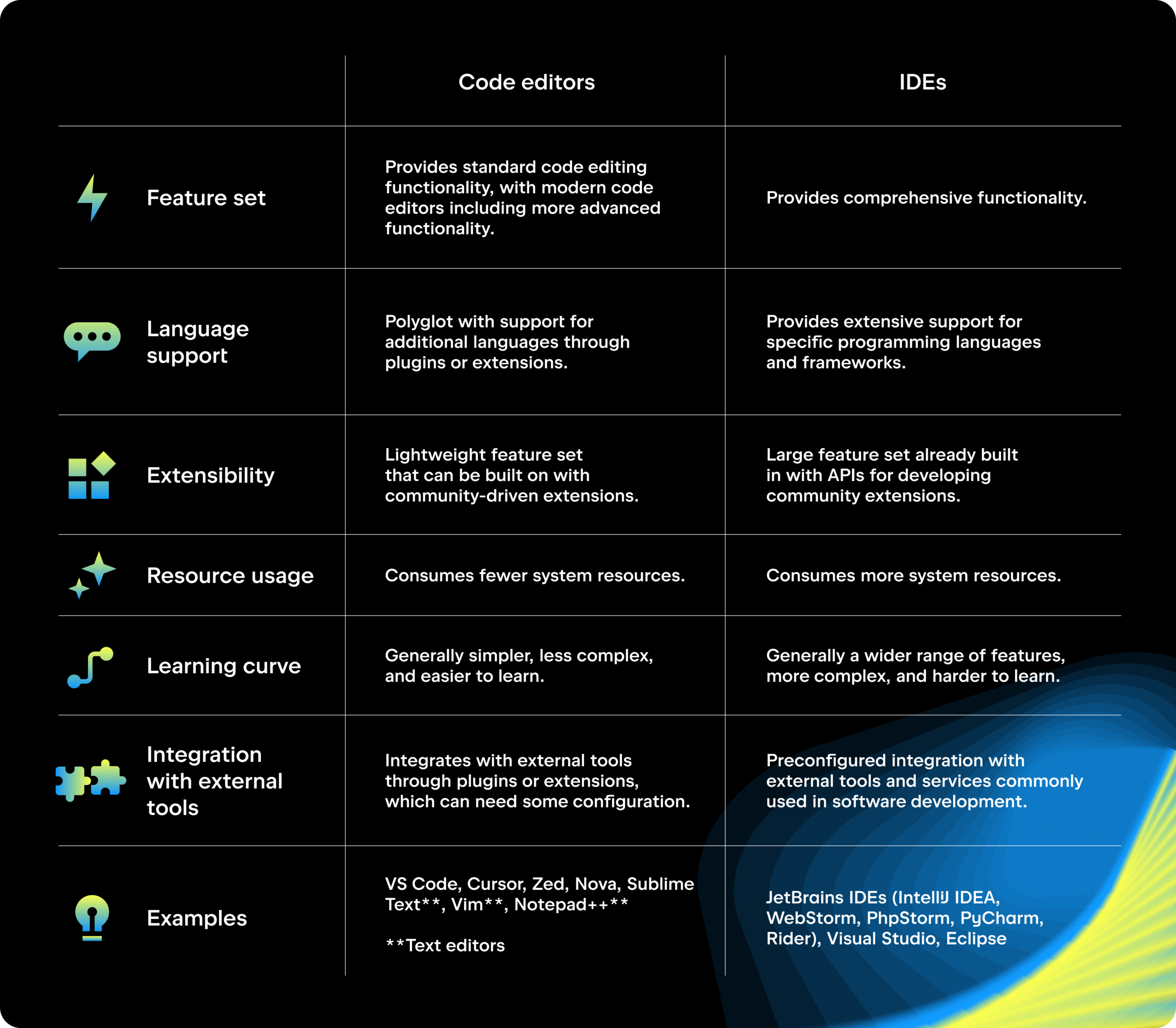
Code editors are programs that text processing specialized in source codeUnlike a simple notepad, they incorporate syntax highlighting, autocomplete, smart indentation, advanced search, and basic error detection, designed to make writing and maintaining code much easier.
They are situated at an intermediate point between pure text editors and integrated development environments (IDE)While an editor focuses primarily on writing and organizing code, an IDE also integrates compilers or interpreters. advanced scrubbers, testing tools, refactoring and, in general, a whole ecosystem of utilities for the complete development cycle.
There are also important differences within the editors themselves: some are designed for Web development (HTML, CSS, JavaScript)Some shine with languages like Java, C++ or Python, and others are true Swiss Army knives capable of opening almost any format and language you can think of.
Key features of a good code editor for software development
Beyond the name and brand, a good editor or IDE should offer a set of basic functions that make your daily life easier with any project. These are the most important:
- Configurable syntax highlighting for various programming and markup languages.
- code completion for words, functions, parameters, variables, and modules.
- Advanced Find and ReplaceIdeally, this would include support for regular expressions and multi-file searching.
- Code folding to collapse sections and focus on the part you're playing.
- Reusable fragment management (snippets) so as not to rewrite the same thing over and over again.
- Ability to save in different encodings of characters (UTF-8, ISO-8859-1, etc.).
- Integration with version control systems like Git or Subversion.
In web development, it is often very useful for the editor to include a live preview in the browser, so you can instantly see how the changes in HTML, CSS or JavaScript look without having to manually reload the page all the time.
The best cross-platform code editors
If you work with multiple operating systems (or your team mixes Windows, macOS, and Linux), it makes a lot of sense to invest in tools multi platformThat way you don't have to change your environment depending on the computer you're sitting at.
Visual Studio Code (Windows, Linux, macOS)
Visual Studio Code, or simply US CodeIt has become one of the most widely used code editors in the world. It is free, open source (under the MIT license), and based on Electron, allowing it to offer the same experience on Windows, macOS, and Linux.
It comes standard with Support for JavaScript, TypeScript, and Node.js and many other common languages, but its greatest strength is the Extensions Marketplace: thousands of plugins with which you can add frameworks, testing tools, linters, support for new languages, live preview, integration with Docker, Kubernetes and almost anything you can think of.
Among its key functions are the advanced syntax highlightingIt features IntelliSense (intelligent autocomplete), code folding, an integrated terminal, Git support, and debuggers for a multitude of languages. Furthermore, it is updated very frequently and has a huge community behind it.
GNU Emacs (Windows, Linux, macOS, Android via ports)
GNU Emacs is one of the great veterans of programming. It was born as an evolution of the original Emacs in the 80s, thanks to Richard Stallman, and became a key piece of the ecosystem. Free software and the GNU ProjectToday it remains an extremely powerful and, above all, highly customizable editor.
It's written in C and includes an integrated Lisp interpreter (Emacs Lisp), allowing you to add almost any functionality using "modes" or packages. This ranges from supporting new languages to turning Emacs into a... Complete IDE, project manager, audio player, or even web serverEverything is just a matter of configuration.
Its extensive use of keyboard shortcuts is one of its defining characteristics, although it also handles well with a mouse. It's cross-platform and highly customizable, with customization options few other editors can match, from menu bars and scroll bars to colors, fonts, and window layout.
Spacemacs (Linux, Windows, macOS)
Spacemacs is an Emacs distribution that combines the best of Emacs and VimIt relies on the power of Emacs, but its key philosophy is very reminiscent of Vim, with a "leader" key (space) to launch most commands comfortably and quickly.
Its design revolves around the ergonomics, mnemonics, and coherenceIt features shortcuts designed for easy recall, consistent usage patterns across languages (e.g., Python and Lisp), and intensive keyboard use. It loads packages deferred to avoid impacting performance and focuses on installing only what you actually use.
Code editors for Windows
Windows offers a good collection of specialized tools that cover everything from very basic tasks to complex projects. Some have become almost standard features of this system.
Notepad++ (Windows)
Notepad++ is a classic for those who need a lightweight, fast and free editorIt is free software, written in C++ using the Scintilla component, and consumes very few resources, so it runs perfectly even on modest machines.
Despite its simplicity, it offers Syntax highlighting for over 70 languagesBlock folding, word autocompletion, functions and parameters, tabs for multiple documents, macro recording, and powerful search and replace with regular expression support.
It has a plugin system to extend its functionality, and if you have browsers installed on your system you can preview HTML files directly in Firefox, Chrome, Edge, or whichever browser you prefer. Many developers use it both as a souped-up notepad and for small scripts or quick edits.
RJ TextEd (Windows)
RJ TextEd is another very complete editor for Windows, geared towards both plain text and... web development languages (HTML, CSS, JavaScript, PHP)It is free and fully compatible with Unicode, both in content and in file names and paths.
It includes tabs for multiple documents, autocomplete, code folding, a dual-pane file explorer, an integrated FTP/SFTP client for uploading files to the server, and a wide variety of theme and design customization options.
Furthermore, it offers powerful search and replace tools, even on multiple files at once. It also has a version adapted for older systems like Windows XP or Vista, optimized to maintain a stable experience with obsolete equipment.
Code editors for macOS
The Mac ecosystem has always paid special attention to developer tools. If you work with an iMac or MacBook, you'll find editors that are very well integrated with the system and include features specifically designed for this environment.
CotEditor (macOS)
CotEditor is a text and code editor lightweight, free and open source Created specifically for macOS, it is developed in Swift and relies on the system's native frameworks, resulting in integration with dark mode, iCloud, system spell checking, and text recognition.
Although it has a minimalist interface, it doesn't lack features: Syntax highlighting for over 60 languagesauto-indentation, code folding, tabs for handling multiple files, search and replace with regular expressions, line and character counter, and Unicode inspection.
It also allows you to define your own syntax and themes, which is very useful if you work with unusual languages or want to fine-tune the editor's appearance.
BBEdit (macOS)
BBEdit is one of the great veterans of the Mac environment. It was born in the early 90s and has been updated ever since to become a A well-established tool for web developers, authors, and programmersIt is a paid program, although it has a free edition with a reduced set of features.
It includes syntax highlighting, autocomplete, advanced search and replace across multiple files, code folding, (S)FTP access, Git and Subversion integration, and a good range of HTML and CSS-specific utilities, including HTML5 support.
To see the result of the HTML code, integrate the WebKit Inspectorwith which you can check the changes directly. It also incorporates a syntax checker and spell checker using macOS's native capabilities.
Editing and development from Android
It is becoming increasingly common to want to work on code from a tablet or mobile phone, whether to make a quick correction or to advance in a project when you don't have your laptop at hand.
Acode (Android)
Acode is a very complete code editor for Android that allows programming in HTML, CSS, JavaScript, PHP, Python, C++, Java, JSON and other languages from a smartphone or tablet. It has a free version and a paid version (without ads).
Key features include syntax highlighting, automatic indentation, code folding, live preview for web projects, and tabs for managing multiple files. It also includes Integrated file manager, access to remote servers via FTP/SFTP/WebDAV and integration with GitHub.
Despite working on small screens, the interface is quite configurable and designed for projects of a certain size, with support for extensions and options to run or preview certain types of code within the app itself.
Great classic text and code editors
Beyond modern tools with flashy interfaces, there are "old school" editors that remain benchmarks for their power and extensibility, especially in Unix and Linux environments.
Vim
Vim is a text editor highly configurable and extremely lightweightIt's famous among programmers for its keyboard shortcuts and modal editing model. With the right extensions, it can function as a full IDE, but you can also leave it as a simple, quick editor.
It supports hundreds of languages and formats, has a plugin system, and its philosophy focuses primarily on... efficient editing of existing codeRefactoring, moving blocks, fixing bugs… More than “writing from scratch”, it shines when you already have a codebase and need to work quickly on it.
The learning curve is steep, mainly due to the intensive use of the keyboard, but once you master the basic commands, everything is much faster than with a mouse. It even includes an interactive tutorial for new users.
GNU Emacs and Spacemacs
In addition to what has already been mentioned, it is worth emphasizing that Emacs can work in both graphical mode like in terminalThis allows you, for example, to connect via SSH to another server and continue using your usual editing environment from the console.
With packages like evil-mode you can add a Vim-like editing style within Emacs, thus combining the advantages of both worlds. Spacemacs takes this idea even further, organizing configuration in layers and offering well-thought-out shortcuts for different languages and technologies.
Advanced IDEs and editors: JetBrains, Eclipse, NetBeans and more
If, in addition to editing code, you need an integrated environment for compiling, debugging, testing, browsing large codebases, and working with specific frameworks, then a Full IDEThis is where very powerful tools like JetBrains, Eclipse, or NetBeans come into play.
What is an IDE and what should you consider when choosing one?
An Integrated Development Environment (IDE) groups together in a single graphical interface a code editor, compiler or interpreter, task automation, debugger and often, testing tools, version control integration, and dependency management.
Before choosing one, you should be clear on the following:
- Languages you will useSome IDEs are designed for a single language (Java, PHP, Python…), others are multilingual.
- Needs of collaborative development: teamwork, shared editing, revisions, etc.
- Operating System where you're going to work: not all of them support all platforms.
- Additional features you need: database tools, profiling, specific frameworks, etc.
- Available budget: there are very capable free options and other paid options with advanced features for businesses.
JetBrains environments: PyCharm, PHPStorm, CLion and IntelliJ IDEA
JetBrains offers a well-known family of IDEs, each focused on one or more languages but with a common philosophy: intelligent autocomplete, powerful refactoringreal-time code analysis and integration with version control systems.
PyCharm It is focused on Python, with a free Community edition (focused on pure Python) and a paid Professional edition that adds support for web frameworks like Django or Flask, database tools, integration with Jupyter Notebook, Anaconda and more.
PHPStorm It focuses on PHP and is highly regarded for working with CMS platforms like WordPress, Drupal, and Joomla, as well as modern frameworks. It offers advanced debugging, secure refactoring across the entire project, database tools, and even live browser previews of changes.
clion It's designed for C and C++, with support for other languages via plugins. It offers refactoring, code inspection, quick documentation, CMake integration, and multiple development tools for complex projects.
IntelliJ IDEA It was originally designed as an IDE for Java, but today, through official extensions, it can also work with HTML, CSS, JavaScript, Python, PHP, SQL, Scala, Groovy and other languages, while maintaining its advanced autocompletion, code analysis, and refactoring.
Eclipse and NetBeans (Java and much more)
Eclipse It began as a Java environment and over time, thanks to its plugins, has expanded to support many other languages (C, C++, PHP, Python, Ruby, etc.). It is open source and free, highly extensible, and has a large community that contributes plugins for almost any need.
It allows you to customize the interface, integrates JUnit for testing, a debugger, optimization tools, and a multitude of views for managing large projects. However, it's a somewhat dense environment for beginners and usually requires some initial configuration.
NetBeans, now maintained by Apache, also focuses on Java but includes built-in support for JavaScript, PHP, HTML5 and CSSIt features autocomplete, a visual debugger, code folding, real-time error and warning detection, and a simpler interface than other heavyweight IDEs.
Komodo IDE and other options
Komodo IDE It's another alternative that supports many languages and offers intelligent autocomplete, syntax highlighting, a visual debugger, testing, and environment customization. The full version is paid, although there is a free edition for personal use with fewer features.
Cloud development and collaborative editors
With the rise of remote work, the browser-based IDEs And collaborative tools have gained significant traction. They allow programming from any computer with an internet connection without installing anything cumbersome.
AWS Cloud9
AWS Cloud9 is a cloud development environment that allows you to Write, run, and debug code from the browserIt includes an integrated editor, debugger, and terminal, with tools designed for the most common languages.
Everything runs on Amazon servers, so you don't need a particularly powerful computer. It also facilitates real-time collaboration and integrates with other AWS services for deploying and managing applications.
Codeshare.io
Codeshare is an online editor focused on the collaboration in real timeIt's very useful for technical interviews, mentoring sessions, or group code reviews. It allows you to share a document, write code together, start a video chat, and choose syntax for various languages (HTML, CSS, PHP, C#, SCSS, etc.).
It can be used without registration, although in that case documents expire after 24 hours. With an account, you can save your work, name projects, and activate "read-only" mode for guests.
Advantages of working with an IDE in the cloud
By setting up your development environment on a cloud server, you gain in flexibility and scalabilityYou are not dependent on the power of your computer, you can expand resources (CPU, RAM, storage) according to your needs, and it is easier to share the environment with other team members.
Furthermore, when a project ends or you no longer need a certain configuration, you can dismantle the resources and stop paying for them, which is very interesting if you work on closed campaigns or projects.
Popular code editors: Visual Studio Code, Sublime Text, Atom, and others
Some publishers have gained so much traction that they appear repeatedly in developer surveys. Each has its strengths and target audience.
Visual Studio Code as a generalist favorite
VS Code stands out for combining a Reasonable performance, huge ecosystem of extensions and a highly polished workflow: Git integration, easy debugging, support for dozens of languages and frameworks, and a user-friendly interface even for beginners.
Features such as IntelliSense, the Command Palette, the issue view, and the Git dashboard make it a popular choice among developers for web projects, backend development, scripting, and even container work.
Sublime Text and its advanced features
Sublime Text is known for its speed and lightnessIn addition to its minimalist, unobtrusive interface, it's also a paid app that can be used indefinitely with occasional reminders to purchase a license.
Among its star features are Goto Anything (ultra-fast jumps to files, lines, or symbols), multi-selection for editing many lines at once, the command palette for accessing functions without touching menus, the side minimap for viewing the entire file at a glance, and distraction-free mode.
Its package system allows for adding support for more languages, productivity tools, and deep customization. However, it doesn't offer built-in debugging at the level of an IDE, and many advanced features depend on extensions.
Atom and his legacy
Atom, created by GitHub, became one of the preferred editors for many developers thanks to its hackable and collaborative approachIt supported a multitude of languages, allowed split screen, real-time editing with Teletype, and had an integrated package manager with thousands of extensions.
Although its official development ceased in 2022, it's still possible to download previous versions. In a way, its spirit lives on in projects like Phoenix Code Editor, which was born as the successor to Brackets with a web architecture (HTML, CSS, JS), live preview, extension management and a clear orientation towards front-end development.
CoffeeCup HTML Editor
CoffeeCup HTML Editor is a tool highly geared towards who builds web pages in HTML, CSS and PHP And perhaps it doesn't need a huge environment. It allows you to start from templates, open files from the server, or download them from a website to edit them.
It includes autocomplete, code validation, tag referencing, and live preview, which is great for seeing changes as they happen. There's a free version and a paid version with extras like structured data and an integrated FTP client.
TextMate, Bluefish, and other specialized editors
TextMateExclusive to macOS, it offers a clean interface, language-specific packages, reusable snippets, powerful search and replace, and multi-editing. It's especially valued by those who want a native Mac tool that's both flexible and user-friendly.
Bluefish It's an open-source editor designed for both programmers and web developers, with versions for Windows, Linux, macOS, and other systems like FreeBSD and OpenBSD. It features a snippet bar, configurable external commands, automatic recovery, autocomplete for many languages, full-screen editing, and unlimited undo/redo.
Premium editors and IDEs: WebStorm, UltraEdit, Espresso, Nova, BBEdit
If your work depends entirely on code and you're looking for highly polished tools, it might be worth investing in payment solutions that provide support, frequent updates, and advanced features.
webstormJetBrains' IDE is one of the best IDEs focused on JavaScript, TypeScript, and frameworks like React, Angular, and Vue. It analyzes your project to offer contextual autocomplete, detects errors as you type, integrates testing tools and bundlers, and allows you to work with Node.js, mobile applications (Ionic, React Native), and desktop applications (Electron).
UltraEdit It's a highly versatile, cross-platform editor capable of opening massive files with ease thanks to its disk-based editing capabilities. It offers configurable syntax highlighting, live preview, powerful search and replace, macros and scripts for automating tasks, and a highly customizable interface with predefined layouts.
Espresso y Nova These are two serious contenders for macOS users. Espresso combines browser preview, multi-editing, code formatting, and a visual CSSEdit tool for working comfortably with CSS, SCSS, and LESS, even on live sites. Nova, on the other hand, includes autocomplete, multiple cursors, a minimap, integrated Git version control, extensions, and a very useful live preview for web projects.
Mac is also back in the game BBEditAs already mentioned, it has paid licenses but the possibility of limited free use after the trial period.
Ultimately, choosing a code editor or IDE for software development involves fitting together three pieces: the project types and languages The software you use, the operating system (or systems) you work with, and the level of complexity and budget you're willing to invest all play a role. Free options like Visual Studio Code, Notepad++, Vim, Emacs, NetBeans, or Atom more than cover many needs; IDEs from JetBrains, WebStorm, UltraEdit, Espresso, or Nova offer added integration and convenience for those who make a living from it; and cloud solutions like AWS Cloud9 or collaborative tools like Codeshare open the door to working with your team from anywhere without struggling with local installations. Choosing the right combination for your specific needs can multiply your productivity and make programming not only efficient but also much more enjoyable.

Passionate writer about the world of bytes and technology in general. I love sharing my knowledge through writing, and that's what I'll do on this blog, show you all the most interesting things about gadgets, software, hardware, tech trends, and more. My goal is to help you navigate the digital world in a simple and entertaining way.