Want to know how to create a Pro account on TikTok ? We hear a lot about TikTok; it's one of the trendiest social media platforms. As a professional, you should consider it if your audience is there. In this article, we'll see how to create a professional account on TikTok.
Why create a pro account on TikTok?
As explained in the introduction, the social network TikTok is currently one of the most popular platforms. In fact, it has been a few years since it gained unanimous support among young people, generation Z in particular.
Here you can learn about: TikTok for Adults | 3 Excellent Alternatives to Use
Here are some numbers to prove its popularity:
- TikTok has over 500 million monthly active users.
- During the first half of 2019, TikTok was the most downloaded app on the Apple App Store.
- 41% of TikTok users are between 16 and 24 years old.
- TikTok is available in 141 countries.
- On TikTok, more than 1 billion videos are watched every day.
Because of its popularity, there is a high chance that the audience (customers and prospects) you are targeting is there. If so, as a professional, it is your job to be on TikTok. It is up to you to adapt to your audience.
Method 1: How to create a pro account on TikTok?
Now let's move on to creating the TikTok professional account. However, you should keep in mind that you need to create a regular account first.
How to create a normal TikTok account?
Here are the steps to create a TikTok account:
- Step 1:: Open the TikTok app.
- Step 2:: Go to the tab at the bottom right "I".
- Step 3:: Click on «Register«.
- Step 4:: Choose an account creation method (phone, email, via Facebook, Google, Instagram, Twitter, etc).
- Step 5:: Fill in the required information (birthday, passwords).
NOTE : (Remember to check your email if you chose this method; this is necessary to create your professional TikTok account).
How to switch from a regular account to a pro account on TikTok?
Now that our regular account has been created, we will start creating the TikTok business account. To do this, simply switch to the regular account we just created.
- Step 1:: On your profile, click on the 3 small dots, top right. This takes you to your account settings.
- Step 2:: Click on «Manage my account«.
- Step 3:: Then, go to «Switch to a professional account«.
- Step 4:: Click on «Continue» and choose the category of your pro account.
Your business or pro account has been created on TikTok.
What are the benefits of having a pro account on TikTok?
With a professional TikTok account, you can:
- Have access to monitor and improve your performance.
- Discover statistical data about your videos and subscribers.
Method 2: How to create a TikTok pro account for free?
As we mentioned at the beginning of the post, TikTok is the most used social network by teenagers and young people. At first it was a success in China, then this application has become one of the most downloaded in the world. Several followers of this social network have gone from being a simple amateur to a professional.
In fact, thanks to its presence on TikTok, it is now very easy to promote your brand, your products and your services to your target audience. Let's see all the steps to create a pro account on TikTok.
What is a pro account on TikTok for?
This social network is now among the most popular platforms in every country in the world. In fact, this is demonstrated by the figures:
- More than 500 million monthly active users.
- Among the most downloaded applications in 2019.
- 41% of these users are between 16 and 24 years old.
- Available in 141 countries.
- More than a billion videos are watched every day.
This way, professionals will be able to easily find their target customers on this platform and offer their brands to them without spending the costs of advertising campaigns.
You just need to create a free professional account and make some fun and outstanding videos. In short, you just need to be creative to build your community and attract new clients from all over the world.
Additionally, by registering as a professional, you will have access to statistics about your videos and subscribers. This allows you to evaluate your performance and design a strategy tailored to your target audience.
- NOTE: : If you are under 13 years old, you cannot register. You will receive the following message «Sorry, you don't seem to be eligible for TikTok«.
Also, if the chosen nickname is already in use, you will be asked to choose a new nickname. Also, if you already have an account and you have been banned, it is unfortunately difficult to create a second personal account. From there, you can create a pro account on TikTok
Complete procedure to open a Tiktok pro account:
Let's move on to the registration steps. In fact, before registering as a professional, you must first have a personal account. In this part, we explain how to create a TikTok account step by step. In fact, the process is very simple, you just need to follow this procedure:
- Step 1:: You start by downloading and installing the application on your smartphone or tablet.
- Step 2:: Then, click on the “ tabYo» at the bottom right and then on “Register".
- Step 3:: Then choose the account creation method: Phone, Email, Facebook, Google, Instagram, Twitter…
- Step 4:: Please enter the requested information (date of birth, password, username, etc.).
- Step 5:: Confirm the opening of your account by clicking on the link you received by email. This step is essential to create a pro account on TikTok.
This is how you create your personal TikTok account. You just have to change from a personal account to a professional account. And this, by following the steps below:
- Step 1:: In your profile, click on the 3 small dots at the top right to access settings.
- Step 2:: Click on «Manage my account»And then«Switch to a professional account«.
- Step 3:: Press “Continue” and choose the category of your professional account.
That's it! You've opened a professional TikTok account. Start by customizing your profile and then create and publish your videos. Don't forget to share them on Facebook and Instagram to gain more followers and expand your audience.
As for the connection process, all you have to do is open the application, click on the “ Connection ” section and enter the access keys you chose when creating your account.
Method 3: How do I create a pro account on Tiktok for my business?
In this part of the article, we will guide you through the 5 easy steps to create a ready-to-use Tiktok pro account.
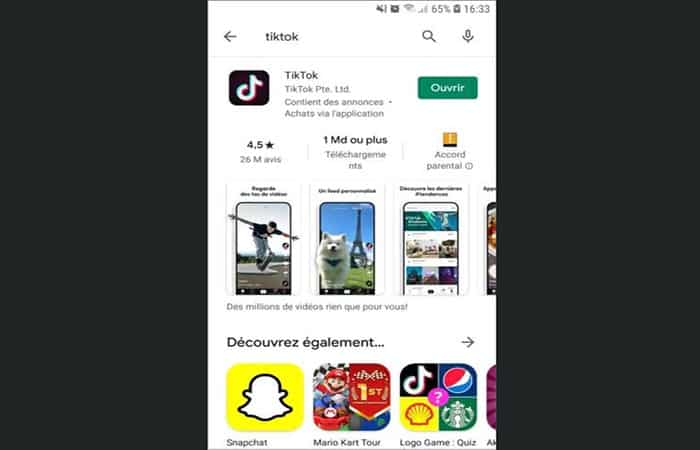
Step 1: Download and install the TikTok app
You'll find the TikTok app on the Apple Store and Google Play. You're unlikely to go wrong with the app. But if you're unsure, choose the one with a billion or more downloads.
Step 2: Discover the different pages
The next step is to discover the different pages found within the application:
The TikTok home page
When you open TikTok, you'll be taken directly to the app's popular content . This is found on the home page, symbolized by the house at the bottom of the screen.
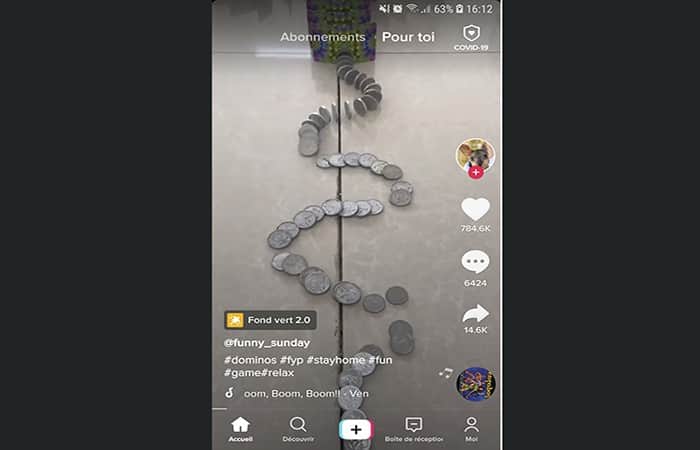
The home page is divided into 2 sections:
- The videos «For you»(text in the center of the top screen) appear by default and are the most viewed content in the application.
- The “Subscriptions” videos(next to the text “For you”) are recent videos posted by people you’ve subscribed to.
- Can subscribe to an account by clicking on the button red «+» below the video creator's profile picture (on the right side of the screen).
- On the rest of the screen, below the profile picture you will find the "Like" buttonwith the number of Me
- Below is the "comment" buttonwhich opens the comments page and then the share button to stream the video in and out of the app.
- The last point located at the bottom right of the screen corresponds to the soundtrack, whether it's the creator's voice or a song.
- By clicking on this soundtrack badge, you will discover all the other Tiktok videos that were also created with the same soundtrack.
- Finally, the text at the bottom left of the screen corresponds to the description written by the creator of the video.
TikTok Research Page and Popular Challenges
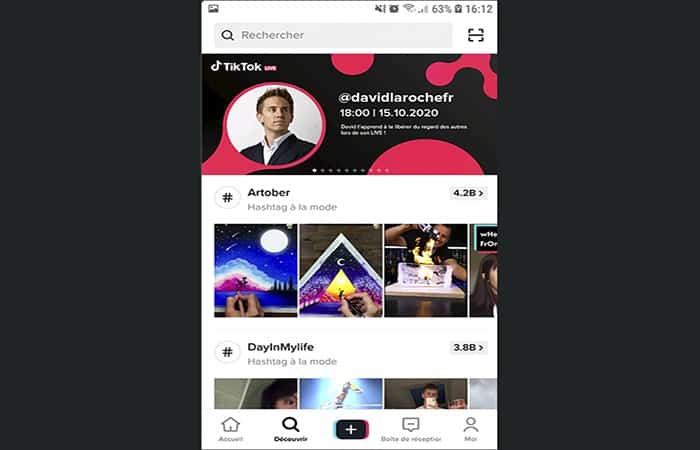
In the menu at the bottom of the screen, the magnifying glass icon will take you to the search page.
- You will be able to search for user accounts and content.
- But you can also find Trending hashtags.
These hashtags often correspond to popular challenges that have been taken on by a large number of users.
TikTok Inbox and Profile Page
The last two buttons in the menu give access to the inbox, that is, the page where you will receive all your notifications (likes, comments, etc.).
And the profile that will bring together your personal information and your own videos once you have created an account.
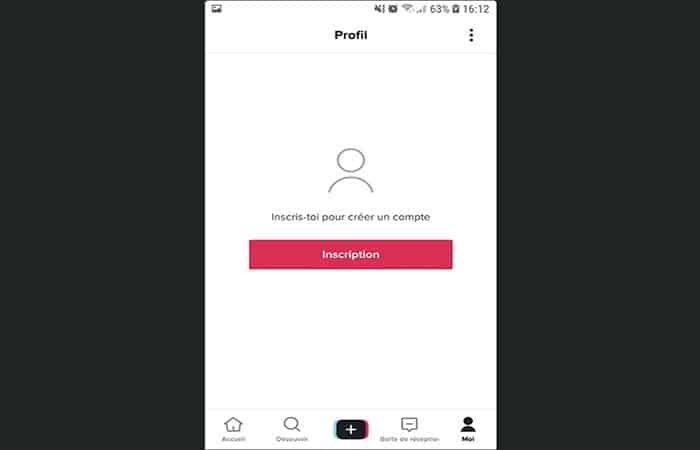
Step 3: Create a basic account
- Step 1:: Once you click on the button «Register» On the profile page, a login page appears.
- Step For individuals or businesses that do not yet have a Tiktok account, click the button red “Register”at the bottom of the screen.
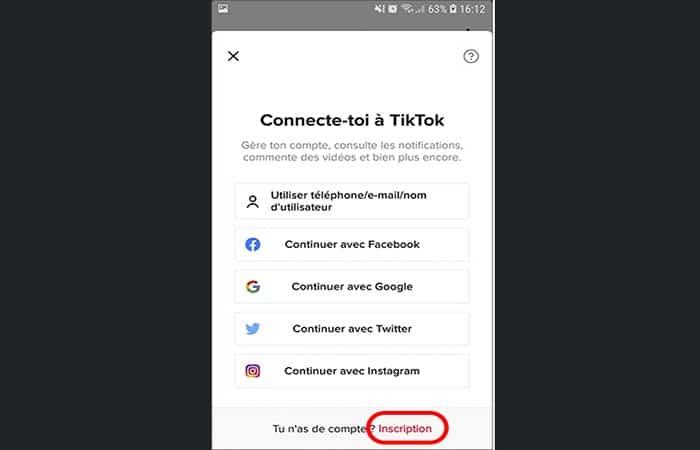
- Step 3:: Then, select the account creation method you prefer.
NOTE : You can create an account using your phone number, email address, Facebook account, or Twitter account.
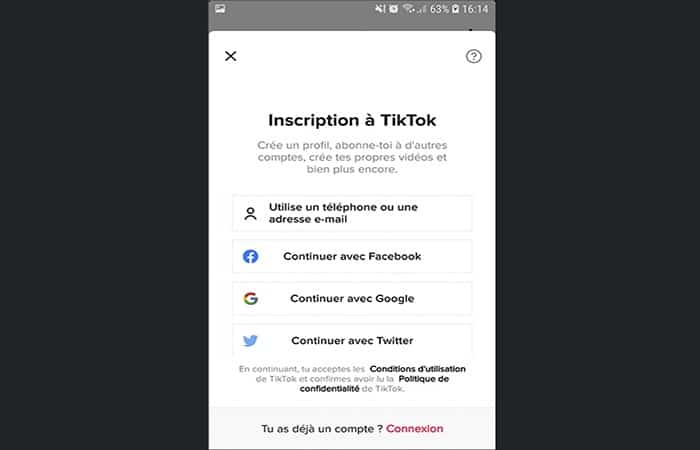
TikTok will ask you to provide a date of birth and choose a username to complete the account creation.
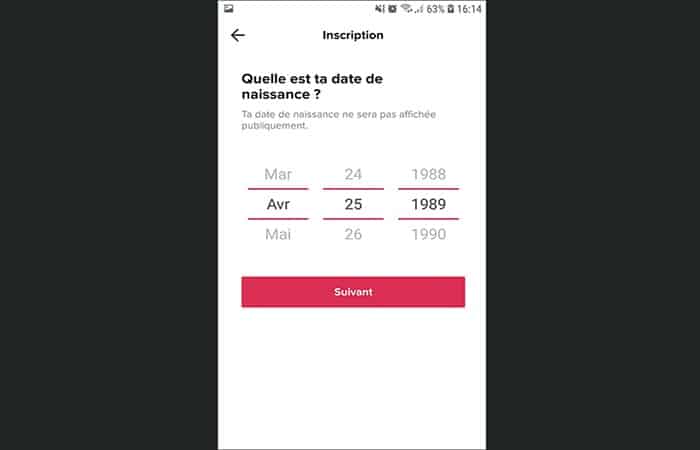

Step 4: Customize your TikTok pro account
Once you've created your account, you'll be able to add a description, a profile photo, and even add links to your other social networks.
- Step 1:: First, click on the button "Edit profile"to access your dashboard.
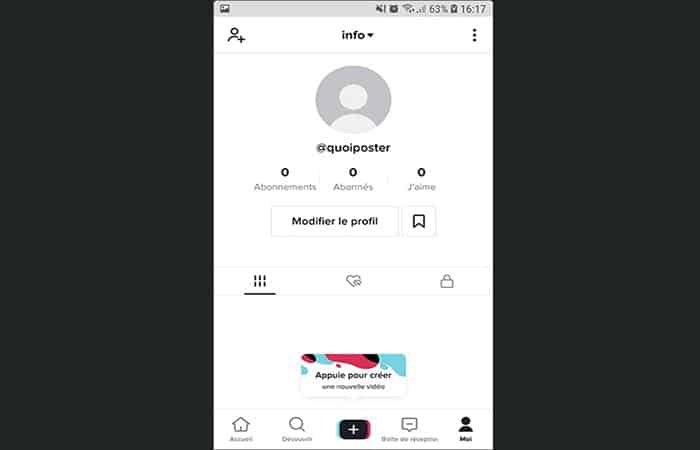
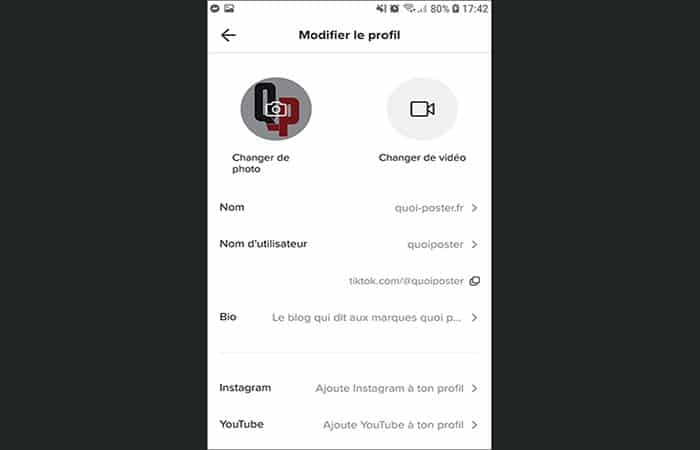
- Step 2:: Once in your dashboard, you will be able to complete each field of your Tiktok profile.
- Profile photo or video: You can add a photo or GIF to your profile picture.
- NameThis is the name that will appear in the header of your profile page. It may be different from your username.
- Username: This is your unique identifier on TikTok. It was usually set when you created your account.
- Bio: This is the description that appears on your profile between your statistics (subscription, subscribers, likes) and your videos. This field can contain a maximum of 80 characters.
- Instagram / Youtube: You can connect your Instagram and Youtube accounts so that TikTok users can easily find you on these other platforms.
Step 5: Switch to a Pro account on TikTok
The advantage of a professional TikTok account is being able to benefit from the analytics data for each of your videos. Thanks to this data analysis, you can learn more about your audience and your content.
The Pro account is free, but it may prevent you from using certain sounds in your videos for copyright reasons.
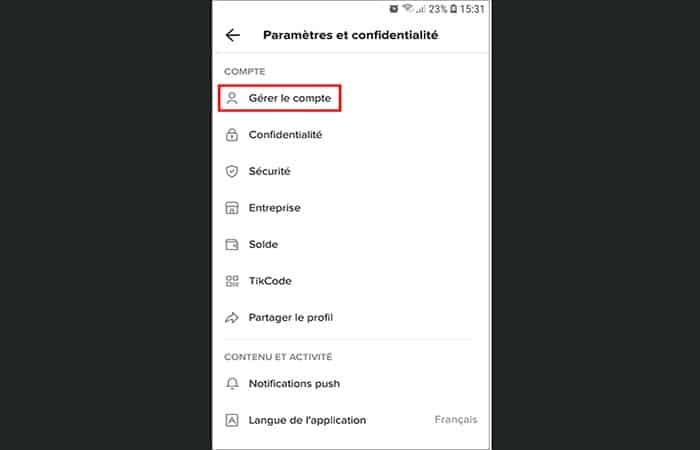
- Step 1:: To upgrade to a Pro account, go to your profile and then click on the 3 dots on the top right from the screen.
- Step 2:: Once on the page «Settings and privacy«, Click «Manage account».
- Step 3:: On this page, click on «Switch to a Pro account«.
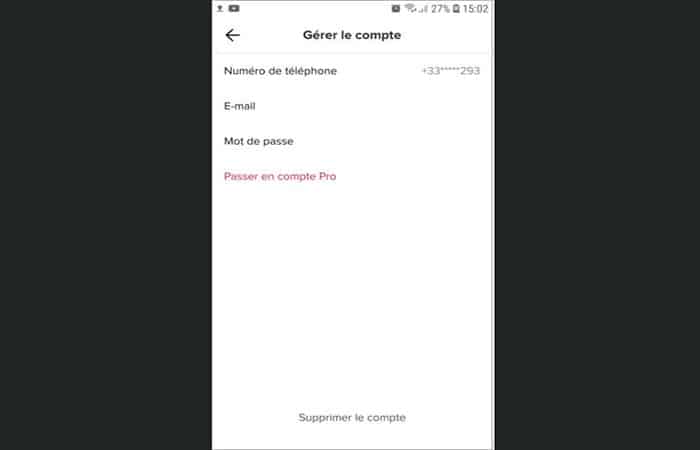
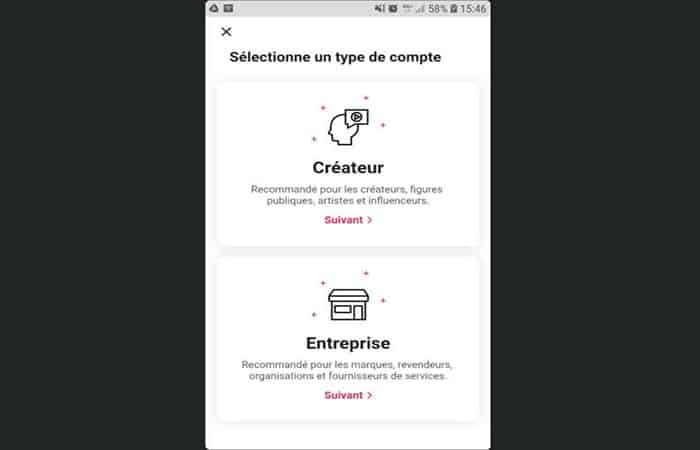
- Step 4:: Then select the account type “Company”.
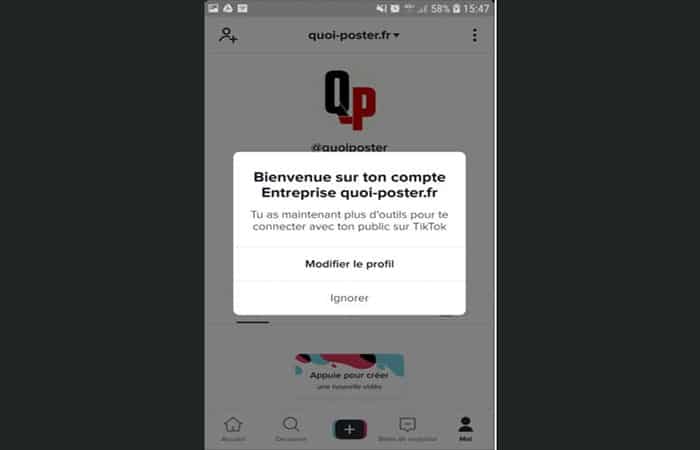
- Step 5:: Then, a message tells you that your account is now a professional account and therefore has more tools to connect with your audience.

Video analysis of the pro account on TikTok
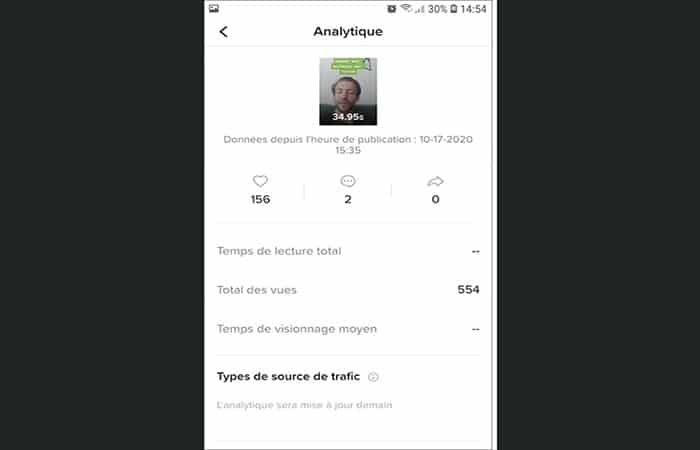
- Step 1:: To access your video analytics, click on the video in question and then on the 3 points of the Menu right.
- Step 2:: In the menu that opens, you will find the Analytics option which will open the page containing the video statistics.
You might also be interested in reading about: How to Change Your Phone Number on TikTok
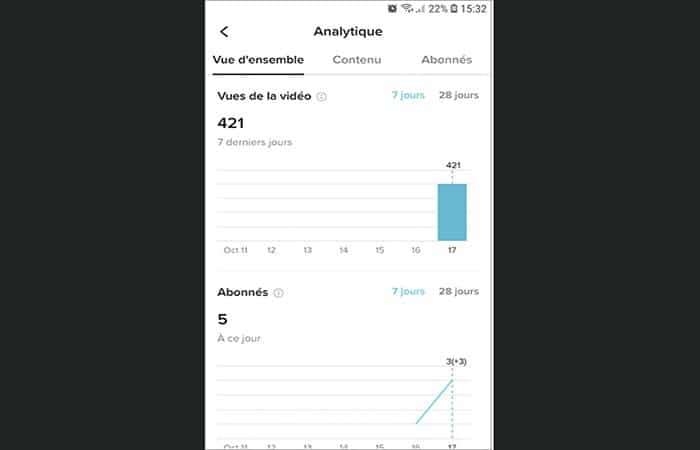
Analytics data from your TikTok pro account
You can also get generic data associated with your account (number of visits, subscribers, profile visits, etc.). To do this, follow these steps:
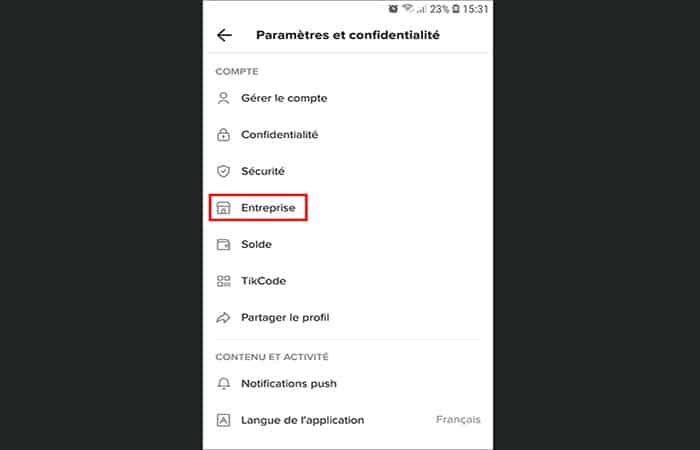
- Step 1:: Go to your profile page and then click on the 3 dots at the top right of the screen.
- Step 2:: On the page «configuration and confidentiality«, Click "Company" and Then in «Analytical data» .
Well done! Your Tiktok account is finally ready. All you have to do is post your first videos and embark on your Tiktok adventure.
Conclusion
As you can see, these are the methods you can use to create your pro account on TikTok. These are the official ways that the social network provides so that you can create marketing through videos. We hope we have helped you with this information.

My name is Javier Chirinos and I am passionate about technology. Ever since I can remember, I have been interested in computers and video games, and that passion has turned into a job.
I have been publishing about technology and gadgets on the Internet for over 15 years, especially in mundobytes.com
I am also an expert in online marketing and communication and have knowledge in WordPress development.