- Galaxy AI is the suite of features of Artificial Intelligence Samsung's translation, summarization, proofreading, and content organization software.
- Bixby is the voice assistant that allows you to activate many Galaxy AI functions with commands spoken and hands-free use.
- The Galaxy AI + Bixby integration facilitates simultaneous translation, interpreter mode, and web summaries in multiple languages, including Spanish.
- Samsung is expanding these capabilities to mobile devices, Smart TV and connected home, reinforcing the IA throughout its ecosystem.
The arrival of the Samsung's artificial intelligence in its Galaxy phones It has completely changed the way we use our phones on a daily basis. It's no longer just about having a voice assistant that responds to basic commands, but about combining Generative AIreal-time translations and advanced features with a simple voice command.
Within this new scenario, Galaxy AI and Bixby play two very different but complementary rolesGalaxy AI is the large suite of intelligent functions debuting on devices like the Galaxy S24, while Bixby becomes the gateway to activate them without touching the screen, speaking naturally and without complicating your life.
What is Galaxy AI and why is it so important in Galaxy phones?
When Samsung unveiled the Galaxy S24 family, one of the biggest stars was Galaxy AI, its generative artificial intelligence platform integrated into the systemIt's not a single function, but a set of tools designed to make your mobile phone do "smart" things for you: understand languages, summarize information, improve writing, or help you organize your content.
The key is that Galaxy AI is not a voice assistant in itself, but a set of capabilities that are used within different apps of the system. For example, it is integrated into the translation functions, in the Web navigator, in the notes app and other Samsung services to automate heavy tasks.
Within that range, the most striking functions are those that rely on the translation and language comprehensionThis is where tools like Live Translate (or Simultaneous Translation) and Interpreter mode come into play, turning your mobile phone into a kind of instant translator always available in your pocket.
In addition, Galaxy AI incorporates productivity features such as creating web page summariesAdvanced spell checking and automatic generation of cover pages or summaries for notes and documents. All of this is designed to save time and reduce the number of steps the user has to take.
Another important point is that, although Galaxy AI debuted in the Galaxy S24, Samsung is clearly committed to bringing this experience to more devices They already offer various types of products, from mobile phones to televisions and even household appliances. It's an ecosystem strategy with AI as its flagship technology.
What is Bixby and how has it evolved with generative AI?
Bixby has been in Samsung's catalog for several years now as its own voice assistant, present in mobile phones, watches and even household appliancesFor a long time, it remained somewhat overshadowed by other assistants like the Assistant of Google, Siri or AlexaBut the company has not abandoned it, far from it.
In fact, Samsung has publicly confirmed that is working on a much more advanced version of BixbyIt leverages generative artificial intelligence to maintain more natural conversations with users. The idea is for it to stop feeling like a "robotic" assistant and instead respond in a more human and flexible way.
This improvement is not limited to mobile phones: Bixby is also present in smartwatches, televisions, and various connected appliances. of the brand. That's why any advance in its intelligence has a direct impact on the entire Samsung ecosystem, from the living room to the kitchen.
In the television sector, for example, Samsung has already begun to Update Bixby on your Smart TVs by 2025 to make it much more conversationalNow it can answer questions more fluently, without pausing what you're watching, and with a more approachable tone, as if you were talking to someone who understands you instantly.
All this work with generative AI makes Bixby a key element in bringing Galaxy AI closer to the user without them having to learn new menusIt is the intermediary that translates your words into actions on those advanced artificial intelligence functions.
How Galaxy AI and Bixby integrate: hands-free for AI
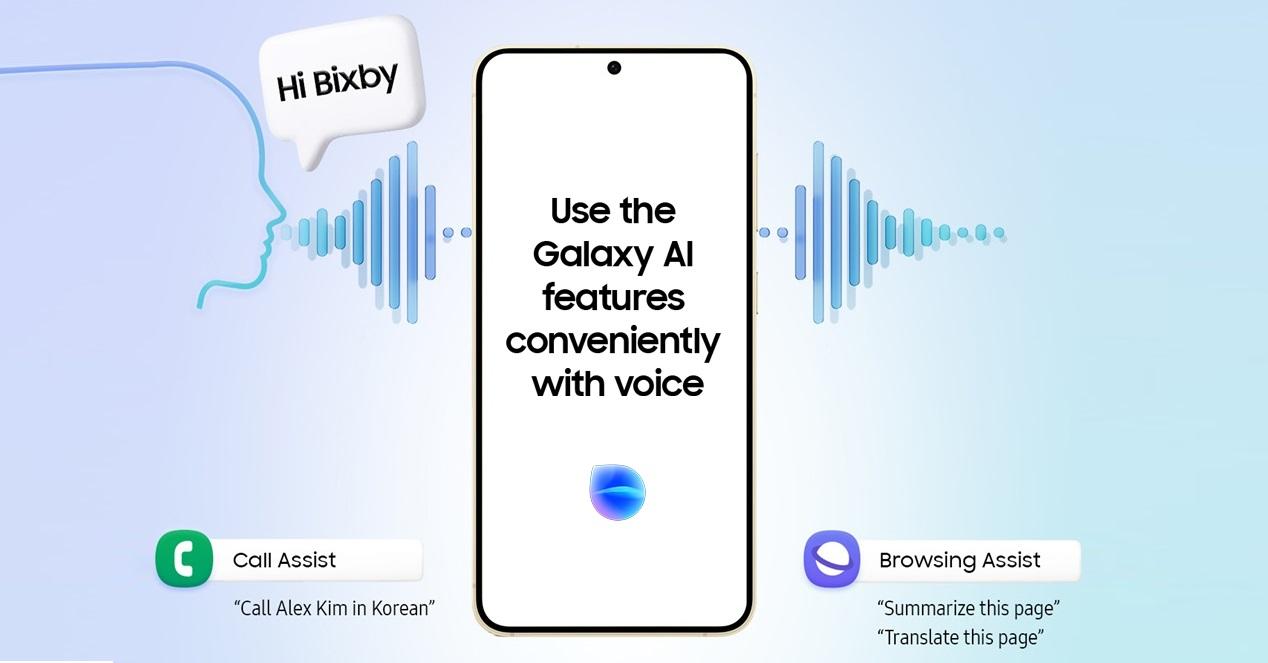
The big news in recent months is that Samsung has decided Connect Galaxy AI directly with BixbySo many of the smart features can be activated with just your voice. Instead of wading through settings and apps, simply say "Hey Bixby" and ask for what you need.
With this integration, Bixby positions itself in the center of navigation and activation of new AI toolsThe goal is to offer a completely hands-free experience: the user doesn't have to touch the mobile phone to start a translation, create a summary, or correct a text.
For example, if you're about to talk to someone who doesn't share your language, you no longer need to go looking for the Interpreter icon in the menu. You just have to say a phrase like “Hello Bixby, turn on Interpreter” and the function will open, ready to start translating the conversation in real time.
The same applies to Live Translate, which is responsible for the simultaneous translation during calls or conversationsWith just a few words directed to Bixby, you can activate this function without taking your eyes off what you're doing, which is perfect for situations involving international travel or work.
This approach also greatly reduces friction for less technical users, because They don't need to memorize where each Galaxy AI function is located.They simply need to know that they can ask Bixby and the assistant will open the appropriate program in each case.

Galaxy AI features that you can activate by voice with Bixby
The list of possibilities is not limited to translation. Bixby now allows access to several of the more powerful Galaxy AI features through simple voice commands, without needing to touch a single key.
One of the stars is the real-time translation with Live TranslateThanks to this feature, you can have calls or conversations with people from other countries while the phone translates what is said on the fly, both in your language and theirs.
Interpreter mode is another key tool, designed for face-to-face conversations with someone who speaks another languageThe mobile screen splits so that each person can see what the other is saying in their own language, and Bixby helps you launch this feature without having to search for it manually.
Galaxy AI also includes the ability to Create automatic summaries of web pages and long articlesWith a voice command, you can tell Bixby to activate the summary function, and the system will condense the content so you're left with only the essentials in a matter of seconds.
The more "school-like" aspect of AI is not missing: spelling and style correction in your textsFrom emails to notes or messages, Galaxy AI is able to review what you write to polish errors and improve readability, and Bixby takes care of implementing those options when you ask it to.
Finally, another interesting use is the Automatic organization of files and notes using AI-generated covers or summariesThis way, you can better organize your information, find what you need faster, and keep your documents looking much clearer without having to spend hours doing it by hand.
Available languages and global reach of the integration
One of Samsung's stated goals is that These AI experiences will be useful to users worldwidenot just for English speakers. That's why Galaxy AI's integration with Bixby has been expanded to a good number of languages.
The list includes Chinese, English (United States, United Kingdom and India), French, German, Italian, KoreanIn addition to Brazilian Portuguese and two Spanish variants: Spanish from Spain and Latin American Spanish, this ensures that most Galaxy users can take advantage of AI voice activation without any issues.
When Samsung says that these features will be available in "all languages supported by Bixby", it is referring precisely to that wide range of languages in which the assistant can understand and execute commandsAs Bixby incorporates new languages, we can expect Galaxy AI's voice-related features to expand as well.
The company also insists that it wants Everyday tasks become "epic" experiences for any user, regardless of where they liveIn this case, AI acts as a facilitator that eliminates language barriers and reduces technological complexity.
Of course, it is worth remembering that Not all Galaxy AI features are compatible with BixbySome features still require direct interaction with the screen or are limited depending on the device model, region, or installed software version.
AI-powered Bixby enhancements on TVs and other devices
The integration between Galaxy AI and Bixby isn't limited to the phone. Samsung is betting heavily on that AI is also noticeable in your Smart TVs and connected home.making Bixby more versatile than ever.
In its 2025 range of televisions, the brand has begun to roll out a revamped Bixby that uses generative artificial intelligence To better understand the questions and respond more naturally, the user can speak directly to the remote or use the microphone button without pausing the content they are watching.
Thanks to this, it's possible to ask it things like "what is the height of Mount Everest?" or more everyday requests like "play some relaxing music for a rainy day," and the television respond without interrupting the movie, series, or program that is on screen.The feeling is closer to a gentle dialogue than a forced interaction.
Another interesting feature on TVs is Click to Search, which It allows you to search for information about what appears on the screen with the help of Bixby.If you see an actor and can't remember their name, or want to know more about a series, you can ask on the fly and get the answer without switching apps.
Furthermore, integration with SmartThings makes it possible to Control connected home devices directly from the sofa using your voice.Turn off the oven, adjust the air conditioning temperature, or manage lights and plugs, all through Bixby without touching your phone or getting up.
To reassure those concerned about privacy, Samsung reinforces these features with its Knox security system, which It protects data and communications even while the TV is listening to voice commands.The idea is to combine comfort and safety in equal measure.
Key differences between Galaxy AI and Bixby
With so much integration it's easy to get confused, but actually Galaxy AI and Bixby fulfill very different roles within the Samsung ecosystem.Understanding that difference helps you make better use of everything they offer.
On one hand, Galaxy AI is a set of artificial intelligence functions and algorithms These are used to translate, summarize, correct, and organize content. It's the intelligent "toolbox" that runs complex tasks in the background.
On the other hand, Bixby is the voice assistant that serves as an interface between the user and those functionsIt listens to your commands, interprets them, and takes care of opening or activating whatever is needed, whether it's a Galaxy AI tool or a device control task, such as changing the volume or opening an application.
Another important difference is that Galaxy AI was initially launched as a major selling point on the Galaxy S24 smartphonesWhile Bixby has long been present in many other products, from older mobile phones to watches, TVs, and home appliances, its reach as an assistant is broader, although not all of these devices yet enjoy the same level of AI.
In terms of user experience, Galaxy AI is most noticeable in specific productivity and communication tasks (translating conversations, summarizing texts, correcting messages), while Bixby is more noticeable in the interaction layer: talking to the television, controlling the mobile phone by voice, asking quick questions or managing the connected home.
Samsung's strategy consists precisely in that you don't have to choose between one or the otherGalaxy AI does the "hard work" and Bixby acts as the butler who receives your requests and tells the AI what to do at any given time.
With all this context, it's easier to understand why the company is investing in making Bixby speak more fluently and humanly: If the conversation with the assistant feels natural, you're much more likely to use Galaxy AI's features on a daily basis. instead of leaving them forgotten on a menu.
The result of this joint effort is that, little by little, Galaxy phones and other Samsung devices are becoming true intelligent control centerscapable of translating, summarizing, helping with everyday tasks and controlling the home with just the voice, without the user having to deal with settings or hidden menus.

Passionate writer about the world of bytes and technology in general. I love sharing my knowledge through writing, and that's what I'll do on this blog, show you all the most interesting things about gadgets, software, hardware, tech trends, and more. My goal is to help you navigate the digital world in a simple and entertaining way.