- The HP EliteBoard G1a integrates a complete AI PC into a keyboard that is only 12 mm thick and weighs less than 1 kg.
- It features AMD Ryzen AI 300 processors with NPUs up to 50 TOPS, up to 64 GB DDR5 and 2 TB NVMe.
- It allows you to connect up to four 4K monitors via USB4/USB-C and features Wi-Fi 7, Bluetooth and an optional battery.
- It is geared towards professional hybrid work, accompanied by the HP Series 7 Pro 4K monitor with Thunderbolt 4.
HP has decided to make a splash at CES 2026 with a device that, at first glance, looks like an ordinary office keyboard, but hides a complete, state-of-the-art PC with artificial intelligence capabilities . It's called the HP EliteBoard G1a and packs into a mere 12 mm of thickness what previously required a tower, an entire laptop, or at the very least, a mini PC with extensive connectivity.
This EliteBoard G1a is essentially a complete computer crammed into a keyboard : an AMD Ryzen AI 300 processor, an NPU with up to 50 TOPS, expandable DDR5 RAM, NVMe storage , an optional battery, speakers, microphones, USB4/USB-C ports, and modern wireless connectivity. It's all designed for hybrid work environments where people jump from desk to desk, with a very minimalist form factor—almost like "I carry my computer in my backpack and just need a screen to plug it into."
What exactly is the HP EliteBoard G1a and why is it different?
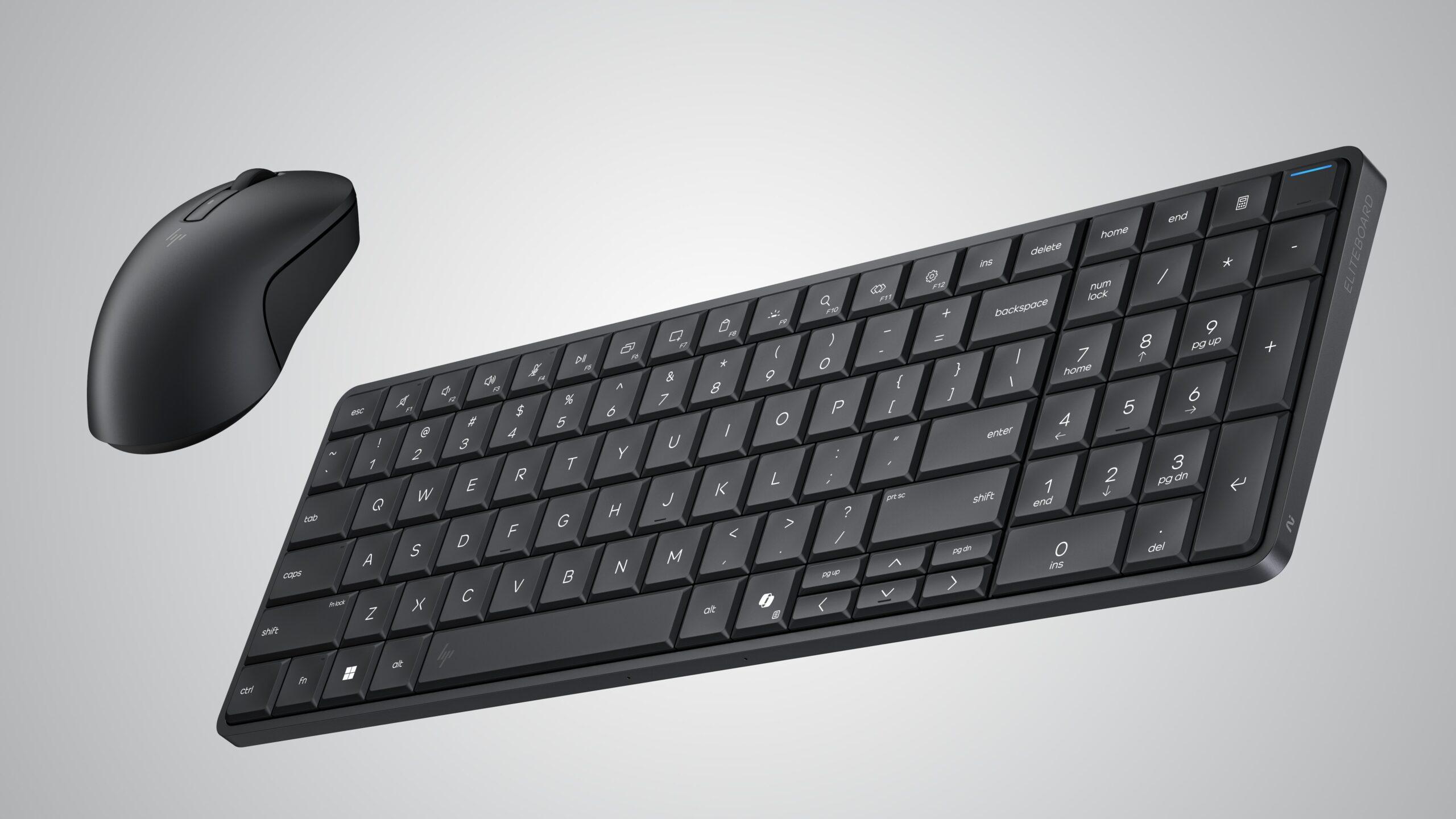
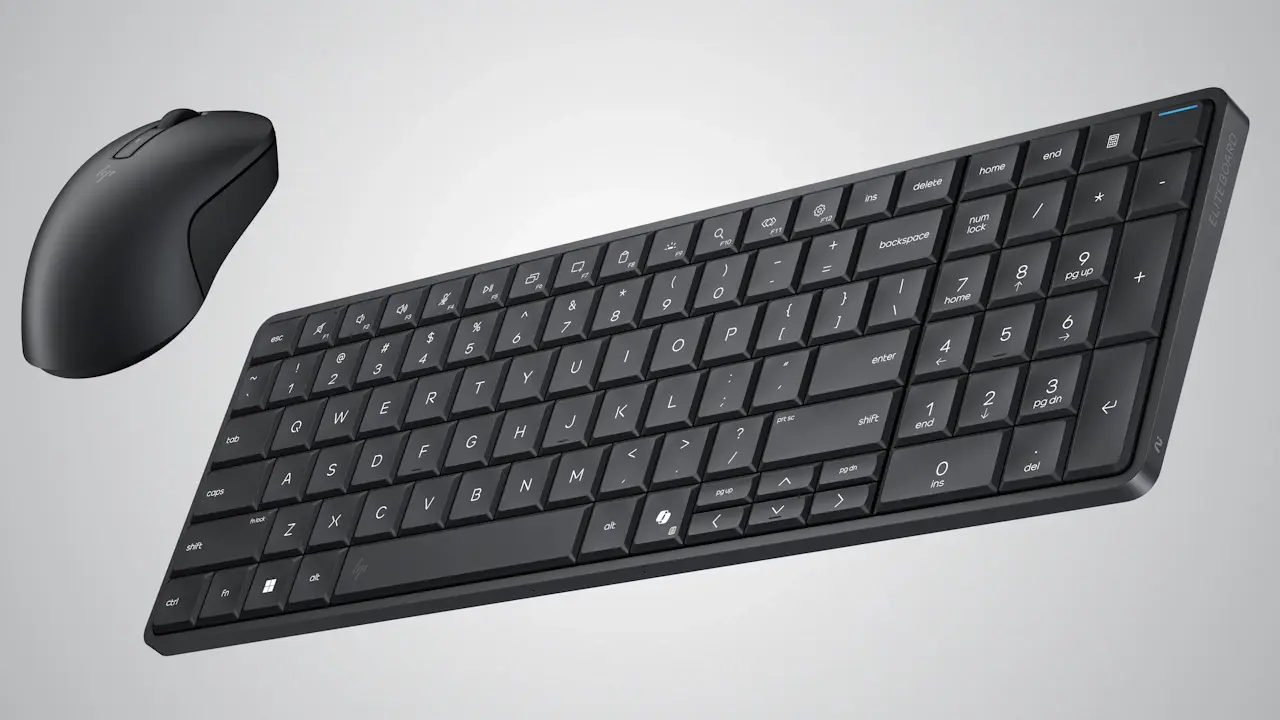
The HP EliteBoard G1a is a desktop PC disguised as a full keyboard , complete with a numeric keypad and a discreet office design. It's not a prototype or a crazy lab idea: HP is launching it as a commercial product and positioning it within the Next Gen AI PC category under Microsoft's Copilot+ brand.
The beauty of the device is that you don't need a tower or a traditional laptop : you connect the keyboard to a compatible monitor via USB-C or Thunderbolt 4 (depending on the screen), turn on the Bluetooth mouse that comes pre-paired, and that's it, you have a complete work environment with Windows 11 running on powerful x86 processors.
The concept of a computer integrated into a keyboard isn't entirely new : microcomputers like the legendary Commodore 64, ZX Spectrum, MSX, and Amstrad CPC already existed in the 80s, and more recently the Raspberry Pi 400/500 revived the idea with Arm hardware and Linux . The difference here is that we're talking about a major manufacturer like HP, current-generation AMD Ryzen AI processors, and an operating system as familiar as Windows 11 Pro or Home, designed specifically for businesses and general users.
HP is targeting the EliteBoard G1a primarily at the modern professional environment , where hybrid work, flexible offices, and shared desks are commonplace. Many people already use their laptops closed and connected to an external monitor, so HP asked themselves: if you're going to work like this anyway, why not simplify things as much as possible and just use the keyboard and laptop?
The result is a proposal heavily focused on saving space and reducing cables , but without sacrificing power for intensive office tasks, heavy browsing, video calls, collaboration tools, AI integrated into Windows and, in general, any demanding but not extreme desktop task.
Design, format and user experience
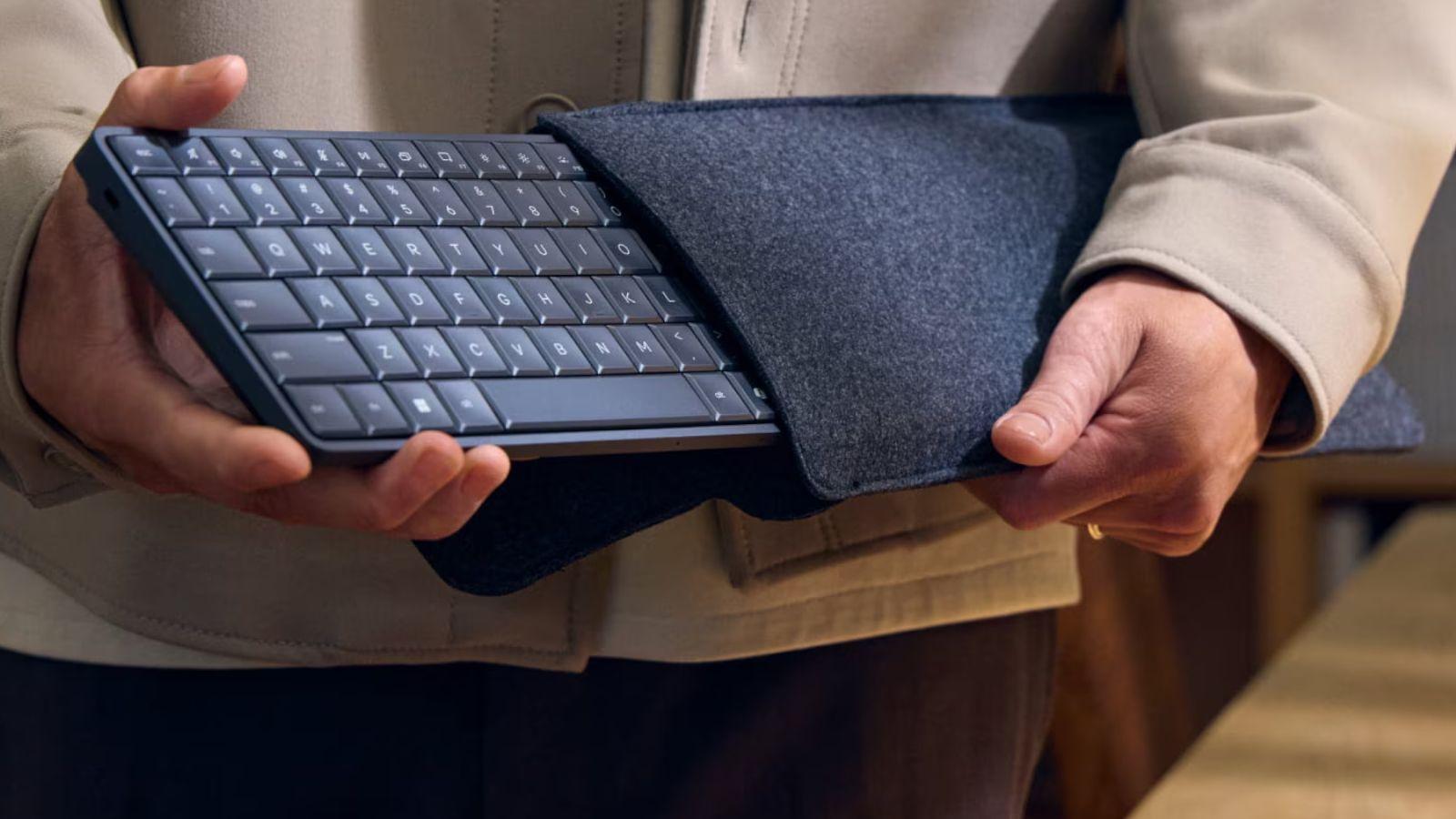
Aesthetically, the EliteBoard G1a could easily be mistaken for a typical office keyboard , with a full layout and a clearly functional focus. HP aims for it to blend seamlessly into a corporate environment while remaining comfortable for extended typing sessions, thanks to its 2mm key travel and responsiveness tailored "for desktop space," according to the brand itself. It also offers configuration options that allow for easy customization to suit individual users.
The overall thickness is a striking 12 mm , making it considerably thinner than most laptops , and the weight ranges from 726 to 750 grams depending on the internal configuration (battery, storage, etc.). In practice, you can easily store it in a case and carry it in your backpack, just like a keyboard, except that you're actually transporting your entire PC.
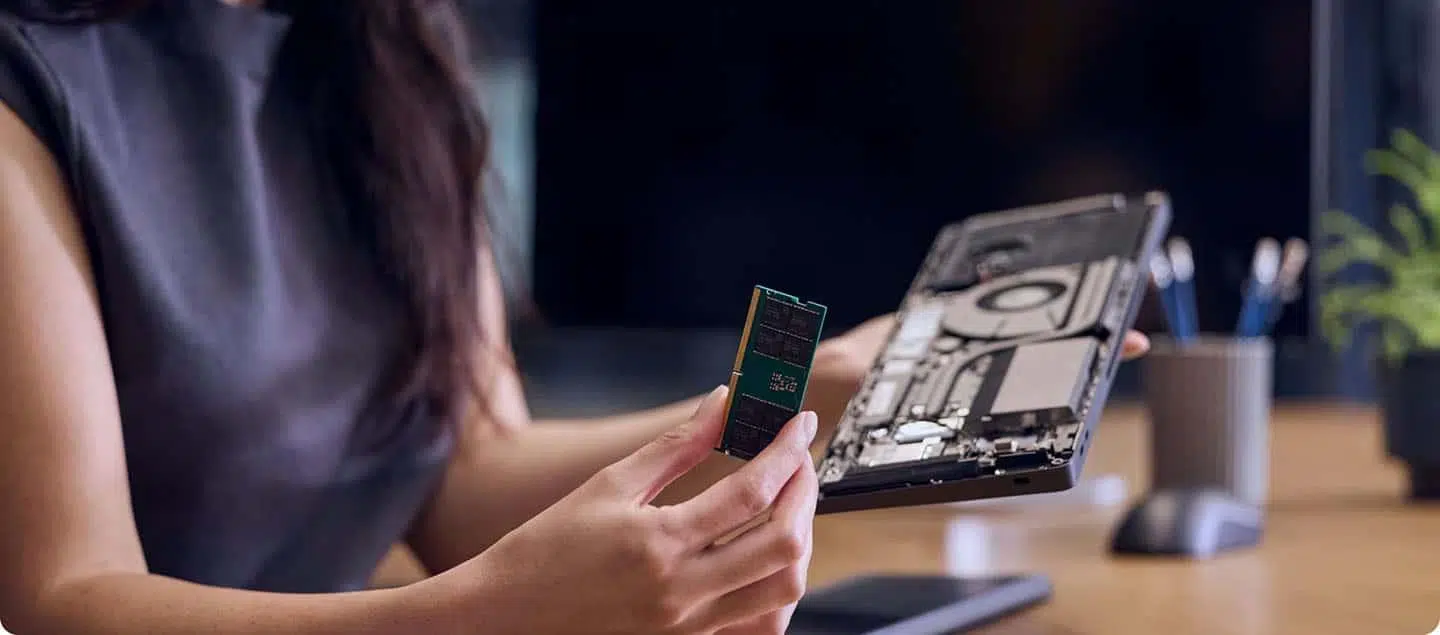
HP has taken into account heavy use and typical office accidents : the keyboard is spill- and splash-resistant, easy to clean, and features a modular design. The top part of the keyboard can be replaced in minutes if it wears out, and the bottom cover is removable for access to the cooling fan, RAM, and SSD , greatly simplifying maintenance and upgrades, as well as improving accessibility for users.
The device also integrates a stereo speaker system and dual microphones , so there's no need to add external speakers for basic audio in video calls, presentations, or light multimedia content. Everything is designed so that, with just one cable to the monitor and a wireless mouse, the desktop remains as clutter-free as possible.
Optionally, some versions of the EliteBoard G1a include a fingerprint reader , which complements the security measures of Windows Hello and HP's enterprise protection solutions. For corporate environments, the company integrates HP Wolf Security for Business, with firmware-level reinforcements and protection against advanced threats, even considering post-quantum security scenarios.
AMD Ryzen AI 300 Processors and AI Power
At the heart of the HP EliteBoard G1a we find the AMD Ryzen AI 300 series processors , manufactured at 4 nm and with a hybrid architecture that combines high-performance cores based on Zen 5 with efficient Zen 5c cores to balance power and efficiency.
HP will offer various configurations within this Ryzen AI range , including models such as the Ryzen AI 5 330 Pro, Ryzen AI 5 340 Pro, Ryzen AI 5 350, and Ryzen AI 7 370 Pro, according to the information gathered. These APUs incorporate an integrated Radeon 800M GPU based on the RDNA 3.5 architecture, sufficient for desktop graphics tasks, multimedia playback, and some light visual work.
The key to the "AI" designation lies in the integrated NPU , the neural processing unit responsible for running AI workloads locally. In the case of the EliteBoard G1a, the NPU can reach up to 50 TOPS, a figure that allows it to meet Microsoft's requirements to be considered a Copilot+ PC, with all the advanced AI features of Windows 11.
This doesn't mean it's designed to train gigantic models or anything like that , but rather to enhance tasks such as assisted content generation, summaries, translations, intelligent editing, productivity features with Copilot , improved video calls, and, in general, all those integrated AI utilities that Microsoft is pushing in its ecosystem; in addition, it facilitates workflows where keyboard shortcuts accelerate daily productivity.
HP complements the hardware with intelligent power and thermal management , combining technologies like HP Smart Sense with AMD Auto State Management (ASM). These systems automatically adjust performance, cooling, and power consumption depending on what you're doing, prioritizing quiet operation and efficiency under light loads and increasing performance when more CPU or NPU power is needed.
Memory, storage and internal expansions
In terms of RAM, the EliteBoard G1a doesn't fall short : it supports up to 64 GB of DDR5 RAM mounted in two SODIMM slots, allowing for dual-channel configurations and, very importantly, the possibility of expanding the memory later if the computer is initially purchased with a smaller amount.
Storage is handled by M.2 NVMe PCIe 4.0 SSDs , supporting high-speed 2280 form factors and capacities up to 2 TB, as explained by HP. This means that read and write performance is far superior to that of a traditional SATA SSD and even surpasses many laptops that still use slower PCIe drives.
The internal design of the keyboard-PC is intended to make access to RAM and SSD relatively simple : removing the bottom cover provides access to the main components, making hardware upgrades accessible to users with minimal experience or IT teams in companies.
An integrated 32W power supply is located next to the motherboard , designed to manage the system's power consumption when connected to a power source via the USB-C/USB4 port. This allows the monitor to power the keyboard/PC, or alternatively, a compatible hub can act as an intermediary between the keyboard, the screen, and other peripherals.
This combination of expandability and compact format puts the EliteBoard G1a in a curious position : on the outside it looks like a simple peripheral, but on the inside it behaves like a serious mini PC, with room to grow in RAM and storage as the needs of the user or the company change.
Connectivity, ports, and multi-monitor support
In terms of physical connectivity, HP will offer the EliteBoard G1a in two main variants : one with a fixed USB-C cable and another with a detachable USB-C cable. The version with the integrated cable compensates for this lack of flexibility by adding an extra USB4 port , and it's important to know where to find the correct USB-C drivers for optimal performance.
Both configurations allow you to power and manage up to four 4K monitors at 60Hz , a remarkable figure for such a compact device. This opens the door to multi-screen workstations, very common in financial, programming , data analysis, or content editing environments.
The keyboard-PC features several USB4 and USB-C 3.2 ports , to which hubs, displays, external storage, and other peripherals can be connected. The idea is that the user can "hang" their entire workstation from just a few cables, centralizing connectivity on the keyboard itself or on a docking station monitor.
In terms of wireless connectivity, the EliteBoard G1a features next-generation Wi-Fi , with options ranging from Wi-Fi 6 to Wi-Fi 7 depending on the specific model, as well as Bluetooth (5.0 or 6.0 depending on the configuration). A pre-paired Bluetooth mouse is included so the user can start working as soon as they connect the keyboard to a monitor.
The ecosystem is completed with the possibility of physically anchoring the keyboard using typical office security systems, something relevant when it comes to a piece of equipment that, despite seeming like just another peripheral, is actually the complete computer and, therefore, a very valuable asset that should be protected against theft or loss.
Internal battery, autonomy and mobility scenarios
One of the most interesting features of the EliteBoard G1a is the optional internal battery . HP states a capacity of 32-35 Wh, depending on the source, which provides around 3,5 hours of use without needing to be plugged in, according to the company's testing conditions.
This autonomy is not intended to turn the device into a classic laptop , as it still needs an external screen (monitor, television or even augmented reality glasses) to work, but it does allow certain "emergency" uses or modular environments where you can use a portable screen powered by a battery.
The battery supports fast charging up to 65W via the USB-C port , so when paired with a compatible monitor or charger, it's relatively easy to recharge quickly. This makes it possible, for example, to move between meeting rooms with a portable screen or take advantage of shared displays without always needing a nearby power outlet.
Some analysts have pointed out that this format departs from the traditional concept of a laptop , because it forgoes the integrated screen from the outset, but at the same time offers a very practical solution for those who have already become accustomed to having their desktop set up with external monitors and hardly use the laptop screen.
Ultimately, the battery is not intended to replace plugged-in use, but rather to provide flexibility : allowing you to turn on the system, give a quick presentation, or continue working for a while even if you don't have an immediate way to connect to the electrical grid.
HP Series 7 Pro 4K Monitor: The perfect companion
HP has paired the EliteBoard G1a with a monitor that perfectly embodies this minimalist desktop philosophy: the HP Series 7 Pro 4K. The brand itself presents it as "the ideal companion" to the keyboard-PC, and this isn't just about aesthetics.
This monitor offers 4K resolution and a refresh rate of up to 120Hz , clearly targeting professional users in design, photography, video, and data analysis who require high sharpness and smoothness on screen. It utilizes IPS Black panels combined with Neo:LED technology, resulting in deeper blacks, improved contrast, and superior color accuracy compared to a conventional IPS panel.
Each Series 7 Pro 4K unit comes factory-calibrated and includes configurable color profiles, allowing it to be adapted to creative, productivity, or analytical work with considerable precision. While it might seem like "too much of a monitor" for a system like the EliteBoard G1a, the reality is that many professionals appreciate that extra image quality regardless of the PC's power.
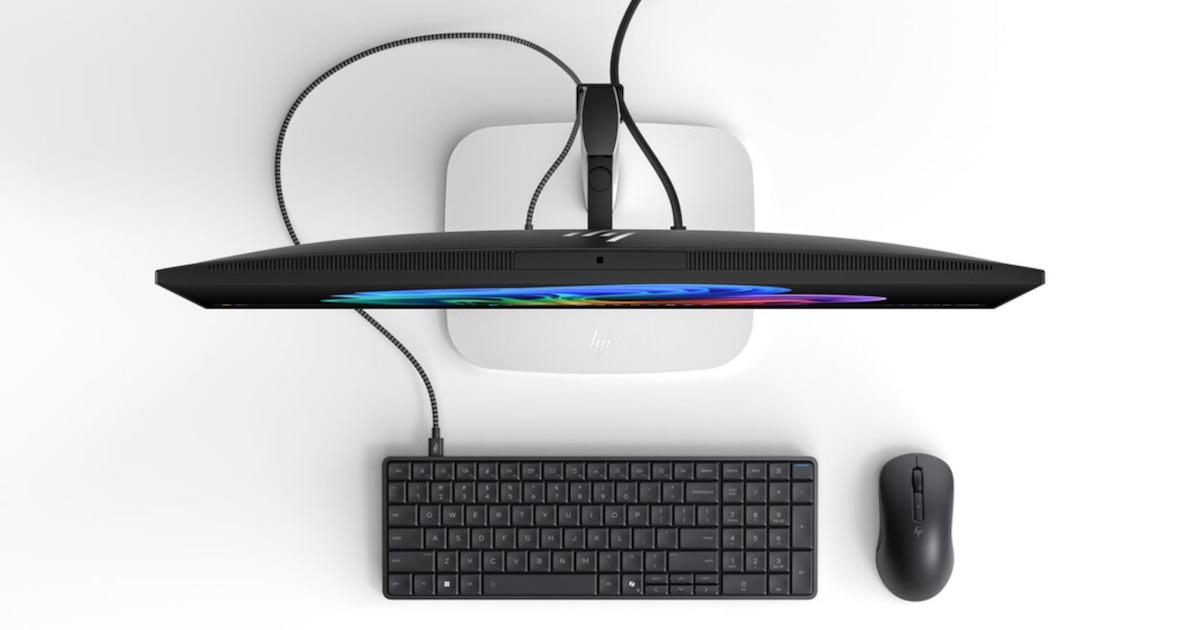
One of the monitor's biggest selling points is its Thunderbolt 4 connectivity with up to 140W of Power Delivery . Thanks to this, a single cable can handle power, data, and video signal between the monitor and the PC/keyboard, simplifying setup as much as possible: one cable to power the monitor and another from the monitor to the EliteBoard G1a, and you're done.
This keyboard-PC + monitor combination with Thunderbolt is the basis of HP's "clean desktop" idea : fewer cables, fewer gadgets, less clutter, but a complete workstation, with local AI, a good screen and the possibility of expanding with hubs and peripherals according to the needs of each user.
Intended uses, target audience and HP approach
HP clearly positions the EliteBoard G1a as a tool for hybrid work and shared workspaces . In companies where there are no assigned workstations, the idea is that each employee can bring their keyboard/PC and plug it into any desk with an available monitor.
The company cites studies like the HP Work Relationship Index , which indicate that a significant percentage of professionals feel their current hardware doesn't fit their work style. The EliteBoard G1a aims to address this gap by offering a lightweight, portable workstation designed for easy movement between rooms, offices, and even homes.
It's also an interesting option for users who already work exclusively with an external monitor and leave their laptop closed, using an external keyboard and mouse. For this user group, switching to a keyboard-PC setup can free up space, reduce visual clutter on the desk, and, in some cases, lower equipment upgrade costs by centralizing the hardware in a single device; for example, it's possible to automate Outlook and optimize workflows with less hardware.
On the other hand, the "first computer with AI integrated into a keyboard" narrative has a lot to do with marketing , as some media outlets have pointed out, since other similar concepts existed before, although not with this specific combination of a 50 TOPS NPU, Windows 11 Copilot+, and the backing of a manufacturer like HP.
Even so, the practical focus is clear: a corporate tool designed for productivity, collaboration, and security , rather than for gaming or extreme professional tasks. It's a machine for running Office, collaboration suites, business applications, everyday AI tools, and the occasional light creative workflow—not meant to replace a dedicated graphics workstation.
Software, security and operating systems
In terms of software, HP offers the EliteBoard G1a with Windows 11 Home and Windows 11 Pro , depending on whether it's intended for end users or businesses. For businesses, Windows 11 Pro for Business is specifically mentioned, offering all associated management and security features.
The fact that the device meets the Copilot+ PC requirements means full access to the next-generation AI capabilities integrated into the system, including local functions accelerated by the NPU. This reduces reliance on the cloud, improves latency, and strengthens the privacy of sensitive data.
HP Wolf Security for Business adds an additional layer of protection at the hardware and firmware level, with defenses designed to mitigate modern attacks targeting the BIOS , secure boot , and other critical vectors; it is recommended to understand the UEFI boot process to better understand these protections.
Although the device is primarily designed for Windows, the possibility of installing Linux in the hands of advanced users is not ruled out , provided they are willing to deal with driver compatibility and NPU support. It's not an officially prioritized use case, but the community will surely experiment with it.
Optionally, biometric authentication using a fingerprint reader adds to the range of secure login methods, making it easier to comply with corporate security policies without overly complicating the user experience.
Price, availability and market context
The HP EliteBoard G1a is scheduled to launch in March 2026 in key markets where HP operates, through both corporate and retail channels. The company has confirmed that month as the launch window for both the keyboard/PC and the HP Series 7 Pro 4K monitor.
At the time of the presentation, HP had not yet released the official price or regional pricing, and some media outlets suggest that, given its level of innovation and professional focus, it won't exactly be a cheap product. In countries like Mexico, for example, it's not even clear if it will be available in the local catalog, as the brand is quite selective about which models it carries and which it doesn't.
The context of CES 2026 has served to position the EliteBoard G1a as one of the most eye-catching products at the show , to the point that it won the Innovation Award thanks to its integration of AI into a keyboard format. Beyond the sensational headline, the truth is that it perfectly represents the trend towards miniaturization and simplification of the workplace.
Meanwhile, the market already had other compact computer options such as minis, NUCs , all-in-one PCs or even keyboards with a Raspberry Pi-type board, but none with this level of integration, x86 power, local AI support and business focus at the same time.
Overall, the HP EliteBoard G1a stands as a very serious experiment in what the desktop of the near future could look like : less plastic and metal on display, more intelligence and performance hidden in a single discreet device, accompanied by a good monitor and supported by the cloud only when it makes sense.
HP's EliteBoard G1a proposal blends nostalgia for old keyboard microcomputers with all the demands of modern work : local AI up to 50 TOPS, Windows 11 Pro, enhanced security, up to 64 GB of RAM and 2 TB NVMe, USB4 and Wi-Fi 7 connectivity, optional battery, and a 12 mm thick design intended to move effortlessly from one desk to another, making it a very particular alternative for those who are already glued to an external monitor and seek to simplify their equipment as much as possible without sacrificing professional-level performance.


Passionate writer about the world of bytes and technology in general. I love sharing my knowledge through writing, and that's what I'll do on this blog, show you all the most interesting things about gadgets, software, hardware, tech trends, and more. My goal is to help you navigate the digital world in a simple and entertaining way.