For safety reasons, iPhone means that you can shield missed calls showing on the Lock Display screen of your iPhone from being answered by anyone else (apart from you). Allow us to check out the steps to Defend Missed Calls on iPhone Lock Display screen.

Defend Missed Calls on iPhone Lock Display screen
Lock Display screen Notifications on iPhone are mainly designed to keep you knowledgeable about incoming messages and calls being made by your contacts to your iPhone.
For the sake of comfort, iPhone means that you can reply to notifications or return missed calls proper from the Lock Display screen of your gadget.
Nevertheless, with this comfort comes the potential of anyone else with the ability to reply your missed calls, in case you've gotten the behavior of leaving your iPhone unattended.
Therefore, we're offering under the steps to Defend Missed Calls on iPhone Lock Display screen. Doing it will shield all missed calls on your iPhone, together with Mobile, FaceTime and in addition Calls from WhatsApp , TextNow, imo and others.
- Associated: Easy methods to Make Free Calls On iPhone Using WhatsApp
Steps to Defend Missed Calls on iPhone Lock Display screen
Comply with the steps below to save Missed Calls on iPhone Lock Display screen
1. From the Residence display of your iPhone, faucet on Settings.
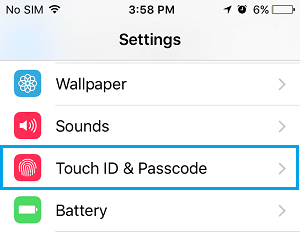
2. On the Setting display, faucet on Contact ID & Passcode (Face ID & Passcode in case of iPhone X).
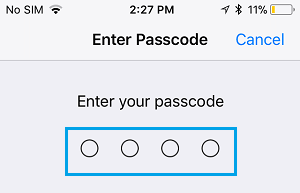
3. On the subsequent display, you may be prompted to enter your Lock Display screen Passcode in an effort to enter the Contact ID & Passcode Display screen.
4. On the Contact ID & Passcode display, disable the choice to Return Missed Calls from the Lock Display screen of iPhone by transferring the toggle subsequent to Return Missed Calls to OFF place (See picture below).
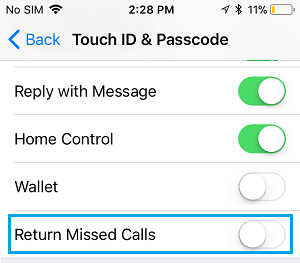
After this setting, all of the missed calls showing on the Lock Display screen of your iPhone will probably be protected. Anyone else, attempting to reply to a missed name from the Lock display of your iPhone will probably be prompted to confirm by coming into your Passcode, utilizing Contact ID or FaceID.
Better of all, the function protects all missed calls, not simply mobile ones.
Particularly, your FaceTime calls are protected, as are any missed calls from VoIP apps that use Apple's CallKit API for Lock display integration, akin to WhatsApp, Viber and so on.
Equally, you might also need to disable Reply From Lock Display screen function on your iPhone, in an effort to stop the potential of anyone else with the ability to reply to incoming messages from the Lock Display screen of your iPhone.
- Easy methods to Disguise Notifications From iPhone Lock Display screen
- Easy methods to Allow Persistent Notifications On iPhone
- Easy methods to Repair Duplicate Message Notifications on iPhone
