Would you like to know how to create an invoice in WordPress or WooCommerce for free? The best WordPress invoice plugins make the process of creating and paying invoices much easier.
Plus, you can automate all billing and payment processes with an expert WordPress billing plugin, allowing you to focus all your time and resources on growing your business instead of thinking about the technical aspects of your service.
We’ll go over what to look for in a WordPress invoicing plugin and the best WordPress invoicing plugins to send invoices directly from your WordPress website in this post. Then, we’ll look at how to work with WooCommerce. Let’s get started!
You might also be interested in: How to Add an Event Calendar in WordPress: Best Plugins
How to invoice on WordPress for free?
Pretty simple. If you already have a WordPress site or blog, you need a free flexible invoice plugin. And you are “good to go”! Of course, if you are just starting your business, blog, or want to provide services, you might want to choose WordPress.
Why? Because WordPress is the most popular CMS platform (41% of websites use it). You can use it for your business, blog, or any project. Plus, WordPress is easy to install and get started. And it has tons of plugins ( including WooCommerce ), themes, designers, tutorials, and a huge community.
Create a WordPress Invoice
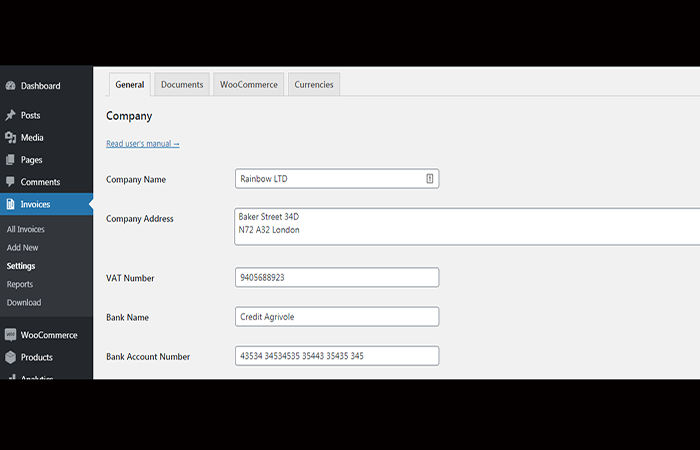
First, see the process for setting up the plugin and issuing a PDF invoice in WordPress below. As you can see, you first enter all the necessary data, products, and taxes. Then you can download the desired PDF invoice or multiple invoices in bulk.
Finally, you send them to your clients or print invoices on your printer. Everything will be under your control. And you'll find all the invoices in WordPress alongside your blog posts and pages. Manage your WordPress blog or business website with all your invoices in one place! Therefore, there's no need for an external invoicing system or billing your services elsewhere.

- Step 1: Download invoices in bulk for a chosen date range. Then send or print invoices.
- Step 2: choose your plugin settings and start billing.
- Step 3: set up invoices on your WordPress and WooCommerce.
- Step 4: View all invoices to easily edit, download and print them.
- Step 5: Add a new invoice in WordPress or WooCommerce at any time.
What features do you need to look for in WordPress invoice plugins?
Finding a comprehensive solution that addresses all your invoicing requirements at once will be difficult. You'll need to carefully examine each feature to find a solution that meets your billing and payment needs. To help you determine which WordPress invoice plugins stand out, check out the best ones, with their key features listed below:
- The ability to deliver single, ongoing invoices to your customers.
- The ability to create a payment plan and recover late payment fees.
- Payment reminder emails.
- Support multiple payment gateways for your customers, allowing them to pay using the method most convenient for them.
- Optional partial payments.
- A simple dashboard for invoice control, payment processing, and status reporting, including tax deduction and other reporting options.
We reviewed several useful WordPress invoice plugins to illustrate each one's functionality and help you choose the best WordPress invoice plugin . We've included both free and premium options so you can choose your budget: features, benefits, and drawbacks for each plugin.
1. YITH WooCommerce
YITH WooCommerce PDF Invoice is a plugin designed to help WordPress users automatically generate PDF invoices for their orders. This plugin allows you to customize the options and automatically create an invoice in WordPress without any effort on your part.
By automating this process, you can save time by not having to do it manually for each order, allowing you to focus on developing your business. Plus, there are many benefits to electronic invoicing.
Advantages
- Link PDF invoice to customer confirmation email automatically.
- Customizable invoice template.
- Template for a customizable shipping list.
- For your records, download invoices from customer order sites.
Disadvantages
- There is nothing to criticize about this plugin as it comes with several useful features in both its free and paid versions.
2. Sliced Invoices
Sliced Invoices is a top-notch WordPress invoicing plugin that includes invoices and quotes you can send to your clients for free or for a fee. You can try out a variety of quotes and invoices here.
Sliced Invoices is a multifaceted company that offers more than just invoices and quotes. It provides pre-designed templates and comes with many add-ons, including 2Checkout Payment Gateway, Authorize.net, Client Area, Easy Translate, Deposit Invoices, Gravity Forms, Stripe, Additional Tax, and others.
In addition, you can get extensions like Braintree, Better URL, Contact Form 7, Formidable Forms, Partial Payments, and Recurring Invoices, among others. Sliced Invoices was the only way to get any of these extensions. Furthermore, these extensions are essential and come with top-notch customer service and a 30-day money-back guarantee.
Advantages
- For fast quoting and invoicing, create an unlimited number of predefined line items.
- Payments are made online. For example, PayPal allows you to accept credit card payments from your customers.
- HTML Notifications. When you're paying, you'll get nicely formatted HTML updates.
Disadvantages
- The free SlicedInvoices plugin has minimal functionality. Some of the most useful features are only included in the premium edition.
3.Freshbooks
FreshBooks is a cloud-based accounting and finance platform that ranks among the best in the world. It was primarily designed for small businesses, business owners, and freelancers who want to track sales, conversions, and other metrics, as well as stand out from the competition by customizing the branding of their financial records, logos, and designs, among other things.
This plugin is known for automating customer invoicing and time tracking. This software was created using an algorithm designed with small and growing businesses in mind. It's also useful for freelancers looking to improve their sales and conversion cycles.
Freshbooks is built in such a way that you can sit back and relax while the algorithm takes care of all your financial and accounting management tasks, including, of course, creating an invoice in WordPress.
When it comes to starting and running a business, you no longer have to worry about not being familiar with basic accounting and finance concepts and processes. All of those torturous lessons have been incorporated into the app, allowing you to relax while the heavy lifting is taken care of.
Advantages
- Freshbooks' billing method is very complex and customizable.
- It has a convenient online payment system.
- The plugin automatically syncs across all your smart devices. As a result, you are still up to date with any changes and ready to make quick decisions.
- Freshbooks will also help you with data on automated tax circulation.
Disadvantages
- Instead of sending the invoice, just send a link to the client. Some clients are hesitant to click on links sent via email.
- Compared to some other cloud-based accounting applications, it seems to be expensive.
- There aren't many options when it comes to customizing billing.
4. Sprout Invoices
Within the WordPress dashboard, Sprout Invoices helps you monitor your clients and schedules and send custom invoices and estimates. It’s essentially an automated client management workflow, which sounds like a positive for freelancers and those who work in customer services.
Sprout Invoices has a few key features. However, the ability to create, send, and receive invoice payments directly in WordPress is the first and perhaps most useful feature. Its user interface makes it easy to create an invoice in WordPress, add a client, and then configure how you want to receive payments.
The plugin provides you with a detailed and fully customized invoice that you can send to clients. Clients can then pay their invoices directly from that page. In addition, Sprout Invoices lets you gather all your clients and projects in one place and then automatically assign invoices to them.
It also helps you create estimates and collect data through a front-end form that is automatically populated by the back-end. Sprout Invoices keeps track of everything in the past.
So for example, reports track invoices that have been sent, invoices that have been collected, outstanding estimates, and projects you're actually working on, all of which can be easily viewed and edited in the admin.
So if you find yourself dealing with client management on a regular basis, Sprout Invoices has created a workflow that should be versatile enough to fit into your current workflow while also being automated enough to handle the most irritating pain points.
Advantages
- You can also use it in conjunction with form plugins like Ninja Forms, WPForms, and others to further customize your invoices.
- Sprout Invoices is Supports multiple languages and local currencies, so you can send invoices to your clients no matter where they are in the world.
- You have an infinite number of invoices and estimates to send, as well as an unlimited number of clients.
- You'll need to upgrade to Sprout Invoices Pro to get recurring invoices and payments, advanced reporting, specific integrations, and other features.
Disadvantages
- Advanced features are only available in the premium version.
5. WooCommerce PDF
With over 200 active installations, it is one of the most common plugins in the official directory of useful plugins for making an invoice in WordPress. It is also one of the best-received, with 000 955-star ratings out of 5. It has the ability to create custom invoice templates. The plugin creates invoices based on a single template per design.
However, you can make your own templates if you are willing to get your hands a little dirty with code. WooCommerce PDF Invoices also helps you preview invoices before sending them to the customer from the admin section.
When you activate the add-on, a new column appears in the " Orders " list table , with a link to the invoice as it will be issued to the customer for each order. It's advisable to double-check everything before submitting an order.
Advantages
- It has an easy-to-use setup wizard.
- It is easy to modify the settings.
- For its free edition, the plugin also provides very responsive support.
- You'll also be able to control how your invoices are numbered, which is crucial for keeping track of your finances.
Disadvantages
- This plugin was created with WooCommerce users in mind. Consider it one of the other best WordPress invoicing plugins on this list if you use a different framework for your sales.
6. WP Invoicing
WP Invoicing is an ideal plugin for creating an invoice in WordPress, because it specializes in this and comes with many features. Without leaving your WordPress dashboard, you can quickly create, edit, and send customized and detailed invoices to your clients.
Generate an invoice in the admin section of your WordPress installation, then email your client with a brief summary of the invoice and a unique link.
Your customer then clicks on a special link to your site, where your invoice is automatically displayed. Your customer pays their invoice with a credit card or PayPal account after verifying the invoice and you are immediately informed.
The plugin supports multiple payment gateways including PayPal, Stripe, Authorize.net, and others. It can also be used to set up recurring payments and create invoices for each payment automatically.
Advantages
- Customize with your own information and logo.
- Partial payments are accepted.
- For more complete customer management, it connects to WP-CRM.
- Line objects can be saved for reuse.
Disadvantages
- You'll need to play around with your WordPress page templates to make the invoice look correct.
7.Xero
Xero is a web-based accounting system for small and growing businesses that was established in 2006. Xero connects small businesses with trusted advisors and gives them real-time insights into their financial situation.
It can be accessed from any computer with an active internet connection, as it is a web-based solution . Small businesses can monitor their cash flow, purchases, and account information from anywhere, thanks to Xero's comprehensive accounting features.
All bank transactions are automatically imported and coded. Online bill payment makes it easy to track expenses and control overdue invoices, helping to improve relationships with vendors who provide essential business supplies.
Personal expenses can also be managed with Xero, which allows for the analysis and approval of mobile receipts. Xero offers unlimited customer support, as well as integration with several different programs, including ADP, Bill.com, and Vend. For product review and feature evaluation, the solution comes with a 30-day free trial.
Advantages
- The GUI is easy to use and understand.
- Invoices are well designed and easy for customers to understand.
- This app connects to your bank account and imports transactions.
Disadvantages
- This option is more expensive than the others on this list.
- The customer service department does not have a good reputation.
You might also want to know: How to Place Menus on Every Page of WordPress
What is your favorite WordPress invoicing plugin?
Sprout Invoices is the best overall option of all the top WordPress invoice plugins we've mentioned. It allows you to generate countless invoices and forecasts and integrates with various payment gateways so your customers can pay securely.
The plugin supports multiple languages and currencies, and its invoices are fully customizable. You'll have access to reporting and customer management. The base plugin is free, but you'll need to upgrade to the premium version if you need recurring payments or want to integrate it with WooCommerce.
However, if you run a WooCommerce store, the WooCommerce PDF Invoice plugin might be preferable due to its bulk generation functionality.
PDF Invoice in WooCommerce with a free plugin
You can create an invoice in WordPress manually. It may be enough when you take orders via a contact form, phone, or email. But when your services and products become more popular, turn to WooCommerce. It's also a free plugin that will allow you to transform your site into a store.
You will be able to showcase your offer and services, and automate the process of obtaining new orders. Now, sell your products and services through your e-store. That is what WooCommerce will allow you to do.
WooCommerce PDF Invoice Plugin
Once your WooCommerce store is up and running, sales are automated, and you have gained more time and energy to grow your business, it’s now time to invoice your WooCommerce orders.
The Flexible Invoices plugin will also allow you to create a PDF invoice in WooCommerce for free. You will then be able to issue an invoice payment in WordPress, generate invoices for WooCommerce orders, and issue a manual PDF invoice at the same time!
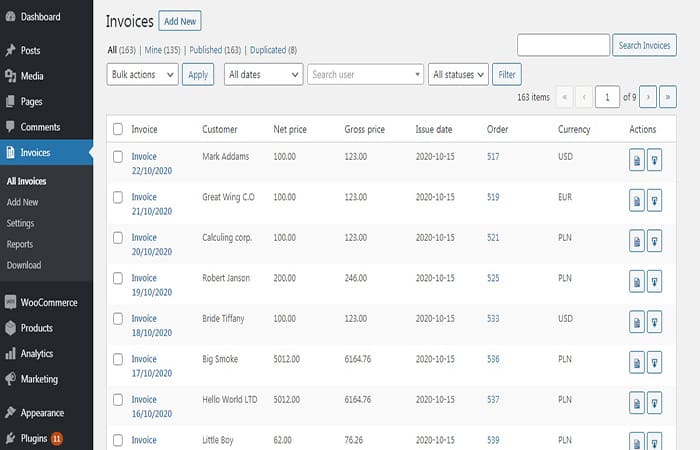
The free Flexible Invoices plugin you have now installed will also invoice your WooCommerce orders. The plugin will work with a standard order, a manual order, and also with a WooCommerce invoice payment via checkout. For example, for WooCommerce phone orders that you will need from time to time.
Is it possible to use the PDF Invoice plugin for WordPress and WooCommerce at the same time?
Yes! Let's say you sell your products and services online in your new WooCommerce store. The Flexible Invoices plugin also helps you issue invoices for WooCommerce orders! The invoice pulls data from WooCommerce orders: your customer's billing address, phone number, payment status, and payment method. All of this information is included on the invoices.
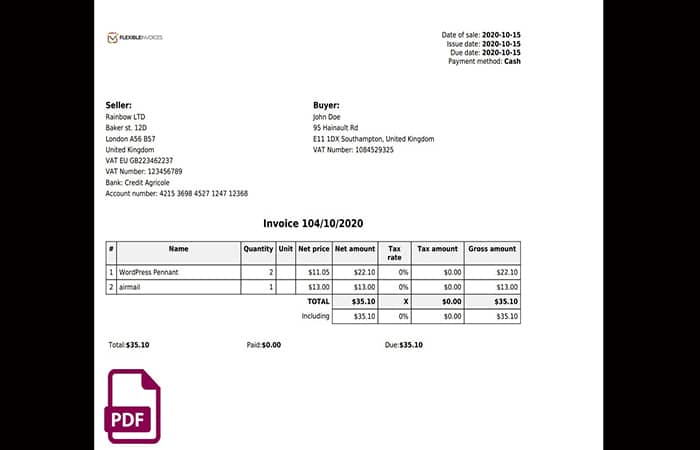
However, you still have some “old” customers. They prefer to call you and don’t want to make a WooCommerce purchase order. Therefore, you still issue invoices manually for them. Of course, all invoices will be ready to edit, download, email and print anytime you need them (both from WooCommerce and WordPress orders).
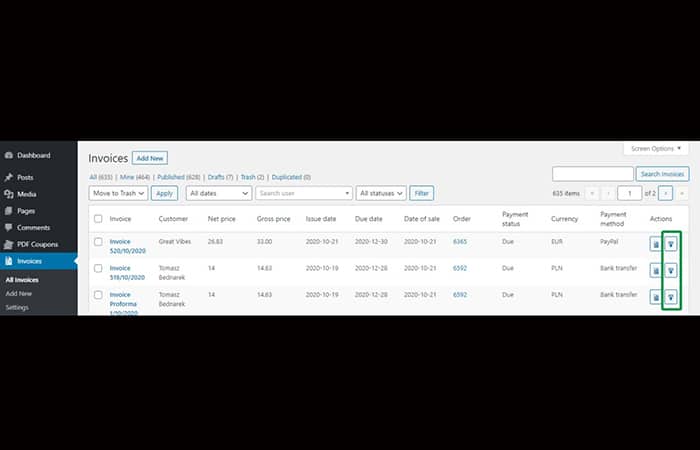
A custom PDF WooCommmerce invoice template
Of course, if you need to edit the pdf invoice template, you can do so. In the free version of the plugin, you can adjust the invoice template. In the PRO version, you can customize 3 types of invoices. It is possible to adjust the invoice to your needs, for example for:
- Change invoice fonts.
- Change the invoice language (the plugin is also compatible with WPML).
- Add a payment link to the invoice.
- Add WooCommerce order meta fields or any annotations you need.
- Adding additional information to invoice notes for a WordPress invoice (outside of WooCommerce orders)
Automatic PDF Invoices for WooCommerce Orders
How much time can you save? With 3 invoices (issuing, downloading, printing and sending an invoice) it can take a few minutes. But with 10 or 20 per day, you may need to speed up and automate the process. The invoice will be automatically generated for the chosen order statuses and then emailed to a customer.

Create a WooCommerce PDF invoice with the PRO version of the plugin automatically. You don't need to do it manually. Use this time for other tasks or enjoy a cup of coffee or fresh juice. The plugin will do the work for you.
Proforma, Invoice, and Proofreading: 3 Types of WooCommerce Invoices
PRO comes with 3 document types. Proforma invoices before payments and corrections for WooCommerce refunds. All automatically, of course!
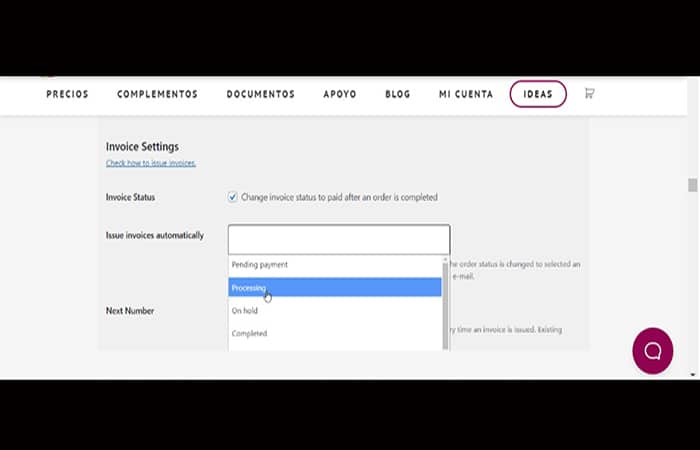
They also have their PDF invoice templates. So now, you can process any type of purchase order and WooCommerce situation on your store.
VAT Number Validation, OSS Support, Conversion Table and Reverse Charge in One Plugin!
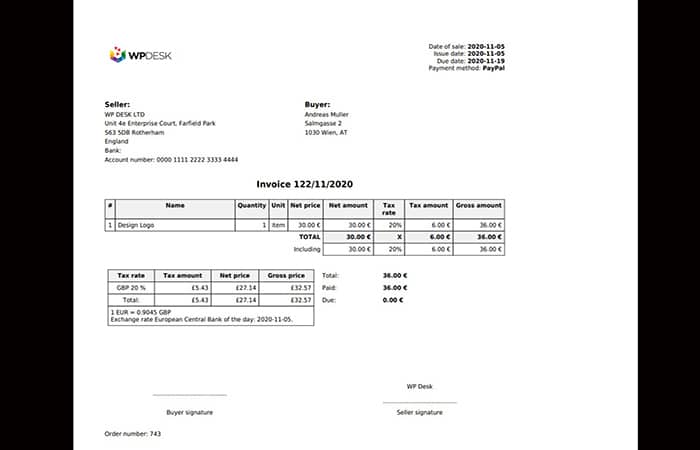
The Flexible Invoices PRO plugin is compatible with EU legislation. It has everything you need to invoice, send and print invoices for your EU customers. So, if you need to issue a WooCommerce invoice for a customer in Europe or it's a matter of days or a week, use the plugin.
All the necessary features for EU sales are built-in. You don't have to look for any other plugin to meet EU requirements. For example, EU VAT number validation for OSS/reverse charge. As of July 2021, the new OSS tax mechanism is in use, replacing the previous MOSS.
WooCommerce Billing System, WooCommerce Invoice, WooCommerce Factory, WooCommerce E-Accounting?
Yes, the plugin is also translated into English, French, Spanish, Italian, Polish and Dutch. So use it as your WooCommerce invoicing system (e-boekhouden WooCommerce) or to issue WooCommerce invoices on your store automatically. The plugin is also compatible with WPML!
Why create digital download invoices
A digital method for creating invoices can have a wide range of uses. Here are just some of the most practical ones.
1. Readily available
A digital copy of a customer’s invoice is always available with a click of the mouse. He or she can feel comforted by the idea that this information is always accessible from the website. This is one of those nuances that improves the way customers view your brand.
2. Save time
Without an automated billing system, invoices can easily get filed away or misplaced. If a client needs a copy, it can take some time to find it. Digital copies that are immediately available can improve business efficiency in this area.
3. Paperless system
Among other benefits of adopting green technology, a paperless system can save the company money while being more environmentally friendly. This can save paper, ink, and also be a more efficient way of doing business. Follow the steps below:
Step 1: Installing Easy Digital Downloads
We've already explained how to create an invoice in WordPress using WooCommerce; now we'll use Easy Digital Downloads to set up online invoices . This tool has many features beyond invoicing, but we'll focus solely on the invoice aspect.
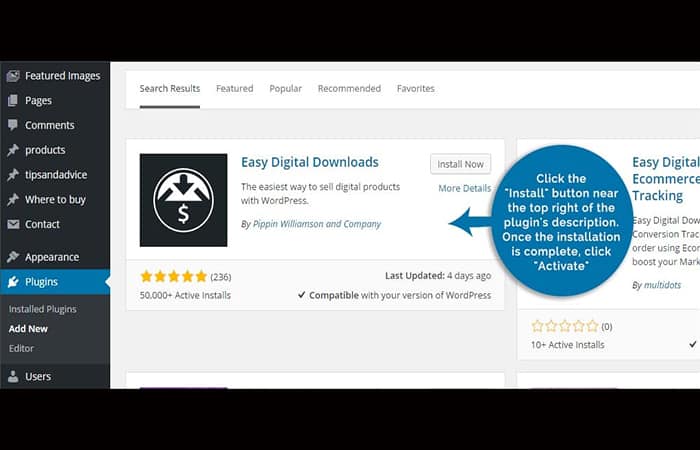
NOTE: The invoice extension is a premium feature. However, you'll gain access to a variety of tools, such as templates and online invoice customization, if you purchase it. To find and install Easy Digital Invoices, go to the " Plugins " section of your WordPress dashboard.
Click the " Add New " button located near the top left of the plugin screen. Once it's loaded, you'll see the text search bar on the right. Simply type the plugin name into this field. WordPress will automatically find any files related to this search.
The add-on should be the first one in the list. Click the " Install " button near the top right of the add-on description. Once the installation is complete, click " Activate ."
There is actually no limit to the number of plugins you can install. However, you want to make sure they are all compatible. Not all plugins will work well with each other and could cause your site to break.
Step 2: Set up a page
After you activate the plugin, EDD will automatically add several new pages to your website. These include things like the “Checkout” page. However, it doesn’t have one available for invoices. To do this:
- Step 1: go to «Pages» in your WordPress dashboard.
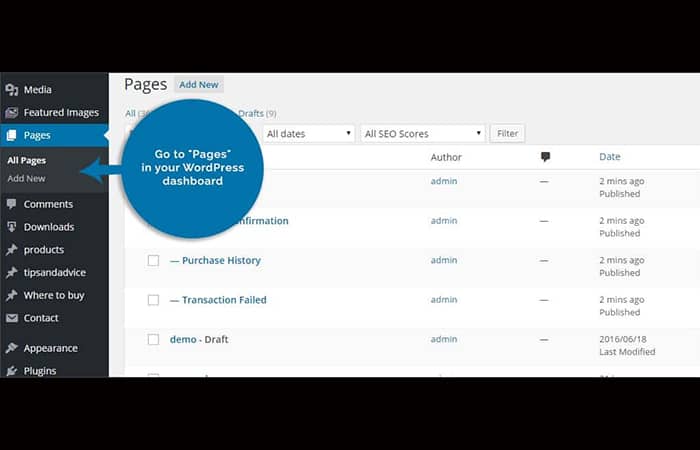
- Step 2: click the button «Add new» at the top to create a new page.
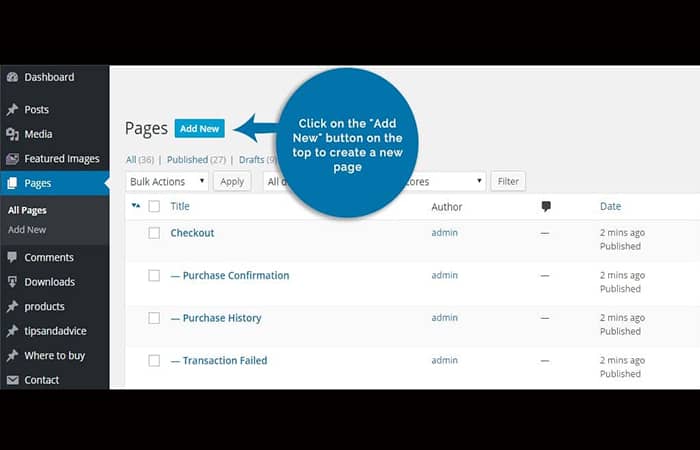
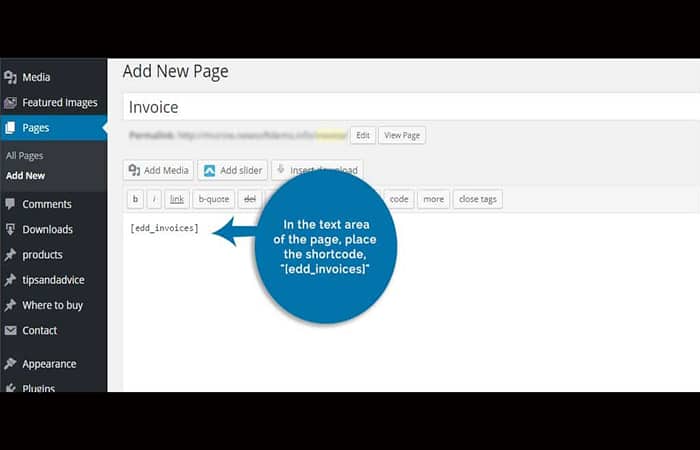
After the editor loads, enter a new name for this page. We suggest using something logical, like " Invoice ." This makes it easy for everyone to find the information on your site. In the page's text area, place the shortcode, "[edd_invoices] ".
After activating EDD, a new control will appear in your WordPress dashboard. You might see " Downloads " somewhere below the " Comments " area on the left. Once you find the link, click on it. Under the downloads control for EDD, you'll see a link for " Extensions ."
Once you click here, you'll see a page with a long list of things you can add to the plugin. Scroll to the bottom until you see " PDF Invoices ." Click the " Get this extension " button. This will take you to the plugin's homepage where you can purchase the extension.
When you purchase the extension, you'll receive a ZIP file that you can install and add to WordPress. The PDF download extension will add a new feature to EDD. After installing the file, return to the " Downloads " section for Easy Digital Downloads. You'll now see additional settings for managing your invoices.
At the top, there will be a drop-down menu next to " Invoice Page ." Click the arrows in this menu and locate the page you created in Step 2. You should also see several fields for your company information. Make sure everything is filled in before saving.
Additionally, you can add your custom logo to the invoice by pasting the image URL into the " Logo URL " field. Once all fields are complete, click " Save Changes " in the bottom left corner. Now, online customers can easily access your invoices and download a PDF with just one click.
Check out: How to Create a Forum in WordPress | Installing Simple Press Forum
Final thoughts
Integrating invoicing functionality into your daily workflow is simple with one of the best WordPress invoice plugins. You can generate invoices directly from your WordPress dashboard. Your client will receive an email with a payment link once the invoice is generated, and you can easily follow the link to make the payment. The email notification is also fully customizable.
Whichever WordPress invoice plugin you choose from the list, you'll find they're all excellent options that include everything you need to start sending invoices from your account. We hope this article helped you find what you were looking for. Let us know how it goes!

My name is Javier Chirinos and I am passionate about technology. Ever since I can remember, I have been interested in computers and video games, and that passion has turned into a job.
I have been publishing about technology and gadgets on the Internet for over 15 years, especially in mundobytes.com
I am also an expert in online marketing and communication and have knowledge in WordPress development.