- STATUS_ACCESS_VIOLATION 0xC0000005 indicates unauthorized access to memory by applications or libraries.
- The most common cases occur in games, browsers, and system tools, often due to third-party drivers or software.
- Updating drivers, checking the event viewer, repairing system files, and cleaning the browser resolves most situations.
- As a last resort, restore points, resetting Windows, or a clean installation can eliminate persistent errors.
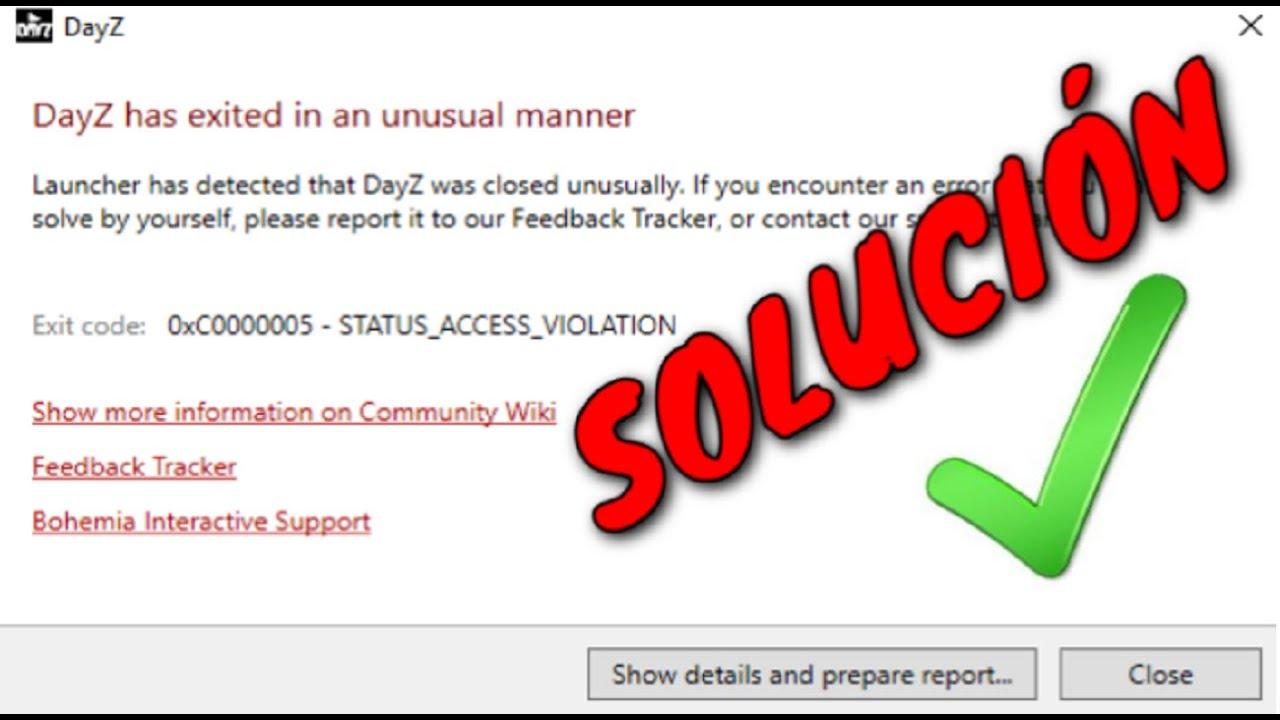
If the code popped up for you STATUS_ACCESS_VIOLATION 0xC0000005 Just when you were about to play a game, open a program, or simply browse with Chrome or Edge, it's normal to be left with a blank stare. The message doesn't help much, and all you see is the application suddenly closing without any explanation.
This flaw is very widespread in Windows 10 and Windows 11This error can appear in games like DayZ or ArmA 3, in system utilities like Ntbackup.exe, or in modern browsers. While it may seem like a mysterious error, it's usually related to memory issues, drivers, third-party software, or even browser extensions. Let's break it down and review all the practical solutions that have worked for other users.
What does STATUS_ACCESS_VIOLATION 0xC0000005 mean?
The code 0xC0000005 This translates to Windows as STATUS_ACCESS_VIOLATIONThis basically indicates that a program has attempted to read from or write to a memory area it doesn't have permission to access. The operating system protects certain memory areas to prevent attacks (such as buffer overflows) and serious errors, so when an application goes astray, Windows blocks and closes it.
This access violation is not always due to an internal failure of the application itself; often it is caused by other software or component The culprit could be a faulty driver, a corrupted sound library, a browser extension, an antivirus module, or even aggressive overclocking. That's why the same error can appear in contexts as different as a game, a browser, or a backup tool.
In some specific scenarios, such as the use of Ntbackup.exe In folders with quotas enabled, Microsoft has acknowledged that the problem is due to memory corruption and has even released specific hotfixes. In other cases, the cause is more diffuse, and you have to delve into event logs, test drivers, and adjust configuration settings to find the solution.
It's important to understand that 0xC0000005 is a very generic error: two different PCs can display the same code but be experiencing completely different problems. That's why it's so important to combine general solutions (drivers, memory, system files) with a thorough review of the Windows logs and the analysis of which exact application is triggering the access violation.
STATUS_ACCESS_VIOLATION errors in games (DayZ, ArmA 3 and others)
One of the cases where this error is most prevalent is in games like DayZ or ArmA 3Some users report that, from one day to the next, the game stops progressing past the menu, crashes when trying to join an official server without mods, and displays STATUS_ACCESS_VIOLATION 0xC0000005, even after reinstalling, verifying files, or launching the game as administrator.
In many of these cases, the problem isn't actually in the game executable, but in other programs that load along with Windows and they attach to the audio, video, or even the game's own memory. Headset control centers, surround sound software, overlays, capture tools, and similar programs can inject libraries that ultimately lead to unauthorized memory access.
A very effective way to investigate what's going on is to use the Events viewer of Windows. Instead of blindly testing, the game is started until it crashes, and then the system logs are reviewed to see which module was involved at the exact moment of the failure.
The procedure that usually works is the following: open the Start menu, type “event” and run the Events viewer; within, access the section of Administrative eventsThis section groups important errors and warnings. If you filter by the approximate time the game closed, you'll usually find two "Application Error" entries: one for the game's executable file and one for the library or program that caused the access violation.
In that second entry, it is usually indicated the application name and module with errorsthe file path and the exception code. For example, some people have seen process failures. AUDIODG.EXE (Windows audio engine) related to a sound manufacturer's DLL, with messages like: “Faulting application name: AUDIODG.EXE… Faulting module name: dtstech64.dll… Exception code: 0xc0000409… Faulting module path: PATH AND NAME OF THE PROBLEM APPLICATION.” That clue clearly points to the audio suite as the culprit.
With that information in hand, the solution lies in close or uninstall The problematic program should be uninstalled before starting the game, or updated from the manufacturer's website to obtain a version that doesn't cause conflicts. This same logic applies to any library we see in the registry: GPU drivers, keyboard/mouse software, screen capture utilities, etc.
GPU settings and graphics drivers
In the gaming field, there have also been cases where the 0xC0000005 error has been resolved by touching the graphics card settingsespecially with control panels like NVIDIA's. Some DayZ users, after trying reinstalls and countless other changes, were only able to eliminate the problem by restoring the GPU to its factory settings.
The specific method they followed is simple: right-click on the desktop, open the NVIDIA control panel and, in the “Control 3D settings” section, click on the option to restore defaults in all available tabs. Then, in “Manage GPU performance drivers” (or equivalent options for monitoring or adjusting the GPU), restore the factory settings.
After applying these changes, some users report that the game has restarted without a single STATUS_ACCESS_VIOLATION error and that they haven't experienced any further unexpected crashes. This suggests that certain aggressive optimizations, custom profiles, or advanced GPU features may have been pushing the game engine toward conflicting memory accesses.
Beyond NVIDIA, it's important to always keep up to date graphics card driversWindows attempts to install recent drivers, but it isn't always able to locate the latest stable versions. Therefore, it's best to go directly to the AMD, NVIDIA, or Intel websites, download the driver appropriate for your model and architecture, and update it manually if your device is experiencing errors or malfunctioning.
If you've recently changed your hardware (for example, your GPU or motherboard), it's even more advisable to check the old drivers that may have been left behind in the system and are causing conflicts with the new equipment. In Device Manager, you can see which devices are having problems and force the search for and installation of new drivers using the "Update driver" option.
STATUS_ACCESS_VIOLATION in Chrome, Edge, and other browsers
Another very common scenario for this error code is that of the modern browsersIn Chrome, Edge, and even others like Opera GX, the status_access_violation message appears when a tab hangs, the browser crashes, or a page refuses to load and throws an access violation warning.
In these cases, the cause is usually a combination of older versions of the browserFaulty extensions, corrupted cached data, and experimental features that don't quite mesh with the rest of the system can all contribute to the problem. Some people see the error several times an hour, while others go days without it appearing, only for it to resurface in bursts.
In Google Chrome, the first logical step is to check if the browser is duly updatedTo do this, open the three-dot menu, go to Help > About Google Chrome, and wait for Chrome to download and install any pending updates. Often, a simple version upgrade fixes internal bugs that were causing access violations.
If this is not enough, it is advisable to review the installed extensionsIt's very common for a poorly maintained extension to attempt to access memory or APIs in an unsafe manner. From the path chrome://extensions/ You can disable all extensions and restart the browser. If the error disappears, reactivate them one by one until you find the one causing the problem.
Another curious solution that has worked on some computers involves renaming the browser's executable file. In the case of Chrome, you can go to the installation folder (by default). C:\Program Files (x86)\Google\Chrome\Application), search for chrome.exe and rename it to something like chrome1.exeThis little trick can prevent certain conflicts with internal routes or profiles and stop the status_access_violation error from appearing.
If it's still not working properly, you can resort to reset Chrome settings To restore settings to their default values: Go to Settings > Reset and clean up > Restore settings to their original defaults. This process undoes problematic changes and erases internal data that might be corrupted, but it retains your basic information if you choose the appropriate options.
How to fix STATUS_ACCESS_VIOLATION in Microsoft Edge
In Edge, the steps to address the error are very similar, because it is also a Chromium-based browser. The first thing to check is if Edge is updated to the latest version: three-dot menu > Help and feedback > About Microsoft Edge, and let the browser check for and install updates.
Next, the following are reviewed: extensions from edge://extensions/Just like in Chrome, the idea is to disable them all, use the browser for a while, and see if the error occurs. If it's gone, re-enable them one by one until you find the problematic one, which you'll need to uninstall or replace with a more stable alternative.
Edge can also fail if the cache and cookies They are corrupted. From Settings > Privacy, search and services > Clear browsing data, select the options “Cookies and other site data” and “Cached images and files” and click “Clear now”. After clearing this data, the browser usually behaves more predictably.
A quick test to rule out extensions or corrupted data is to open a window InPrivate via the three-dot menu or the shortcut Ctrl + Shift + NIn this mode, Edge loads without much of the stored information and without certain add-ons; if the error stops appearing in private sessions, the problem is almost certainly in some extension or in the cache of the normal session.
If none of the above works, you can reset Edge Completely reset the browser by going to Settings > Reset settings > Restore settings to their default values. This option returns the browser to a state similar to when it was first installed, preserving some personal data but deleting advanced settings that might be causing the STATUS_ACCESS_VIOLATION.
Drivers, memory, and system files in Windows
When error 0xC0000005 appears when starting programs in general, beyond games or browsers, you need to broaden the focus and check the status of drivers, memory and system filesOn many computers, the problem arises after installing a Windows update or updating a specific driver.
In that case, one of the first recommendations is Uninstall the latest Windows updates or revert a recently installed driver update. You can list recent updates and undo any that may have triggered the problem from Windows Settings or the Control Panel.
If you suspect that there are corrupted system files, it is advisable to run the System File CheckerA Command Prompt window opens with administrator privileges and the command is launched. sfc /scannowWindows itself will analyze important files and, if it detects anything broken, will attempt to repair it automatically by replacing corrupted components.
In addition to CFS, it's important to check for other conditions. RAM memory problemsWindows includes a diagnostic tool that can be launched by pressing Win + R, typing mdsched.exe and follow the instructions to reset and analyze the memory. If errors appear, there may be faulty modules or electrical problems causing invalid memory accesses.
In some more severely affected systems, it may be necessary recreate the boot registers and delete certain suspicious files. From a CMD window with administrator privileges, sequences such as the following have been used:
Del C:\Windows\System32\xOsload.exe
Del C:\Windows\System32\xNtKrnl.exe
Del C:\Windows\System32\Drivers\oem-drv64.sys
attrib c:\boot\bcd -h -r -s
ren c:\boot\bcd bcd.old
bootrec /rebuildbcd
These commands delete suspicious files, change BCD file attributes, rename the boot record, and force Windows to rebuild boot recordIt is a delicate operation that must be done knowing what you are doing, but in some cases it has allowed the reversal of startup damage that resulted in 0xC0000005 when launching applications.
Another trick that can influence this is the management of the Data Execution Prevention (DEP)It can be temporarily disabled using the command bcdedit.exe /set {current} nx AlwaysOff Run the command prompt with administrator privileges and restart. If the error disappears, we know that DEP was blocking certain commands; it's then recommended to re-enable it with... bcdedit.exe /set {current} nx AlwaysOn, since it is an important layer of security.
When to use official Microsoft hotfixes
In professional environments or with system-specific tools, such as Ntbackup.exeMicrosoft has documented specific cases where the STATUS_ACCESS_VIOLATION 0xC0000005 error occurs due to a known bug. For example, when backing up a folder with quotas enabled, the program may throw this error due to internally managed memory corruption.
For those types of cases, Microsoft usually publishes a hotfix This update only corrects the problem described in the corresponding Knowledge Base article. The company itself indicates that these patches are intended for systems that are actually experiencing that specific vulnerability, and recommends waiting for the next cumulative update if the problem is not critical.
When a hotfix is available, a "Hotfix download available" section usually appears at the top of the official article. If it doesn't appear, you should contact Microsoft Customer Service and Technical Support to request the fix. It's also important to note that other issues may require separate support requests, with the usual support costs.
The documentation for these hotfixes typically includes the attributes of the affected fileswith date, time, version, size and platform (for example, IA-64 or x86 versions of Ntbackup.exe), so that the administrator can verify that the patch has been applied correctly by comparing the local time information with the UTC time displayed by the system.
If your case exactly matches the scenario described by Microsoft (same application, same operation, same error code), it is worth considering installing the hotfix, always taking the logical precautions in production systems and preferably in a prior test environment.
Other common causes: updates, apps, and malware
Aside from drivers, memory, and documented cases, error code 0xC0000005 can be triggered by faulty installations, outdated applications, or malware that it may have touched crucial files. We install more and more programs, and with that, the chances increase that one of them will leave the system in an unstable state.
If the error appears right after installing or updating an application, it's worth checking if there is a latest version compatible with your WindowsSometimes, after a major operating system update, a certain version of a program becomes incompatible and starts causing access violations. Downloading the latest version from the official website is usually the quickest solution.
When the problem occurs with UWP applications downloaded from the Microsoft Store, Windows offers the option to reset the appFrom Settings (Win + I) > Apps, find the problematic program in the list, go to "Advanced options," and use the "Reset" button. The system erases its internal configuration and returns to a clean state, which can resolve persistent errors such as 0xC0000005.
We must not forget the possibility that there may be malware interfering with the systemIn today's world, it's easy for malware to sneak in through dubious downloads, deceptive ads, or email attachments, and start modifying system files or shared libraries. A full scan with Windows Defender or a [unclear - possibly a scan tool] will help detect and remove malware. third-party antimalware solution It can uncover threats that are causing these access violations.
In addition, it is advisable to complement the antivirus with maintenance tools that clean junk files, corrupted registry entries, and installation remnantsWhile they won't fix a broken driver on their own, they can reduce minor conflicts and improve overall performance, which indirectly helps to reduce the number of these types of errors.
Preventive measures to reduce future errors 0xC0000005
Once you've managed to eliminate the STATUS_ACCESS_VIOLATION, it makes sense to take some steps to prevent it from ruining your day again. The first is to keep both the operating system and the browsers and critical applications always up to dateOlder versions often contain bugs related to memory management that are corrected over time.
In the case of web browsing, a very simple way to reduce risks is to install a good ad blockerMany ads are not only annoying, but can also serve as an entry vector for malicious scripts or exploits that end up generating unstable behavior in the browser and leading to errors such as status_access_violation.
It is also recommended to use one periodically. PC repair and cleaning tool This involves removing temporary files, optimizing the registry, and checking some basic system parameters. This type of preventative maintenance helps prevent the system from accumulating digital junk and reduces the number of conflicts between applications and libraries.
Finally, it's a good idea to schedule in-depth malware scans regularly, either with Windows Defender or a more advanced anti-malware solution. Detecting and removing threats before they can corrupt system files or manipulate memory is one of the best defenses against unauthorized access.
System restore, reinstall, and other emergency solutions
If, after trying everything above, error 0xC0000005 persists, there are still a few things you can try before giving up. One of the most effective is to resort to... Windows restore pointsBy default, the system creates points when you install applications, drivers, or important updates.
From the search box, you can open the "System Restore" tool, go to the "System Protection" tab, and click "System Restore." There you will see the available restore points with their date and time; simply choose one from before the problems started and follow the wizard. The computer will restart and return the system to that previous state, without deleting your personal files.
This option is especially useful because it undoes profound changes in the system These problems aren't solved simply by uninstalling a program. If a driver or an update left the system internally in a problematic state, a restore point allows you to return to a configuration that was working correctly.
If even that doesn't work, there's always the option of using the following: Windows reset to restore it to its freshly installed state, preserving (or not) your personal files. In the worst-case scenario, a clean installation from scratch can be performed. This is a drastic and somewhat cumbersome solution, but it usually fixes the vast majority of problems, including persistent 0xC0000005 errors.
On very powerful or new computers, such as some laptops with Intel i9-14900HXIt's not uncommon to see users reinstall Windows multiple times searching for the cause of random STATUS_ACCESS_VIOLATION errors in browsers like Opera GX or Chrome. If the problem persists after a clean installation, it's almost certainly due to a driver conflict, some additional software from the manufacturer, or a hardware component that isn't functioning correctly.
In short, although the code STATUS_ACCESS_VIOLATION 0xC0000005 may sound alarming due to its technical nature, with a combination of Registry review, driver updates, system cleanup, memory check, and adjustments to browsers or games It is usually possible to locate the cause and stop suffering from unexpected shutdowns, keeping the PC much more stable for gaming, work, or daily browsing.

Passionate writer about the world of bytes and technology in general. I love sharing my knowledge through writing, and that's what I'll do on this blog, show you all the most interesting things about gadgets, software, hardware, tech trends, and more. My goal is to help you navigate the digital world in a simple and entertaining way.