- Claude Code joins Slack as an assistant programming agency capable of creating, modifying, and testing code from conversation threads.
- La IA Use the context of channels and threads to choose repositories, investigate bugs, and propose changes with human monitoring and control from Slack and the web.
- The integration, supported by MCP and GitHub, turns Slack into an agency hub where conversation, code, and automation converge for technical teams.

Claude Code has made the definitive leap to Slack And with that, the way technical teams collaborate, discuss bugs, and turn those conversations into working code without leaving the chat completely changes. Instead of having AI locked in a browser tab or the IDE, it now literally sits in the middle of the threads where bugs, product ideas, and architectural decisions arise.
This new beta integration, launched by anthropic, carries the call agency coding At the heart of daily work: Slack channels. From now on, simply mentioning @Claude in a thread so that the programming task is routed to Claude Code on the web, with chat context, the appropriate repository, and tracking within the thread itself. All of this opens the door to much more agile workflows, especially in startups and tech companies that are heavily reliant on Slack.
What is Claude Code and why is it not "just another chatbot"?
Claude Code is not just a chat window with a friendly AI; is a programming assistant With agency capabilities, meaning it can act autonomously on code, files, and tests within a framework controlled by the development team. Its design is based on Anthropic's advanced models, but goes several steps beyond simply answering questions.
In practice, Claude Code functions as a virtual junior engineer The developer is assigned specific tasks: creating new files, modifying existing modules, refactoring parts of the system, or preparing test suites to strengthen coverage. The developer sets the direction, reviews the results, and makes the final decision, but a considerable portion of the repetitive or exploratory work is delegated to AI.
Compared to the "classic" chatty Claude, Claude Code maintains contextual knowledge about the relevant code. From a project's perspective, it understands the structure of the repositories it has access to and can chain actions together: explore, propose changes, execute them, verify them, and summarize what it has done. It is, essentially, a tool built to be integrated into the software development lifecycle.
For teams working in complex environments such as trading platforms, DeFi protocols or blockchain infrastructuresThis approach can shorten development times and free up senior profiles to focus on architectural decisions. security and regulatory compliance or integration with other critical systems.
Until now, most code assistants have focused on the IDE...helping while you were coding. The twist that Anthropic proposes with Claude Code is that AI will be integrated where problems are discussed, not just where solutions are typed.
Claude Code's arrival on Slack: AI takes center stage in the conversation
The big news is the direct integration of Claude Code within Slack This is a research preview beta for Claude Code users on Team and Enterprise plans. Until now, Claude in Slack could provide light support: explaining bugs, generating code snippets, and proposing simple solutions. With this release, the role shifts to an agent that handles complete development tasks.
The operation is simple: You mention @Claude in a channel or thread with a code-related request The system automatically detects that it's a programming task. If it clearly identifies coding intent, your message is sent to Claude Code on the web, creating a new session associated with your organization and connected repositories.
Typical examples would be things like “@Claude fix the payment proofs that are failing” or “@Claude refactor the authentication module based on the team’s latest feedback.” Instead of simply replying in the thread with suggestions, Claude Code starts a real working session: he inspects the code, runs tests (if they are configured), proposes changes, and posts updates in the Slack thread.
This way of interacting significantly reduces the friction between detecting a problem and starting to solve it. Instead of opening a ticket in another tool, assigning it, switching to the IDE, and then returning to the chat, whole Boot The task is done in the same conversation where the bug or change request appeared.The workflow feels much more natural for teams that already use Slack.
Furthermore, The integration relies on Claude's existing app for Slack.Claude Code has been added with a layer of intelligent routing. If the request isn't for code, Claude responds as a normal chat assistant; if it detects development intent, it launches the coding session on the web. You can even force something to be treated as a code task using buttons like "Retry as Code".
Changes in workflows: from talking about the bug to having AI fix it
Claude Code's biggest impact on Slack isn't in the model itself, but in the workflow it enables.TechCrunch and other outlets clearly highlight this: the next battle of programming assistants won't be won solely with better models, but with deep integrations into the tools where the teams are already working.
Slack has established itself as basic communication infrastructure in thousands of technology companiesReports cited by SiliconANGLE indicate over 42 million daily active users by early 2025, with a strong presence in software and IT services companies, and around 60% of startups paying for Slack compared to a much smaller percentage paying for [other services]. Microsoft Teams.
In that context, Having Claude Code integrated into Slack turns the platform into a true “agency hub”where team conversation, code, automation, and AI coexist. When a bug is reported, a new feature is discussed, or an architectural change is evaluated, AI can intervene at that precise moment, leverage the context, and get to work.
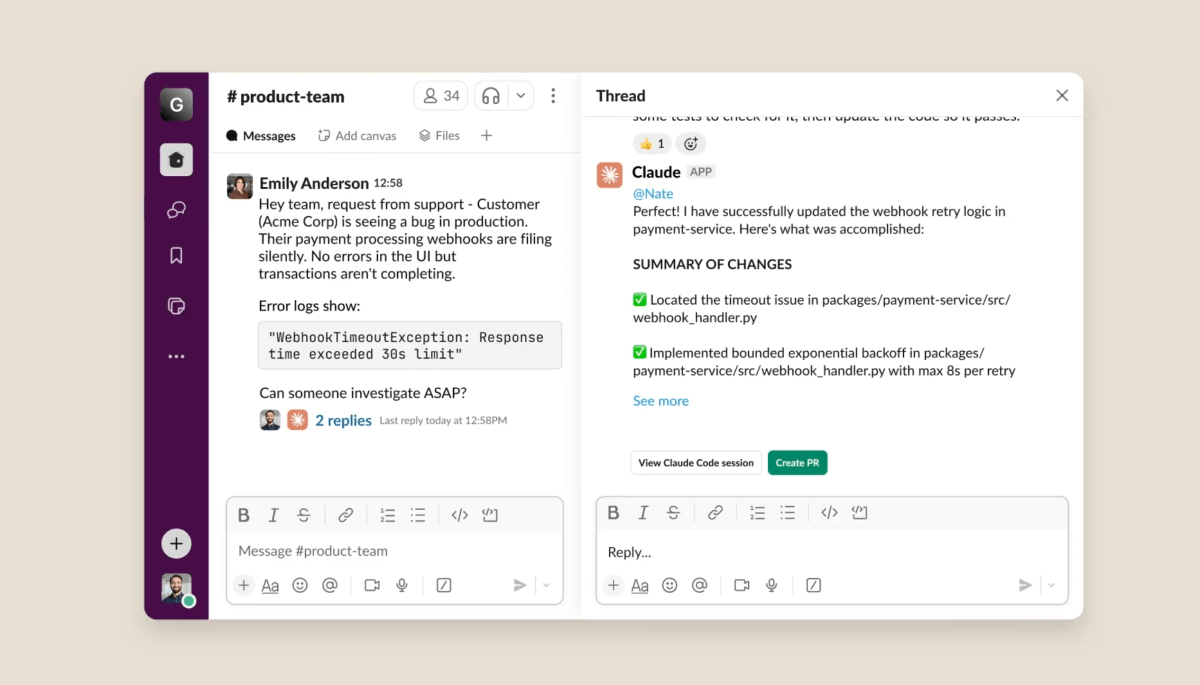
Integration is not limited to responding in text. Claude Code uses the channel or thread context to select the appropriate repositoryCreate a structured session on the web and keep the team informed through status messages: task start, intermediate milestones, change summary and action options such as “View Session” or “Create PR”.
This trend is not exclusive to Anthropic. Tools such as Cursor or GitHub Copilot They are also pushing their assistants toward chats and collaborative platforms, generating pull requests from conversations or proposing changes based on discussion threads. However, Anthropic's strategy is particularly strong in using Slack as a central hub where code, conversation, and agents converge.
Case study: how to delegate coding tasks to Claude Code from Slack
The typical workflow for delegating a development task to Claude Code from Slack It follows a fairly logical sequence that Anthropic has designed to fit with the usual way teams work.
First, A need is detected in a conversationSomeone mentions that a payment verification process is failing, another colleague provides the error log, and a third mentions when the failure started. All this information is compiled into a thread that clearly describes the problem, which is much more comprehensive than a brief ticket in a task manager.
At that point, any team member can mention to @Claude in the same thread with a prompt like “Can you fix the failed payment proofs?”. Claude analyzes the message, reviews the thread context (including previous messages with explanations, logs or reproductions) and determines that it is a coding task.
From there, the Claude Code flow is activated: A new coding session is created on the Claude Code website.The repository that seems most relevant based on the Slack context is selected (and if there is any doubt, confirmation will be requested or a dropdown menu with several options will be displayed) and the investigation of the problem begins.
During all the process, Claude is reporting the progress within the same threadThis includes: which files are being reviewed, what hypothesis is being considered regarding the cause of the error, what changes are being proposed, whether tests have been run and with what results. Upon completion, a message is published with a summary and action buttons, including "View Session" to open the entire technical session in the browser and "Create PR" to generate a pull request with the changes.
The team always has the final say: Developers can review each modification, discuss it, and decide whether to merge it or not.For sensitive environments such as exchanges cryptocurrencies, Whether it's investment platforms or payment systems, this balance between automation and manual control is crucial, as it requires traceability and auditability of every change in the code.
How Claude Code leverages conversational context in Slack
One of the great strengths of this integration is the way Claude Code uses all the context generated in Slack.It does not limit itself to reading the message where it is mentioned, but can rely on the thread or channel history to understand exactly what is being asked.
When mentioning @Claude within a thread, AI collects previous messages as a source of informationThis includes how the bug has been described, when it started occurring, whether it affects production or only staging, what steps have been taken to reproduce it, and what ideas have been considered. All this "human conversation" acts as a detailed briefing.
In channels where minor improvements, product requests, or micro-adjustments are discussed, it's very convenient that, once a change has been agreed upon, Simply tag Claude and he'll turn that wish list into code.For example, if a thread lists three UX adjustments for a screen, Claude can take that list, locate the affected files, and propose the changes in bulk.
When the mention is made in the main channel, without a thread, Claude is also able to look at recent messages to extract context.However, Anthropic's recommendation is to use threads to group relevant information and facilitate the work of AI, as well as human reading.
This context-based approach is especially valuable in domains such as algorithmic trading, smart contracts, or blockchain infrastructureswhere details about how a bug was discovered or what impact it has on the business are essential for prioritizing and implementing the right solution. The more useful conversation that accumulates in Slack, the better the briefing Claude Code has to act.
Interface, buttons, and flow control from Slack and the web
Claude Code's user experience on Slack combines elements within the chat itself and in the web interfaceso you can launch tasks in seconds, but have a larger and more detailed space to review and continue iterating.
In Slack, the tab for Home App The Claude app lets you check if your account is properly connected, as well as link or unlink your Claude user with your Slack workspace. This step is key for Each team member should use their own account and usage limitsinstead of sharing credentials.
For each task that is triggered towards Claude Code, The app displays different action buttons in status messages: “View Session” to open the session in the browser, “Create PR” to generate a pull request based on the changes, “Retry as Code” if you want a chat request to be reprocessed as a code task, or “Change Repo” to correct the repository selection if you consider it to be unsuitable.
On Claude Code's website, The complete session history is preservedThis record not only serves to audit changes, but also to resume sessions in the future, continue technical exploration, or reuse parts of the solution for other contexts.
Furthermore, Each session can originate a pull request directly from Claude CodeThis makes it easier to close the loop: from the Slack thread where a problem is detected to the PR ready for review on GitHub, passing through the intermediate AI session where the hard work of modifying and testing the code has been done.
Current integration requirements, access, and limitations
To use Claude Code in Slack, you need to meet a series of technical and permission requirements., both at the Slack level and in Claude's account and the connected repositories.
Firstly, The Slack workspace administrator must authorize the installation of the Claude app.Without this step, no user will be able to connect their account or trigger tasks in Claude Code. Once installed, each person must authenticate their own Claude account from the App Home, ensuring the integration respects individual plans and limits.
In addition, it is necessary access Claude Code on the webbecause sessions are created and managed there. Users without access to Claude Code will still receive standard chat responses in Slack, but will not be able to launch full coding sessions or create pull requests directly.
Regarding the repositories, for now The integration has focused on GitHubThis means you need to connect GitHub to Claude Code and grant it the appropriate permissions for your working repositories. If you don't see a specific repository in the dropdown menu, usually checking your GitHub permissions, reconnecting your account, or verifying the organization that the repository belongs to is sufficient.
Anthropic also points out some operational limitations: Each session can generate a single pull requestUsage limits associated with each user's Claude plan apply, and web access is required to review full session details. However, the history remains available at claude.ai/code and can be accessed later if needed.
Best practices for getting the most out of Claude Code from Slack
The quality of the requests you make to Claude Code greatly influences the results you will obtain.Anthropic proposes a series of recommendations that fit with the user experience that many teams already have with other AIs.
To begin with, it is advisable Be specific in what you are asking forMention specific files, classes, or functions; include error messages; and indicate whether the problem affects a specific part of the system or the entire module. The clearer and more defined the objective, the easier it will be for the AI to propose a suitable solution, and the fewer iterations you will need.
It also helps a lot Provide explicit context when it is not easily deduced from the thread.For example, specifying the repository or project if multiple projects are being discussed in a channel. If you want to further refine the outcome, you can directly state whether you expect Claude to create tests, update documentation, or submit the pull request for review.
Another important recommendation is make good use of Slack threads to maintain conversations about the same bug or feature. This not only better organizes the discussion for the human team, but also allows Claude to capture everything relevant when you mention him within that thread, instead of having to piece together the context from messages scattered throughout the channel.
Finally, it makes sense decide when to use Slack and when to go directly to the Claude Code web interfaceSlack is ideal when all the context is already in a conversation, when you want to launch a task asynchronously, or when multiple colleagues need visibility. The web version is more convenient for long sessions, file uploads, more interactive work, or complex tasks that require many fine-tuning iterations.
Claude Code, MCP and integration with other enterprise tools
Behind this integration lies a key element: the Model Context Protocol (MCP)MCP, an initiative driven by Anthropic to connect AI models with external data sources, APIs, and tools in a standardized way, allows Claude to do more than just "read" text; it can also call tools, query internal systems, and work with corporate resources.
In the context of Slack, MCP opens the door to workflows where Claude Code communicates not only with GitHub, but also with other critical services , the databasesInternal search engines, documentation systems, or even company-specific APIs. The idea is to build a framework of tools accessible to AI in a secure and controlled manner.
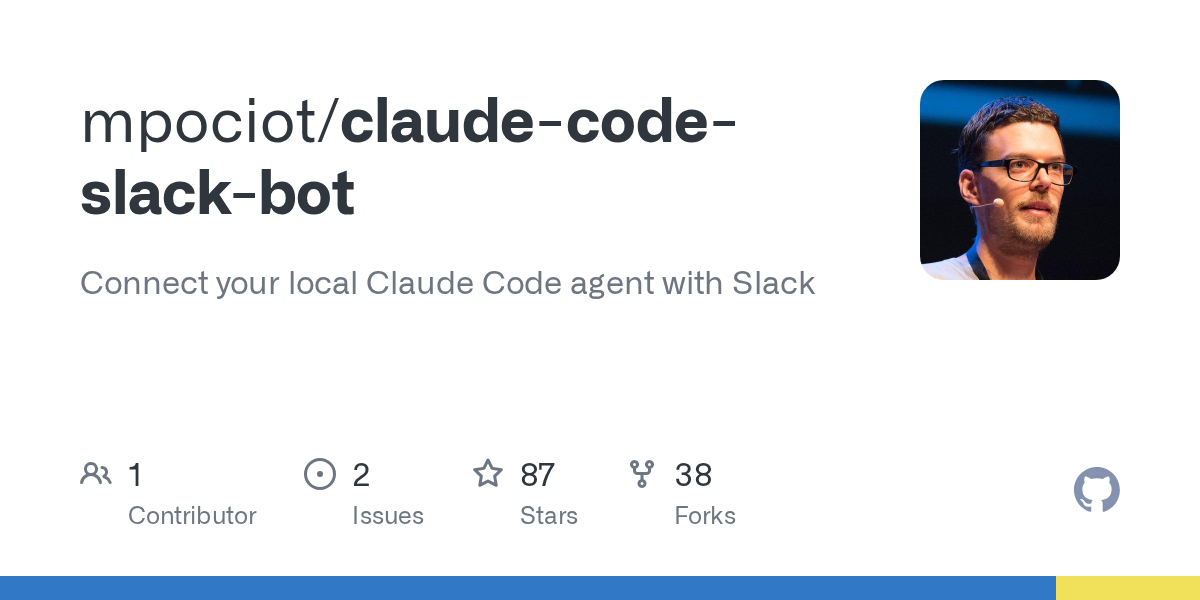
Other projects are already leveraging MCP to Setting up Slack bots based on Claude's SDK that offer advanced features: answers in streaming, maintaining context at the channel or thread level, direct upload of files (images, documents, code) for AI analysis, configuration of working directories and connection to specialized MCP servers (filesystem, GitHub, PostgreSQL, web search, etc.).
In these scenarios, the bot can Convert Claude's Markdown to Slack's own formatUpdate messages on the fly as you receive new response fragments and manage long sessions with multiple participants, all with debugging options that can be activated via environment variables to view detailed logs of traffic, requests and responses.
This modular and extensible approach fits very well with companies that want Take advantage of Claude's power without giving up your own ecosystem of toolswhether for development, data analysis, financial operations or internal document management.
Claude Code on Slack and the MCP ecosystem paint a picture of a scenario where AI is deeply integrated into the workflows where decisions are made, discussions take place, and software is built. From the initial bug reports to the final pull request, AI plays a crucial role. it fills gaps that were previously filled with manual tasks and continuous context switching, allowing technical and product teams to move faster without losing control over what goes into their code.


Passionate writer about the world of bytes and technology in general. I love sharing my knowledge through writing, and that's what I'll do on this blog, show you all the most interesting things about gadgets, software, hardware, tech trends, and more. My goal is to help you navigate the digital world in a simple and entertaining way.