- ONNX Runtime runs accelerated ONNX models (TensorRT, OpenVINO, DirectML) on multiple platforms.
- Enables fast and efficient inference on CPU/GPU/NPU, on-premises, at the edge, and in the cloud with APIs in multiple languages.
- Practical example: WinUI 3 in Windows with DirectML and ResNet50; also easy to use in Python.

The hot question in applied AI development is what role ONNX Runtime plays in bringing models to production. Simply put, ONNX Runtime is the inference engine optimized for ONNX-formatted models , designed to run on different systems and take advantage of available hardware (CPU, GPU, or NPU). Throughout this article, you'll see what it's for, how to use it in Python and .NET, and a step-by-step example using WinUI 3 on Windows accelerated with DirectML.
If you're coming from training with PyTorch or TensorFlow and want a fast and efficient deployment, ONNX lets you export the model, and ONNX Runtime handles its execution quickly and with low memory consumption. Privacy, low latency, and low cost are clear advantages when performing inference locally or at the edge without relying on the cloud.
What is ONNX Runtime?
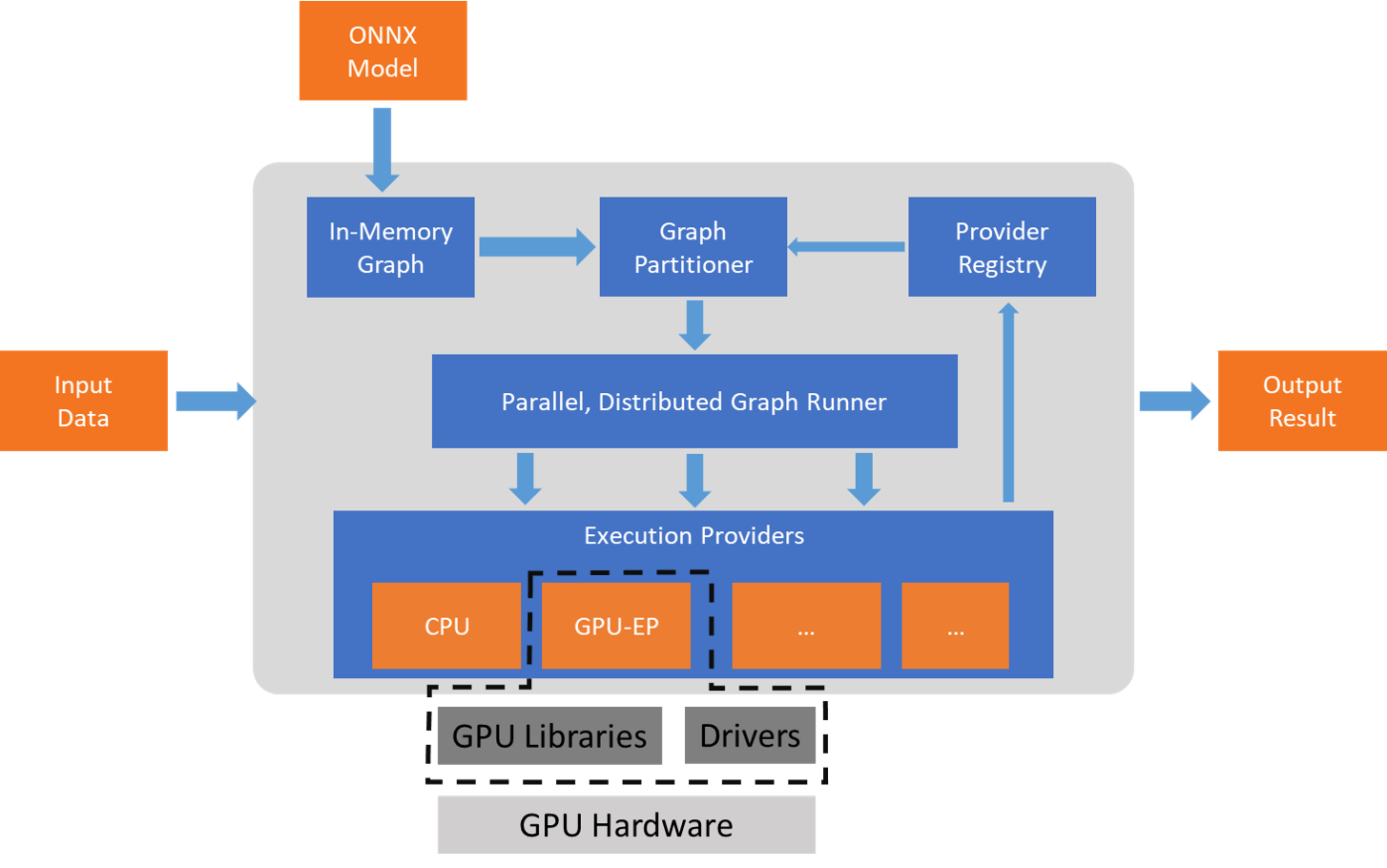
ONNX Runtime is a cross-platform machine learning model accelerator with APIs in C, C++, Python, C#, Java, and JavaScript (including Node.js). It is Linux , Windows, and macOS ready, and also integrates with web, mobile, and edge environments. Its design supports both deep neural networks and traditional ML models and can be extended with hardware-specific execution providers.
These providers include TensorRT on NVIDIA GPUs , OpenVINO on Intel hardware , and DirectML on Windows . This abstraction layer allows the ONNX model itself to leverage available device acceleration while maintaining a stable interface. Large-scale services like Bing, Office, and Azure AI already use it, with observed CPU performance improvements of up to 2x in certain scenarios, thanks to graph optimizations, operator fusion, and efficient memory management.
ONNX: The Standard Model Format
ONNX (Open Neural Network Exchange) is an open standard for representing trained models. It allows exporting from PyTorch, TensorFlow/Keras, scikit-learn, TFLite, MXNet, Chainer, or MATLAB and running them anywhere with engines like the ONNX Runtime. An ONNX model includes the network structure , trained weights , and input/output descriptions , enabling interoperability between frameworks and hardware.
This approach accelerates the transition from research to production: you train wherever you prefer and deploy wherever it's most convenient (cloud, on-premises, edge). ONNX also makes it easy to optimize size and performance using techniques like post-training quantization, which is very useful for embedded devices or IoT.
If you need to inspect a model, tools like Netron help visualize the graph and layers. And if you work with object detection, models like Ultralytics' YOLO export well to ONNX for later execution with ONNX Runtime, OpenVINO, or other engines, gaining portability without being tied to a single ecosystem.
ONNX Runtime Packages and Usage in Python
For Python, ONNX Runtime offers PyPI packages for both CPU and GPU. Before installing, check the system requirements to choose the correct build. With pip, installation is straightforward and allows you to get up and running quickly with local or remote inference.
Quick Install:
pip install onnxruntime        # build para CPU
pip install onnxruntime-gpu    # build con aceleración GPU (según plataforma)
Once installed, loading the model and querying metadata is straightforward. The inference session exposes methods for reading expected inputs and outputs , as well as metadata from the model itself, which helps validate shapes and types before invoking session.run.
Example session:
import onnxruntime as ort
session = ort.InferenceSession("ruta/al/modelo.onnx")

# Metadatos y firmas
meta = session.get_modelmeta()
first_input_name = session.get_inputs().name
first_output_name = session.get_outputs().name

# Inferencia (todas las salidas o sólo algunas)
results_all = session.run([], {first_input_name: indata})
results_some = session.run(, {first_input_name: indata})
The documentation accompanying the model usually specifies the necessary preprocessing and input formats. Make sure to respect scaling, normalization, and tensor dimensions, or the inference will fail or produce inconsistent results.
Complete flow example:
// Selección y visualización
FileOpenPicker picker = new() { ViewMode = PickerViewMode.Thumbnail };
picker.FileTypeFilter.Add(".jpg");
picker.FileTypeFilter.Add(".jpeg");
picker.FileTypeFilter.Add(".png");
picker.FileTypeFilter.Add(".gif");
InitializeWithWindow.Initialize(picker, WinRT.Interop.WindowNative.GetWindowHandle(this));
StorageFile file = await picker.PickSingleFileAsync();
if (file == null) return;

var bitmap = new BitmapImage();
bitmap.SetSource(await file.OpenAsync(Windows.Storage.FileAccessMode.Read));
myImage.Source = bitmap;

// Preprocesado con ImageSharp
using var fileStream = await file.OpenStreamForReadAsync();
IImageFormat format = SixLabors.ImageSharp.Image.DetectFormat(fileStream);
using Image<Rgb24> image = SixLabors.ImageSharp.Image.Load<Rgb24>(fileStream);

image.Mutate(x => x.Resize(new ResizeOptions
{
    Size = new SixLabors.ImageSharp.Size(224, 224),
    Mode = ResizeMode.Crop
}));

var mean = new[] { 0.485f, 0.456f, 0.406f };
var std = new[]  { 0.229f, 0.224f, 0.225f };
DenseTensor<float> input = new(new[] { 1, 3, 224, 224 });

image.ProcessPixelRows(accessor =>
{
    for (int y = 0; y < accessor.Height; y++)
    {
        Span<Rgb24> row = accessor.GetRowSpan(y);
        for (int x = 0; x < accessor.Width; x++)
        {
            input = ((row.R / 255f) - mean) / std;
            input = ((row.G / 255f) - mean) / std;
            input = ((row.B / 255f) - mean) / std;
        }
    }
});

// OrtValue desde memoria (evita copias)
using var inputOrt = OrtValue.CreateTensorValueFromMemory(
    OrtMemoryInfo.DefaultInstance, input.Buffer, new long[] { 1, 3, 224, 224 });
var inputs = new Dictionary<string, OrtValue> { { "data", inputOrt } };

if (_inferenceSession == null) InitModel();
using var runOptions = new RunOptions();
using var results = _inferenceSession.Run(runOptions, inputs, _inferenceSession.OutputNames);

// Postprocesado: softmax y Top-10
var logits = results.GetTensorDataAsSpan<float>().ToArray();
float sum = logits.Sum(v => (float)Math.Exp(v));
var softmax = logits.Select(v => (float)Math.Exp(v) / sum).ToArray();
The output indices correspond to labels from the training set (e.g., ImageNet). You can map them to a LabelMap (an array of strings in the same order as the model classes) and extract the top 10 with the highest confidence to display in the TextBlock.
Postprocessing and labels:
var top10 = softmax
    .Select((score, idx) => new Prediction { Label = LabelMap.Labels, Confidence = score })
    .OrderByDescending(p => p.Confidence)
    .Take(10);

featuresTextBlock.Text = "Top 10 predictions for ResNet50 v2..." + Environment.NewLine;
featuresTextBlock.Text += "-------------------------------------" + Environment.NewLine;
foreach (var p in top10)
{
    featuresTextBlock.Text += $"Label: {p.Label}, Confidence: {p.Confidence}" + Environment.NewLine;
}

internal class Prediction
{
    public object Label { get; set; }
    public float Confidence { get; set; }
}

public static class LabelMap
{
    public static readonly string[] Labels = new[]
    {
        // Lista completa de etiquetas (p.ej., ImageNet) en orden; omitada por brevedad
        "tench", "goldfish", "great white shark", /* ... */ "toilet paper"
    };
}
By clicking "Select photo", the model is initialized (if it wasn't already), the image is processed, and the most probable predictions appear with their confidence levels . This pattern can be adapted to other ONNX models and tasks (detection, segmentation, text, etc.).
Running on Azure and MLOps
If you need to scale, Azure Machine Learning lets you deploy ONNX models as REST endpoints, managing versions, monitoring, and the MLOps lifecycle. This allows you to move your on-premises workflows to the cloud, maintaining the same model artifact and benefiting from server-side accelerators.
The typical workflow is to package inference with ONNX Runtime within a container, expose an endpoint, and orchestrate updates , metrics , and alerts . This approach unifies development and operation of the model at scale.
Hardware acceleration and compatibility
ONNX Runtime stands out for its Execution Provider architecture : it leverages NVIDIA GPUs with TensorRT ; optimizes Intel CPUs/VPUs with OpenVINO ; and accelerates Windows performance on GPUs and NPUs from various manufacturers with DirectML . It also includes integrations with Vitis AI to run models on Xilinx FPGAs (e.g., U250), extending its reach to specialized configurations.
This flexibility allows a single ONNX model to perform well across cloud, edge, web, and mobile , with the engine adjusting operators and memory to each platform. The result is lower latency and improved throughput without changing your high-level code.
On-premises AI: privacy, cost, and control
Running AI locally with ONNX Runtime offers privacy (no data sharing), minimal latency , and predictable cost (no cloud API consumption). It's especially valuable in healthcare, manufacturing, or scenarios with limited connectivity, and integrates well with .NET (including VB.NET ) or Python depending on your stack.
For advanced models, a GPU provides significant acceleration , but ONNX Runtime is also CPU-optimized. The key is to respect the model's preprocessing and, if appropriate, apply quantization to reduce size and memory usage while maintaining adequate accuracy.
Conversion and good practices
Converting models to ONNX from PyTorch is usually done with torch.onnx.export and from TensorFlow with tf2onnx . Ensure that the sample tensor (dummy input) has the correct form and that the graph operations are supported by the target opset.
After conversion, validate the model by querying inputs/outputs with the ONNX Runtime and run test cases. If there are custom layers, you may need to make adjustments or replace them with supported operators; compatibility between opsets and versions is important to avoid surprises.
Applications and Use Cases
In computer vision, ONNX facilitates classification, detection, and segmentation across a wide range of devices, from servers to edge and IoT . Size reduction through quantization and inference optimizations make it ideal for real-time applications (e.g., factory robots or quality inspection).
In healthcare, ONNX models in wearables and monitoring systems can preprocess signals (such as ECGs) and extract features locally, preserving privacy. For smart cities, cameras with ONNX identify vehicles in real time without relying on the cloud, optimizing traffic and resources.
Featured Resources and Content
ONNX Runtime powers AI in Windows, Office, Azure Cognitive Services, and Bing , as well as in thousands of projects worldwide. Educational materials are available that delve deeper into ONNX, its relationship with opsets , hardware acceleration, and real-world use cases such as Bing's semantic image search.
An example of an educational program outlines these milestones: ONNX Presentation , Introduction to ONNX , Demonstration: Conversion from CoreML , ONNX Runtime , Versions and opsets , Hardware acceleration , Case study . This type of content illustrates how to move from a model to an optimized deployment.
To download ready-made models, the ONNX Model Zoo offers image classifiers, detectors, and NLP models. If something doesn't convert on the first try, it's usually helpful to open a support ticket in the corresponding converter's repository and review the unsupported operations.
As a final note, there are also specific integrations such as that of Vitis AI (Xilinx) with ONNX Runtime for U250 FPGAs, expanding the range of deployment in programmable hardware for high performance and low latency cases.
ONNX Runtime has established itself as a key component for running AI models quickly, versatilely, and efficiently in almost any environment. Whether you work with Python or .NET, locally or on Azure, and require support for CPUs, GPUs, NPUs, or even FPGAs, the ONNX + ONNX Runtime combination allows you to train wherever you want and deploy wherever it suits you best, with a proven optimization path and an active community driving its evolution.


Passionate writer about the world of bytes and technology in general. I love sharing my knowledge through writing, and that's what I'll do on this blog, show you all the most interesting things about gadgets, software, hardware, tech trends, and more. My goal is to help you navigate the digital world in a simple and entertaining way.