The article describes the main steps that must be taken to transfer programs from 32-bit to 64-bit. The main problems faced by developers planning to migrate 32-bit programs to 64-bit systems are described. Of course, the list of issues considered is not complete, but we hope to offer a more detailed version of this article in the future.
Transferring 32-bit to 64-bit programs
These are the steps to successfully migrate applications from Windows 32-bit to 64-bit Windows systems:
Step 1: 64-bit mode may be different. Let's fix it
In the context of computer architecture, the term "64-bit" refers to 64-bit integers and other data types of this size. "64-bit" systems can be understood as 64-bit microprocessor architectures (e.g. EM64T, IA-64) or 64-bit operating systems (e.g. Windows XP Professional x64 Edition).
AMD64 (or x86-64, Intel 64, EM64T, x64) is a 64-bit microprocessor architecture and corresponding instruction set developed by AMD. This instruction set was licensed by Intel under the name EM64T (Intel64). The AMD64 architecture is an extension of the x86 architecture with full backward compatibility.
The architecture became widespread as the basis for personal computers and workstations. IA-64 is a 64-bit microprocessor architecture developed jointly by Intel and Hewlett Packard. It is implemented in the Itanium and Itanium 2 microprocessors. The architecture is primarily used in multiprocessor servers and cluster systems.
Maybe you may be interested: How to download PCI device for Windows 7 64 bit
AMD64 and IA-64 are two different 64-bit architectures, which are incompatible with each other. This is why developers need to decide at once whether they need to support both architectures or just one. In most cases, if you do not develop highly customized software for cluster systems, or do not implement your own high-performance DBMS, you will most likely have to implement support only for the AMD64 architecture, which is much more popular than the IA-XNUMX architecture. IA. -64.
This is especially about software for the PC market, which is almost 100% occupied by the AMD64 architecture. Later in the article we will talk only about the AMD64 (EM64T, x64) architecture, since it is the most current one for application software developers today. Speaking about different architectures, we should mention the notion of “Data Model”.
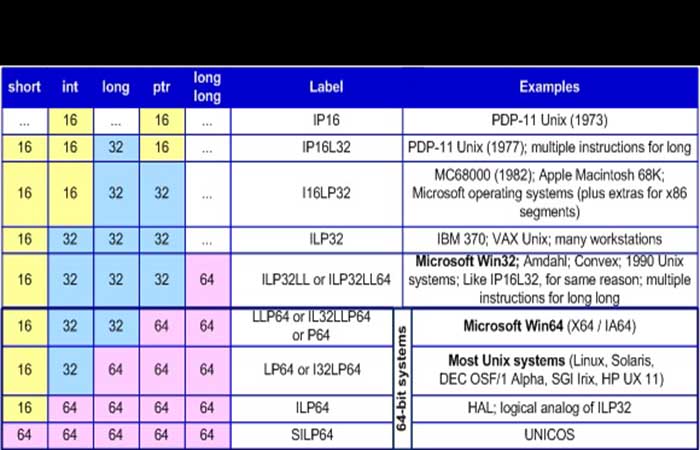
By data model We understand the correlations between accepted font sizes within the framework of the development environment. There may be several development tools that adhere to different data types for an operating system. But usually only one model that corresponds most closely to the operating environment dominates. hardware and software.
An example of this is 64-bit Windows, which has a native data model of LLP64. However, for compatibility reasons, 64-bit Windows supports running 32-bit programs that operate in the ILP32LL data model mode. Table 1 provides information about the basic data models.
The data model used greatly influences the development process of 64-bit applications, as the size of the data used in the program code must be taken into account.
Step 2: Find out if you need the 64-bit version of your product
You should start mastering 64-bit systems with the question: “Do I really need to rebuild my project for a 64-bit system?” You give an answer to this question only after you have thought it through carefully. On the one hand, you may fall behind your rivals if you do not offer 64-bit solutions. On the other hand, you may lose out There developing a 64-bit application that will not provide any competitive advantage. Let's list the basic factors that will help you make a decision.
2.1. Application life cycle duration
You should not create the 64-bit version of an application with a short life cycle. Thanks to the WOW64 subsystem, old 32-bit applications work quite well on 64-bit Windows systems, and that is why it makes no sense to make a 64-bit program, since it will not be supported in 2 years.
Moreover, practice shows that migration to 64-bit versions of Windows has been delayed, and perhaps most of its users will use only the 32-bit version of the program solution in the short term.
If you plan on long-term development and support of a software product, you should start working with the 64-bit version of your solution. You can do this without rushing, but keep in mind that the longer you don't have a full 64-bit version, the more difficulties you will face in supporting this application installed on 64-bit versions of Windows.
2.2. Intensive resource usage of an application
Recompiling a program for a 64-bit system will allow it to use larger main memory sizes and will also speed up its operation by 5-15%. A 5-10% increase will be obtained due to the use of the architectural capabilities of the 64-bit processor, for example, a larger number of registers. The rest of the 1-5% speed increase is explained by the absence of the WOW64 layer, which translates API calls between 32-bit applications and a 64-bit operating system.
If your program does not work with large data (more than 2 GB) and the speed of its operation is not crucial, the migration to a 64-bit system This won't be as urgent in the near future. By the way, even simple 32-bit applications can gain advantages by running in a 64-bit environment.
You may know that a program created with the / key LARGEADDRESSAWARE: YES can allocate up to 3 GB of memory, if 32-bit Windows is started with the key. This 32-bit program launched on a 64-bit system can allocate almost 4 GB of memory (in practice, about 3,5 GB).
2.3. Library development
If you develop libraries, components, or other elements with the help of third-party developers who create their own software, you must act quickly while creating the 64-bit version of your product. Otherwise, customers interested in releasing 64-bit versions will have to look for alternative solutions.
For example, some software and hardware security developers were slow to respond by releasing 64-bit programs, and that caused some customers to look for other tools to protect their programs.
An additional advantage of releasing the 64-bit version of a library is that You can sell it as a separate product. Therefore, your customers who want to create both 32-bit and 64-bit applications will need to purchase 2 different licenses.
2.4. Your product's dependency on third-party libraries
Before planning to work on creating the 64-bit version of your product, find out whether 64-bit versions of libraries and components are used. In addition to this, find out the pricing policy for the 64-bit version of a library. If support is not provided, look for alternative solutions that support 64-bit systems beforehand.
2.5. Using 16-bit applications
If your solutions still use 16-bit drivers, it's time to get rid of them. 16-bit applications on 64-bit versions of Windows are not supported. We should explain one thing here about using 16-bit installers. They are still used to install some 32-bit applications.
There is a special mechanism that replaces some of the most popular 16-bit installers with their newer versions. It can lead to the Misconception that 16-bit programs still work in the 64-bit environment. Remember: it's not like that.
2.6. Code assembly
Don't forget that using large assembly code can significantly increase the cost of creating the 64-bit version of an application. After thinking about all the factors listed and weighing all the pros and cons, decide whether you need to port your project to 64-bit systems. If the answer is yes, we can go further.
Step 3: Tool Kit
If you have decided to develop the 64-bit version of your product and are willing to spend time on it, it is still not enough to guarantee success. The point is that you need to have the entire set of necessary tools, and here you may face some difficulties. The lack of a 64-bit compiler may be the simplest but most insurmountable problem.
If everything is clear about the absence of a 64-bit compiler, other similar problems may seem less transparent and occur only at the stage of porting the project to a new architecture. That is why we would like to advise you to find out in advance whether all the necessary components that you will need to implement the 64-bit version of your product exist. You may face unpleasant surprises.
Of course, it is impossible to list here everything you may need for a project, but we will continue the list to help you orient yourself, and perhaps remember other things necessary for deploy your 64-bit project:
3.1. A 64-bit compiler
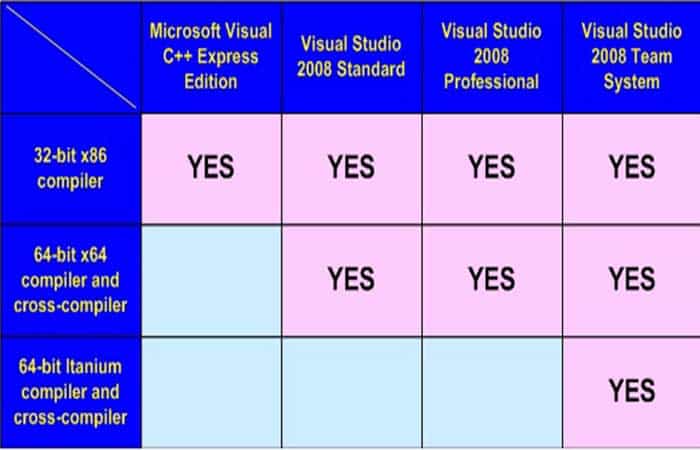
There is little more to say about the importance of having a 64-bit compiler. It simply has to be that way. If you plan to develop 64-bit applications using the latest version of Visual Studio, the following Table 2 will help you understand which of the Visual Studio editions you need.
3.2. 64-bit computers under control of a 64-bit operating system
Of course, you can use Virtual machines to start 64-bit applications on 32-bit computers, but it is too inconvenient and will not provide the necessary level of testing. It is desirable that the machines have no less than 4-8 GB of main memory.
3.3. 64-bit versions of all libraries used
If libraries are presented in source code, there must be a 64-bit configuration of the project. It can be a difficult and thankless task to update the library for a 64-bit system on your own, and the result can be unreliable and contain bugs. In addition, you may violate license agreements with these actions. If you use libraries in the form of binary units, you should also find out if there are 64-bit units.
You cannot use a 32-bit DLL inside a 64-bit applicationYou can create a special link via COM, but it will be a separate, large and difficult task. Also note that you may need to spend some extra money to purchase the 64-bit version of the library.
3.4. Absence of integrated assembly code
Visual C++ does not support a 64-bit inline assembler. You must use an external 64-bit assembler (e.g. MASM) or have an implementation with the same functionality in C/C++.
3.5. Update of the test methodology
It means a significant rebuild of the testing methodology, updating unit tests, and using new tools. We will discuss this in more detail later, but don't forget to take it into account when evaluating the time costs of migrating an application to a new system.
3.6. New data to test
If you are developing resource-intensive applications using a large amount of main memory, you should provide replenishment of the test input database. During load testing of 64-bit applications, it is advisable to exceed the 4 GB limits of used memory. Many errors can occur only under these conditions.
3.7. 64-bit security systems
The security system you use must provide full compatibility with 64-bit systems. For a long time there has been no automatic protection system for 64-bit binary files (Hasp Envelop program).
Therefore, the security mechanism had to be implemented manually within the program code, and that was a more difficult task that required professionalism and time. Don't forget about issues related to security, system updates, and so on.
3.8. Installer
You need a new installer capable of fully installing 64-bit applications. We would like to warn you about a very typical mistake. It is the creation of 64-bit installers to install 32/64-bit program products. When preparing the 64-bit version of an application, developers often want to make the “64-bit mode” absolute and create a 64-bit installer forgetting that those who use a 32-bit operating system simply cannot launch such an installation package.
Please note that it is not the 32-bit application included in the distribution kit along with the 64-bit one, but the installer itself. Because if the distribution kit is a 64-bit application, of course it will not work on a 32-bit operating system. The most unpleasant thing is that a user will not be able to guess why this is happening.
Step 4: Setting up a project in Visual Studio 2005/2008
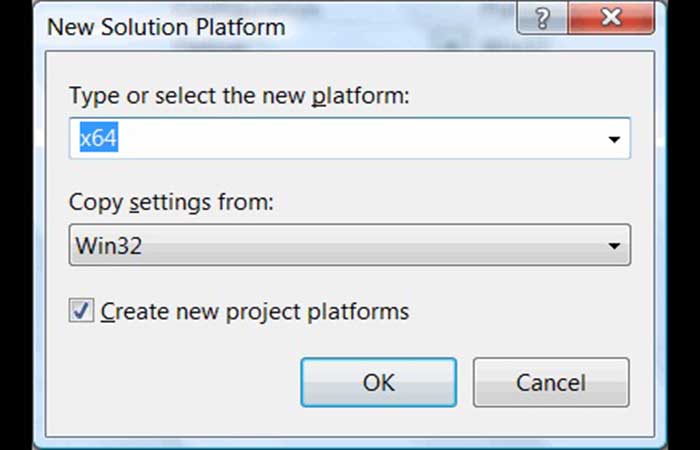
Creating a 64-bit configuration of a project in Visual Studio seems to be quite simple. Difficulties will begin at the stage of building a new configuration and searching for errors in it. To create the 64-bit configuration itself, you need to perform the following 4 steps:
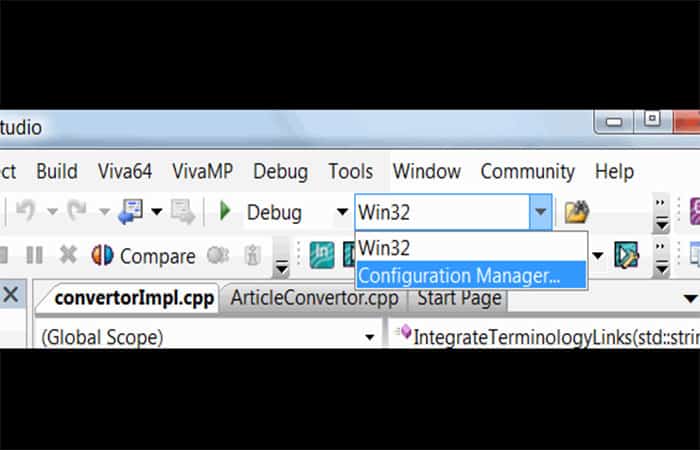
Step 1: Start the configuration manager, as shown in image 1:
Step 2: In the configuration manager, choose the new platform support:
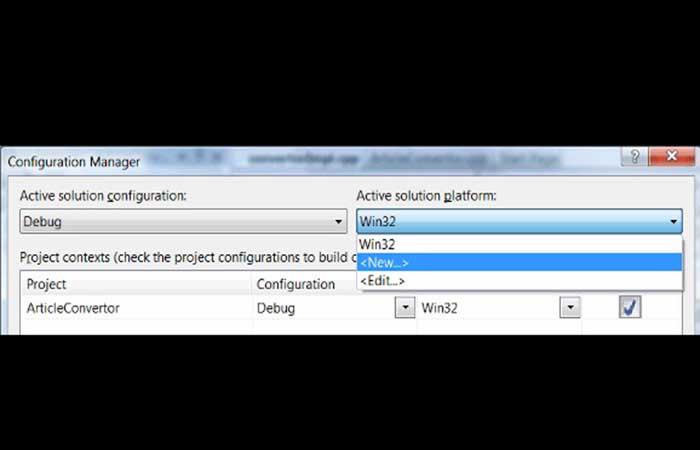
Step 3: Choose the 64-bit (x64) platform and the 32-bit version settings as the base. Visual Studio will automatically correct the settings that influence the build mode.
Step 4: The addition of a new configuration is complete and you can now choose the 64-bit configuration version and start building a 64-bit application. The choice of the 64-bit configuration for building is shown in Figure 4.
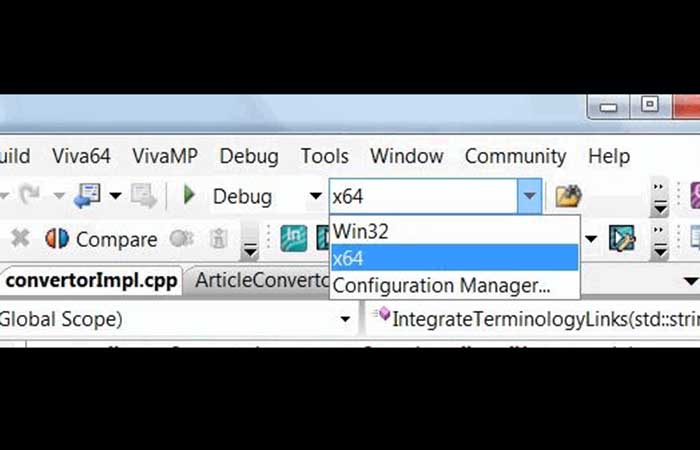
If you are lucky, you won't need to additionally configure a 64-bit project. But it depends greatly on the project, its complexity, and the number of libraries used. The only thing you need to change at a time is the stack size. If the stack size in your project is set to default, which is 1 MB, you should set it to 2MB for 64-bit version.
It is not necessary, but it is better to make sure beforehand. If you use a different size than the default, it makes sense to increase it twice for the 64-bit version. To do this, find and change the parameters Stack Reserve Size y Stack Commit Size in the project settings.
Step 5: Building an application
Here we should tell you about typical problems that occur at the compilation stage of 64-bit configuration, discuss what problems occur in third-party libraries, tell you that in the code related to WinAPI functions, the compiler will not allow placing a pointer of type LONG, and you will have to update your code and use type LONG_PTG. And there is much more to say.
Unfortunately, there are so many problems and the errors vary so much that we cannot describe them all in one article, or even in one book. You will have to go through all the errors that the compiler shows you and all the new warnings that were not there before and, in each particular case, figure out how to update the code.
Let's describe here only the types that may be of interest to developers when porting applications. Most recompilation errors will be related to the use of these very types:
- In t 32/32: basic type. On 64-bit systems it remains 32-bit.
- Length 32 / 32: basic type. On 64-bit Windows systems it remains 32-bit. Please note that on XNUMX-bit systems Linux 64-bit, this type was extended to 64-bit. Don't forget this if you develop code that should compile for both Windows and Linux systems.
- size_t 32 / 64: unsigned basic type. The size of the type is chosen such that the maximum size of an array theoretically possible can be written to it. You can safely put a pointer into the size_t type (except for pointers to class functions, but this is a special case).
- ptrdiff_t 32 / 64: similar to the size_t type, but this is a signed type. The result of the expression where one pointer is subtracted from another (ptr1-ptr2) will have the type ptrdiff_t.
- Pointer 32/64: The size of the pointer is directly dependent on the platform size. Be careful when converting pointers to other types.
- __int64 64 / 64: 64-bit signed type.
- DWORD 32 / 32: 32-bit unsigned type. In WinDef.h it is defined as: typedef unsigned long DWORD;
- DWORDLONG 64/64: 64-bit unsigned type. In WinNT.h it is defined as: typedef ULONGLONG DWORDLONG.
- DWORD_PTR 32/64: unsigned type into which a pointer may be placed. In BaseTsd.h it is defined as: typedef ULONG_PTR DWORD_PTR.
- DWORD32 32 / 32: 32-bit unsigned type. In BaseTsd.h it is defined as: typedef unsigned int DWORD32.
- DWORD64 64 / 64: 64-bit unsigned type. In BaseTsd.h it is defined as: typedef unsigned __int64 DWORD64.
- HALF_PTR 16 / 32: half a pointer. In Basetsd.h it is defined as: #ifdef _WIN64. typedef int HALF_PTR; #else typedef short HALF_PTR; #endif
- INT_PTR 32 / 64: signed type into which a pointer can be placed. In BaseTsd.h it is defined as: #if defined (_WIN64) typedef __int64 INT_PTR; #else typedef int INT_PTR; #endif
- Length 32 / 32: signed type that remained in 32 bits. Therefore, in many cases, LONG_PTR should now be used. In WinNT.h it is defined as: typedef long LONG;
- LONG_PTR 32 / 64: signed type into which a pointer can be placed. In BaseTsd.h it is defined as: #if defined (_WIN64) typedef __int64 LONG_PTR; #else typedef long LONG_PTR; #endif.
- LPARAM 32/64: parameter for sending messages. In WinNT.h it is defined as: typedef LONG_PTR LPARAM.
- SIZE_T 32 / 64: analogue of type size_t. In BaseTsd.h it is defined as: typedef ULONG_PTR SIZE_T.
- SSIZE_T 32/64: Analogue of type ptrdiff_t. In BaseTsd.h it is defined as: typedef LONG_PTR SSIZE_T.
- ULONG_PTR 32 / 64: unsigned type into which a pointer may be placed. In BaseTsd.h it is defined as: #if defined (_WIN64) typedef unsigned __int64 ULONG_PTR; #else typedef unsigned long ULONG_PTR; #endif.
- WORD 16 - 16: Unsigned 16-bit type. In WinDef.h it is defined as: typedef unsigned short WORD.
- WPARAM 32/64: parameter for sending messages. In WinDef.h it is defined as: typedef UINT_PTR WPARAM.
These are the types to consider when migrating 32-bit programs to 64-bit Windows systems.
You may want to know: How to use all the RAM in Windows 10
6. Diagnosing hidden errors
If you think that after fixing all the compilation errors you will get a long-awaited 64-bit application, we have to disappoint you. The hardest part is yet to come. At the compilation stage, you will fix the most explicit errors that the compiler has managed to detect, and they are mostly related to the impossibility of implicit type conversion.
But this is only a small part of the problem. Most errors are hidden. From the point of view of the abstract language C++, these errors appear safe and are disguised by explicit type conversions. The number of such errors is much larger than the number of errors detected at the compilation stage.
You should not put your hopes on the /Wp64 key. This key is often presented as a wonderful means of checking for 64-bit errors. In reality, the /Wp64 key simply allows you to receive some warning messages about the incorrectness of some code sections in 64-bit mode, while compiling 32-bit code.
When compiling 64-bit code, these warnings will be displayed anyway. And that is why the /Wp64 key is ignored when compiling a 64-bit application. And surely this key will not help in finding hidden errors. Let's consider several examples of hidden errors.
6.1. Explicit type conversion
The simplest kind of error (but certainly not the easiest to spot) relates to explicit type conversions, when significant bits are cut off. A popular example is the conversion of pointers to 32-bit types when passing them to functions like SendMessage:
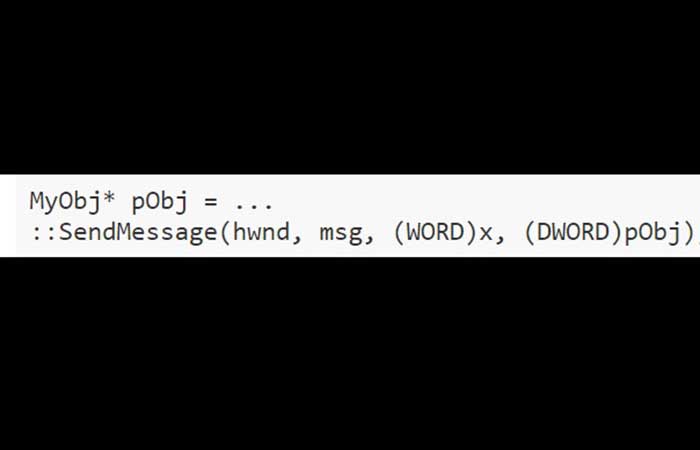
Here, explicit type casting is used to convert a pointer to a numeric type. For a 32-bit architecture, this example is correct since the last parameter of the SendMessage function has type LPARAM, which matches DWORD on a 32-bit architecture. For a 64-bit architecture, DWORD is incorrect and should be replaced with LPARAM. The LPARAM type has either 32-bit or 64-bit sizes, depending on the architecture.
This is a simple case, but type conversions often appear more complicated and are impossible to detect using compiler warnings or searching the program text. Explicit type conversions suppress compiler diagnostics, as they are intended for this very purpose: to tell the compiler that the type conversion is correct and that the programmer is responsible for the safety of the code.
Explicit searching won't help either. Types can have non-standard names (defined by the programmer via typedef) and the number of methods for performing explicit type conversion is also large. To diagnose such errors safely, you should use a special set of tools, such as Viva64 or PC-Lint analyzers.
6.2. Implicit type conversion
The following example relates to implicit type conversion, where important bits are also lost. The fread function code performs the file reading, but fails when attempting to read more than 2 GB on a 64-bit system.
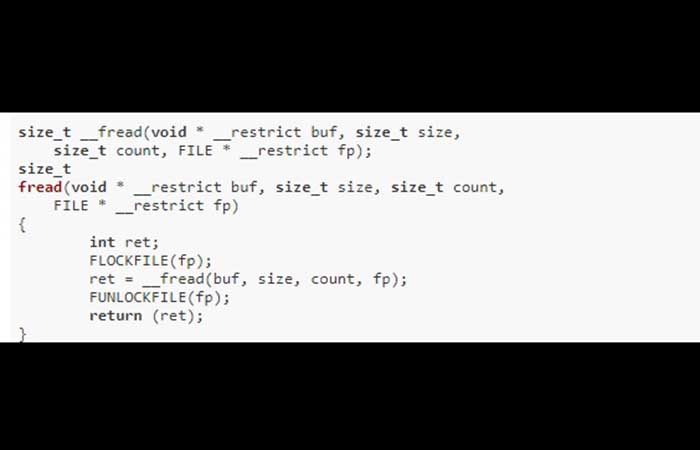
The __fread function returns the size_t type, but the int type is used to store the number of bytes read. As a result, for large sizes of read data, the function may return a false number of bytes. It can be said that this is illiterate code for beginners, that the compiler will announce this type of conversion, and that this code is actually easy to find and fix. This is in theory.
In practice, things can be quite different for large projects. This example is taken from the FreeBSD source code. The bug was fixed in December 2008! Note that the first (experimental) 64-bit version of FreeBSD was released in June 2003.
6.3. Bits and Shifts
It is easy to make a mistake in code while working with separate bits. The next type of error relates to shift operations. Here is an example:
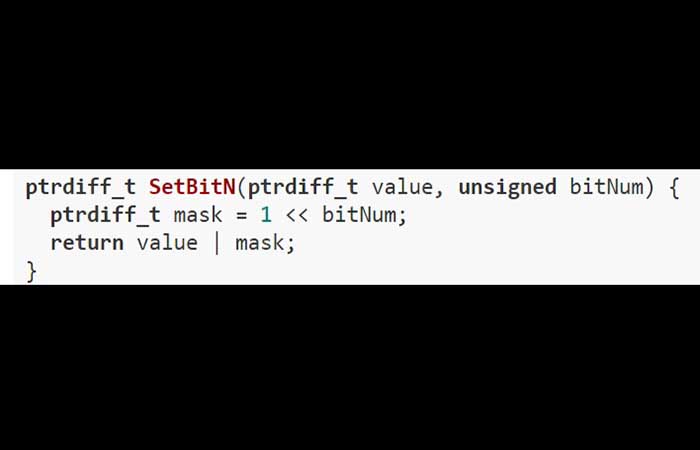
This code works fine on a 32-bit architecture and allows you to set bits with numbers from 0 to 31 to the unit. After port the program to a 64-bit platform, you will need to set bits 0 through 63. But this code will never set bits 32-63.
Note that "1" has type int, and when a shift occurs at 32 positions, an overflow will occur as shown in the image. Whether we get 0 (Figure B) or 1 (Figure C) as a result depends on the compiler implementation.
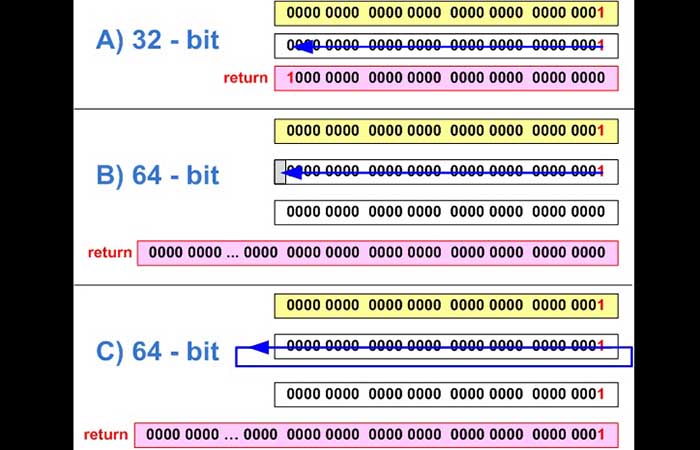
To fix the code, we need to make “1” a constant of the same type as the mask variable:
ptrdiff_t mask = ptrdiff_t(1) << bitNum;
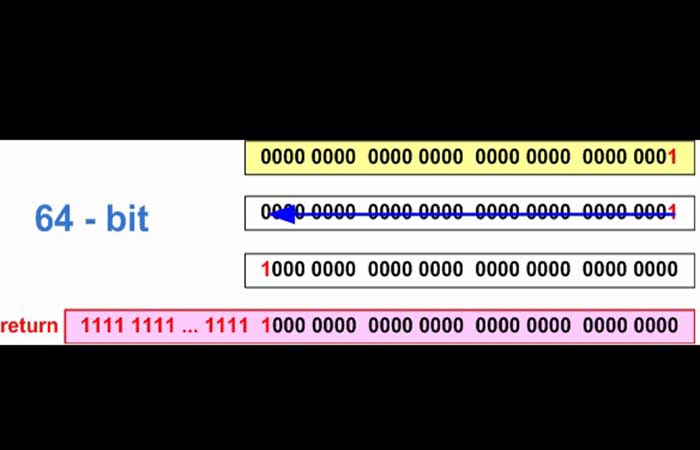
Also pay attention to the fact that incorrect code leads to one more error. When setting 31 bits on a 64-bit system, the result of the function will be the value 0xffffffff80000000. The result of 1 << 31 expression is the negative number -2147483648. In a 64-bit integer variable, this number is presented as 0xffffffff80000000.
6.4. Magic numbers
Magic constants, i.e. numbers with the help of which defines the size of this or that type, can cause a lot of problems. The right decision would be to use sizeof() operators for these purposes, but in a large program, an old section of code may still be hidden where, as programmers believe, the pointer size is 4 bytes and in size_t it is always 32 bits. Typically, these errors look like this:
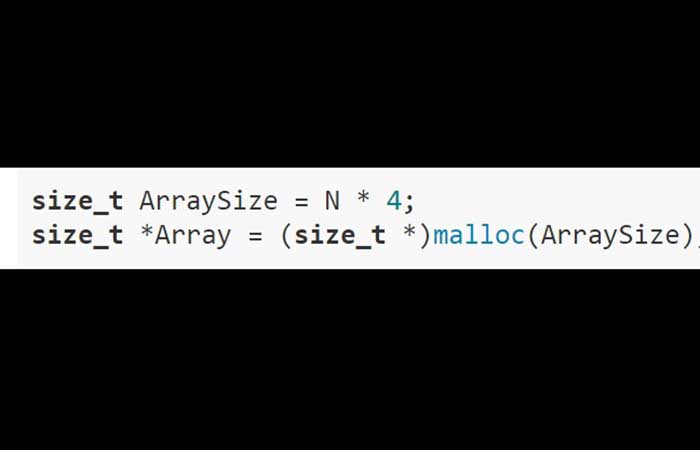
Below are the basic numbers you need to be careful of when transferring programs from 32-bit to 64-bit.
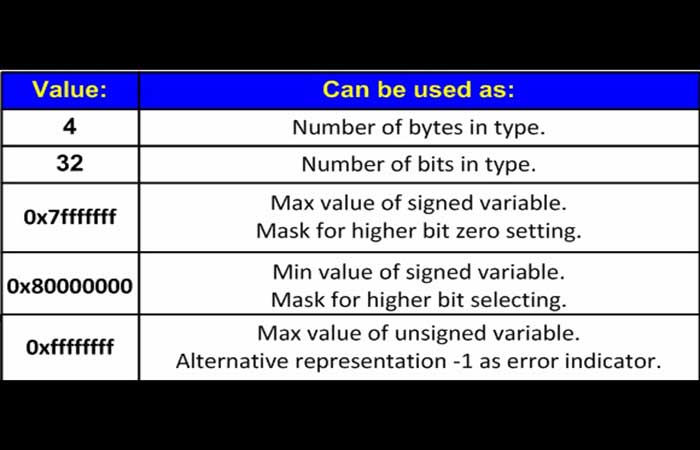
These are the basic magic values that are dangerous when migrating applications from a 32-bit to a 64-bit platform.
6.5. Errors related to the use of 32-bit variables as indexes
In programs that process large data, errors related to indexing large arrays or endless loops may occur. The following example contains 2 errors:
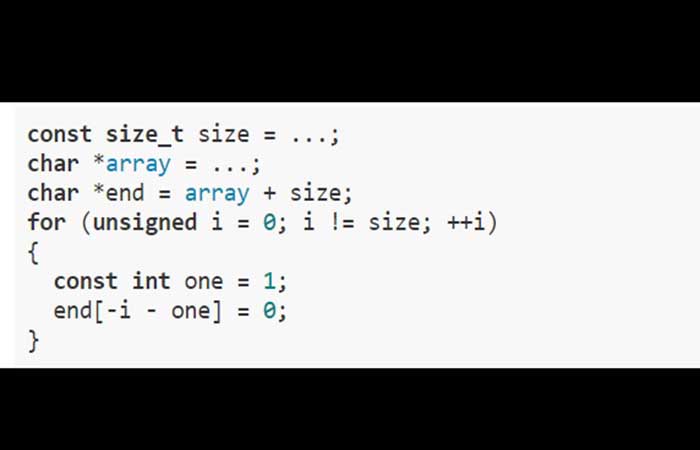
The first mistake Here is that if the size of the data being processed exceeds 4 GB (0xFFFFFFFF), an eternal loop may occur since the variable 'Yo' has the type 'unsigned' and will never reach the value 0xFFFFFFFF. We deliberately write that it can happen but not necessarily. It depends on the code that the compiler will build.
For example, in debug mode there will be an eternal loop, and in release code there will be no loop, as the compiler will decide to optimize the code using a 64-bit register for the counter, and the loop will be correct. All this adds a lot of confusion, and code that worked yesterday may fail today.
The second mistake It is related to analyzing the matrix from start to finish to determine which negative index values are used. This code will work fine in 32-bit mode, but when run on a 64-bit computer, out-of-bounds access to the array will occur in the first iteration of the loop and the program will crash. Let us study the reason for such behavior. According to the rules of C++, the expression “-i – one” on a 32-bit system will be calculated as follows: (in the first step i = 0):
The expression "-i" has an unsigned type and a value of 0x00000000u.
The variable 'one' will extend of the type 'int' to unsigned type and will be equal to 0x00000001u. Nota: the type int extends (according to the C++ standard) to the type 'unsigned' if it participates in an operation where the second argument has an unsigned type. A subtraction operation is performed involving two values of type unsigned, and the result of the operation is 0x00000000u – 0x00000001u = 0xFFFFFFFFu. Note that the result will have an unsigned type.
On a 32-bit system, accessing the array by index 0xFFFFFFFFu is the same as using index -1. That is end [0xFFFFFFFFu], is an analogue of end[-1]. As a result, the array elements will be processed correctly. On a 64-bit system, the situation will be quite different with respect to the last point.
The unsigned type will be extended to the signed ptfdiff_t type, and the array index will be equal to 0x00000000FFFFFFFFFi64. As a result, an overflow will occur. To correct the code, you should use the types ptrdiff_t and size_t.
6.6. Errors related to changing the types of functions used
There are mistakes that are not anyone's fault, but they are still mistakes. Imagine that a long, long time ago in a galaxy far away (in Visual Studio 6.0), a project was developed that contained the CSampleApp class, a successor to CWinApp. In the base class there is a virtual function WinHelp. The successor overlays this function and performs all the necessary actions. This process is shown in the following figure.
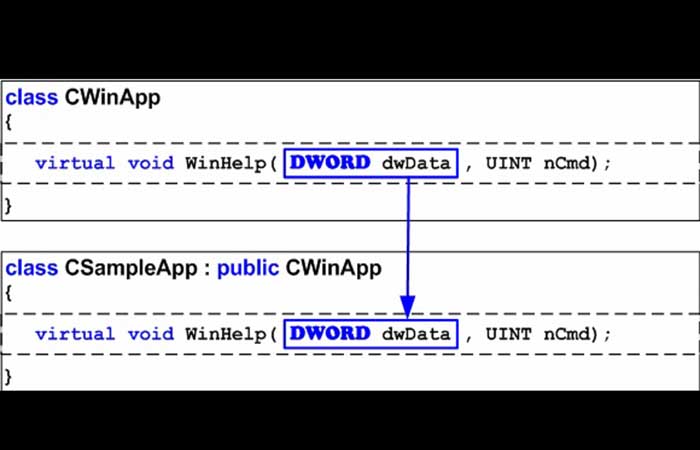
The project was later moved to Visual Studio 2005, where the prototype of the WinHelp function was changed, but nobody noticed because in 32-bit mode the DWORD and DWORD_PTR types matched and the program continued to work correctly.
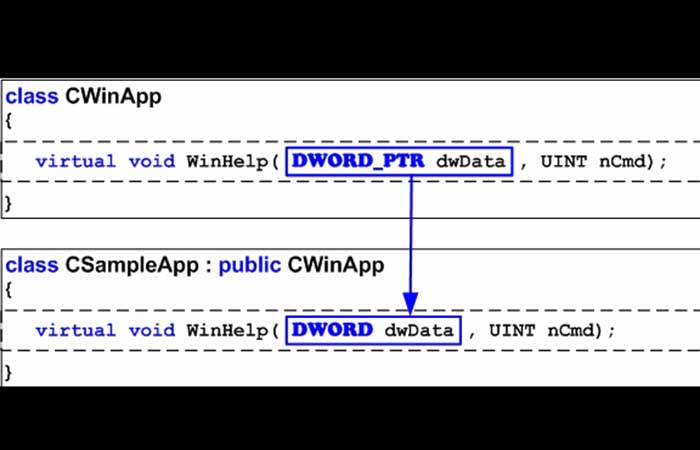
The bug is waiting to reveal itself on a 64-bit system, where the DWORD and DWORD_PTR types have different sizes. So it turns out that in 64-bit mode, classes contain two DIFFERENT WinHelp functions, which is surely wrong. Note that these pitfalls can hide not only in MFC, where some of the functions now have other types of arguments, but also in the code of your applications and third-party libraries.
6.7. Diagnosing hidden errors
There are many examples of such 64-bit bugs. As you can see, the stage of finding hidden bugs is not a trivial task, and moreover, many of them will occur irregularly and only with large data inputs. Static code analyzers are good at diagnosing such bugs, as they can check the entire code of an application regardless of the input data and the frequency of execution of its sections under real conditions.
It makes sense to use static analysis both at the stage of porting an application to 64-bit platforms, in order to find most of the errors from the very beginning, and in the further development of 64-bit solutions. Static analysis will warn and teach a programmer to better understand the peculiarities of errors related to a 64-bit architecture and to write more efficient code.
In fairness, we should say that the Gimpel PC-Lint and Parasoft C++ test code analyzers both have rule sets for diagnosing 64-bit errors. But first of all, these are general-purpose analyzers and the rules for diagnosing 64-bit errors are incomplete. Secondly, they are intended primarily for the LP64 data model used in the family of OS Linux, so they are not as useful for Windows programs that use the LLP64 data model.
Step 7: Updating the Testing Process
The passage of find errors in the program code The method described in the previous section is necessary, but insufficient. None of the methods, including static code analysis, can guarantee the detection of all errors, and the best result can be achieved only when different methods are combined.
If your 64-bit program processes a larger data size than the 32-bit version, you should extend your testing to include processing data larger than 4 GB. This is the limit beyond which many 64-bit errors begin to occur. These tests can take much longer, and you should be prepared for this.
Typically, tests are written in such a way that each test can process a small number of items and thus make it possible to perform all internal unit tests in several minutes, while automated testing (e.g. using AutomatedQA TestComplete) could be performed in several hours.
A sorting function that sorts 100 items will almost certainly behave correctly on 100000 items on a 32-bit system. But the same function may fail on a 64-bit system when trying to process 5 billion items. The execution speed of a unit test can be reduced by millions of times.
Don't forget about the cost of adapting tests while mastering 64-bit systems. A good solution is to split unit tests into fast ones (working with small memory sizes) and slow ones that process gigabytes and run, for example, overnight. Automated testing of resource-intensive 64-bit programs can be organized on the basis of distributed computations.
Warnings
Hay one more unpleasant thing. You will hardly succeed in using tools like BoundsChecker to search for errors in resource-intensive 64-bit programs that consume a lot of memory. The reason is a significant slowdown of the programs being tested, which makes this approach very inconvenient.
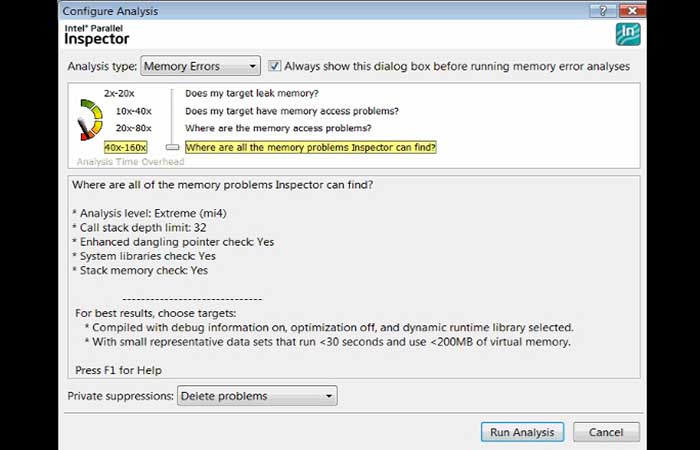
In the mode of diagnosing all errors related to memory operation, the tool Parallel Inspector included in Intel Parallel Studio, will slow down the execution of an application by 100 times, on average. You will most likely have to leave the algorithm being tested overnight to see the results only the next day, while normally this algorithm operates in just 10 minutes.
Still, we are sure that Parallel Inspector is one of the most useful and convenient tools when working in the mode of searching for memory operation errors. You just need to be prepared to change the practice of error diagnosis and keep it in mind when planning to master 64-bit systems.
Take a look at: 10 Best Windows 10 Repair Tools
Final thoughts
Don't forget to add tests that check the compatibility of data formats between 32-bit and 64-bit versions. Data compatibility is often violated during migration, due to writing types like size_t or long (on Linux systems) to files. That's all for our tutorial on how to transfer 32-bit to 64-bit programs. We hope you had a good experience while going through the process.

My name is Javier Chirinos and I am passionate about technology. Ever since I can remember, I have been interested in computers and video games, and that passion has turned into a job.
I have been publishing about technology and gadgets on the Internet for over 15 years, especially in mundobytes.com
I am also an expert in online marketing and communication and have knowledge in WordPress development.