- Setting up a public or private account and adjusting the visibility of each post allows you to control who sees your content and how it is shared on and off TikTok.
- The options for comments, mentions, direct messages, and reuse (Duet, Paste, stickers) are key to limiting interactions and avoiding awkward situations.
- Age-specific settings, along with comment filters, blocking, and reporting, strengthen the safety of teenagers and reduce the risk of harassment.
- Managing downloads, logged-in devices, and personalized ads helps better protect your personal data and activity on TikTok.

If you use TikTok daily, setting up your privacy settings is almost as important as choosing which videos to upload. This social network collects a huge amount of data about your activity within the app, and it also has a large user base of young people, so it's worth taking five minutes to get everything properly configured.
Throughout this guide, you'll calmly and step-by-step explore all the privacy options TikTok offers : how to make your account private or public, who can see your videos, who can message you, how to limit comments, block disruptive users, report content that violates the rules, and much more. The goal is for you to finish reading with the feeling that you're in control of what is and isn't visible on your profile.
What is TikTok and why do its privacy settings matter so much?
TikTok is a social network focused on short videos that has already surpassed one billion active users worldwide, with a large presence of teenagers aged 13 and up. It allows users to record, edit, and publish clips that can range from a few seconds to about 10 minutes, and upload pre-made videos of up to nearly an hour.
Besides being entertaining, TikTok is a data-driven machine: it records what you search for, what you watch, who you interact with , how long you spend on each video, what content you like, and what you skip. With all this information, it can deduce very specific interests and even sensitive aspects of your life, which impacts the content and ads you see.
That's why it's so important to dedicate time to privacy settings: it's not just about who sees your videos , but also how your data is used, how ads are personalized, and what kind of interactions you allow within the platform.
In this context, knowing all the security options, for both adults and children, helps you avoid uncomfortable situations, cyberbullying, or unnecessary exposure of your personal information. If you are a parent or guardian, it also allows you to better supervise children's use of the app (especially with features like Family Sync).
Public and private accounts on TikTok
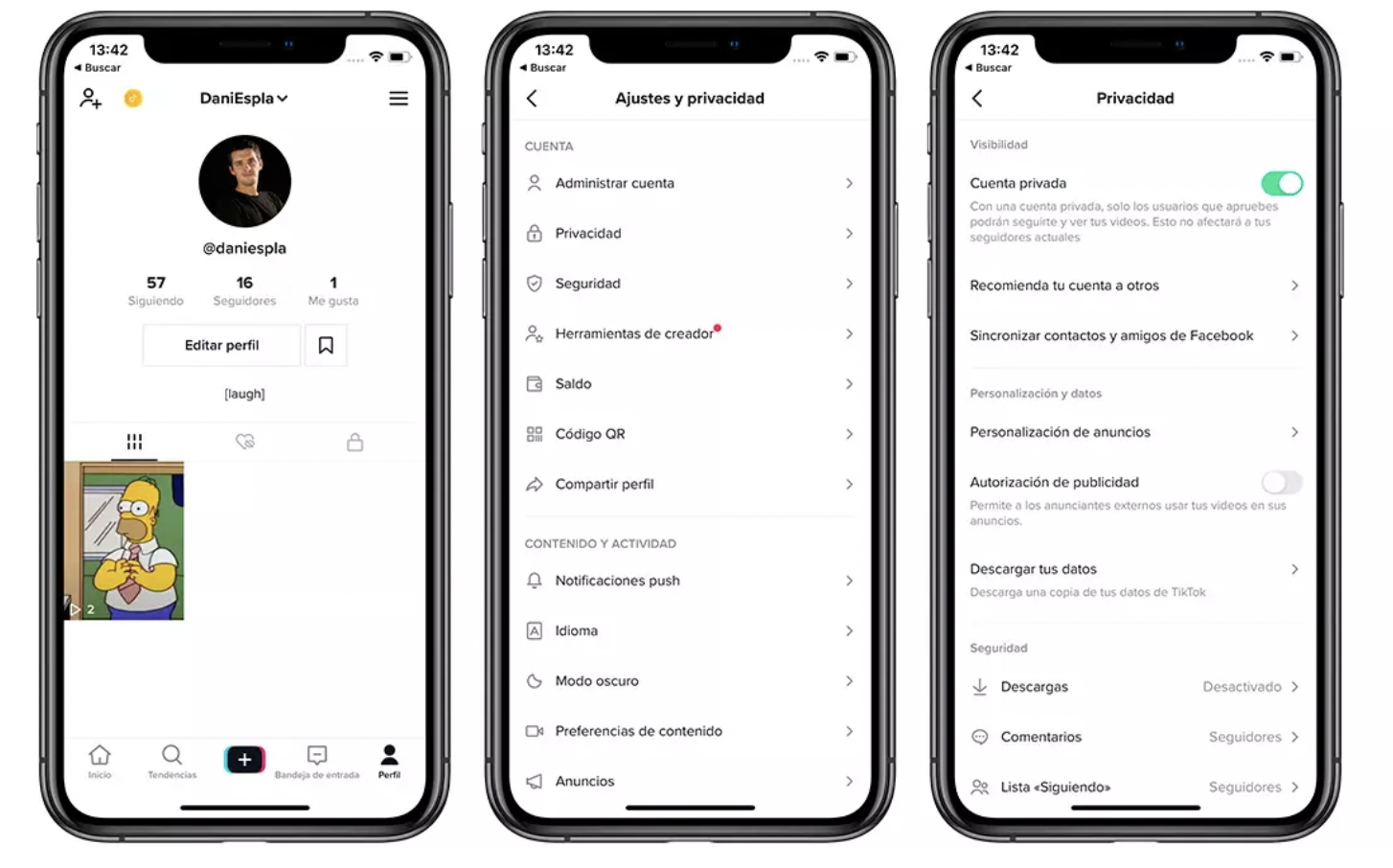
The first big decision you need to make is whether you want your account to be private or public . This setting is the foundation upon which all other privacy and visibility controls are built.
Differences between private and public accounts
With a private account , only people you approve can follow you. This means you decide on a case-by-case basis who can and can't join your community, and only those people will be able to see your videos, live streams, bio, likes, and follower and following lists.
When your profile is private, features like Duet, Paste, and downloads are also limited : other users won't be able to reuse your videos with these tools or download your clips to their phones from the app. This is a highly recommended option for young people or anyone who doesn't want their content to circulate freely.
With a public account , your posts can be visible to anyone, both on and off TikTok, depending on your settings. Anyone can follow you, see your videos and follower lists, and even share your content on other platforms or via a link, whether or not they have a TikTok account.
Additionally, with a public profile and depending on your settings, other users will be able to create Duets, use Paste, create stickers with your videos, or download them . Your videos may also appear in search engines, blogs, social media, and news outlets if they go viral or are embedded on other websites.
In both types of accounts, some things don't change: your username, nickname, and profile picture are always public, and anyone can search for your account on TikTok. What you can do, however, is adjust the visibility of each post individually.
How to switch between a private and a public account
To decide whether you want your account to be private or public, TikTok lets you turn this option on or off from the main settings menu. The change is reversible, so you can try one option and revert to the other whenever you want, or delete your TikTok account.
When modifying this setting, it's advisable to also review the other options for comments, messages, Duet, Paste, and downloads, because they don't behave the same if the account is public or private , and you may want to tighten or loosen some controls.
If you are particularly concerned about the exposure of minors, it is useful to know that teen accounts are created private by default and come with several added restrictions that we will see in the age-based settings section.
Control who sees your videos, stories, and posts
In addition to deciding whether your profile is public or private, on TikTok you can adjust the visibility of each post individually . This applies to videos, photos, and Stories, giving you fine-tuned control over who can see each piece of content.
Visibility options per post
When you create a new video or Story, the preview screen lets you open the post settings and choose your target audience. There you can select whether you want the content to be accessible to everyone, only to friends, or only to yourself.
If your account is public, the options are usually Everyone, Friends, and Only You . “Everyone” includes people who use TikTok without logging in and even those who receive the link outside the app. “Friends” refers to followers you also follow, creating a reciprocal relationship.
If your account is private, the options change slightly: you can choose between Followers, Friends, or Only You . The idea is that, even if you keep your account private, you have some leeway to further limit who sees certain posts.
You can also change these settings after publishing. Just go to your profile, open the video, tap More options, and then Post privacy settings , where you can change the audience as many times as you like.
It's important to note that even if you change a video's privacy settings, the view count doesn't reset . The total number of views remains the same; you simply stop allowing new people to see it by narrowing the audience.
Dedicated visibility for Stories
TikTok Stories also have their own settings. If you've already posted one, you can go to it from the "Following" feed, your inbox, or your profile, and tap Share, then Settings to choose who can see it.
This way you can, for example, make your Stories more intimate than your regular videos, or vice versa: limit videos to friends but leave Stories open to everyone for lighter content.
Keep in mind that TikTok may apply additional restrictions based on your age or country; in some cases, especially with younger accounts, visibility may be set to "Only Me" by default and not allow changes until a certain age is reached.
If your content deals with sensitive topics or isn't suitable for all audiences, it's recommended that you tag it appropriately within the app so that it's not shown to anyone under 18. This helps limit the exposure of people who shouldn't see certain types of posts.
Who can add your posts to their Stories and reuse your content
Another key aspect of privacy is content reuse . TikTok allows other people to add your posts to their Stories, create Duets, use Paste, or create stickers from your videos, as long as you authorize it.
To adjust this, go back to your profile, open the menu, go to Settings and Privacy, and then to Privacy. Within this section, you'll find Content Reuse , with the option "Allow content reuse from."
From there, you can choose who can add your videos to their Stories or use features like Duet and Paste. Keep in mind that to change this setting, your account must be public ; with a private account, these options are usually very limited or disabled.
If you choose to disable reuse on a specific post (for example, when uploading a video and unchecking "Allow content reuse"), no one will be able to use that clip in Duets or Paste , regardless of the rest of the general settings.
Privacy settings based on user age
TikTok applies a series of additional controls for minors that affect almost all functions: visibility, direct messages, downloads, Duets, Paste, stickers or comments.
Accounts for 13 to 15 years old
For users between 13 and 15 years old, account creation defaults to a private profile with several restrictions . Only people approved by the minor will be able to follow them and see their posts, bio, likes, and follower and following lists.
On these accounts, other users cannot create stickers, make Duets, or use the Paste function with the child's videos. Downloading posts or adding their videos to third-party Stories is also prohibited.
Direct messages are disabled for this age group, regardless of whether the account is public or private . This prevents strangers from contacting younger teenagers directly.
Regarding comments, the default setting is that only friends (mutual followers) can comment , and it cannot be changed to "Everyone" on public accounts or to "Followers" on private accounts.
Additionally, by default, accounts for users aged 13 to 17 do not appear as suggestions to mutual contacts, and account suggestions are disabled until the user chooses to manually enable them from the privacy settings.
Accounts for 16 to 17 years old
For 16- and 17-year-olds, TikTok maintains a series of protective measures, but they are somewhat more flexible . Upon registration, the account is also set to private by default, although it can be changed to public in the settings.
If the user keeps their account private, only people they approve will be able to follow them and see their posts, and no one will be allowed to use Duet, Paste, or create stickers from their videos. Video downloads will be disabled and unusable.
If you choose to make your account public, anyone can follow you and view your videos, which can be shared both on and off TikTok. Features like Duet, Paste, stickers, and downloads can be enabled or disabled in your privacy settings, depending on your preferences.
In this age group, direct messages are available , with a tiered system: messages from friends go to the inbox, those from potential connections (followers, following, contacts you may know) and other people may arrive as requests or be directly blocked if you choose "Do not receive".
Regarding comments, if the account is private, the initial setting is usually "Followers," with the option to change it to "Friends." If the account is public, the default value is "Everyone," although you can lower it to "Friends" or completely disable the ability to comment on each video you post.
Interaction management: comments, mentions, and direct messages
Beyond who sees your videos, it's essential to decide who can interact with you through comments, mentions, and direct messages. TikTok consolidates all these options in the Privacy section, within the Interactions subsection.
Configure comments
In the Privacy menu, you'll find the Comments option, where you can choose who can comment on your videos and Stories . The options are usually Everyone, Friends, or turning comments off. If you need more details on managing comments, see how to enable comments on your personal account.
Mentions and tags
In the same Interactions section is the Mentions option, where you define who can tag you in videos and who can mention you in descriptions, stickers, comments, and Stories.
The usual settings are Everyone, People you follow, Friends, or Nobody. Choosing "Nobody" prevents your username from being used to get your attention, while "Friends" significantly limits noise and unwanted mentions in content you're not interested in.
Direct messages: who can message you
Direct messages are managed from "Permission settings" within Privacy. From there you decide which groups can send you messages or message requests depending on their relationship with you.
You'll find options like "Potential Connections" (your followers and related accounts) and "Other People on TikTok." For each group, you can enable or disable message requests, so only those you choose can message you . If you have any questions, see how to enable private messaging on TikTok.
Remember that direct messaging is not available for accounts aged 13 to 15. For accounts aged 16 and 17, you can choose whether you receive messages from friends, potential connections, other people, or no one at all, on both public and private accounts.
Reuse, downloads, and visibility of your activity
Another very sensitive aspect of privacy on TikTok is the control over how other people use your content and what parts of your activity are visible to other users.
Enable Duo, Paste, and sticker creation
In the Content Reuse section, you can configure whether other users can Duet or Paste your videos, create animated stickers from them, or add your posts to their Stories . All of this is only fully available with public accounts.
By default, these features are very restricted in some age ranges: for those under 16, no one can use Duet or Paste with your videos, and you also can't create stickers with your clips. These options only become available once you reach a certain age, with the default setting being "Friends."
If you have a public account and are of legal age, you can change the control to "Everyone" or limit it even further, and even disable it for each post through the "Allow content reuse" setting before publishing the video.
video downloads
Downloads are managed from the "Video Downloads" setting. Here you choose whether you want to allow other people to download your clips to save them to their device.
For accounts between 13 and 15 years old, this option is disabled and cannot be changed even if the profile is public. For 16 and 17 year olds, if the account is private, or if the user is under 16, the feature also remains disabled by default.
In all other cases, with a public account you can enable downloads so people can take your videos outside of TikTok. However, even if you block downloads, links to your posts can still be shared , so your content can continue to circulate through links.
Who sees your "Following" list and your likes
TikTok lets you decide the visibility of your "Following" list and the videos you've liked. For the former, you can make the list visible to everyone or restrict it so only you can see who you follow.
Something similar happens with the videos you've marked as "liked": you can make it a public list or change it to "Only me" so that no one else can snoop on your tastes and better protect your privacy on the platform.
Profile viewing history
Within the "Viewers" or "Profile View History" section, you can enable or disable the feature that shows who has viewed your profile in the last 30 days . If you enable it, you will see who has visited your profile, and those you visit will see that you have viewed theirs.
If you're uncomfortable leaving a trace or don't want to know who's watching, you can leave it disabled. It's a useful tool for creators who want to better understand who's interested in their content, but it's not essential for using TikTok normally.
Block users and report inappropriate content
On any social media platform, you might encounter annoying or harassing individuals, or people who upload content that violates community guidelines . TikTok offers two main tools for these situations: account blocking and content reporting.
How to block a user on TikTok
Blocking someone means that person won't be able to see your videos or interact with you through comments, direct messages, likes, or follow requests. It's a drastic but very effective solution when the situation becomes uncomfortable.
To do this, go to the profile of the account you want to block, tap the options icon (the arrow or menu in the upper corner), and select "Block." Then, simply tap "Block" again to confirm and complete the process.
If you ever want to review who you've blocked or give someone a second chance, you can go to Privacy > Interactions > Blocked Accounts. From there you can see the list of blocked people and unblock them if you wish.
How to report a video, account, or message
If you come across a video, audio, live stream, message, or comment that you believe violates TikTok's Community Guidelines (for example, due to harassment, sexual content, hate, or violence), you can report it directly from the app.
To report an account, go to its profile, tap the options icon in the top corner, and select "Report." The app will ask you to choose the reason for the report from a list of categories so the moderation team can review it more accurately.
These tools help maintain a healthier community: if TikTok detects that content violates its rules, it will remove it and may apply additional measures to the account , such as restrictions or suspensions.
Other important settings: data, ads, and connected devices
In addition to everything related to visibility and interactions, TikTok includes a number of advanced options to manage your personal data, ads, and logged-in devices.
Personalization and data
In the "Personalization and data" section, you can control how your data is used for advertising. If you disable personalized ads , TikTok will stop using your usage habits to show you ads tailored to your interests.
This doesn't mean you'll stop seeing ads, but they will be less targeted. You'll also find the "Download TikTok data" option, which lets you request a file containing all the information the platform has about you : uploaded videos, activity, profile data, etc.
Within the ad-related settings, you may find options to mute certain advertisers, manage data from outside TikTok, view information about how the ads you receive are personalized , or consult the commercial content library.
Managing logged-in devices
From the "Manage account" menu, you can see which mobile phones or devices are currently logged into your account. This is very useful for detecting suspicious logins or closing sessions on old phones you no longer use.
When you go to "Manage devices," you'll see a list of your devices and the date you last logged in to each one. If you recognize a device you no longer use, you can log out by tapping the trash can icon on the right.
If you see an unfamiliar device, the safest thing to do is log out from there and immediately change your password. This will prevent anyone from accessing your account without your permission.
Taking care of these security details, combined with good privacy and ad settings, allows you to use TikTok with much more peace of mind, knowing at all times what you share, with whom you share it, and how your data is used.
With all these options properly configured—from account type to comment filters, direct messages, repurposing your videos, downloads, account recommendations, and device management—you have pretty complete control over your TikTok experience, so you can enjoy the platform, create or consume content, and connect with others while keeping your privacy and digital security at the level you're most comfortable with.


Passionate writer about the world of bytes and technology in general. I love sharing my knowledge through writing, and that's what I'll do on this blog, show you all the most interesting things about gadgets, software, hardware, tech trends, and more. My goal is to help you navigate the digital world in a simple and entertaining way.