- Linux It's safe by design, but the malware Attacks targeting this system have skyrocketed in recent years, affecting both servers and home computers.
- Kaspersky for Linux offers real-time protection, behavioral analysis, web defense, and removable device scanning, integrated into its Standard, Plus, and Premium plans.
- Antivirus software on Linux is more recommended for servers and critical environments, while on the desktop it can be optional if good security practices are applied.
- There are commercial and free alternatives such as ClamAV, Comodo, Bitdefender, Sophos or Microsoft Defender, so the choice should be based on compatibility, performance and real needs.
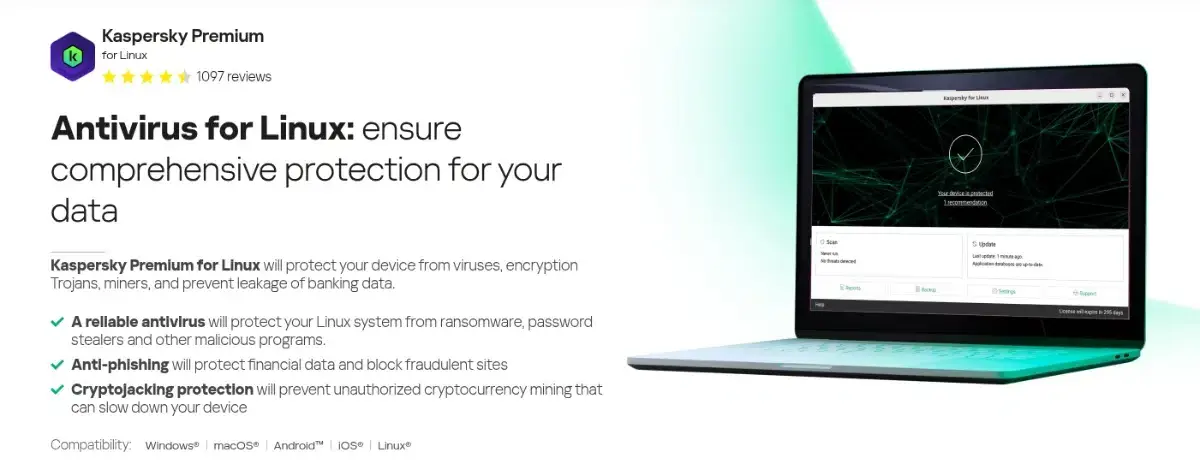
For years, the mantra has been repeated that there are no viruses on Linux and that common sense is all it takes to stay safe. Many of us come from Windows, from that era when the first PC came loaded with antivirus and firewalls, and some of us fondly remember (and with a touch of auditory trauma) Kaspersky and its alerts every time a virus was detected. Now, that same name is making waves again on the Linux desktop.
The question more and more people are asking is clear: is it worth installing Kaspersky on Linux? The landscape has changed dramatically: backdoors disguised as critical tools like XZ have appeared, along with nearly undetectable malware like Symbiote, sophisticated phishing campaigns, and a growing interest from cybercriminals in the Linux ecosystem. Let's take a closer look at what Kaspersky for Linux offers , what threats actually exist, and in what cases it can be useful… and in which it probably won't offer much.
Linux, its security and why it's now of so much interest to attackers

Linux is an open-source operating system comprised of several key components : the boot loader , the kernel, the background daemons, the init system that coordinates the boot process, the graphical server, the desktop environment, and, above all, the applications we use daily. This modular and open architecture is one of the reasons it is perceived as a very secure system.
Linux security rests on several important technical pillars : each user has their own permissions and passwords, root access is tightly controlled, there is strict separation between accounts, and most software comes from official repositories that are constantly reviewed by the community and developers. In addition, there is an extensive logging system that records access, errors, and intrusion attempts.
The open-source nature of the kernel and much of the ecosystem is both a strength and a weakness . On the one hand, anyone can study the code and even try to introduce malicious modifications. On the other hand, thousands of developers and security experts continuously audit it, detecting vulnerabilities and deploying patches very quickly. Examples like the XZ utility scandal show that, even if a backdoor is slipped through, there are also enough eyes to catch it.
Linux has traditionally been considered "more secure" than Windows or macOS for several reasons : more restrictive user permissions by default, centralized software installation via package managers, very fast system and application updates, a historically small desktop user base, and a huge diversity of distributions, package managers, and desktop environments. All of this makes it much more difficult for a single piece of malware to massively affect the entire ecosystem.
The problem is that this situation has changed radically in recent years . Linux continues to overwhelmingly dominate the world of servers, the cloud, embedded devices, and, to a lesser extent, Android . More and more users are adopting it on their desktops for work, gaming, or content creation. This combination of market share and concentration of critical services makes it too tempting a target for attackers to ignore.
Is Linux still a truly secure system?

The Linux architecture itself continues to offer very clear security advantages . User permissions limit the scope of any malware that manages to execute, isolation between accounts reduces cross-contamination, and solutions like SELinux provide extremely granular mandatory access control ( MAC ) over processes, files, and services. If a binary attempts to do something that the security policy doesn't allow, it is blocked without hesitation.
System event logs allow you to reconstruct what happened in the event of an incident : who tried to log in, which files were modified, which services failed, and from which IP addresses the suspicious attempts originated. For an administrator, this is invaluable when it comes to strengthening configurations, detecting attack patterns, or documenting an intrusion attempt.
The open development model, with thousands of eyes reviewing the code, also helps to stay one step ahead . Vulnerabilities are discussed publicly, documented, and patched very quickly. Unlike the proprietary model, where you depend on the vendor's pace and priorities, in Linux the community and maintainers of each distribution can react faster, integrating fixes into the official repositories.
However, no system is infallible, and Linux is no exception . Highly sophisticated threats exist, such as Symbiote-type malware, which injects itself into processes and disguises itself to be almost invisible, even to advanced tools. Campaigns like the Perfctl malware, which has been exploiting configuration errors on Linux servers since 2021, have demonstrated that a single misconfiguration or a poorly secured service is enough to leave the door wide open.
Furthermore, market realities work against them : nearly three-quarters of desktop PCs still use Windows, a significant portion use macOS, and Linux, while still representing modest percentages on desktops, governs the majority of critical infrastructure. Cybercriminals target areas with the greatest potential for financial impact, sensitive data, or extortion, and this directly includes the Linux ecosystem.
The rise of malware on Linux and Kaspersky's move
According to data from Kaspersky itself, the volume of malware targeting Linux has increased twentyfold in five years . This isn't just about classic viruses: we're talking about ransomware, cryptocurrency miners that silently drain the CPU, backdoors embedded directly into the code of popular tools, remote access Trojans, and all sorts of scripts designed to steal credentials.
The case of the XZ compression utility in 2024 has become the perfect example of this new scenario . A carefully introduced backdoor managed to infiltrate well-known distributions like Ubuntu, Debian, and Fedora, and nearly became a security catastrophe of historic proportions. It was detected thanks to the meticulous attention to detail of a developer who noticed unusual behavior in SSH performance tests.
Added to all this are "classic" threats that no longer distinguish so much by platform : very convincing phishing campaigns, fraudulent websites that imitate banks and online stores, pages that try to exploit browser or user vulnerabilities, or forms designed to capture passwords and banking data.
Meanwhile, Kaspersky had been offering Linux solutions for years, but these were almost always focused on businesses : antivirus software for file servers, on-demand scanning tools, and utilities like Kaspersky Virus Removal Tool (KVRT) for scanning and cleaning unprotected systems in real time. What was missing was a "desktop" product designed for home users who install Linux on their PCs or laptops.
The novelty is precisely this leap into the home market with [unclear] , an adaptation of their corporate antivirus with a much closer focus to the end user, packaged in DEB and RPM, ready to install on the main 64-bit distributions, with continuous protection features very similar to those we already knew in Windows and macOS.
What exactly does Kaspersky offer for desktop Linux?
Kaspersky's Linux version for home users focuses on real-time protection and proactive defense . It monitors the entire system—hard drives, critical directories, running processes, and individual files—to detect and neutralize malware before it can execute or spread.
It includes automatic scanning of removable devices : USB drives, external hard drives, and other media connected to the computer are scanned for threats as soon as they are mounted. This is an important layer of defense when sharing data with Windows or macOS systems, as it prevents your Linux machine from becoming a mere carrier of external viruses.
Detection isn't limited to traditional signatures; it also relies on behavioral analysis and artificial intelligence . The antivirus monitors for suspicious patterns, such as attempts to encrypt all files in a folder en masse (typical of ransomware), unusual connections to remote servers, or processes attempting to escalate privileges for no apparent reason. If something matches a malicious profile, it's blocked even if it hasn't yet been cataloged.
Another key feature is web protection : Kaspersky for Linux filters the pages you visit, identifies malicious sites, and warns you if you are about to follow a phishing link or enter data on a fraudulent website. It also includes specific mechanisms to verify banking websites and online stores, reducing the risk of financial data theft during payments and transactions.
Finally, the software includes measures against threats that have proliferated especially on Linux , such as cryptojacking (unauthorized cryptocurrency mining) or Trojans designed to steal login credentials and passwords stored on the system or in the browser. The idea is to offer a "complete" security package very similar to that of its version for other operating systems.
Kaspersky for Linux compatibility, requirements, and payment model
Kaspersky distributes its antivirus for Linux in DEB and RPM packages , so it can be installed relatively easily on most 64-bit distributions. Officially mentioned distributions include Ubuntu (including the latest LTS branch), ALT Linux, Uncom, and RED OS, although the actual requirement is compliance with the specified architecture and dependencies.
In terms of hardware , the requirements are quite modest : a processor equivalent to an Intel Core 2 Duo around 1,8 GHz, at least 2 GB of RAM, 1 GB of swap memory, and about 4 GB of free disk space for the program itself and its databases . In other words, any reasonably modern computer or a laptop from a few years ago should be able to run it without problems.
The licensing model is unified with the rest of Kaspersky's products . There isn't a separate "Kaspersky Linux"; instead, protection is included within their Standard, Plus, and Premium subscription plans. All editions share the core security features, and the difference lies in the number of devices you can protect and the extra utilities (such as a password manager , unlimited VPN , or parental controls).
Prices vary depending on the offer and plan chosen , but as a reference, you can expect to pay around €17-€35 per year for basic protection of a single device in the Standard editions, with scaling costs and features towards Plus and Premium, which can protect up to 10 devices, including Windows, macOS, and Linux. Some websites mention promotions with attractive discounts for the first year and prices around €66 for certain options.
A 30-day free trial is available , allowing you to assess the impact on performance, integration with your distribution, and whether it truly provides added peace of mind. It's worth noting that the company itself has acknowledged that this new solution is not yet fully compliant with the European GDPR, something they assure will be addressed in future updates.
Is an antivirus like Kaspersky necessary on a home Linux PC?
This is where the debate that most divides the community comes into play . Many veteran Linux users have gone decades without installing antivirus software on their desktops and have never had a serious problem. They follow some basic guidelines: install only from official repositories, don't run shoddy scripts from dubious sources, be wary of suspicious email attachments, and keep up to date with updates. For this type of user, the feeling is that antivirus software on Linux is simply unnecessary.
At the other extreme are those who believe the risk is no longer so theoretical . The surge in malware in recent years, the XZ case, examples like Perfctl, and the emergence of highly advanced threats against servers and cloud environments have a side effect: the same user who previously said "there are no viruses in Linux" now sees constant headlines about incidents in kernel-based systems.
The specific use you give to the system is crucial . If it's a server exposed to the internet, sharing files with other users, managing critical services, or storing sensitive data, an antivirus that scans in real time and filters email, files, and traffic can be a reasonable complement to other measures (firewall, constant updates, system hardening, etc.).
On a personal desktop computer, the answer is less clear-cut . If you limit yourself to browsing trusted websites, always use your distribution's repositories or stores, avoid installing random binaries, and practice good digital hygiene, the probability of infection remains low compared to other systems. For many, adding Kaspersky would only make sense if you share a lot of files with Windows or macOS users or if you manage particularly sensitive tasks on that computer.
It's important to remember that Linux can act as a "bridge" for malware from other platforms . It's relatively common to accidentally download a malicious Windows executable from Linux: it won't infect you directly, but if you forward it to someone or copy it to a shared partition, you could be spreading the problem. In these cases, running ClamAV or a similar antivirus program before sharing executable files is a good practice.


Passionate writer about the world of bytes and technology in general. I love sharing my knowledge through writing, and that's what I'll do on this blog, show you all the most interesting things about gadgets, software, hardware, tech trends, and more. My goal is to help you navigate the digital world in a simple and entertaining way.