- The IP address identifies a device on a network, and can be public or private.
- The direction MAC It is unique to each device and serves for its physical identification.
- The network mask determines which part of the IP belongs to the network and which part to the device.
- Dividing networks using subnets optimizes traffic and improves security.

You've probably heard of IP addresses, MAC addresses, and subnet masks more than once, especially when talking about the internet, Wi-Fi networks, or even setting up a router . While they sound like complicated technical terms, they're actually more relatable concepts than you might think, and once you understand how they work, they can help you better understand how your devices connect to the network.
In this article, we clearly and comprehensively explain the role each of these elements plays within a network, how they interrelate, and why they are essential for any device—whether your mobile phone, smart TV , or computer—to access the internet or communicate with other devices on the same local network. To learn more, you can read about network discovery in Windows 10.
What is an IP address?

An IP (Internet Protocol) address is the unique identifier that allows each device to connect and communicate within a network. It acts like its license plate. There are two main types:
- public IP: It is the one assigned to you by your Internet provider and the one displayed when you connect to web pages.
- Private IP: It is the one assigned within your local network, for example, between your router and the connected devices at home.
All IP addresses consist of four numerical blocks separated by periods , and each block can range from 0 to 255. For example: 192.168.1.1. These addresses can be assigned manually (static IP address) or dynamically via a DHCP server. It's also important to understand how devices connect to networks, which you can learn about in our guide on preventing automatic connections on Wi-Fi networks.
What is a MAC address?
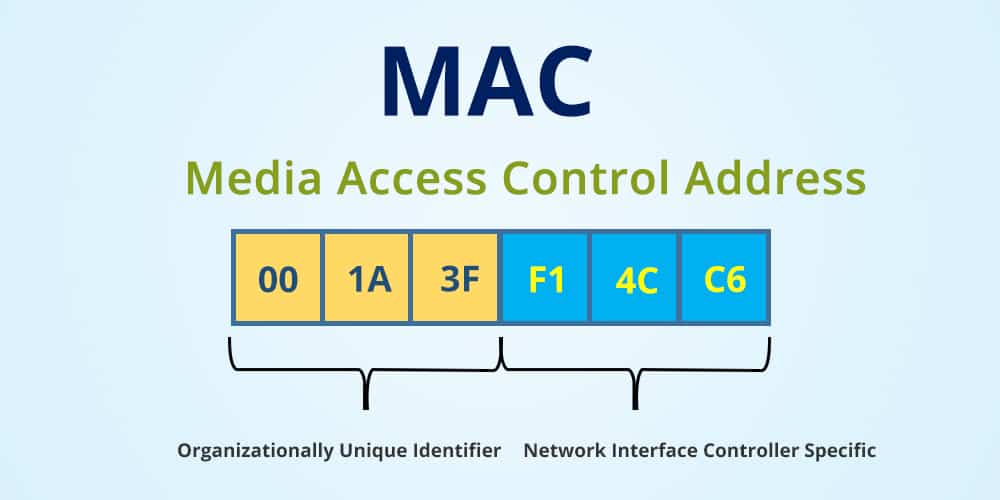
The MAC (Media Access Control) address is a unique physical identifier embedded in every network card of a device, whether for Ethernet or Wi-Fi. While the IP address can change or depend on the network you are connected to, the MAC address is always the same, as it is pre-assigned to the device.
It consists of 12 hexadecimal characters grouped into six pairs , such as 00:1E:C2:9E:28:6B. The first three indicate the device manufacturer, and the remaining three identify the model or serial number. This simplifies network management, as detailed in social media management applications.
What is the network mask or subnet mask?

The network mask , or subnet mask, indicates which part of the IP address identifies the network and which part identifies the device (host). It functions similarly to a magnifying glass, allowing us to separate IP addresses into two halves: the network portion and the host portion.
For example, in an IP of type 192.168.123.132 and a mask 255.255.255.0:
- 192.168.123 It is the fixed part: the network.
- 132 It is the variable part: the device within that network.
This distinction is essential for an operating system or router to know whether another device is on the same local network or if it should send information externally . To facilitate this management, it's helpful to calculate subnets, which you can do with online tools, such as those explained in subnet calculators.

How are IP, MAC and Netmask related?
These three elements work together to ensure connectivity within a network. The IP address logically identifies the device, the subnet mask defines its network, and the MAC address physically identifies it.
When a device wants to send data, it first uses the IP address to locate the destination. Then, using the subnet mask, it determines if that destination is on the same network. If it is, the MAC address is used for direct communication. If not, the traffic is redirected through the router or gateway to the internet or an external network. This saves unnecessary bandwidth and optimizes performance. You can learn more about networks in general in our article on the history of social media before Facebook.
Types of IP addresses: classes and ranges
IP addresses are classified into different classes according to their size and use . The most common are:
Class A
- Range of the first octet: of 0 to 127
- Default mask: 255.0.0.0
- Use: large companies, allows millions of devices per network
Class B
- Range of the first octet: of 128 to 191
- Default mask: 255.255.0.0
- Use: medium-sized networks (hospitals, universities)
C class
- Range of the first octet: of 192 to 223
- Default mask: 255.255.255.0
- Use: small networks, such as homes or offices

Variable Length Masks (VLSM)
Variable Length Subnetting (VLSM) allows for the use of more flexible subnet masks. With VLSM, a large network can be divided into several smaller ones , adapting them to the number of devices required.
For example, instead of using a mask of 255.255.255.0 for your entire network, you can have one subnet with a mask of 255.255.255.128 (for 126 hosts) and another with a mask of 255.255.255.192 (for 62 hosts), depending on your needs.
This has several advantages:
- Optimizes the use of available IP addresses.
- Minimize traffic between segments.
- Facilitates network control and management.
How do I find out my IP address and subnet mask?
The way to find this information depends on the device you're using. Below, we summarize it for the most common systems:
Windows
- Balance Win + R, type “cmd” and press Enter.
- On symbol of the system, writes ipconfig / all.
- You will see information about your network, including IP address, subnet mask and more.
MacOS
- Go to System Preferences → Network.
- Select your connection (Wi-Fi or Ethernet), press Advanced.
- In the TCP / IP you will find the data.
iOS
- Go to Settings → Wi-Fi.
- Tap the “i” icon next to your network.
- Displays the IP address and subnet mask.
Android
- Go to Settings → WiFi.
- Select your current network and enter advanced settings.
- There you will find your IP and mask.

What is a subnet mask used for?
The primary function of a subnet mask is to determine if one device is on the same network as another . But it also has other key uses:
- Optimize traffic: prevents data from leaving to external networks if the destination is on the same network.
- Improve security: allows you to segment networks and isolate departments, teams or devices.
- Allows you to create subnets: ideal for dividing a large network into smaller, more manageable networks.
Practical example: network division with masks
Let's say you have a Class C network with an IP address of 192.168.1.0 and a mask of 255.255.255.0. This allows you to have up to 254 devices.
If you need to split it into two subnets, you can change it to a 2 (/255.255.255.128) mask. You'll then have:
- Subnet 1: of 192.168.1.0 to 192.168.1.127
- Subnet 2: of 192.168.1.128 to 192.168.1.255
Each subnet will have 126 hosts available, since one IP is reserved for the network and another for broadcast.
Subnet Calculators
If you don't want to do the calculations manually, you can use one of the many online subnet calculators . These tools tell you how many hosts you can have per subnet based on the subnet mask, the range of available IP addresses, the broadcast address, and so on.
Understanding how IP addresses, MAC addresses, and network masks relate to each other is key if you want to understand how the internet works behind the scenes. These concepts allow devices to communicate with each other and seamlessly access the content we search for every day. Being aware of how networks are organized is also essential to keeping your connection secure, fast, and optimized.


Passionate writer about the world of bytes and technology in general. I love sharing my knowledge through writing, and that's what I'll do on this blog, show you all the most interesting things about gadgets, software, hardware, tech trends, and more. My goal is to help you navigate the digital world in a simple and entertaining way.