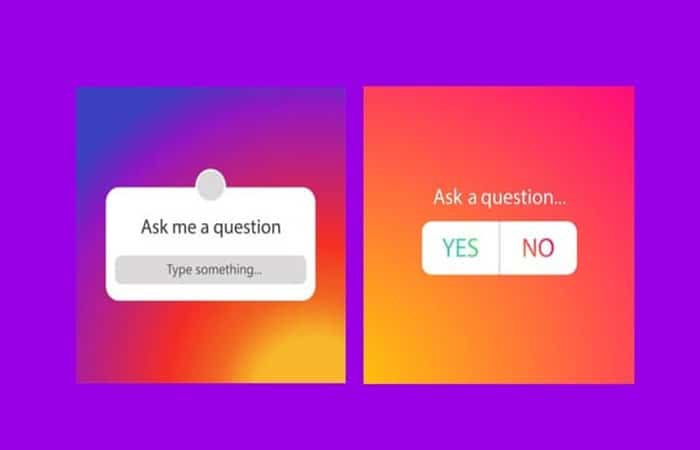
Would you like to know how to vote in Instagram Stories PollsInstagram stories have become a new milestone, in terms of interaction between user and followers. Well, they allow you to implement a large number of methods to publicize various topics that you want to address. In this sense, you can now vote in a poll or Instagram story.
In this way, currently It is not only possible to post questions on Instagram Stories. But it can be self-answered and then shared on Instagram Stories. Additionally, questions can be asked and the same answer options added to for followers through polls and quizzes on Instagram Stories.
For this reason, we will show you a guide with simple steps so that you can finally learn how to Vote in Instagram Stories Polls.
How do Instagram Stories polls work?
If Instagram stories were a novelty, they brought with them new ways in which users of the platform could interact with their followers and be more connected with them.
You may also be interested in reading about: How To Add Music To Instagram Stories
One of these innovations was that of surveys, with which a user can ask your followers for their opinion or with a simple selection list. Likewise, you can also add quizzes to Instagram stories, in which a series of possible answers are shown so that the follower must try to guess the correct one.
In this way, these Instagram polls work in the same way as adding stickers. Well, to activate the questions in Instagram stories, you will only have to Select the survey sticker and add it to your stories.
In addition, these surveys can be add to any kind of story that you want to upload to your Instagram account. That is, you can add the survey sticker to a photo, video or simply text that you want to add to your stories.
How to make Instagram Stories polls
By allowing your followers to vote in Instagram Stories polls, you will have several benefits on your account. First of all, you get much closer to all those users who follow you.
In the same way, you allow your followers to comment on either your photo or any activity you want to ask about. But the best benefit is that with these polls you maintain greater activity on the platform which will increase your visibility and therefore, your followers.
To create Instagram Stories polls you must do the following:
- Step 1:: do a common story as if you were uploading a photo.
- Step 2:: Then you look for the stickers button and enter it where it will show you all the options that you can add to the story.
- Step 3:: You must select the survey or questionnaire, depending on the type of question you want to ask your followers.
- Step 4:: Then you fill in the boxes with the questions and answer options and at the end you save and upload the photo.
Survey questions can be yes and no or Open questions so that they can answer whatever they want. Similarly, you can only choose emojis if you want them to answer you or ask you questions where you put several answers and the followers have to choose the correct one.
How to vote in Instagram Stories polls.
One of the favorite interactions of the users of this popular social network is to actively participate in surveys, questions or questionnaires that make the pages or accounts they follow on Instagram.
To perform this type of interaction You won't need to download any program or access external applications. Well, Instagram polls are one of the features that are added to this service.
To vote in Instagram Stories polls, you just need to have the app updated to its latest versions. Since in older versions this feature did not yet exist. So if you already have it updated, just go in and look at many stories until you get a poll.
Therefore, in order to be able to vote correctly on an Instagram story easily, you just have to wait to access an Instagram story that contains an embedded poll or questionnaire. You won't have to wait too long, since with just look at the accounts you follow on the platform you will find a user who has added a question or poll template to Instagram stories.
Once you have it at your disposal, you will only have to Select the answer that you consider to be the most appropriate. your opinion on the survey you conducted. However, if it is really a questionnaire survey, you only have to select the answer option that you consider correct from the list that will be displayed.
Can I vote more than once in Instagram Stories polls?
No, You cannot vote two or more times in the same Instagram poll. This option is valid so that each person can only cast one vote regarding their opinion. If you have already voted in a survey conducted by a user and you return to their story, you will not be able to vote again. What will appear is the option that you had previously registered.
What you can do is vote on another poll made by the same user. There are people or pages that upload more than one poll at a time, so you can vote on each one only once.
Can you delete a vote from Instagram Stories polls?
No, you cannot delete a vote from a poll after it has been cast. Since the post-vote history disables the option to vote again, it is therefore impossible to change your choice or delete a vote you have already made.
How to see the results of Instagram Stories polls you've already voted on
By voting on polls or Instagram stories, you can find out what results they are generating. You just have to keep an eye on the account that posted the poll to find out.
After you have cast your vote in a poll, the history will show you the results up to the moment you voted. But if you want to know what the final result was, You must wait for the person who made the survey to upload the results in another story
Can Instagram Stories poll results be shared?
Instagram Poll Results can be shared, while those in quizzes do not. To share the results of a story, you just need to find the story after it has been deleted.
- Step 1:: To do this you must open your account profile and enter the menu.
- Step 2:: There you must select the file option where you can see all the stories you have uploaded.
- Step 3:: Then you choose the survey history you want to share and then you need to open the statistics.
In this part you can see the results obtained by allowing your users to vote in a survey in the history. In these results The share button appears and when you press it the application will generate a new story showing the results.
Are Instagram Stories poll votes anonymous?
The new Instagram sticker that allows its users conduct surveys of any kind It has become one of the most interactive ways to maintain a close relationship between the user and their followers, while remaining active on the Instagram platform.
One of the biggest concerns for those voting in an Instagram poll or quiz is know whether your identity will be visible or not For those who took the poll on their stories, well, it's not unusual to want to participate in some of these Instagram story interactions but keep a low profile in the process.
However, you should know that Your identity will be available from the person who took the poll. That is, the user who created the poll in their stories, you can find out which of your followers voted in the poll, as well as which answer they selected during the voting process.
On the other hand, even though participation in Instagram polls is not anonymous, you don't have to worry about negative consequences. Beyond participating in a poll that exposes a controversial topic, There is nothing counterproductive about voting in Instagram polls.
How do you delete a vote in Instagram Stories polls, and other social networks?
Now, let's look at an alternative you can use to delete a vote in Instagram Stories polls, and on other social networks:
How do you delete a vote on Instagram?
In case the survey is uploaded to the site, please do the following:
- Step 1:: click on the avatar
- Step 2:: click on the published story
- Step 3:: stop choosing the one we want to delete
- Step 4:: Click on the three dot link at the bottom right
- Step 5:: In the menu that appears, select «delete«
Can you reset a poll in zoom?
Start the scheduled Zoom meeting that has polling enabled. Click Polls in the meeting controls. (Optional) You can choose Relaunch to restart this survey.
- NOTE: : If a poll is restarted in a meeting, the poll report will only show the last occurrence of the poll.
How do I delete a Slido result?
Delete test questions
- Step 1:: Place the cursor over the question you want to delete.
- Step 2:: By clicking on the three dots next to it.
- Step 3:: Choose Delete.
How to delete activity in Instagram Stories polls?
Instagram help center
- Step 1:: Tap or your profile picture at the bottom right to go to your profile.
- Step 2:: Tap on the top right corner, then tap Configuration.
- Step 3:: Touch Security, then touch Clear search history (iPhone) or Search history (Android).
- Step 4:: Touch Erase everything, then touch Erase everything to confirm.
Can anyone see what you vote on in Instagram Stories polls?
So, in short: YES, people who create an Instagram poll can, in fact, see how you voted! We hope this doesn't stop you from engaging with your fellow Instagrammers.
How do I vote in Facebook polls?
This is how you do it:
- Step 1:: In a group conversation, just press the icon + and then select surveys.
- Step 2:: From there, you can add the specific question and answers for your friends to vote on and hit submit.
- Step 3:: The survey will appear in the conversation of Messenger, where your friends can easily vote.
How do you create a meeting room in Zoom?
Creating meeting rooms
- Step 1:: Start an instant or scheduled meeting.
- Step 2:: Click Small group rooms.
- Step 3:: Select the number of rooms you would like to create and how you would like to assign your participants to those rooms: Automatically: Let Zoom divide your participants evenly into each of the rooms.
- Step 4:: Click Create rooms for small groups.
How do you get into Slido?
Enter Slido at the beginning
- Step 1:: Ask people to open their browsers.
- Step 2:: Navigate to slido.com.
- Step 3:: Tell them to enter your event's #eventcode.
What should I do to cancel my voter registration?
Voting is a privilege, but you may want to cancel your registration for a variety of reasons. For example, you may be moving and intend to register in your new state or country. To cancel, you must contact the appropriate election office and request that your name be removed from the voter rolls. You may be required to fill out some paperwork.
How can you check the status of my voter registration?
Check your voter registration status to confirm that you can vote in the upcoming election. Learn how to get a voter registration card and what you can do if you need a replacement. Learn how to register to vote and find voter registration deadlines in your state.
Here you can learn about: How to Create Colored Letters on Instagram Stories
Conclusion
As you can see, these are the methods you can use to vote in polls. Instagram Stories, deleting a vote, taking polls, viewing poll results, and sharing poll results. We hope this information has helped you.

My name is Javier Chirinos and I am passionate about technology. Ever since I can remember, I have been interested in computers and video games, and that passion has turned into a job.
I have been publishing about technology and gadgets on the Internet for over 15 years, especially in mundobytes.com
I am also an expert in online marketing and communication and have knowledge in WordPress development.