The temperature unit displayed on the iPhone will change regardless of your location in a nation or region. Below you can find the steps to switch between Celsius and Fahrenheit on iPhone.
Switch between Celsius and Fahrenheit on iPhone
The temperature unit that appears on the iPhone (°C or ° F) is determined by your language and region selection during setup.
This means that your iPhone will display the temperature in degrees Fahrenheit for parts of the United States and in degrees Celsius for parts of the United Kingdom and other countries.
However, if you constantly travel between America and Europe, you can simply switch between Celsius and Fahrenheit, regardless of your device's language and time zone settings.
Switching between Celsius and Fahrenheit on iPhone is done via the iPhone Settings menu and also immediately in the Weather app.
1. Switch between Celsius and Fahrenheit on iPhone using Settings
Follow the steps below to switch between Celsius and Fahrenheit on your iPhone or iPad. iPad
1. OPEN Settings > tap Basic > Language and region.

2. On the Language & Region screen, scroll to the bottom and click Temperature unit.
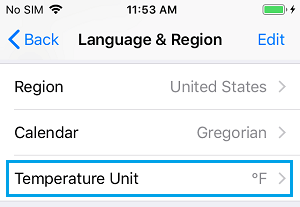
3. On the next screen, choose whether you want to see the temperature in Celsius o Fahrenheit.
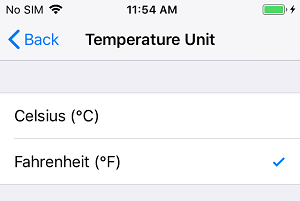
This transformation of the temperature display unit will likely be independent of your iPhone's language, region, and time zone settings.
2. Switch from Celsius to Fahrenheit in the Weather app
You can also change the international temperature unit in Apple's Weather app.
1. Open in Weather on your iPhone and click on line 3 the menu icon in the bottom right corner of your screen.
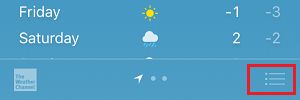
2. On the next screen, click ° F to change to Fahrenheit and press ° C if you want to see the temperature in degrees Celsius.
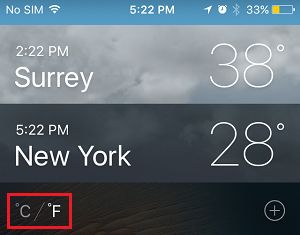
This way, you can switch between Celsius and Fahrenheit immediately in the Weather app, without having to go into your iPhone settings.
Observe: The above change is not limited to the Weather app only, as changing the temperature unit in the Weather app will always change the temperature unit in the iPhone Settings (Basic > Language & Zone > Temperature Unit).
3. Switch between Celsius and Fahrenheit on Mac
As with the iPhone or iPad, it's usually easy to switch between Celsius and Fahrenheit on the Mac.
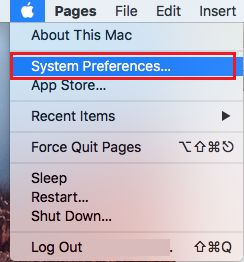
1. Push the button The Apple Icon in the top menu bar and click System preferences in the drop-down menu.
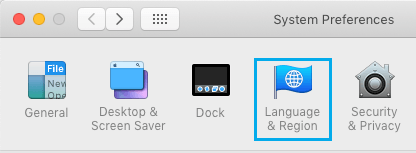
2. In the System Preferences view, click Language and area icon.
3. On the Language and Region screen, click Arrow after the Temperature topic and choose the unit you prefer for the temperature display (both Celsius o Fahrenheit).
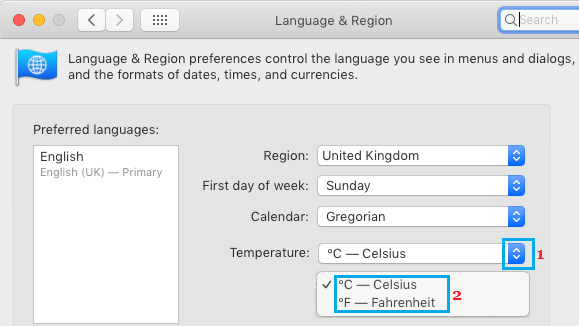
Then the temperature will likely be displayed in your preferred unit of measurement on your Mac, in the Weather widget in the Notifications heart, and also by Siri.
- How to add, remove, and reorder cities in the iPhone Weather app
- How to have climate in the lock screen iPhone

My name is Javier Chirinos and I am passionate about technology. Ever since I can remember, I have been interested in computers and video games, and that passion has turned into a job.
I have been publishing about technology and gadgets on the Internet for over 15 years, especially in mundobytes.com
I am also an expert in online marketing and communication and have knowledge in WordPress development.