- Mythic allows you to run games Windows en Mac without virtualization, integrating Epic Games and in the future Steam.
- Apple's Game Porting Toolkit is the technological foundation that facilitates the translation of games between platforms.
- Other options such as CrossOver and Porting Kit also allow you to play Windows titles, although with different advantages and limitations.

If you're a Mac user and a gaming enthusiast , you've probably thought at some point that gaming on Mac has changed radically in recent years . Gone are the days when playing games on macOS was a pipe dream, with extremely limited catalogs and insurmountable technical barriers. But despite the technological leap, the question remains: can I easily play my Windows games on my Mac? Today we'll tell you all about Mythic and other alternatives, integrating the best that current options offer, explaining their advantages, limitations, and how to get the most out of them.
Currently, the new generation of Apple Silicon processors has revolutionized graphics power on Macs. We have chips capable of running demanding titles like Cyberpunk 2077 or popular franchises like Resident Evil. However, the native game catalog still doesn't quite match that of Windows, and many major platforms like Steam, Epic Games, and Origin don't yet offer full support for our platform. But thanks to initiatives like the Game Porting Toolkit and applications like Mythic, we're finally enjoying a truly compelling cross-platform gaming experience.
Why is it still difficult to play Windows games on Mac?
Despite Apple's advancements in hardware , we continue to face the same old problem: game compatibility . Many current and past releases are developed exclusively for Windows, and although Apple has put a lot of effort into providing tools for porting games (such as the aforementioned Game Porting Toolkit), there is still no complete equivalence between the two systems in terms of game catalogs.
Access to major gaming platforms is also limited. Epic Games, Steam, and Origin don't offer all their features and games to Mac users , forcing us to find alternative solutions to take advantage of the game libraries many of us already have on Windows.
Traditional options: virtual machines and emulators
When we talk about playing Windows games on a Mac , several classic alternatives emerge:
- Virtualization: Tools like Parallels or VMware allow you to install Windows inside macOS, but they require a Windows license, they consume a lot of resources and do not always offer the smoothest gaming experience.
- Wine and derivatives: Wine (and its many wrappers like PlayOnMac, Whisky, or WineBottler) lets you run Windows components on a Mac. The problem is that its interface isn't the most user-friendly, and can be a headache for anyone unfamiliar with computers.
These options have allowed Mac gamers to survive in recent times, but they are still intermediate solutions with limitations : complex configurations, random errors and, in many cases, an unpolished user experience.
Game Porting Toolkit: Apple's ace up its sleeve
In its effort to close the gap, Apple launched Game Porting Toolkit : a suite of tools for developers that allows them to port Windows games to macOS, iPad , and iPhone . It supports technologies like DirectX 11 and 12, and combines the best of Wine with Metal to achieve very advanced graphics compatibility.
The biggest drawback is that Game Porting Toolkit isn't designed for the general public , but rather for programmers looking to port their games. While revolutionary for the industry, it remains beyond the reach of most home users, unless you're a developer willing to wrestle with command lines, scripts, and manual configurations.
Mythic: The Revolution for Playing Windows Games on Mac
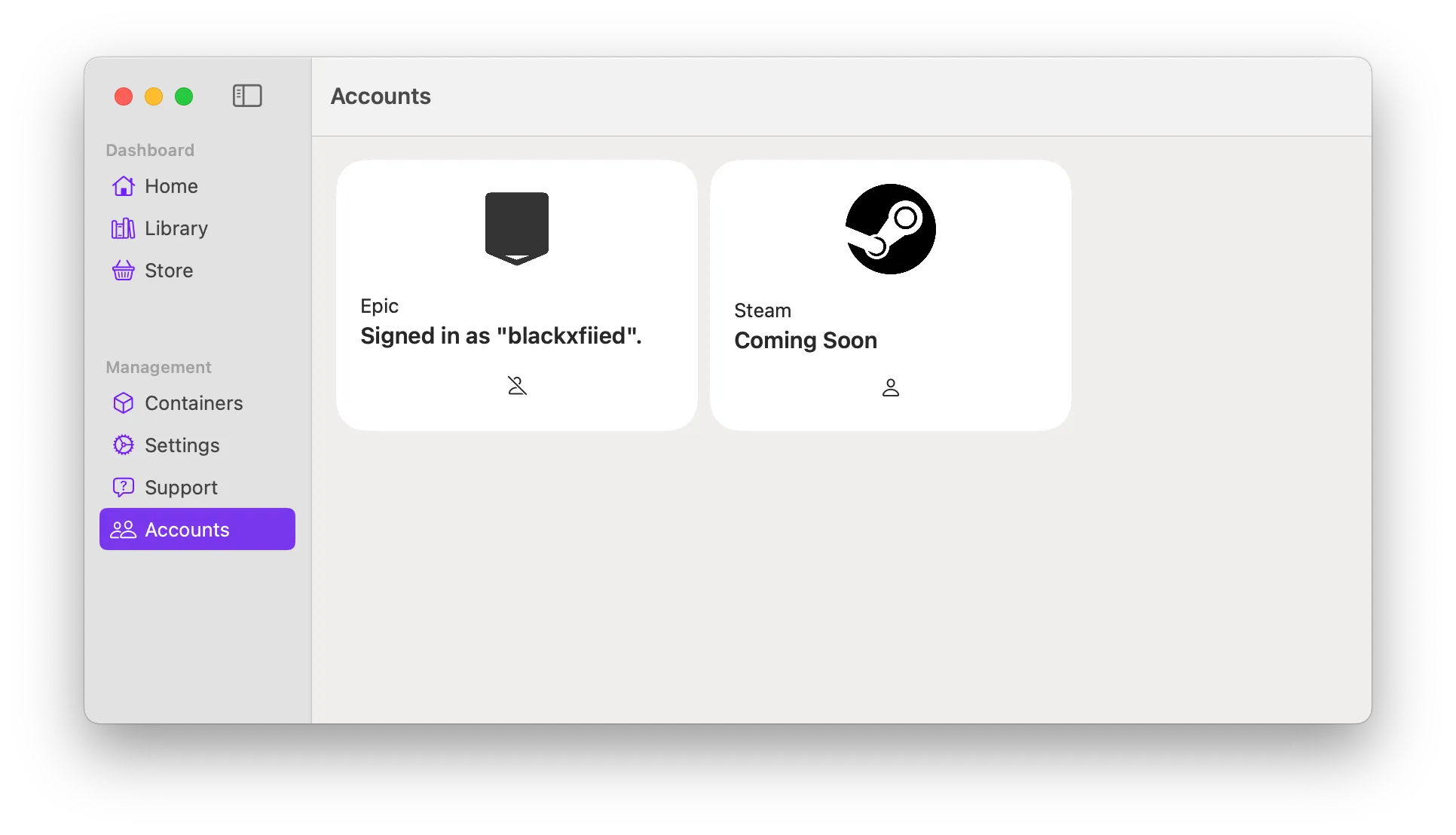
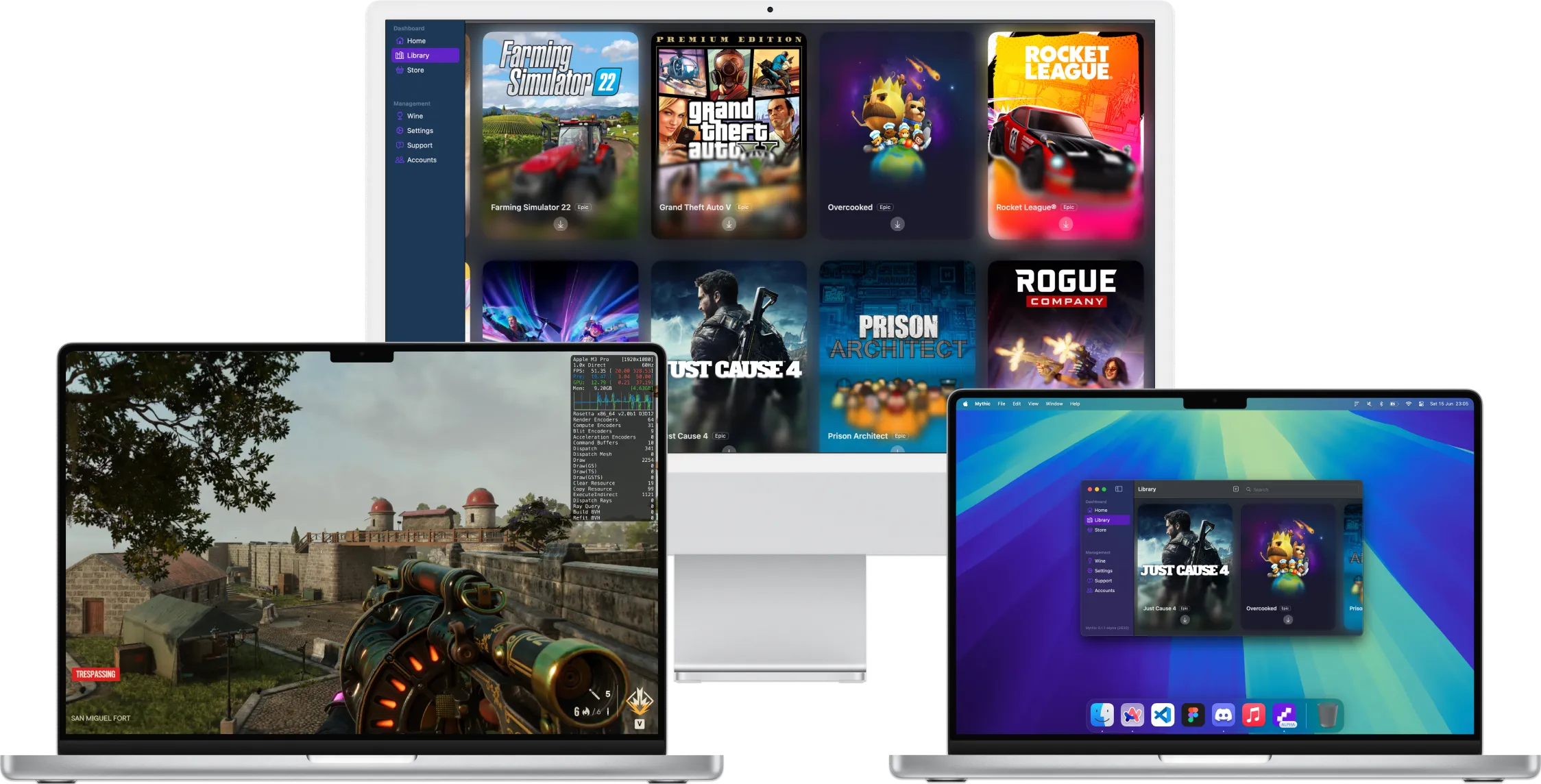
Enter Mythic, a solution that puts the full power of the Game Porting Toolkit within everyone's reach . Mythic is a completely free and open-source application that acts as a real-time launcher and translator for Windows games on your Mac. Forget virtualization, duplicate desktops, or endless configurations: Mythic does the hard work for you.
The app is written in Swift, Apple's native language, ensuring lightweight functionality, full integration with macOS, and reduced resource consumption. No heavy Electron-based apps or complicated menus.
One of Mythic's strengths is its direct integration with your Epic Games account , allowing you to access your game library and run games just like you would on Windows, all from your Mac. And that's not all: support for other platforms, such as Steam, will be expanded soon, making the experience even better. The developer community is very active, releasing updates almost weekly, and you can follow their progress on the public GitHub roadmap.
How do I install and use Mythic?
Installing Mythic is as simple as you'd expect on a Mac environment:
- Download the app from the official website or its GitHub repository.
- Drag Mythic to your Applications folder, like any other macOS software.
- When you open it for the first time, the necessary components (about 2 GB of the Game Porting Toolkit) are downloaded. You only need to do this the first time.
- The interface will prompt you to log in with your Epic Games account. If you have any games on this platform, it will automatically recognize them.
That's it. The interface is clean, straightforward, and couldn't be simpler . If you've never tried Wine or other methods, you'll find Mythic is on another level, and you don't need any advanced computer skills.
What about Steam and other stores?
One of the long-standing problems for Mac users is the very limited integration with major game stores . For now, Mythic offers direct integration with Epic Games, but the team is actively working to bring Steam, GOG, and other platforms into support soon . Given the pace of development, it's quite likely that we'll soon be able to take advantage of even larger game libraries.
In the meantime, you can now run your Epic Games purchases on Mac, with a virtually Windows-like experience, but without the headaches of virtual machines.
What if I have local games?
Mythic doesn't limit its options to online platforms alone. If you have Windows games downloaded and saved on your Mac , you can add them manually using the "local file" option. The process is also simple: just click the + button, select the desired executable file, and Mythic will do the rest. While this does require a bit more technical knowledge, the application's interface is quite helpful.
Comparison with other alternatives: CrossOver and Porting Kit
But Mythic isn't the only tool to achieve our goal. Other applications have been on the market longer and offer different advantages:
- Wine: It's the classic emulator that lets you run Windows apps and games, although it requires more skill and patience from the user. It's free and open source, but the setup can be hellish for some titles. For a simpler option, you can check out Crossover for Mac.
- cross over: It's the "easy" version of Wine, also based on this emulator, but with a more intuitive interface and wizards that make installing many games easier. It's paid, but it does have Steam compatibility. Epic Games Store, Battle.net, Ubisoft Connect, GOG Galaxy, and other major launchers. It also collaborates closely with the Wine development team, ensuring regular updates and support for new titles.
- Porting Kit: Free, also based on Wine and wrappers like Wineskin, it focuses specifically on games. It allows you to search for the desired title and automatically creates an optimized container, making it simpler than manually configuring Wine. Although it's not as advanced as Mythic in terms of integration with the Game Porting Toolkit, it's a very valid option that continues to receive support.
Therefore, if you need a more polished solution, this is the professional, but paid, option. If you prefer a free one, Porting Kit is the intermediate step that makes it easier than pure Wine, although it lacks as much innovation as Mythic offers by leveraging Apple's Game Porting Toolkit directly.

Other options: streaming game
We couldn't complete this overview without mentioning game streaming . Platforms like GeForce Now, Xbox Cloud Gaming, and similar services allow you to play any modern title on your Mac using your browser and a decent internet connection. You can even connect a PlayStation or Xbox controller to feel right at home. The only drawback is that they usually require a monthly subscription, and the catalog is subject to commercial agreements.
While streaming doesn't replace the experience of having the game running locally, it is a great option if you have a good connection and want to avoid any installation or configuration.
Why is Mythic the most promising option right now?
After years of half-baked solutions, Mythic arrives like a breath of fresh air. It's completely free , you can use your own accounts and games, and you don't need to struggle with advanced configurations. Those who have tried Mythic agree that installation is straightforward, integration is seamless (at least with Epic Games, for now), and resource consumption is significantly lower than that of virtual machines or streaming.
Being in alpha, some bugs may still be present, but development is open and progressing very quickly . If you install Mythic today and your favorite game doesn't work, it might work tomorrow. And since it's free, you have nothing to lose by installing it and keeping an eye on its development.
What is the gaming experience like with Mythic?
You'll barely notice you're running a Windows game. Everything runs on macOS: notifications, controls, sound... and most importantly, there's no need to virtualize anything or take up extra space with virtual machines. Just open Mythic, launch your game store, and start playing as if you were on a Windows PC.
If you prefer to run games locally, you also have that option. The interface makes it easy to add Windows executables, although some knowledge of files and folders is recommended.
Community and future prospects
One of the biggest advantages is that Mythic is open source , meaning the community can contribute to development, report bugs, suggest improvements, and help refine the tool. This collaborative approach ensures constant evolution, frequent patches, and greater transparency. Furthermore, the developers' interest in integrating Steam and other stores promises an ever-expanding catalog and compatibility.
If you have any doubts about your games' compatibility, remember that both Mythic and Wine have forums and databases where you can check if the game works well on Mac or if it requires any special adjustments. You can also follow their progress and even suggest ideas on their GitHub.
There's no need to resign yourself to it if you're a Mac user and want to play the latest titles on the market. Although native solutions still have a long way to go, applications like Mythic, along with alternatives like Porting Kit and the ever-popular Wine, have democratized access to gaming on Mac. The future looks bright, especially for those who don't want to be complicated by virtual machines or streaming subscriptions, but instead want to take advantage of their own Windows game catalog with all the benefits of macOS.
Table of Contents
- 1 Why is it still difficult to play Windows games on Mac?
- 2 Traditional options: virtual machines and emulators
- 3 Game Porting Toolkit: Apple's ace up its sleeve
- 4 Mythic: The Revolution for Playing Windows Games on Mac
- 5 How do I install and use Mythic?
- 6 What about Steam and other stores?
- 7 What if I have local games?
- 8 Comparison with other alternatives: CrossOver and Porting Kit
- 9 Other options: streaming game
- 10 Why is Mythic the most promising option right now?
- 11 What is the gaming experience like with Mythic?
- 12 Community and future prospects
