- DWMBlurGlass allows you to recover the Liquid Glass/Aero type crystalline effect in Windows 11.
- Installation is simple and offers multiple visual customization options.
- Not all windows and apps They apply the effect, but the overall change is noticeable.
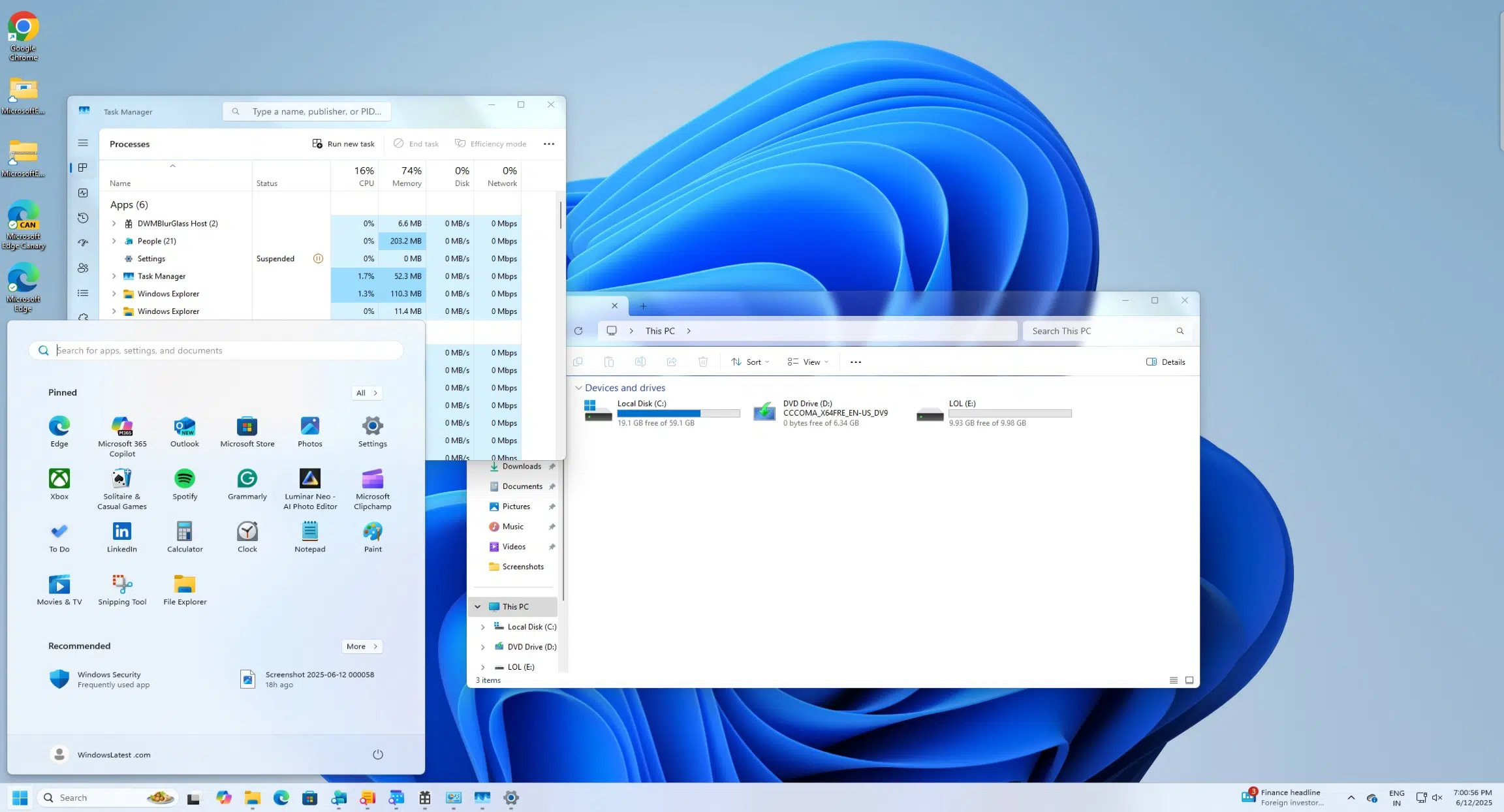
For some time now, Windows users have looked back with a touch of nostalgia on the visual effects that accompanied versions like Vista and 7, especially the famous Aero Glass interface. With the arrival of Windows 11 and the new design trends championed by Apple in macOS 26 under the name Liquid Glass , the community has seen a renewed interest in glass and translucent blur effects, seeking ways to replicate them in a modern environment. This guide reveals, in detail, how you can give your Windows 11 PC a sleek and modern look using the DWMBlurGlass application , achieving that striking and contemporary "glass" finish that has become fashionable again both on macOS and among Windows customization enthusiasts.
We'll explore in depth what Liquid Glass design is, its differences and similarities to Aero Glass, how the engineering behind the Desktop Window Manager (DWM) has made this visual revolution possible, and, above all, we'll guide you step-by-step through installing and getting the most out of DWMBlurGlass, the open-source tool that's setting trends among digital tuning enthusiasts. You'll discover all the important details, recommendations, and tricks to enjoy a unique and cutting-edge experience on your Windows desktop.

Why is the Liquid Glass effect back in fashion?
The translucent, glass-effect design made a strong comeback after the release of macOS 26, whose Liquid Glass visual language surprised the industry and reminded many Windows users of the sensations experienced with the legendary Aero Glass of Vista and 7. These effects provide an aesthetic layer that conveys modernity, depth, and a premium touch that, for years, disappeared from the Windows environment in favor of proposals like Acrylic or Mica.
Apple revolutionized its interface by showcasing how the "glass" effect can be elegantly integrated into the operating system. Meanwhile, while Windows 11 incorporated new visual effects, more nostalgic and demanding users are looking to go a step further. Their goal is to recover and improve upon classic blur and transparency effects, achieving a level of customization that combines performance with a striking visual appearance.
This boom has motivated the community to create custom solutions like DWMBlurGlass, which, by leveraging the system's internal structure, allows for the return of that "liquid" feel to the Windows 11 graphical interface, all in a way that is simple and, most importantly, safe for the average user.

The Evolution of Windows Design: From Aero Glass to Liquid Glass
The design journey in Windows has been marked by iconic phases . With the arrival of Windows Vista in 2006, Microsoft embraced Aero Glass, a visual revolution based on blurred backgrounds, transparencies, and highlights that gave windows an almost futuristic finish for the time. However, with the advancement of new versions, the company opted to simplify the interface, eliminating the classic glass in favor of less aggressive effects such as Acrylic (present in Windows 10) or Mica (in Windows 11).
While Mica offers subtle transparency and blurring effects, the sense of depth and luxury of Aero Glass was lost , leaving many users wanting a more "handmade" and vibrant visual experience. Therefore, the introduction of Liquid Glass in macOS 26, so similar to what Aero Glass offered, has prompted the Windows community to search for alternatives and tools capable of bringing that magic back to their desktops.
It is in this context that the open-source project DWMBlurGlass takes center stage, allowing users to break the limitations of the official Windows 11 interface and recover, and even improve, the legendary glass effect so in demand today.
What is DWMBlurGlass and how does it work?
DWMBlurGlass is a free and open-source tool designed to modify the functionality of the Desktop Window Manager (DWM) , the component responsible for managing visual effects and window composition in Windows. Originally created by developer Maplespe and available on GitHub, this application allows you to inject custom blur and transparency effects, replicating the Liquid Glass look (similar to Aero Glass) in Windows 11 and also in Windows 10.
The great success of DWMBlurGlass lies in its ability to overcome the limitations imposed by Microsoft , offering advanced customization options and control over blur, opacity, and effect type. It leverages internal DWM calls and reverse engineering techniques, all within a secure, lightweight environment compatible with most current versions of the operating system.
Thanks to this software, you can transform the appearance of classic applications like Windows Explorer, Paint, Control Panel, Notepad, and Task Manager , giving them the iconic crystalline finish. On the other hand, some modern apps like the Microsoft Store and Calculator retain the Mica style , so the effect won't be universal in all cases, but the result is still impressive, especially in dark mode.
Advantages and precautions when using DWMBlurGlass on Windows 11
Choosing DWMBlurGlass to restore the Liquid Glass effect in Windows 11 has multiple advantages :
- Total Control on the type of blur, opacity and visual finish.
- Allows you to choose between modes such as CustomBlur y Aero, adapting to different styles and needs.
- Simple interface and constant updates thanks to its open-source community.
- Low load on system resources, maintaining performance.
However, it's crucial to be aware of certain risks . While the application is generally safe, there may be incompatibilities with specific versions of Windows, especially if there are recent system updates that alter DWM's functionality. If problems arise, simply end the process from the Task Manager and delete the application folder. Furthermore, any modifications to the visual composition might stop working correctly after major system updates, although its open-source nature often facilitates quick fixes from the community.
Detailed guide to installing and configuring DWMBlurGlass
If you want your Windows 11 to look like the brand new macOS 26 or revive the spirit of Aero Glass, follow these steps to easily install and configure DWMBlurGlass in Spanish:
- Download DWMBlurGlass from its GitHub repository. Always check for the latest version and download the ZIP file from the "releases" section.
- Extract the ZIP file by right-clicking and selecting the corresponding option (“Extract all…”).
- Move the unzipped folder to a permanent location, preferably within the "Program Files" folder on your main drive. This makes it easier to access and avoids permission issues.
- Access the “Release” subfolder within the main DWMBlurGlass directory.
- Run the file "DWMBlurGlass.exe" by double-clicking. In some cases, the system may display a warning; confirm that you want to run the file.
- When you open the app, Click the "Install" button to start the automatic installation of the necessary resources. If errors appear or the changes are not applied, go to the "Symbol" tab and click "Download" to download the files. Symbols from Microsoft servers. This is critical to ensure compatibility with your specific version of Windows.
- Explore the “Advanced” and “Blur Methods” tabs where you'll find multiple customization options. The most recommended is "CustomBlur," which replicates the classic Aero Glass effect and adds additional controls over blur and intensity.
- Select the Aero mode If you're looking for a pure Windows Vista style, perfect for those who want maximum fidelity to the original design. This mode allows even greater control over which windows receive the effect and how the blur is distributed.
- Confirm the changes by clicking “Save” in the main application window. Watch selected windows instantly acquire the Liquid Glass effect.
- If you don't see immediate changes, make sure the symbols are downloaded correctly (a green check mark should appear in the Symbol tab).
Additionally, it is advisable to restart the system or close and reopen key applications for the effect to be applied correctly.
Which applications and windows benefit from the Liquid Glass effect?
Not all Windows applications react the same way to DWMBlurGlass effects . After testing the tool, it was observed that the "glass" effect is implemented particularly well in classic programs and system windows such as:
- File Browser
- Classic Paint
- Control panel
- Task Manager
- Memo pad
Other modern apps, such as the Microsoft Store or Calculator, often retain the native Windows 11 Mica style and may not display the expected changes. This is because, in some cases, modern apps use their own visual rendering engines or do not allow direct DWM intervention. Even so, the overall change in the environment is noticeable , and the result is usually spectacular, especially when combined with dark backgrounds or custom themes.
Additional tips and tricks for a professional finish
For those seeking a perfect result without visual errors , here are some practical tips:
- Back up your data and restore points before experimenting with DWMBlurGlass, so you can go back if you run into problems.
- Update Windows to the latest version and follow the program developer's compatibility recommendations.
- Avoid overlaying other programs that modify the visual composition of windows, such as third-party skins or overlays, as they may interfere with the operation of DWMBlurGlass.
- If the effect stops working after a major Windows update, visit the GitHub repository to download the latest version or search the community for solutions.
- For an extra touch, explore the setting of the intensity and type of blur in the “Advanced” tab, adapting the effect to your monitor, theme, and personal preferences.
Is it safe to use DWMBlurGlass on a daily basis?
The use of DWMBlurGlass is, in the vast majority of cases, safe and stable . Being open-source, the code can be reviewed for potential vulnerabilities, and if incompatibility issues arise, the application can simply be removed without leaving any trace on the system. However, like any software that interacts at a low level with the system, it is not without risks, especially on critical production systems or those where stability is paramount.
It's worth remembering that Microsoft could modify DWM's behavior in future Windows 11 updates, which could temporarily affect DWMBlurGlass's functionality. The advantage of its active community is that they tend to release patches and updates quickly, keeping the tool up-to-date for most users.
Bringing back the crystalline effect in Windows 11 is now a near reality thanks to DWMBlurGlass. Whether you're nostalgic for Aero Glass or want to show off a modern and distinctive desktop, this solution will allow you to get the most out of the Liquid Glass aesthetic inspired by macOS 26. It's advisable to follow the steps and recommendations above precisely to enjoy spectacular and safe customization , always retaining the option to revert changes if needed. Now, Windows customization takes a leap forward, integrating the best of both worlds and making a truly premium visual experience available to everyone.

Passionate writer about the world of bytes and technology in general. I love sharing my knowledge through writing, and that's what I'll do on this blog, show you all the most interesting things about gadgets, software, hardware, tech trends, and more. My goal is to help you navigate the digital world in a simple and entertaining way.