- Seamless integration between desktop and cloud editors via DocSpace or your own servers.
- Advanced real-time co-authoring tools with permission control and flexible editing modes.
- Full compatibility with standard Office formats and extended capabilities for managing interactive PDFs.

If you're looking for a way to eliminate the chaos of emailing file versions, you've come to the right place. The ONLYOFFICE suite presents itself as a powerful and free alternative that allows teamwork regardless of location, combining the convenience of a PC-based application with the power of the cloud. In fact, it's one of the strongest options if you're comparing LibreOffice vs. WPS Office vs. ONLYOFFICE for Windows to decide which best suits your workflow.
The best part is that you don't need to be a computer expert to get it up and running. Whether you want to set up your own server at home or prefer to use a ready-made solution, there are multiple ways to ensure your documents, spreadsheets, and presentations update instantly as you and your colleagues work on them.

Connecting your desktop to the DocSpace cloud

To start collaborating from the desktop application, the first step is to link it to DocSpace. Simply open the program and look in the left panel for the option to connect to the cloud , selecting the ONLYOFFICE icon. When you click connect, the system will ask for your DocSpace URL (yourdomain.com), where you'll need to enter your usual credentials to automatically sync all your files.
If you don't already have an account, don't worry, you can create one directly from the app by clicking the ONLYOFFICE cloud creation button . After completing the registration and confirming your email, you'll have a space to manage rooms and store documents that can be easily edited by your team.
Self-hosting and Workspace options
For those who prefer complete control over their data, ONLYOFFICE Workspace is the crown jewel. It's an open-source platform that you can install on a Linux server using Docker. Through an automated installation script , you can set up the system in just a few minutes, ensuring your machine meets the minimum requirements (such as at least 6 GB of RAM and a dual-core processor).

Once installed, Workspace is not just for editing text; it integrates a complete productivity ecosystem with project management, CRM, calendar, and email. This solution is ideal for companies that need a secure virtual environment where files never leave their own servers.
Mastering co-editing and teamwork

When it's time to work on documents with others, ONLYOFFICE offers two very useful modes. Quick mode is the default and allows everyone to see changes in real time, ideal for brainstorming sessions. On the other hand, strict mode lets you lock the paragraph you're writing, making your changes visible only to others once you've saved your work, thus preventing annoying interruptions.
For seamless collaboration, it's essential to leverage review tools. You can tag colleagues in comments to get their attention or use the track changes feature, which allows the document owner to accept or reject suggestions. Furthermore, if someone makes a glaring error, version history lets you revert to any previous state of the file.
File permissions and security management
We don't always want everyone to be able to delete content. That's why there are very granular access levels. You can share a link with read-only permissions , allow others to comment only, or grant full access. For spreadsheets, there's the custom filter , which is fantastic because it allows collaborators to see only the information they're interested in without exposing sensitive data from the original sheet. If you handle large files, you'll find it useful to know how to work with heavy documents and spreadsheets in Linux using ONLYOFFICE to avoid slowdowns.
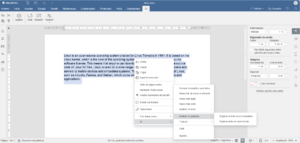
Furthermore, the suite is compatible with a wide variety of formats, notably its native support for DOCX, XLSX, and PPTX . This means you can switch from Microsoft Office to ONLYOFFICE without your documents becoming distorted or losing their formatting, facilitating the technological transition in any office or educational institution.
Advanced PDF editing and new views

Unlike other editors, ONLYOFFICE allows you to work with PDFs in two ways. There are standard PDFs, which you can view and annotate, and fillable PDF forms , where you can create interactive fields, checkboxes, and dropdown lists for others to easily complete.
A welcome recent improvement is the multi-page view . Instead of endlessly scrolling down, you can now place multiple pages side by side. This is especially useful when reviewing lengthy contracts or academic papers, as it allows you to compare the content flow and overall document design at a glance.
Integrations with other platforms and APIs
If you already use tools like Nextcloud, ownCloud, or Seafile, you can integrate ONLYOFFICE editors using pre-built connectors. Furthermore, if you're a developer, there's the Create App tool , which allows you to generate a sample web application using Next.js and React to test how to connect the Document Server to your own project via the API.
For educational environments, the suite integrates seamlessly with Moodle or Chamilo, allowing students and teachers to write articles or take tests without leaving the learning platform, avoiding external distractions and centralizing all teaching materials in one place.
Having an open-source suite that combines the power of local editing with the flexibility of the cloud allows any team, from a small startup to a university, to manage its documentation with complete security, taking advantage of real-time co-authoring features, version control, and exceptional format compatibility that simplifies the daily workflow.

Passionate writer about the world of bytes and technology in general. I love sharing my knowledge through writing, and that's what I'll do on this blog, show you all the most interesting things about gadgets, software, hardware, tech trends, and more. My goal is to help you navigate the digital world in a simple and entertaining way.