- ZFS integrates RAID, volume manager and file system with high data integrity, snapshots and integrated replication.
- mdadm offers a classic, simple, and well-tested software RAID that complements LVM and traditional file systems well.
- Performance and reliability They depend heavily on the array design, the type of disks, and the use of functions such as O_DIRECT or the write cache.
- The choice between ZFS and mdadm should be based on actual performance needs and resource requirements. hardwareease of management and backup strategy.
When you're considering setting up a serious storage server on Linux , sooner or later the question arises: should I go with ZFS or use mdadm with LVM and traditional RAID? At first glance, they seem like two ways of doing the same thing, but in reality, they reflect very different philosophies and have direct implications for performance, ease of management, reliability, and, of course, how peacefully you'll sleep when a disk starts to fail.
In this article we will calmly break down the differences between ZFS and mdadm (Linux Software RAID)Reviewing real-world cases, the strengths and weaknesses of each solution, how they behave with different RAID levels (RAID0, RAID1, RAID5/6, RAID10, RAIDZ1/Z2…), what happens with backups, silent data corruption, RAM or CPU usage, and even how cache modes affect performance. O_DIRECT in virtualization environments.
What is RAID and why does it matter when comparing ZFS and mdadm
Before we delve into ZFS and mdadm, it's worth remembering exactly what RAID solves and what it doesn't, despite the fact that it's sometimes confused with backups . RAID stands for "Redundant Array of Independent Disks," and its original purpose was to combine several small disks into a single logical unit that offers higher performance, greater usable capacity, or redundancy against physical failures.
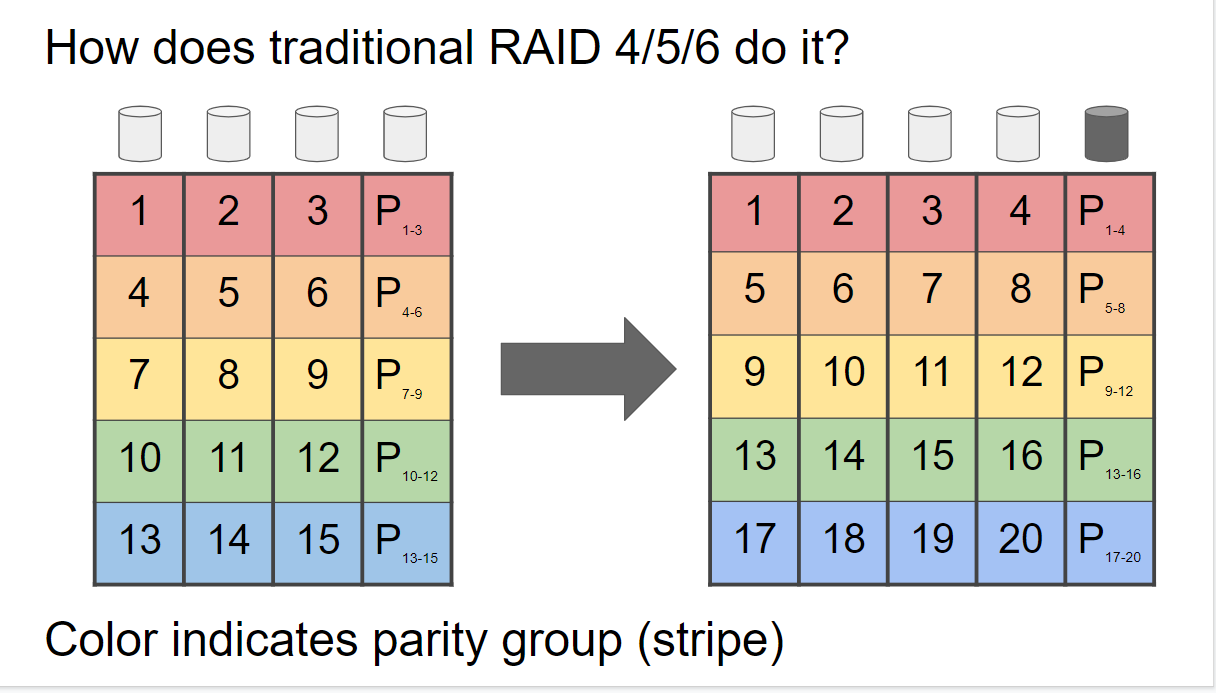
A RAID array can combine different techniques such as striping (distributing data in blocks across multiple disks), mirroring, and parity . Depending on how you combine these elements, you obtain different RAID levels: RAID 0 prioritizes performance, RAID 1 creates an exact copy on another disk, RAID 5/6 uses distributed parity to balance space and fault tolerance, RAID 10 combines mirroring and striping, and so on.
The key is to understand that RAID increases availability and reduces the impact of a disk failure , but it's not a substitute for a good backup system. You can still lose data due to logical corruption, accidental deletions, ransomware, or a catastrophic failure of multiple disks, and RAID won't protect you from that.
Furthermore, not all RAID systems are implemented the same way: hardware RAID with dedicated controllers, kernel-integrated software RAID (mdadm), and hybrid solutions like ZFS or Btrfs that combine a volume manager and file system in a single layer.
ZFS: File system and volume manager in one package
ZFS isn't just "another type of RAID": it's a 64-bit file system with an integrated volume manager . That means that, unlike mdadm, it doesn't just group disks, but also understands how data is stored at the block and metadata levels, and can make intelligent decisions about integrity, caching, snapshots, and compression.
In ZFS, you create a storage pool (zpool) made up of one or more vdevs. Each vdev can be a set of disks in RAIDZ1, RAIDZ2, mirrors, etc. The classic RAID levels are still there, but with different names: RAIDZ1 is similar to RAID5, RAIDZ2 to RAID6 , and ZFS mirrors are equivalent to RAID1 or RAID10-type combinations when using multiple mirrored vdevs.
Once you have the zpool, ZFS automatically mounts the associated filesystem . There's no need to create a block device, then an LVM, then a separate filesystem. You can create datasets and zvols (block volumes) within the pool, with different quotas, compression, or properties for each.
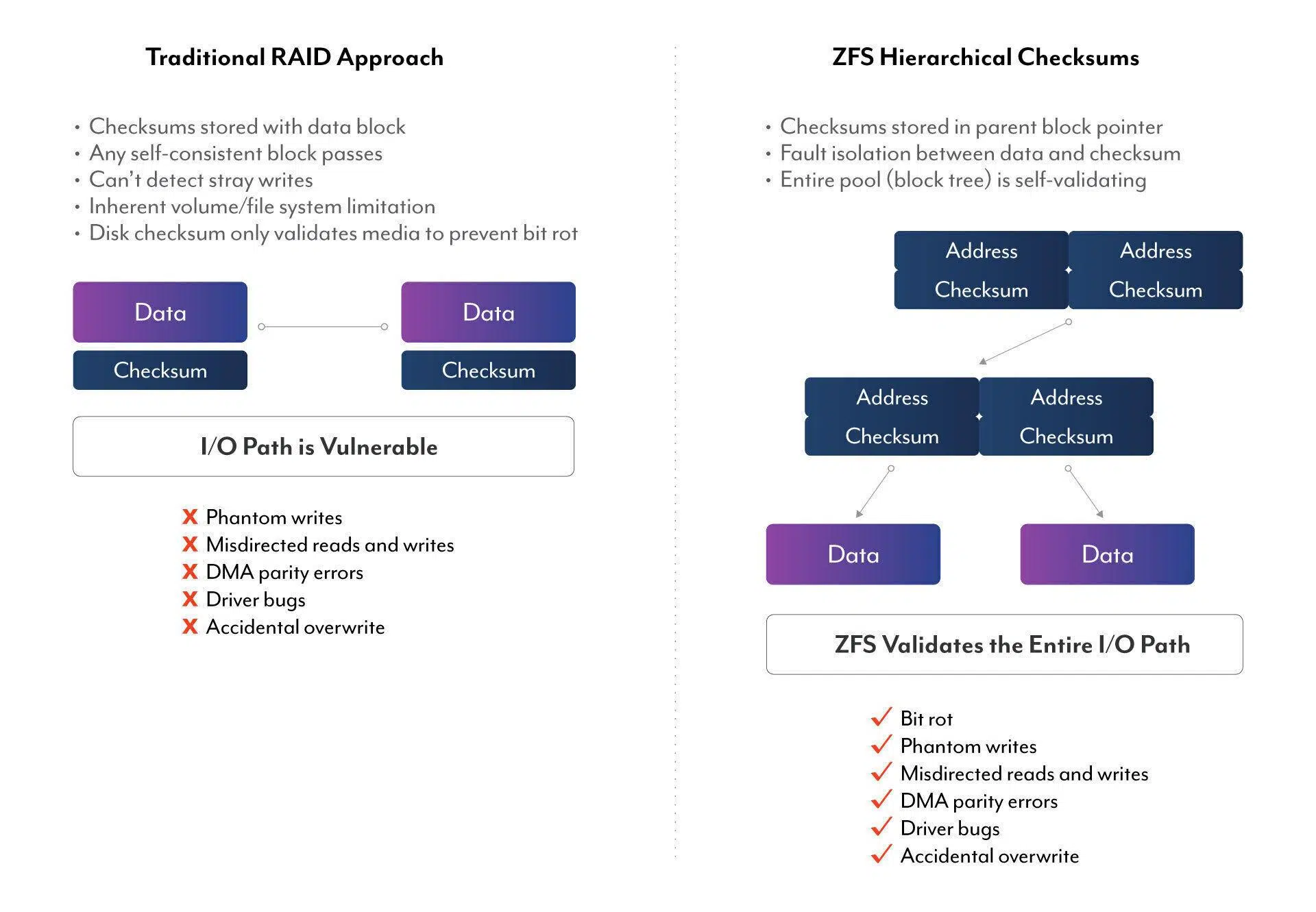
One of ZFS's key strengths is its copy-on-write (COW) model : it never overwrites blocks in place, but instead writes the new version to a different block and updates the metadata at the end. This helps avoid the classic "write hole" problem in RAID 5/6, where a power outage during a write operation leaves the parity in an inconsistent state.
Furthermore, ZFS includes built-in features that in the mdadm/LVM/EXT4 world would require several additional layers, such as lightweight snapshots, clones, transparent compression, deduplication, data scrubbing with checksums , and advanced caches. ZVOLs integrate very well with hypervisors for VM storage.
mdadm and LVM: Classic Software RAID in Linux
mdadm is the standard Linux utility for managing MD RAID (also called Linux Software RAID) . It works at the block level, without involving a file system. With mdadm, you create a /dev/mdX device that groups several physical disks or partitions, and then you place the desired file system (EXT4, XFS, etc.) or an LVM on top of that device.
The philosophy here is modular: mdadm handles RAID, LVM handles logical volumes, and the file system only deals with data storage . This provides a lot of flexibility, but it also means more layers and more things to configure manually (fstab, boot scripts , monitoring policies , etc.).
The basic syntax of mdadm follows a fairly logical structure: mdadm dispositivoThe most common modes are --create to create a new RAID, --assemble to assemble an existing one, --manage to manage an active array, --grow to expand, and --detail to view information.
For example, creating a RAID1 with two disks would look something like this: mdadm --create --verbose /dev/md0 --level=1 --raid-devices=2 /dev/sda1 /dev/sdb1If the array already exists and needs to be mounted after a reboot, you would use --assemble indicating the RAID device and member disks.
For more advanced configurations, mdadm is often combined with LVM, so that RAID provides a large block of storage and LVM allows it to be divided into multiple logical volumes of different sizes, on which file systems are then mounted and given to services, virtual machines , etc.
Key differences between ZFS and mdadm: architecture and features
The first major difference is that ZFS integrates RAID, volume management, and the file system , while mdadm only handles the software RAID. This directly impacts the types of things you can do "natively" with each solution.
In mdadm, if you want snapshots, volume cloning, or thin provisioning for virtual machines, you have to use LVM-thin, snapshot file systems (like Btrfs), or additional layers. ZFS offers all of that by default: any dataset can have instant snapshots and clones in a matter of seconds, and zvols integrate very well with hypervisors for VM storage.
Another important difference is data integrity . mdadm protects against disk failures thanks to RAID, but it doesn't monitor what happens within the file system or add checksums at the data block level. ZFS, on the other hand, calculates checksums for all data blocks and metadata, and during scrubs, it verifies that what is read matches what is expected, correcting from another disk if it detects silent corruption.
The way you expand or manage storage also changes significantly . In mdadm, you can grow certain RAID levels by adding disks and then resizing LVM and the file system, but it's a delicate and relatively slow process. ZFS allows you to add new vdevs to the zpool to increase capacity; however, each vdev has its own RAID configuration, and data distribution is done at the vdev level, something that must be considered when designing the pool.
Finally, day-to-day management is different: ZFS has very coherent and descriptive commands (zpool, zfs) , while mdadm has a powerful but sometimes unintuitive CLI, and you also depend on files like /etc/mdadm.conf and /etc/fstab for everything to work properly at startup.
Performance: RAID10, RAID5/6, RAIDZ and real-world use cases
In terms of performance, there's no single winning answer, because it depends heavily on the type of drives (HDD, SATA SSD , NVMe), the RAID level, and the access pattern (sequential vs. random, reads vs. writes, block size, etc.). Even so, some patterns are fairly clear.
On traditional hard drives and SATA SSDs, ZFS typically performs very well . Its copy-on-write design and I/O grouping method tend to convert many random operations into sequential ones, which is a great fit for the mechanics of mechanical drives. Furthermore, it can leverage RAM, L2ARC (read cache on SSDs), and ZIL/SLOG (write intent register) to smooth out spikes and improve latency.
However, when all primary storage is fast NVMe, ZFS doesn't always deliver 100% of its potential . It was designed in an era where disk latency provided ample headroom for CPU calculations while waiting for the disk to load; with NVMe, the CPU sometimes becomes the bottleneck, resulting in performance below what a single NVMe drive would provide.
As for mdadm, real-world tests show that it offers solid performance, especially in RAID0, RAID1, and RAID10 , but it can fall behind hardware RAID and ZFS in some scenarios with software RAID5/6, particularly in write-intensive operations where parity calculations and journaling take a greater toll.
There are real-world use cases where a large RAID 10 array with mdadm (for example, 16 x 2TB drives in RAID 10 measuring over 1GB/s of theoretical throughput ) doesn't achieve those figures in practical applications (real-world traffic, 10GbE backups , etc.). The theory says one thing, but the entire stack (network protocol, CPU, file system, caches) often limits the final performance to below the array's raw maximum.
Reliability and typical problems: write hole, O_DIRECT and silent corruption
Beyond the MB/s figures, what really sets ZFS and mdadm apart is how they handle failures and "ugly" scenarios : power outages during writes, silent corruption, kernel bugs, or applications that use direct disk access modes.
The infamous RAID write hole affects RAID 5/6 implementations where a power outage can leave a data write and its parity incomplete, causing difficult-to-detect internal inconsistencies. Hardware RAID controllers mitigate this with battery-protected write caches (BBUs), while ZFS avoids it thanks to its COW model, which only considers the new version of the data valid once everything has been written correctly.
In the Linux world, mdadm relies on mechanisms like journaling and bitmaps to mitigate risk, but it remains more vulnerable to these scenarios than ZFS or a good hardware RAID with protected caching. This is noticeable in both reliability and performance under write-intensive workloads, where journaling places a direct burden on slow disks.
Another sensitive issue is the use of O_DIRECT (cache “none” in VMs) In virtualization environments, when a virtual machine accesses storage using direct device access, the software RAID (md/dm) can end up forwarding the same memory pointer as multiple independent writes to each disk. If another thread modifies memory while these writes are in progress, each disk may end up recording different content, degrading or corrupting the RAID.
A real case has even been documented where A write to swap in progress coincides with the release of that memoryThe swap input is discarded while I/O continues, and the RAID ends up marking the array as degraded. Technically O_DIRECT It promises to "try to minimize the effect of caches," not to break consistency between replicas, but in practice it is a mode in which you have to be very careful with MD RAID.
If you avoid that caching mode in VMs, or know exactly what you're doing, mdadm is perfectly valid , but it does consume slightly more RAM. With ZFS, on the other hand, cache and I/O flow control is much more integrated into the file system stack, and the risk of these scenarios is significantly reduced.
Practical examples: from large RAID10 arrays to non-redundancy pools for VMs
To see the philosophical difference between ZFS and mdadm, it is very helpful to review real use cases that reflect common doubts of administrators and advanced users.
In one scenario, someone has a server running Ubuntu with 16 2TB disks in RAID 10 using mdadm . The raw speed is excellent, but they encounter a specific reliability issue: after a few reboots, the array doesn't load correctly, requiring repeated unmounting and re-creation. This is precisely the kind of situation RAID is meant to prevent.
Part of the risk stems from the fact that RAID10, as currently configured, cannot tolerate the failure of two consecutive disks that leave an entire stripe without data . This is the Achilles' heel of this particular design: the theoretical failure condition that RAID10 cannot handle is met, and the array becomes unrecoverable.
In this situation, options such as switching to RAID50 (five RAID5 stripes of three disks each, plus one spare) or RAID60 (two RAID6 stripes of eight disks) are being considered . The idea of migrating everything to ZFS with equivalent configurations also arises: five RAIDZ1 vdevs of three disks (with one spare disk) or two RAIDZ2 vdevs of eight disks, seeking a compromise between performance and fault tolerance.
The logical conclusion is that, with so many disks, the layout design is just as important as the chosen technology . A larger number of virtual arrays (vdevs) typically provides higher IOPS and throughput, but also increases the complexity of fault handling; a couple of large RAID Z2 vdevs enhance fault tolerance, but can be somewhat less responsive under certain workloads.
In another example, an administrator wants to set up a data pool for virtual machine working disks where the absolute priority is to squeeze the 4 TB of capacity and achieve good performance, without worrying too much about redundancy, since the VMs are backed up off-site to other storage, even off-site.
The choice is between setting up a ZFS pool in RAID 0 or an LVM-thin stack on mdadm RAID 0. Both allow snapshots and thin provisioning for VMs, perfect for online backups on platforms like Proxmox. In this case, the typical recommendation "don't use RAID 0 in production" becomes less relevant, because disaster recovery relies on external backups, not local resilience.
The decision-maker has extensive experience with ZFS, but has barely touched mdadm/LVM. The dilemma here is not so much reliability (which is already covered by backups) as ease of daily management, platform integration, and sustained performance under virtualization workloads.
Hardware RAID versus ZFS and mdadm: CPU, cache, and portability
The comparison also cannot ignore the role of RAID hardware with dedicated controllers , which are very common in brand-name servers (Dell, HP, etc.). A Dell H710P-type card (like many LSI controllers ) has its own processor, cache memory (often 1 GB), and BBU to ensure that cache writes survive a power outage.
The great advantage of hardware RAID is that the operating system only sees one logical disk , which greatly simplifies compatibility and allows the use of virtually any operating system without worrying about complex software RAID configurations. Furthermore, the central CPU barely notices the parity and heavy I/O work, because the controller handles it all.
But in return, you're tied to that controller: if it fails, you often need the exact same model to recover the array . With RAID software like mdadm or with ZFS, you simply move the disks to another server running Linux and the necessary tools; the array can then be detected and assembled without much trouble.
Another practical problem with controllers is their reliance on manufacturer-specific management tools and utilities , which are not always well-maintained for modern distributions. They typically include a pre-boot configuration environment (the controller's BIOS/UEFI), but on consumer motherboards, the hardware is sometimes not even detected correctly.
In terms of performance, in tests with eight 4TB WD Red Plus drives in RAID 6, hardware RAID typically offered the best sequential read and write speeds , followed closely by ZFS, with mdadm lagging behind, especially for complex writes. The likely reason is that ZFS and hardware RAID address the write hole and leverage fast caches, while mdadm relies almost entirely on the physical disks for journaling and rebuilds.
Resource consumption: RAM, CPU and swap
One of the most common comments about ZFS is that it "loves RAM ." And it's true: the more memory it has for ARC (Adaptive Replacement Cache), the better it can cache reads and improve performance. On serious servers, it's also recommended to use ECC memory so that ZFS doesn't have to deal with RAM errors that could corrupt the integrity of its checksums.
In terms of CPU usage, ZFS consumes slightly more resources than mdadm, especially if you enable compression, deduplication, or use many advanced features . However, with modern CPUs, this cost is usually perfectly manageable in most home and small business environments, especially compared to the added value of data integrity and snapshots.
It's also worth mentioning that ZFS isn't a good idea for managing swap . A sort of race can ensue: available RAM decreases, the system wants to use more swap, ZFS tries to increase its ARC or manage more metadata, which consumes even more RAM, creating an unpleasant loop. That's why it's common practice on servers where all data storage is on ZFS to maintain a small RAID 1 array with mdadm just for swap and perhaps the base system.
On the mdadm side, RAM consumption is more modest, since most of the caching intelligence is handled by the underlying file system (for example, EXT4 or XFS). The CPU also suffers less with pure mdadm , although with RAID 5/6, parity calculations will always incur a cost, whether in software or hardware.
In any case, tests show that even with veteran dual-Opteron CPUs, CPU spikes during software RAID rebuilds are not usually catastrophic ; they are rarely the absolute bottleneck compared to disk speed.
Ease of daily administration and learning curve
For someone starting from scratch, mdadm might seem intimidating due to its syntax , but once you learn four basic commands, managing RAID 1 and RAID 10 becomes relatively straightforward. The same goes for LVM: it's difficult at first, but then you'll be navigating between physical volumes, volume groups, and logical volumes with ease.
ZFS, on the other hand, has more new concepts at the beginning: pools, vdevs, datasets, zvols, ARC, L2ARC, ZIL/SLOG, properties, snapshots, scrubs… The learning curve is steeper, but in return, many common tasks (creating a new dataset with compression, taking a snapshot, replicating data to another server) are solved with a couple of very coherent commands.
In day-to-day administration, ZFS wins over many administrators because Its CLI is designed as a coherent whole. Commands like zpool status, zpool scrub, zfs list, zfs snapshot o zfs send | zfs recv They cover most actions with little effort. With mdadm and LVM, actions are spread across several tools and scattered configuration files.
Another strength of ZFS is the backup replicationThe combination of snapshots with zfs send/recv It allows you to send incremental data streams to another ZFS server very efficiently, copying only changed blocks. For an environment with multiple NAS devices or servers, having this built-in capability is a real boon.
With mdadm and traditional file systems, you can also mount replication ( rsync , LVM snapshot tools, specialized backup solutions , etc.), but nothing as tightly coupled to the file system logic as ZFS.
Regarding automatic booting and mounting, it's important to remember that an mdadm RAID array won't automatically mount after a reboot unless it's properly declared in `/etc/mdadm.conf` and `/etc/fstab`. The same applies to any file systems placed on top of it. With ZFS, the system itself handles mounting datasets according to their properties, which simplifies things somewhat.
Having considered all these factors, it's clear that mdadm shines when you want a classic, simple, and highly integrated software RAID solution for Linux , especially in RAID 1/10 configurations or when you have RAM limitations and want something understated and proven. ZFS, on the other hand, feels like the ideal "all-in-one" solution when you value both data integrity and the flexibility to take snapshots, clone, compress, and replicate without relying on countless external tools.
In environments with heavy workloads on mechanical or SATA disks, ZFS typically offers excellent performance, and if you add NVMe as an L2ARC cache or as a "special" vdev for metadata and small files, it can scale very well. Where it might fall slightly short is in very simple configurations on pure NVMe drives, where other approaches or even standalone disks with good backups can offer more power with less complexity.
For situations where absolute performance is paramount and local redundancy isn't critical , it sometimes makes more sense to use separate disks, automate frequent backups, and forgo RAID for that specific area. In other cases, the choice between ZFS and mdadm depends on weighing prior experience, available hardware resources, and how much you value the convenience of having everything integrated versus the simplicity and cleanliness of classic software RAID.


Passionate writer about the world of bytes and technology in general. I love sharing my knowledge through writing, and that's what I'll do on this blog, show you all the most interesting things about gadgets, software, hardware, tech trends, and more. My goal is to help you navigate the digital world in a simple and entertaining way.