- Complete evaluation of Intune vs. Workspace ONE, Jamf, Google Endpoint Management, ManageEngine and JumpCloud with a focus on Linux.
- Analysis of integration with Entra ID/Microsoft 365, Conditional Access, Defender and co-management options with SCCM.
- Total cost of ownership, licensing, vendor lock-in, and hybrid routes for SMEs and MSPs.
- Summary guides for installing, updating, and uninstalling Intune on Ubuntu and RHEL.
In many organizations, endpoint management is no longer solely a Windows issue . Today, Linux, macOS, iOS , and Android coexist , along with remote work, complicating daily orchestration. Microsoft Intune has become the standard for those within the Microsoft ecosystem, but it doesn't always meet the expectations for immediacy or heterogeneity of certain fleets.
A prime example: teams using both Intune and DattoRMM value Intune's policies and Autopilot, while DattoRMM's real-time monitoring and near-instant check-in with devices from anywhere are particularly appealing. However, Intune's slowness in applying policies, software, and patches, coupled with DattoRMM's lack of policy management and inconsistent patching, suggests exploring a more centralized MDM alternative that seamlessly integrates Azure/Office 365, Defender, Conditional Access, and Entra ID.
What does an MDM for Linux need when you already use Microsoft?
Those coming from Microsoft seek continuity: integration with Azure AD/Entra ID and Microsoft 365 , consistent policies, reporting, and compliance. But they also demand rapid deployments , reliable patch management, and, if possible, an Autopilot-like experience to accelerate the deployment of new or reassigned teams.
This analysis often includes names like ManageEngine UEM and co-administration with SCCM/Configuration Manager, as well as cross-platform options. Ultimately, the goal is a solution that combines visibility and immediate implementation with robust policies and true compatibility beyond Windows.
To complete the picture, it's important to consider the total cost of ownership, the learning curve, and vendor lock-in. In environments with many components, harmonizing licenses and application catalogs reduces friction and budget surprises, especially when Linux and macOS coexist alongside Windows.
A final criterion is interoperability with third-party identities and applications. When the technology landscape is heterogeneous and multi-cloud, avoiding silos and facilitating SSO, MFA, LDAP, or RADIUS without additional servers can make a significant difference in security and operations.
Intune today: strengths and limitations on Linux, Windows, and macOS
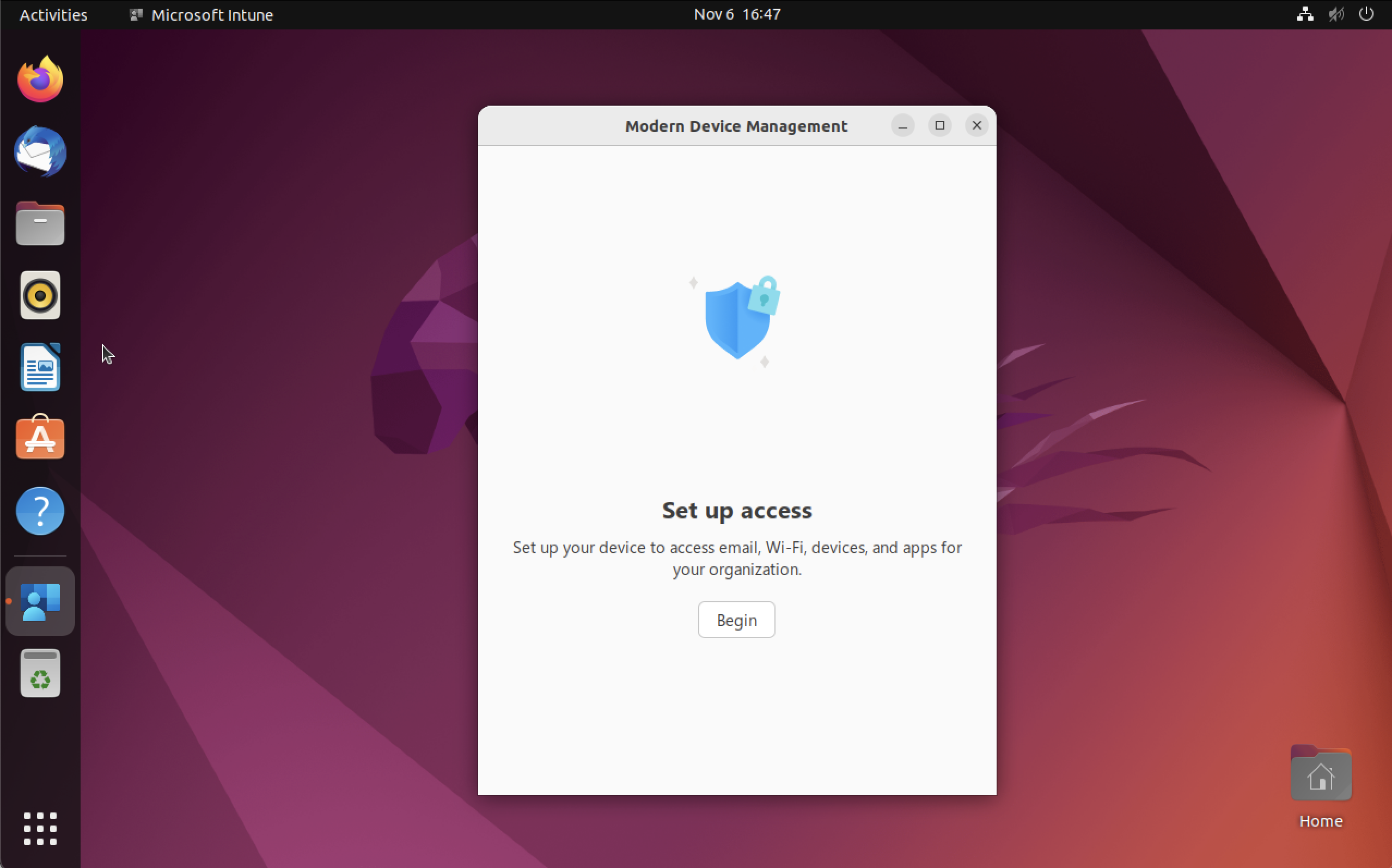
Intune shines where the Microsoft ecosystem is dominant: native integration with Azure AD/Entra ID and Microsoft 365 , app deployment , security and compliance policies, and a familiar way of operating for Windows administrators (e.g., ADMX templates). When used in conjunction with hybrid AD and other Microsoft security layers, it significantly raises the bar for Windows.
Historically, its focus has been on Windows; Microsoft has expanded its functionality on macOS and Linux, but on Linux, progress has been slow and primarily focused on compliance policies . Furthermore, for some features (such as certain workflows with Conditional Access and privileged users), the use of Microsoft Edge is required, which limits the flexibility of the end user on Linux.
A common complaint when comparing it to RMM tools is the change propagation time : policies, software, and patches aren't always applied as quickly as support teams or MSPs with demanding SLAs require. This lag contrasts sharply with platforms that prioritize telemetry and instant actions, such as DattoRMM.
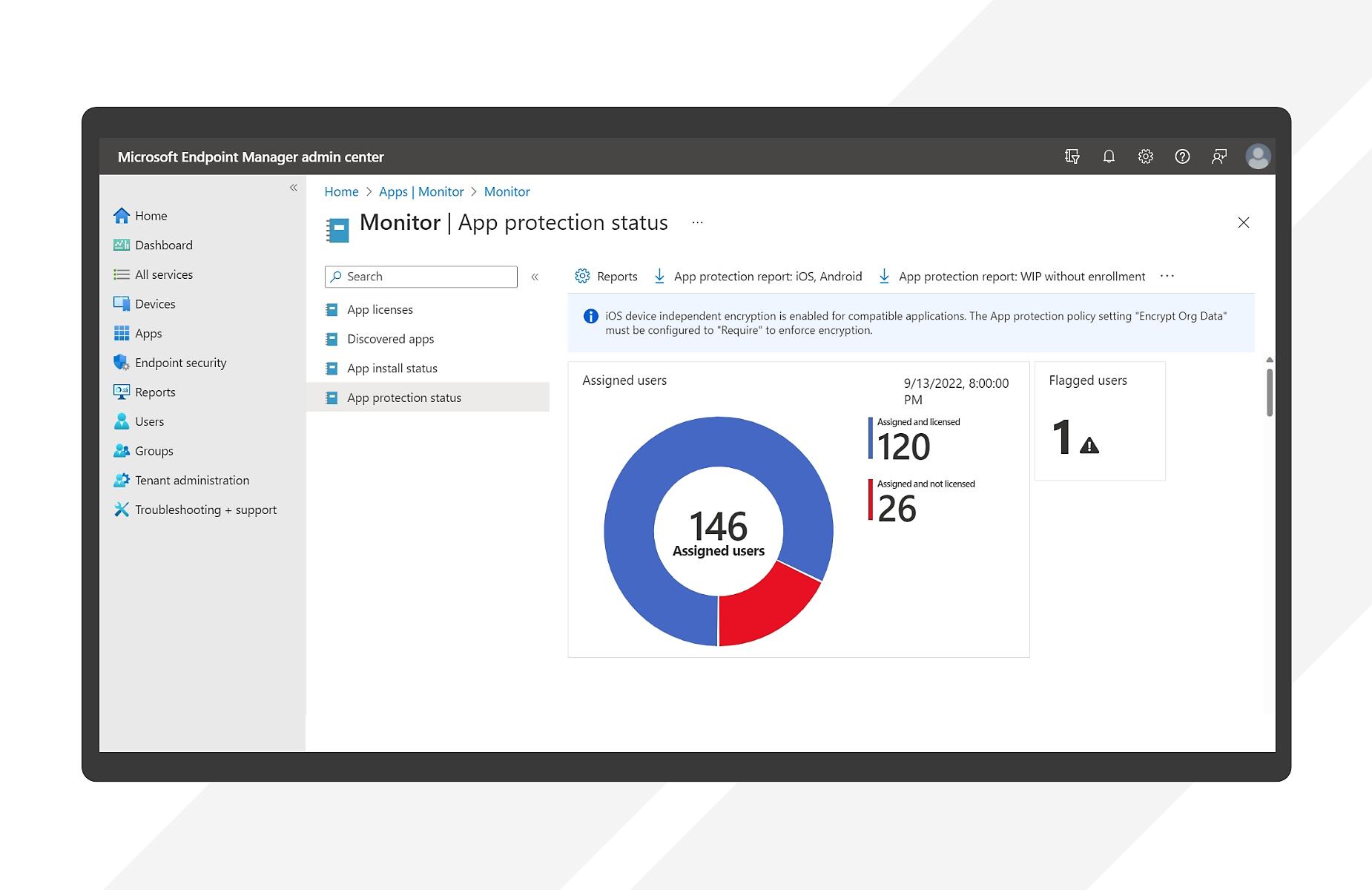
In terms of features, the Intune/Configuration Manager family offers a comprehensive suite for businesses: cloud-based MDM , corporate data isolation, an admin center with alerts and status updates, Active Directory connectors and certificate-based authentication, ADMX templates and Graph API for automation, integration with AAD and Win32 LoB apps, user-based deployment, granular Conditional Access compliance, application/device/security reporting, subscriptions for single-use devices (kiosks), and remote support as a premium add-on. The offering is complete , and its final scope depends on the licenses purchased within the Microsoft ecosystem.
Cross-platform alternatives: Workspace ONE, Jamf, Google Endpoint Management, ManageEngine, and JumpCloud
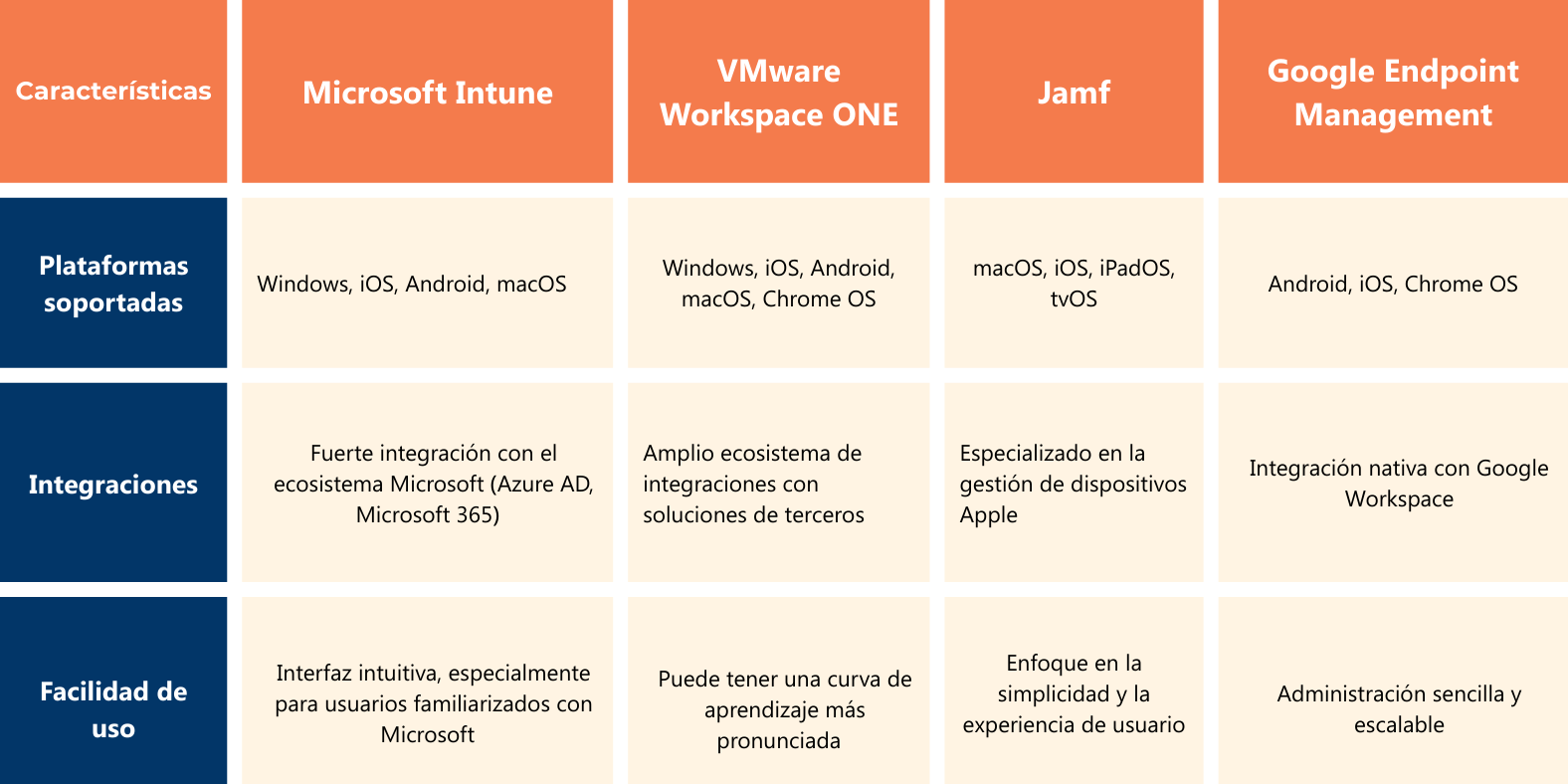
In terms of market share and maturity, VMware Workspace ONE is the most cross-platform competitor. It stands out for its third-party compatibility, multi-platform management, and built-in support for Chrome OS . It typically requires a steeper learning curve, but in return offers great flexibility for integrating tools from outside the Microsoft ecosystem.
Jamf specializes in Apple and is the go-to solution when macOS and iOS/iPadOS are the dominant technologies. Its offering focuses on ease of use, deep support for the Apple ecosystem, and a management experience closely aligned with the expectations of creative and development teams working on macOS.
In the Google ecosystem, Google Endpoint Management focuses on Android and its native integration with Google Workspace. The experience is very simple and cloud-first, and while its strength lies in Android and ChromeOS, it also supports Windows, Linux, and macOS . Its two drawbacks are less comprehensive support for iOS and the need for additional configuration of some third-party integrations.
If you're looking for a classic UEM, ManageEngine UEM stands out in comparisons due to its focus on comprehensive management and detailed endpoint control. In teams that have previously used combinations like Intune and DattoRMM, ManageEngine is often praised for its balance of policies, reporting, and daily administration.
JumpCloud, on the other hand, goes beyond MDM: it's an open directory platform designed for SMEs and MSPs that unifies identity (IAM Zero Trust), offers unlimited SSO (SAML, OIDC, and passwords), MFA (Push/TOTP) even on RADIUS and LDAP , integrated MDM, remote application installation/management, remote assistance, and synchronization with Microsoft 365 and Google Workspace. Its focus is on orchestrating access to resources from multiple providers without forcing a single stack.
Ecosystem experiences: Microsoft vs. Google
In 100% Microsoft environments, Intune offers seamless integration with Entra ID and Microsoft 365, centralizing policies, apps, and compliance in a unified console. It's ideal when Windows sets the standard and continuity with Microsoft management tools and templates is valued.
Within the Google ecosystem, Endpoint Management shines thanks to its simplified Android management , with very direct orchestration from Google Workspace. The experience is designed for the cloud, and while it supports other systems, its main strength remains Android and ChromeOS, with certain limitations on iOS that should be considered before deployment.
Both options can coexist depending on the type of devices and the corporate identity. If your fleet is Android-first and your office suite is Google, Endpoint Management is usually the natural choice; if your core is Windows and you use Microsoft 365, Intune is better suited for day-to-day use.
However, when the actual catalog of endpoints is heterogeneous (Linux/macOS/Windows + Android/iOS), many companies value hybrid strategies or platforms that prioritize interoperability to avoid vendor lock-in and constant custom integrations.
Azure AD/Entra ID, Intune, and Configuration Manager vs. JumpCloud
What does Entra ID (formerly Azure AD) offer?
Entra ID was created to extend Microsoft identity to the cloud, providing SSO and MFA within the Microsoft ecosystem (Azure, Intune, Microsoft 365). It does not replace Active Directory in all its functions and lacks native support for key protocols such as LDAP and RADIUS . The licensing model is tiered: there are limits on objects and SSO per user in the free tier, and additional costs for features such as advanced RBAC or MFA for external identities.
Microsoft's identity, compliance, security, and device portfolio evolves frequently and combines multiple products. This breadth, while powerful for large enterprises, adds complexity to migrations from on-premises Active Directory and necessitates the use of specialized consulting, especially when seeking co-management with SCCM or a full Active Directory Active Directory.
What is Intune and what is Configuration Manager?
Microsoft Intune Premium Suite is the MDM offering for iOS/iPadOS, Android, and Windows, now also available for macOS and Linux. Windows administrators will appreciate its legacy features (such as ADMX templates), and the platform is even more powerful when combined with hybrid Active Directory and other Microsoft security services. On Linux, the current focus is on compliance , and the capabilities roadmap is expanding gradually.
Configuration Manager , for its part, provides cloud MDM, corporate data isolation, an administration center with alerts, connectors for Active Directory and certificates, ADMX templates and Graph API, integration with Azure Active Directory and Win32 LoB apps, application deployment, Conditional Access compliance (with additional products such as EMS E5), app/compliance/operations/security reporting, kiosk subscriptions, and remote support as a premium add-on. The integration between Intune and SCCM enables powerful co-management scenarios for demanding enterprise environments.
What is JumpCloud and why is it of interest to SMEs and MSPs?
JumpCloud is an open cloud directory with Zero Trust IAM, multi-OS MDM (Linux, macOS, iOS/iPadOS, and Windows; Android is on the roadmap), unlimited SSO (SAML, OIDC, and passwords), SCIM/REST for automated add/delete/change, MFA Push/TOTP also on RADIUS/LDAP, remote app installation and management, Remote Assist at no extra cost, HRIS integration, zero-touch sign-up for Apple, attribute-based group memberships (ABAC), cross-policy management, and privileged CLI for commands , reporting (Device/Directory/Cloud Insights), and an LDAP cloud directory with AD synchronization.
As additional features, it offers conditional access (location, whether the device is managed, group MFA), patch management, and a password manager integrated with the directory. Its differentiating value is that it doesn't require "ownership" of the identity: it can consume identities from both Azure Active Directory and Google and orchestrate access with less friction and without additional servers.
Practical comparison: usability, policies, and speed
Many complaints about Intune revolve around the user experience and wait times: configuration changes that take hours, failures due to minor details (for example, poorly defined Registry rules ), stumbling license assignments, and the need for third-party tools to debug events/syncs. There are even accounts that testing a new option can take several days because the effect isn't immediate.
In terms of policies, Active Directory Group Policy Objects (GPOs) are incredibly powerful but strictly Windows-based, and their complete migration to the cloud isn't straightforward. Microsoft has extended policies to other operating systems with Intune, while JumpCloud offers GPO-like policies for Windows, macOS, and Linux , with actions such as Forced Updates (FDE), disabling the update assistant, configuring updates, and remotely executing commands and scripts when a policy falls short.
In terms of operational speed, Intune follows its own probing/deployment schedule: the "upload MSI, create package, assign" workflow doesn't guarantee immediate installation. JumpCloud, on the other hand, emphasizes faster actions for commands and policies, something that support teams and MSPs appreciate.
For identity management, the open directory platform simplifies life for those who mix Microsoft 365, Google Workspace, Okta, or AWS, eliminating silos and reducing administrative overhead. And crucially, with JumpCloud , a user can use RADIUS/LDAP with MFA without setting up additional servers; Microsoft's approach often involves AD/AAD Connect/AAD DS and other components that add complexity and cost.
Total cost of ownership, licenses, and vendor lock-in
Microsoft's typical hybrid architecture adds layers and, therefore, budget: personnel, hardware , energy, maintenance, and a larger attack surface . Added to this are tiered licensing and product family changes (for example, Entra for decentralized identity, identity verification, and rights management), which monetize interoperability and complicate direct comparisons.
There are over 30 Microsoft 365 licensing options, with significant differences when Intune is included. Some features, such as federated SSO outside the stack, advanced RBAC, or MFA for external identities, require higher tiers or additional authentication fees. JumpCloud's approach, on the other hand, tends to package features based on use cases, reducing uncertainty.
Migration also has its nuances. A real-world example: when trying to activate a "full Active Directory" (AAD), the organization encountered problems with its VDI infrastructure, as only persistent virtual machines were compatible with local Active Directory File System (ADFS). These kinds of scenarios serve as a reminder that the transition to the Microsoft cloud, with its legacy systems and multiple Single Sign-On (SSO) components, is not always straightforward.
Vendor locking is another issue. Buying Intune often means also acquiring adjacent security and analytics services. This introduces costs, dependencies, and some unpredictability in the medium term. An open directory alternative allows you to choose "the best of the best," for example, by seamlessly integrating CrowdStrike's XDR or SentinelOne .
Co-management with SCCM, hybrid routes, and viable combinations
For Microsoft stores with enterprise iOS/Android devices, Azure + Intune can be a good fit, especially if there's already a robust Active Directory infrastructure and a team familiar with the stack. For those seeking compatibility with Linux/macOS and non-Microsoft solutions, JumpCloud offers a central point of orchestration and integrated MDM, and can coexist with Intune to maximize value where each excels.
In MSPs, JumpCloud's Multi-Tenant Portal allows you to manage multiple clients from a single dashboard, standardizing cross-OS GPO-style policies (FileVault 2, BitLocker, screen lock, etc.). Fewer vendors mean less complexity, better cost per endpoint, and more time for high-impact tasks aligned with business objectives.
In any case, consolidation reduces tool overlap in remote work, and choosing the right "core" (identity + MDM + policies + patching) avoids difficult-to-maintain "puzzles." If total control over Windows is the priority, Intune + SCCM is hard to beat; if heterogeneity and operational speed are paramount, open directory solutions are the clear winners.
How to install and maintain Intune on Linux (Ubuntu and RHEL)
If you choose to keep Intune for part of your Linux fleet, Microsoft publishes the official package at packages.microsoft.com and provides documentation for installation, upgrades, and uninstallation for Ubuntu and Red Hat Enterprise Linux. Announced support includes Ubuntu Desktop 22.04 LTS and 24.04 LTS (x86/64, also on Hyper-V) and RHEL 8 and RHEL 9.
General requirements
- Ubuntu desktop 22.04 LTS or 24.04 LTS (physical or Hyper‑V, x86/64 CPU).
- Red Hat Enterprise Linux 8 or 9
Installation on Ubuntu Desktop
In Ubuntu, the installation is done by adding the Microsoft key and repository, updating indexes, and bundling the Intune portal:
- Install basic dependencies:
sudo apt install curl gpg - Add the signature key from Microsoft:
curl https://packages.microsoft.com/keys/microsoft.asc | gpg --dearmor > microsoft.gpg sudo install -o root -g root -m 644 microsoft.gpg /usr/share/keyrings/ rm microsoft.gpg - Add the repository y updates the indexes:
sudo sh -c 'echo "deb [arch=amd64 signed-by=/usr/share/keyrings/microsoft.gpg] https://packages.microsoft.com/ubuntu/$(lsb_release -rs)/prod $(lsb_release -cs) main" >> /etc/apt/sources.list.d/microsoft-ubuntu-$(lsb_release -cs)-prod.list' sudo apt update - Install the Intune portal:
sudo apt install intune-portal - Restart your computer to complete the setting.
Update on Ubuntu Desktop
The Intune app is usually updated through the Software Updater. To force a manual update :
- Refresh metadata (e.g. intune-portal, msft-broker, msft-edge):
sudo apt update - Update packages and cleans premises:
sudo apt-get dist-upgrade
Uninstall on Ubuntu Desktop
To remove the app and delete local registration data :
- Remove the portal:
sudo apt remove intune-portal - Purge to remove local configuration associated with device registration:
sudo apt purge intune-portal
Installation on Red Hat Enterprise Linux
In RHEL, import the key , add the Microsoft repository, and proceed with the installation:
- Add the repository and key:
sudo rpm --import https://packages.microsoft.com/keys/microsoft.asc sudo dnf config-manager --add-repo https://packages.microsoft.com/yumrepos/microsoft-rhel9.0-prod - Install the Intune app:
sudo dnf install intune-portal - Restart the system to complete the installation.
Upgrading on Red Hat Enterprise Linux
To keep the app up to date , use one of these options:
Option 1 :
sudo dnf updateOption 2 :
sudo dnf update intune-portalUninstall on Red Hat Enterprise Linux
The process for removing the portal and cleaning local data is straightforward:
- Remove the package:
sudo dnf remove intune-portal - Delete local registry data associates:
sudo rm -rf /var/opt/microsoft/mdatp
sudo rm -rf /etc/opt/microsoft/mdatp
sudo rm -rf /opt/microsoft/mdatp
Practical tips: security, adoption and scalability
Beyond the tool itself, it's essential to implement good security practices: MFA everywhere, disk encryption (FileVault/BitLocker), web filtering, user training, and a disciplined patching schedule. These measures improve security posture regardless of the MDM system chosen.
If the organization doesn't have a very large team, starting with basic policies and gradually increasing complexity helps avoid unexpected operational bottlenecks. Prioritize training and internal communication to mitigate resistance to change when adopting a new solution.
Finally, remember that the real value of any MDM is multiplied by visibility: clear reporting of compliance, patch status and applications facilitates audits, reduces incidents and allows you to measure the impact of each configuration.
Choosing a device management platform when Linux is part of your infrastructure requires looking beyond the checklist: integration with Entra ID/Defender/Conditional Access, speed of execution, cross-platform breadth, licensing model, and, importantly, the freedom to move without vendor lock-in . With Intune, Workspace ONE, Jamf, Google Endpoint Management, ManageEngine, and JumpCloud all on the table, there's room for pure, mixed, or co-managed configurations; the key is aligning workflows, security, and cost with what your organization truly needs in the short and medium term.

Passionate writer about the world of bytes and technology in general. I love sharing my knowledge through writing, and that's what I'll do on this blog, show you all the most interesting things about gadgets, software, hardware, tech trends, and more. My goal is to help you navigate the digital world in a simple and entertaining way.