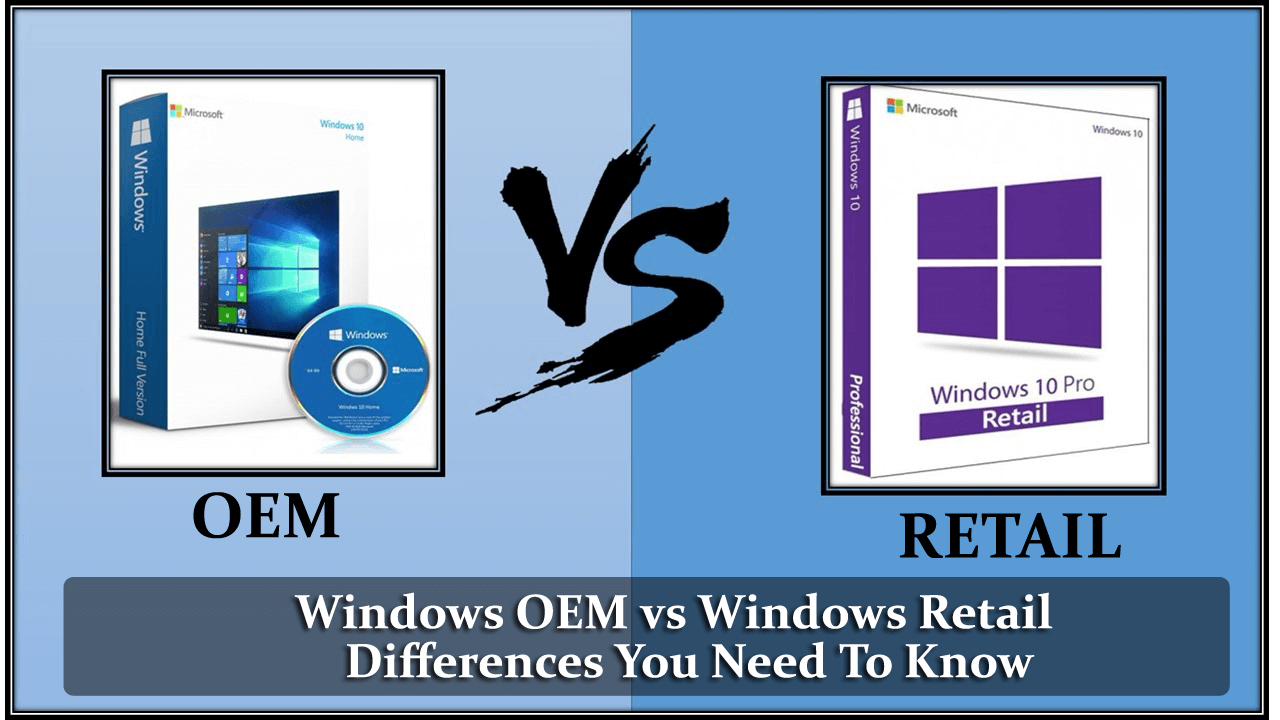
- OEM is cheaper and is permanently associated with hardware (motherboard), while Retail is linked to the user and can be moved to another PC.
- OEM licenses lack direct support from Microsoft and are intended for manufacturers, unlike Retail licenses which include official support.
- Volume licenses are geared towards companies with many devices and are managed through multiple keys (MAK/KMS) and specific agreements.
- Choosing between OEM, Retail, or Volume depends on whether you're changing hardware, the number of devices, and the level of flexibility and security you need.
If you've ever searched for a key Windows cheap online, you've surely come across them OEM licenses for a few euros and Retail versions considerably more expensiveAt first glance they seem the same, Windows looks and works the same, but in reality what you are buying in terms of rights, support and flexibility is very different.
Therefore, before rushing to buy the first offer you see on Amazon, in a keyshop or in a hardware store, it's important to be clear about What is the difference between Windows OEM and Retail, what limitations does each have, when is it worth paying more, and what legal or practical risks do you assume?We're going to break all this down calmly, with real-world examples and practical information, so you don't waste your money or get any surprises when you change your PC.
What do OEM, Retail, and other Windows licenses mean?
OEM It comes from “Original Equipment Manufacturer”, which in Spanish is original equipment manufacturerTranslated: It's the license that manufacturers and assemblers (Dell, HP, Asus, but also the local store) use to sell you a computer with Windows already installed.
Retail is the license of retail sales designed for the end userIt's the typical product key that historically came in a Windows box, or that you buy today from the Microsoft Store or authorized retailers. It's associated with the user, not a specific PC.
In addition to these, Microsoft handles other types of licenses such as volume licenses (OLP / GVLK), widely used in companies and organizations, which allow you to activate many devices with a master key and manage them centrally.
In the case of Office and other products, the same pattern is repeated: OEM tied to the device, Retail tied to the user, and Volume designed for multiple workstationsThe logic is the same, only the product changes.

Basic differences between a Windows OEM license and a Retail license
The first thing that needs to be made clear is that, At the level of operating system functions, Windows OEM and Windows Retail are identical.Whether you install Windows 10 Pro OEM or Windows 10 Pro Retail, you will have the same features. updates and performance.
The real difference lies in the license agreement and how you can use that keyIn other words, what you can legally do with it, on which devices you can activate it, what support it includes, and for how long it will be valid.
Who is each license intended for?
The license OEM is intended for manufacturers and assemblers who assemble computers and sell them already equipped with Windows. In theory, that key should be pre-installed on a new computer and It should not be sold separately to the end user.although in practice you'll find it in a thousand online stores.
The license Retail is geared towards the general public: This is what a user or a small business buys when they want licensing a PC without a factory operating system or changing the Windows version (for example, from Home to Pro) with all the guarantees of Microsoft.
Linking the license to the hardware
A key OEM is tied to the first PC where it is activatedand very specifically, to the motherboardAs long as the computer still has the same motherboard, the license is considered valid; if you change it for a different one, Microsoft interprets it as a new computer and activation may stop working.
With a license Retail allows you to uninstall Windows from one computer and activate it on a different one.provided you don't have it installed on two PCs at the same time. The restriction isn't so much the hardware as the number of active devices simultaneously. A Retail key can only be in use on one computer at a time..
Technical support included
In OEMs, the contract states that support must be provided by who sold you the equipment (the manufacturer or the store that assembled the PC). Microsoft is not committed to helping you directly with problems related to that specific installation, beyond updates via Windows Update and public documentation.
With a Retail license, on the other hand, Support is provided by MicrosoftThis includes official support via chat, phone, or from the built-in Windows help tools, especially useful if you need to Reassemble a complicated activation after a hardware change or resolve specific system issues.
Upgrade vs. clean install
Windows OEM licenses are conceived as Licenses for new computers without a pre-existing operating systemThey are not intended, at least on paper, to serve as a license for Upgrading from an older version of Windows (for example, from Windows 7 to Windows 10/11).
According to the edition, the Retail keys do allow it. Use the installer as an update on previous systems or as a clean installation on a blank disk; they are much more flexible for migration scenarios.
32 bit and 64 bit
When you buy a OEM license: you usually choose during the purchase whether you want the 32-bit or 64-bit versionAnd that choice is considered closed: it is geared towards a specific team with a specific architecture.
With a Retail license, the norm is that You have the right to use both the 32-bit and 64-bit versions of the same edition of Windows.You can switch between them by reinstalling the system, as long as you respect the rule of only one PC being activated at a time.
How OEM licenses work in practice
The usual way to find an OEM license is by buy a pre-assembled laptop or desktop computerIn Windows 7 and earlier, the manufacturer affixed a sticker to the casing with the alphanumeric product key, which you could read and reuse if you manually reinstalled the system.
Since Windows 8, Microsoft changed the model: The OEM key is written directly into the computer's BIOS/UEFI.When you install Windows from scratch, the installer automatically detects it and activates the system without you having to type anything.
This has two important effects: on the one hand, It makes reinstallation much easier on the same PC; on the other hand, it makes it difficult for you to retrieve and use that key on a different computerbecause the contract and activation consider it "attached" to that hardware.
If you want to see the OEM key injected into many Windows 8/10/11 computers, you can open the Symbol of the system as administrator and use a command like:
wmic path softwarelicensingservice get OA3xOriginalProductKey
With that command, the system returns the product key stored in the firmwarewhich you can save in a text file or on a memory stick USB as a backup, although its legal reuse will always be conditioned by the type of license.
Typical limitations of an OEM license
Beyond the price, which is usually lower, OEMs have a number of drawbacks which should be kept in mind:
First, we talked about license for a single computer and associated with its motherboardYou can change the hard drive or add RAM without major problems, but significant replacements like a new motherboard can cause activation to fail. Microsoft believes you are trying to use that key on a different computer..
Second, the Direct support from Microsoft is not included.If Windows is causing problems, legally the computer vendor is the one who should help you. In practice, many users who build their own PCs with an OEM end up self-managing support, seeking solutions in forums or turning to the community.
Additionally, for individual OEM purchases for home assembly, There is no guarantee that you can use that key as an upgrade license. from older systems. The intended use is to install a new Windows on a new PC, not to upgrade an old Windows 7/8 to a more modern edition.
We must also add the legal aspect: technically, Microsoft sells OEM licenses only to manufacturers and integratorsWhen you see obscure websites selling very cheap OEM keys to individuals, those keys often come from... distribution channels not fully aligned with the Microsoft contract, however much they may be activated without error.
Microsoft policy and changes between Windows versions
Over the years, Microsoft has been inconsistent with the use of OEM by home users. With Windows XP, Vista, and even Windows 8 It was quite normal for anyone to buy an OEM motherboard and use it without any major problems to build their PC at home.
With Windows 7 and, later, Windows 8.1 and Windows 10The terms were tightened, and the company reiterated that OEMs were for equipment intended for resale, not for end users building their own PCs. It even introduced, and then withdrew, the so-called "personal use license" for certain OEMs.
The reality of the market, however, is that Windows OEM licenses continue to dominate sales rankings on Amazon and other online storesThe price difference compared to a retail version (we're talking about savings that can easily range from 15% to 40% or more) makes many users turn a blind eye and use them anyway on their personal computers.
Retail Licenses: When is it worth paying more?
the licenses Retail is the "official" and most flexible option For most individual users and small businesses, especially if you think in the medium and long term and tend to change your machine every few years.
With a Retail, you can Install Windows on a PC today, deactivate it later, and reuse that same key on another new computer.As long as you comply with the rule of not having it active on more than one device at the same time, you will be within what the contract allows.
This type of license also usually includes the right to Use both 32-bit and 64-bit of the same edition, and is more tolerant of internal hardware changes (motherboard, CPU, etc.). If the system detects that "the PC has changed too much," it is often enough to Contact Microsoft support to reactivate the key in the new set of components.
It's also the ideal license if you want upgrade version (for example, from Home to Pro) with official support, or if you value being able to open a support case with Microsoft every time you have a strange error that isn't fixed with a simple restart.
Volume licensing (VL / OLP / GVLK) and enterprise use
In the corporate world, in addition to OEM and Retail, the following also come into play: volume licensesThese are purchased directly from Microsoft or certified partners. They are designed for organizations that need dozens or hundreds of computers with Windows or Office.
In this model, a multiple activation key (MAK) or a KMS service which allows you to activate multiple installations with a single contract. It's ideal for SMEs and large companies because The number of licenses can be increased or decreased depending on the template.and it is much more convenient and economical than buying individual keys.
Volume licenses are usually transferable between devices within the organization and are managed centrally, which facilitates tasks such as renewing equipment, reinstalling systems or allowing remote work without losing traceability of what is licensed and what is not.
Although some online stores resell very cheap volume keys to individual users, it should be noted that Its use outside of a business environment may conflict with Microsoft's license terms.In the European Union, the resale of used licenses has some legal protection, but that doesn't mean you're not operating in a gray area.
Windows 10, Windows 11 and account-linked activation
With the arrival of Windows 10 and the subsequent free upgrade to Windows 11Microsoft took another step with the activation model. Many users upgraded from Windows 7/8.1 without ever receiving the new key generated during the process.
When performing the update, the system generates a unique digital identifier based on your PC's hardware configuration and registers it on Microsoft's activation servers. From that moment on, Every time you reinstall the same edition of Windows on that computer, it activates automatically when connecting to the Internet, without needing to type a password.
This is very convenient if you often format or reinstall Windows on the same PC, but it has a downside: if you change critical components such as the motherboard or the processorThat hardware “footprint” can change so much that Microsoft servers no longer recognize the device as the same and the activation will automatically become invalid.
In those cases, especially if you started with a Retail license or have the key associated with one Microsoft accountIt is usually possible to reactivate Windows by contacting official support from the Windows help app itself, explaining that you have upgraded your hardware and want to keep your legitimate license.
Legality and risks of buying cheap keys online
The popularity of Windows has transformed the sales of Key elements of OEM, Retail, and Volume in a huge business for many websitesOn platforms like Amazon or PcComponentes you can find fully legal and invoiced licenses, but there are also a number of opaque websites that sell keys at ridiculously low prices.
When a legitimate Windows 11 Retail license easily exceeds the 100 Euros And if you see websites offering "the same thing" for 10 or 15 euros, it's time to be wary. Many of those warning signs are... Recovered OEMs, volume licenses already used, or keys directly generated for temporary use that expire after a few weeks or months.
In the specific case of the European Union, there is case law that allows the resale of used licenses Provided certain conditions are met, Microsoft is obligated to reactivate those keys if they were properly released. However, this doesn't mean that any cheap key from a key shop will be safe or compliant with the agreement.
Furthermore, buying from dubious websites adds another risk: malware and security problems. Downloads Fake, manipulated installers or "magic" activators can end up opening the door to viruses, ransomware or theft of personal data, something that is not even remotely worth saving a few euros on the license.
If you want to save money without getting into trouble, the wisest thing to do is to resort to trusted stores (Amazon, PcComponentes, the Microsoft Store itself or other reputable distributors) and, if you buy cheap OEMs, accept all the limitations and possible reactivation problems that they entail.
Which license is right for you based on your situation?
Choosing between OEM, Retail, or Volume is not so much a technical question as a usage decision, budget and future forecastSome typical scenarios can serve as a guide.
Si vas a buy a pre-configured laptop or PC and you don't plan to change the motherboard or processor during its lifespan, a An OEM license included in the price is usually sufficientIt's stable, it gets updated, and you'll be legally covered as long as you don't try to extract it to another computer.
If you build your own PC for gaming or work and you usually Upgrade components every few yearsThe film changes. That's where a [something] usually makes much more sense. Retail licensebecause it will allow you Take Windows with you to your next computer without having to pay every time you change your motherboard.
In professional environments with dozens of teamsThe logical option is the volume licensesNot only are they more affordable beyond a certain number of workstations, but they also facilitate the controlled management of activations, reinstallations, and hardware changes.
For very old computers with Windows 7/8, it sometimes pays to take advantage of that old license to upgrade to Windows 10 and then to Windows 11provided that the hardware meets requirements such as TPM y start Sure. Many of those keys are still accepted by Microsoft servers to activate modern systems.
Ultimately, the key is to decide if you prefer Pay little now and be tied to the hardware. with an OEM, or Invest a little more and gain freedom To transfer a license from one PC to another with a Retail license. Considering how often you change equipment and what level of support and peace of mind you want, the choice usually makes itself.
Having seen the whole picture, it's quite clear that, although Windows works the same with an OEM as with a Retail, What you're really buying is the level of flexibility, support, and legal security you'll have throughout the life of that license.If you understand these differences well and choose the option that best suits your PC usage, you'll save yourself a lot of headaches when you change hardware or need to reactivate the system.

Passionate writer about the world of bytes and technology in general. I love sharing my knowledge through writing, and that's what I'll do on this blog, show you all the most interesting things about gadgets, software, hardware, tech trends, and more. My goal is to help you navigate the digital world in a simple and entertaining way.