Es pot utilitzar per a Disable Location Companies completely or selectively per a particulars aplicacions i empreses in gadget. You'll discover beneath the steps to Disable Location Companies on iPhone or iPad.

Disable Location Companies On iPhone
iPhone makes use of mix of Mobile, Wi-Fi and GPS expertise per find your exact location at a given level of time.
La primaria goal de localització companyies Funció en l'iPhone és permetre la navegació, suggestion i diferents Apps per oferir les driving instructions, suggestions i diferents locals principalment basats en alerts.
Nevertheless, draw back of getting Location Companies enabled on iPhone comes sense el tipus de success per battery life and Privateness considerations.
Therefore, we'refering beneath the steps to Disable Location Companies a l'iPhone for particular Apps and likewise to completely disable Location Companies in your gadget.
1. Fully Disable Location Companies on iPhone
Per a vostè està interessat en aquest excessiu step, és attainable per a l'iPhone de monitoratge de la seva location.
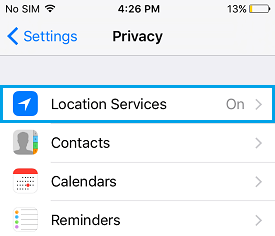
Go to Settings > Privateness choice > faucet on Location Companies.
Amb la pantalla de pantalla sencera, transfer el toggle subsequent a Location Companies to OFF place.
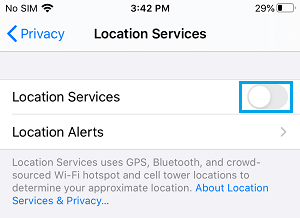
On l'affirmation pop-up, faucet al Flip OFF choice to verify.
Be aware: The above steps will utterly disable 'Location Companies' Function in your gadget, stopping all Apps and companies from accessing your Location Info.
2. Stop Particular Apps from Monitoring Location on iPhone
Així com una alternativa molt disabling Location Companies, it's attainable to Disable Location Companies per a pointless Apps en el seu gadget, whereas permeti solely probably el most important Apps per a entrar Location info.
Go Settings > Privateness > faucet on Location Companies.
On Location Companies display screen, choose App per which you wish to Disable Location Companies.
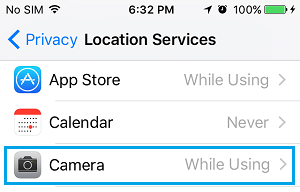
Amb la pantalla de pantalla de nit, faucet amb el que no means choice to forestall aquest explicit App from accessing your Location info.
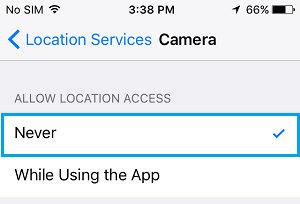
Equally, vostè pot ser que repeteixi per sobre de la dislocació de Companyies per a altres aplicacions que tot just consideri habitualment no obligatòria o essencial per a vostè.
3. Disable Location Companies for System Companies On iPhone
Altres than Apps, són nombrosos Systems Companyies que han entrat en la teva localització info.
Go to Settings > Privateness > Location Companies > scroll down and faucet on System Companies.
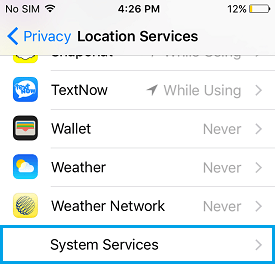
Amb la pantalla de pantalla screen, vostè pot ser forestal d'any.
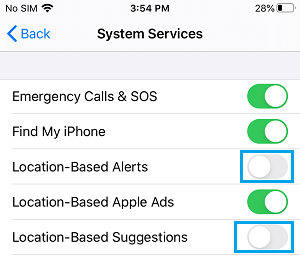
Per a instance, vostè pot ser possible per a Disable 'Location-Based mostly Alerts' and Location-Based mostly Options per shifting the toggle subsequent to those companies to OFF place.
- Methods to Take away Localització Knowledge From Pictures On iPhone
- Methods to Flip Off Frequent Places Monitoring on iPhone
